

Founder workflow case study · Jonathan Montoya
What changes when you give an AI agent a real job instead of asking it for another list of ideas? In this walkthrough, I open my own businesses and show the work: a community support process, app reviews, a Facebook content queue and course lessons. The goal is practical: turn a clear instruction into something you can inspect and use.
The short answer: I use a lead agent to coordinate focused tasks across my businesses. Each job needs context, access to the right tools, a definition of “done” and a review step. The examples below show outputs from that approach, not a promise that an AI team can run every business without its owner.
See AIM Agent and the current setup →
Disclosure: I am a co-founder of AIM Agent and have a financial interest in the product. This is my own demonstration, not an independent product review or a controlled performance study.
Watch the original demonstration
The 13-minute demonstration is the source for this case study. The screenshots below are frames from that video. Its original offer details may differ from today's package; the current AIM Agent page explains current inclusions and requirements.
How the AI team is organized
I have several businesses and communities. That creates a familiar problem: a useful idea for one project competes with the ongoing work in another. A single conversation full of unrelated instructions becomes hard to manage.
In the demonstration, a lead agent acts as a Chief of Staff. Focused agents work on individual projects. The point of the structure is to keep each project attached to its own audience, objective and instructions while a lead coordinates priorities. If the role is new to you, read what an AI chief of staff is.
- The owner sets the outcome. For example: prepare useful posts for a specific community.
- The lead organizes the task. It identifies the project, inputs and what needs to happen next.
- A focused agent does supported work. Research, draft, review or prepare an action through the available tools.
- The result is checked. A saved draft, actual scheduled post or working lesson is more useful evidence than “done” in a chat.
These job titles describe roles in the setup. They do not mean the software has the judgment, responsibilities or professional qualifications of a human executive.
Content: from a task to a scheduled queue
One example in the video is a new Facebook group. I show the group's scheduled-post screen, including the platform's 20+ scheduled-post indicator and individual posts with scheduling controls.
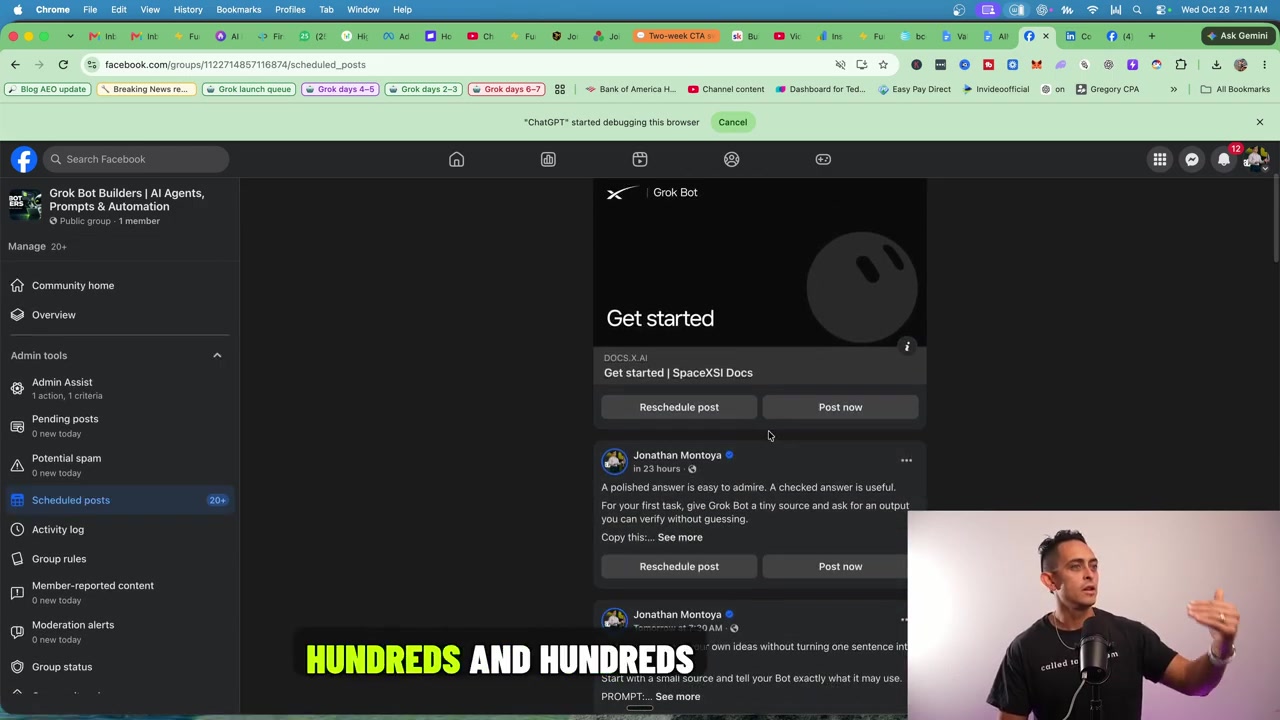
The useful change is the handoff from content ideas to an inspectable queue. A workable version starts with the group's purpose and a small set of topics. Drafts can then be checked for relevance, repeated ideas, broken links and unsupported claims before being scheduled.
What to copy: review a small sample before asking for a large batch. If five posts repeat the same idea, producing another fifty magnifies the problem. Decide what a reader should learn from each post and verify that the queue actually contains the approved versions.
Community support and app reviews
The next example is inside my Skool communities. Members request access to a program. In the video, I show a conversation where eligibility is checked, instructions are provided when access cannot be verified, and an unlock is reported after the requirement is satisfied.
This is a process, not just a friendly reply. The agent needs the eligibility rule, a reliable place to check it, the correct course and a clear escalation path when records do not match. A request in a comment is not by itself evidence that someone qualifies.
Another example shows reviews of members' apps. The demonstrated feedback discusses the product experience and includes screenshots. The member's app is an object of review; it is not an app that AIM Agent created.
What to copy: define a review checklist. For a new app, check the first-screen explanation, intended customer, signup route, pricing clarity and the main task a user is supposed to complete. Report what was actually checked. If a login or paid step prevents testing, explain that limit rather than inventing a successful test.
You can see the community contexts at Local AI Agency Accelerator and Build & Sell Apps With AI. Community access and current offers are described on their own pages.
Course creation: a usable lesson, not just an outline
At approximately 10:07, the demonstration shows the MakerAI classroom. The walkthrough card describes 17 practical lessons narrated in my AI voice. The video then opens a lesson with a player and lesson navigation, followed by a course example in another community.
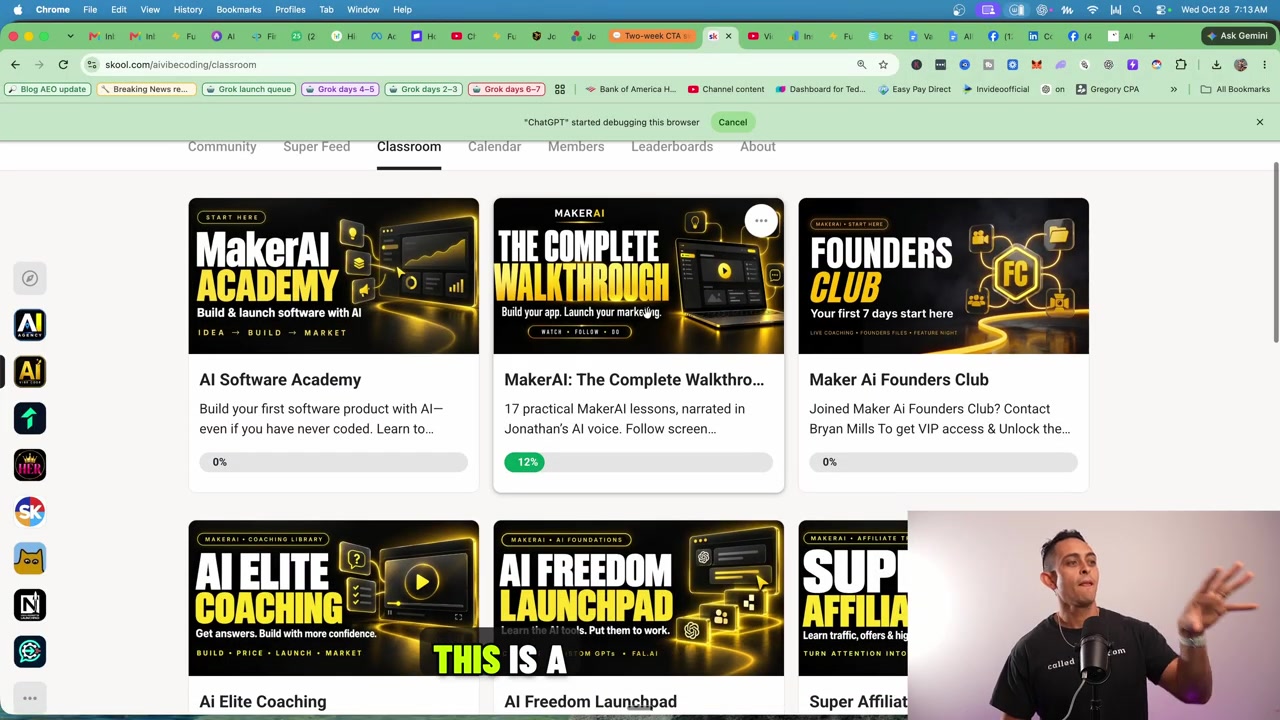
A useful lesson needs more than an outline. It needs a clear learning outcome, accurate instructions, a screen recording that matches those instructions, understandable narration and a working place for the student to watch.
What to copy: build one lesson all the way through before expanding a course. Play it as a student. Check the audio, screen readability, navigation and the action the student should be able to perform afterward. Only then reuse the production process for the next lesson.
MakerAI is the software-business context in this example. Freedom Threads is another product context shown in the demonstration. Those businesses and AIM Agent have different jobs; using AI in their course production does not make every product feature an AIM Agent feature.
What the results establish, and what they do not
The video also shows social analytics. I describe approximately 1.6 million LinkedIn impressions over a 28-day period and compare that with a longer-range account view. That is an account-level observation during the workflow, not a controlled test proving that AI caused every impression.
| Evidence shown | Reasonable conclusion | Not established |
|---|---|---|
| Facebook scheduled-post queue | Prepared posts were in the queue | Future reach, customers or sales |
| Skool course and lesson screens | Course materials existed and were organized | Student outcomes or automatic production without review |
| Community replies and app feedback | Concrete examples of the support workflow | Perfect accuracy across every member or app |
| LinkedIn analytics | Reported impressions for the displayed account and period | AI-only attribution, revenue or typical customer results |
There is no measured before-and-after time study here, so I am not assigning an invented number of hours saved. Nor should you add views from different platforms and reporting windows into a single comparable result. The strongest evidence in this case study is the work you can inspect.
Set up your first useful job
Start smaller than “run my business.” Choose one job where you know what good work looks like and can check the result.
- Choose one outcome. Example: prepare three helpful posts for your existing customers, saved as drafts.
- Supply the source material. Give the agent your offer page, audience notes, approved examples and relevant product facts.
- Set the boundaries. Say where to save the work, which claims require sources and which actions need your approval.
- Review a sample. Check the first draft for accuracy and voice before expanding the assignment.
- Verify the actual output. Open the drafts or destination page. Confirm that links, formatting and media work.
- Improve the instructions. Save the corrections that matter, then repeat the job with a clear schedule if the setup supports it.
A concrete first assignment
Use this approved product page and these customer questions to prepare three educational posts for our community. Each post should answer one question, include a practical example and avoid unverified income claims. Save the posts as drafts for my review. Show me the saved drafts and flag any facts you could not verify. Do not publish or message members.
This is an illustrative starting assignment, not the original prompt used in the video. It gives you an outcome, inputs, quality criteria and a stopping point you can verify.
Frequently asked questions
What is AIM Agent?
AIM Agent is a prepared AI business-team setup with a lead role, specialist guidance, Business Bots and reusable business skills. It works with supported AI tools and connected services; you provide context, permissions and direction.
Does AIM Agent replace every person in a business?
This demonstration does not establish that. It shows specific content, community and course workflows. Owners still need to make decisions, check important work and handle exceptions.
Are the screenshots real?
The two screenshots in this article are frames from the embedded demonstration. Their captions identify what is visible and what the image can support. They are not generated dashboards.
Are the LinkedIn impressions guaranteed?
No. They are a result shown from my account for a particular period. Impressions are not revenue, and this example does not isolate AI's contribution or predict another account's results.
Do I need separate AI subscriptions?
The current AIM Agent offer states that third-party AI subscriptions are separate. Review the official product page for current requirements, provider costs and support details before purchasing.
Where should a beginner start?
Choose one low-risk task you can check, such as a content draft or research summary. Provide reliable sources, review the output and expand only after the process works for you.
Give your next idea a clear first job
The opportunity is to apply your business knowledge through a repeatable workflow: define the job, provide the context, inspect the result and improve the process. That is how I approach the examples in this demonstration.
Explore AIM Agent's team, setup and current offer →
Sources: Jonathan's original demonstration and the official AIM Agent product page, reviewed November 8, 2026. Product availability and package details may change.
