
Online Business · Pricing
ClickFunnels has four plans, and the yearly prices look very different from the monthly ones. Here is what each plan costs, what the limits are, and how to pick without overbuying.
ClickFunnels is one of the best known funnel builders. But its pricing page shows two prices for most plans, and it is easy to mix them up.
I read the ClickFunnels pricing page and its FAQ on October 21, 2026. Below are all four plans, the real monthly and yearly cost, the limits that matter, the refund policy, and a simple way to choose.
Quick answer
ClickFunnels has four plans. Launch is $97 a month, or $81 a month billed yearly. Scale is $197 a month, or $164 billed yearly. Optimize is $297 a month, or $248 billed yearly. Dominate is $5,997 a year and is only sold yearly. Plans differ by workspaces, team members, contacts, emails per month, courses, and support. ClickFunnels offers a 30-day money back window and says it does not take a percentage of your sales. Checked October 21, 2026.
What you are paying for
Before the numbers, a quick word on what ClickFunnels is. It is a tool for building sales funnels: the pages that take someone from first visit to purchase. The pricing page and footer list sales funnels, websites, an online store, landing pages, a blog, email marketing, workflows, online courses, and membership sites.
So the price covers a lot more than page building. Hosting is included too. If you would otherwise pay for separate tools for pages, email, and courses, keep that in mind when you compare prices.
How much does ClickFunnels cost?
Here are the four plans from the ClickFunnels pricing page, checked October 21, 2026.
- Launch: $97 a month, or $81 a month billed yearly.
- Scale: $197 a month, or $164 a month billed yearly. This one is marked Most Popular.
- Optimize: $297 a month, or $248 a month billed yearly.
- Dominate: $5,997 a year. It is an annually only plan.
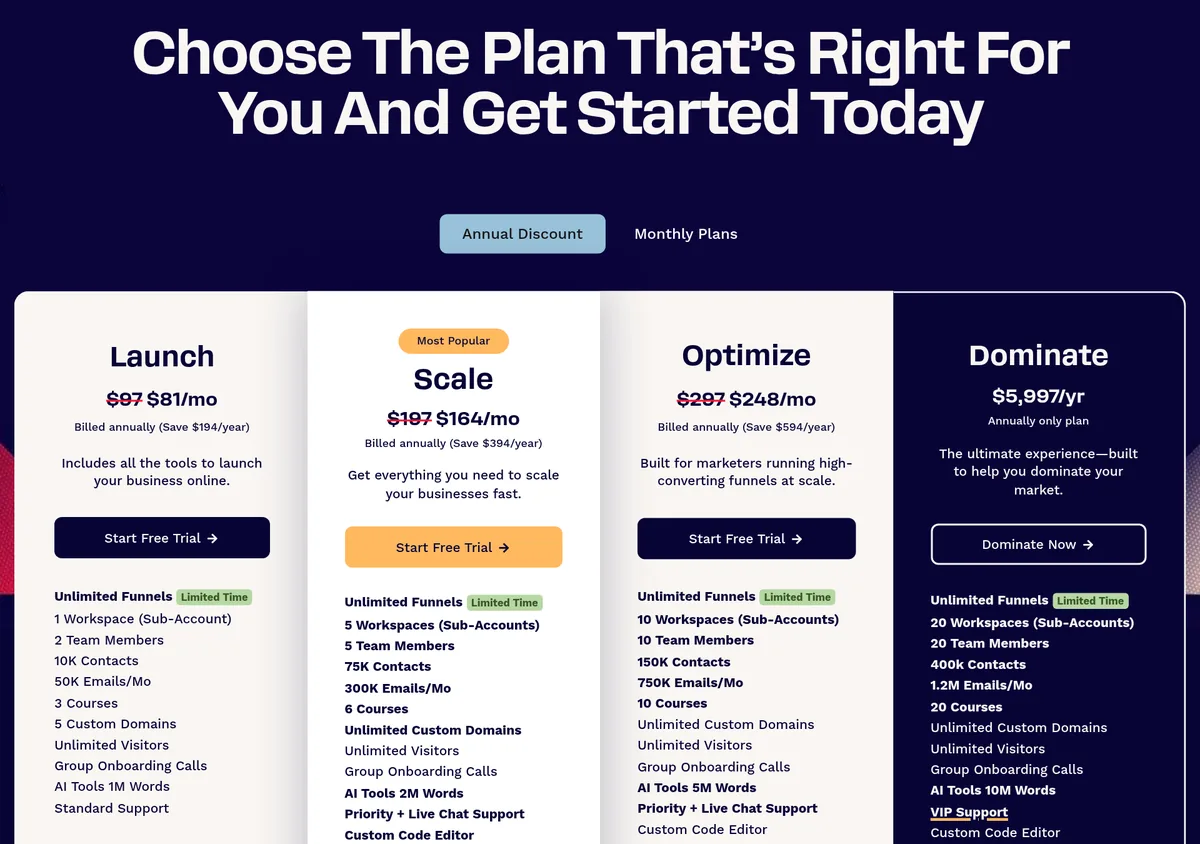
The page shows the monthly price crossed out next to the yearly price. So when you see $81, remember that is the yearly rate, paid up front for the year.
Monthly vs yearly: what you save
ClickFunnels lists how much each plan saves when billed yearly:
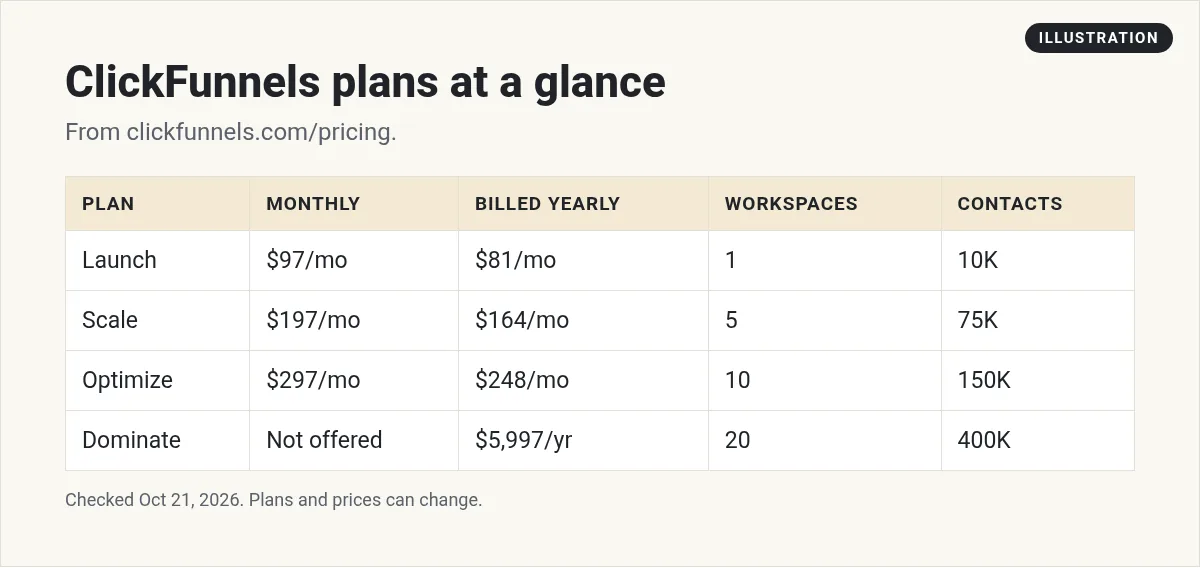
| Plan | Monthly billing | Yearly billing | Savings listed |
|---|---|---|---|
| Launch | $97/mo | $81/mo | $194 a year |
| Scale | $197/mo | $164/mo | $394 a year |
| Optimize | $297/mo | $248/mo | $594 a year |
| Dominate | Not offered | $5,997/yr | Yearly only |
By my math, Launch on monthly billing is $1,164 for the year ($97 times 12). Take off the $194 ClickFunnels says you save, and the yearly bill is about $970. Divide that by 12 and you get the $81 a month shown on the page, rounded.
What each plan includes
All plans list unlimited funnels (marked limited time), unlimited visitors, and group onboarding calls. The main differences are limits.
| Limit | Launch | Scale | Optimize | Dominate |
|---|---|---|---|---|
| Team members | 2 | 5 | 10 | 20 |
| Emails per month | 50K | 300K | 750K | 1.2M |
| Courses | 3 | 6 | 10 | 20 |
| Custom domains | 5 | Unlimited | Unlimited | Unlimited |
| AI tools (words) | 1M | 2M | 5M | 10M |
| Support | Standard | Priority and live chat | Priority and live chat | VIP |
Two extras start on Scale: the custom code editor and webhooks with full API access. Dominate adds a 3 hour private onboarding.
What a workspace is, and why it matters
ClickFunnels calls a workspace a sub-account. Think of it as a separate business inside your login, with its own funnels and contacts.
Launch gives you one workspace. Scale gives you five. So if you run more than one brand, or build funnels for clients, Launch will feel tight fast. If you only have one business, one workspace is often enough.
Refunds, fees, and changing plans
The pricing page FAQ answers a few common questions:
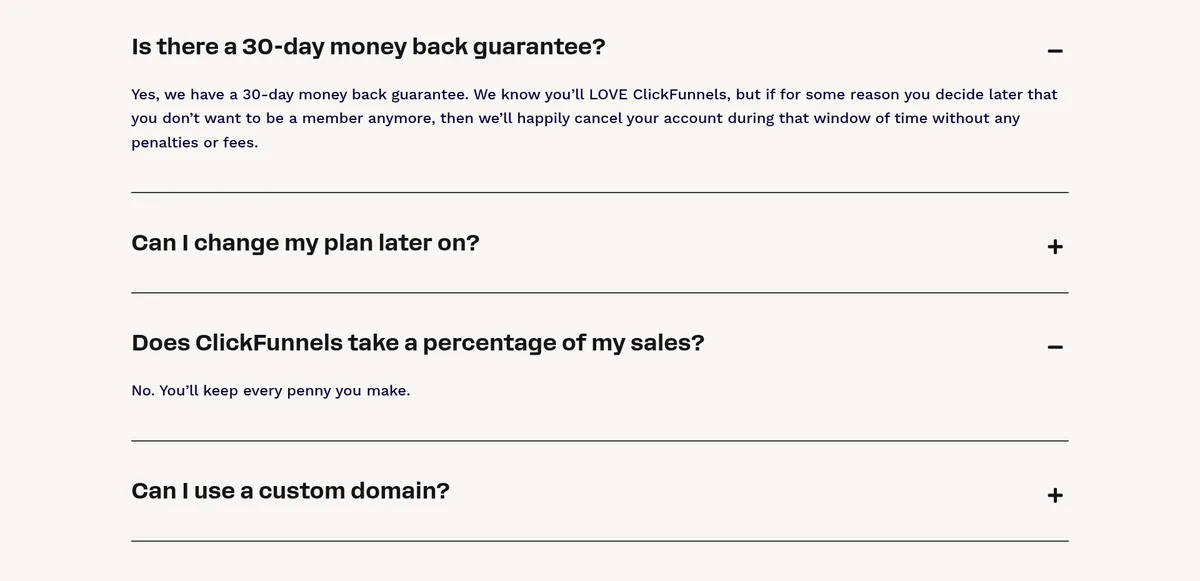
- Money back window: 30 days. The FAQ says if you decide to leave in that window, ClickFunnels will cancel your account without penalties or fees.
- Cut of your sales: no. The FAQ says ClickFunnels does not take a percentage of your sales.
- Changing plans: you can change your plan at any time, during or after your trial.
- Hosting: included. You do not need a separate hosting account.
Each plan has a Start Free Trial button. The trial length was not shown on the pricing page I checked, so look for it at sign up.
No percentage of sales does not mean no payment fees. Your payment processor, like Stripe, still charges its own fees.
Costs that are not on the price tag
- Payment processing fees from your payment company.
- A domain name if you do not own one yet.
- Going over limits. If you pass your contact or email limits, you may need a bigger plan.
- Other tools you connect, like a separate email or scheduling app.
Three example buyers
Here is how I would match the plans to three made-up people. These are examples, not real customers.
- A coach with one offer. One brand, a small list, and one course. Launch covers it. Two team members is enough for the coach and one helper.
- A small agency with four clients. Each client needs its own space. Launch has one workspace, so Scale with five workspaces is the fit.
- A course creator with eight courses. Launch allows 3 courses and Scale allows 6. Optimize, with 10 courses, is the first plan that fits.
Notice the pattern. You rarely pick a plan for its features. You pick it for its limits: workspaces, team members, contacts, emails, and courses.
Is ClickFunnels worth the price?
It can be, if you will actually build and run funnels. ClickFunnels puts pages, checkout, email, courses, and hosting in one place. That can replace several separate tools.
It is not worth it if you sign up and never launch anything. The most expensive plan is the one you pay for and do not use. Before you buy, write down the first funnel you will build and the date you will launch it.
How to try ClickFunnels without wasting money
- Pick the first funnel you want to build. Keep it to one offer.
- Start on Launch, billed monthly.
- Build and publish that one funnel in your first two weeks.
- Check your limits. Are you close on contacts, emails, or workspaces?
- Upgrade only if you hit a limit. Switch to yearly once you are sure.
Which ClickFunnels plan should you pick?
Launch fits you if:
- You have one business and are just getting started.
- Your list is under 10,000 contacts.
- You do not need the API or custom code.
Scale fits you if:
- You run a few brands, or need more than 2 team members.
- You send a lot of email or need webhooks.
- You want faster support.
Optimize or Dominate fit teams running many funnels at large scale. Most beginners do not need them.
How ClickFunnels compares on price
ClickFunnels is not the only option. Some all-in-one tools start lower, and some include a CRM and texting. I compare several in my guide to the best sales funnel software. If you are an affiliate marketer choosing between two big names, read HighLevel vs ClickFunnels for affiliates.
The right tool is the one you will actually use. A cheaper tool you never set up costs more than a pricier one that brings in leads.
Common ClickFunnels pricing mistakes
- Reading $81 as the monthly price. It is the yearly rate. Monthly billing is $97.
- Buying Scale for one brand. Five workspaces is great for agencies, not always for one business.
- Paying yearly on day one. Use the first 30 days to be sure first.
- Forgetting payment fees. ClickFunnels takes no cut, but your payment processor does.
- Not checking again. Unlimited funnels is marked limited time, so terms may change.
Already using ClickFunnels? See how to use ClickFunnels for affiliate marketing.
Before I buy ClickFunnels
Nothing you check here is sent or saved. Download it if you want to keep it.
Have something worth putting in a funnel
In my free workshop, I show how regular people use AI to build a simple app or product they can sell, step by step.
Join my free AI workshopFree to join. No credit card needed.
Frequently asked questions
How much does ClickFunnels cost per month?
Launch is $97, Scale is $197, and Optimize is $297 a month on monthly billing, checked October 21, 2026. Billed yearly, they work out to $81, $164, and $248 a month.
What is the cheapest ClickFunnels plan?
Launch, at $97 a month or $81 a month billed yearly.
Can I get my money back from ClickFunnels?
The pricing FAQ describes a 30-day money back window. If you cancel within it, ClickFunnels says there are no penalties or fees.
Does ClickFunnels take a cut of my sales?
No. The pricing FAQ says ClickFunnels does not take a percentage of your sales. Your payment processor still charges its own fees.
Is there a ClickFunnels free trial?
Each plan has a Start Free Trial button. The trial length was not shown on the pricing page I checked, so look for it at sign up.
What is the ClickFunnels Dominate plan?
It is the top plan at $5,997 a year, sold yearly only, with 20 workspaces, 20 team members, VIP support, and private onboarding.
Sources
Checked October 21, 2026. Plans, prices, and rules can change.
