
Build with AI · Comparison
An AI website builder turns a short description into a working site. Here are five options, what each one is built for, and what the first paid plan costs.
A few years ago, a website meant a template, a weekend, and hours of dragging boxes around. Now you can type what you want and get a first draft in minutes.
But "AI website builder" covers two kinds of tools. Some make classic business websites. Others build full apps from a prompt. I checked five pricing pages on October 24, 2026 so you can see the real numbers side by side.
Quick answer
An AI website builder makes a site from a short text prompt. Wix, Squarespace, and Framer focus on business and marketing sites. Lovable and Overskill build sites and full apps from a chat. On October 24, 2026, entry paid plans ran from $10 a month (Framer Basic, billed yearly) to $25 a month billed monthly (Lovable Pro and Overskill Starter).
What is an AI website builder?
An AI website builder is a tool that writes the first version of your site for you. You describe your business or idea. The tool picks a layout, writes starter text, and adds pages. Then you edit it.
The AI part saves you the blank page. You still need to check the words, add real photos, and make sure the details are right.
There are two kinds:
- Site builders with AI. Wix, Squarespace, and Framer. You get a normal website with a drag and drop editor and AI help on top.
- AI app builders. Lovable and Overskill. You chat with the AI and it writes the code. These can make simple websites too, but they can also make apps with logins and data.
The 5 options side by side
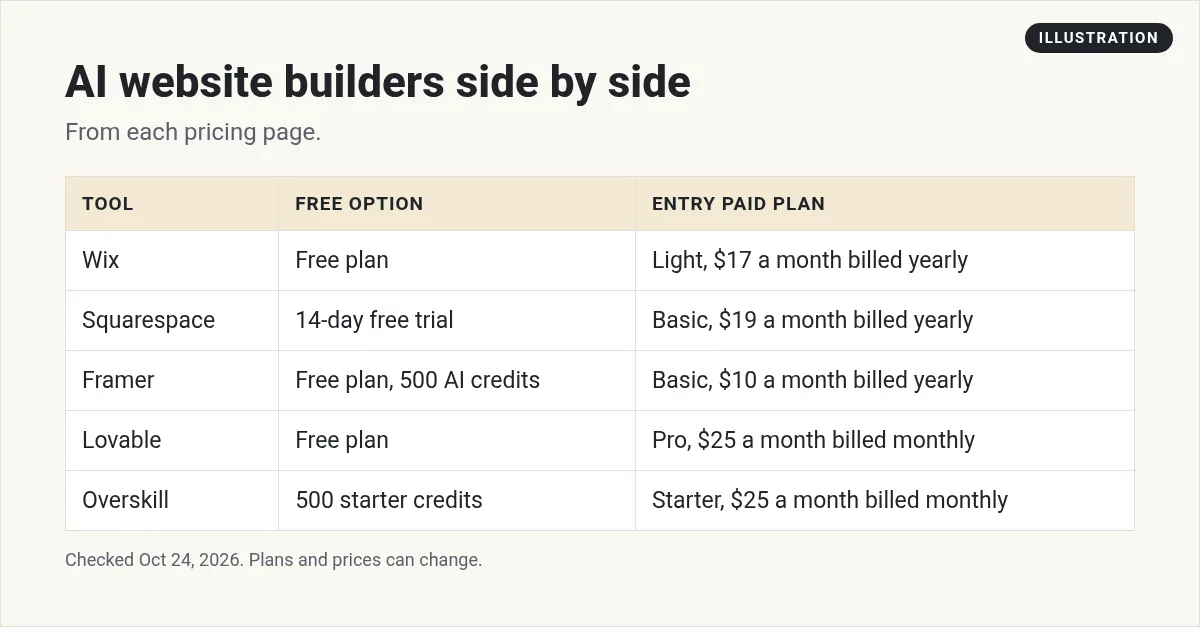
All five numbers came from each company's own pricing page on October 24, 2026. Note the billing basis. Wix, Squarespace, and Framer show prices for yearly billing. Lovable and Overskill show the monthly price.
1. Wix
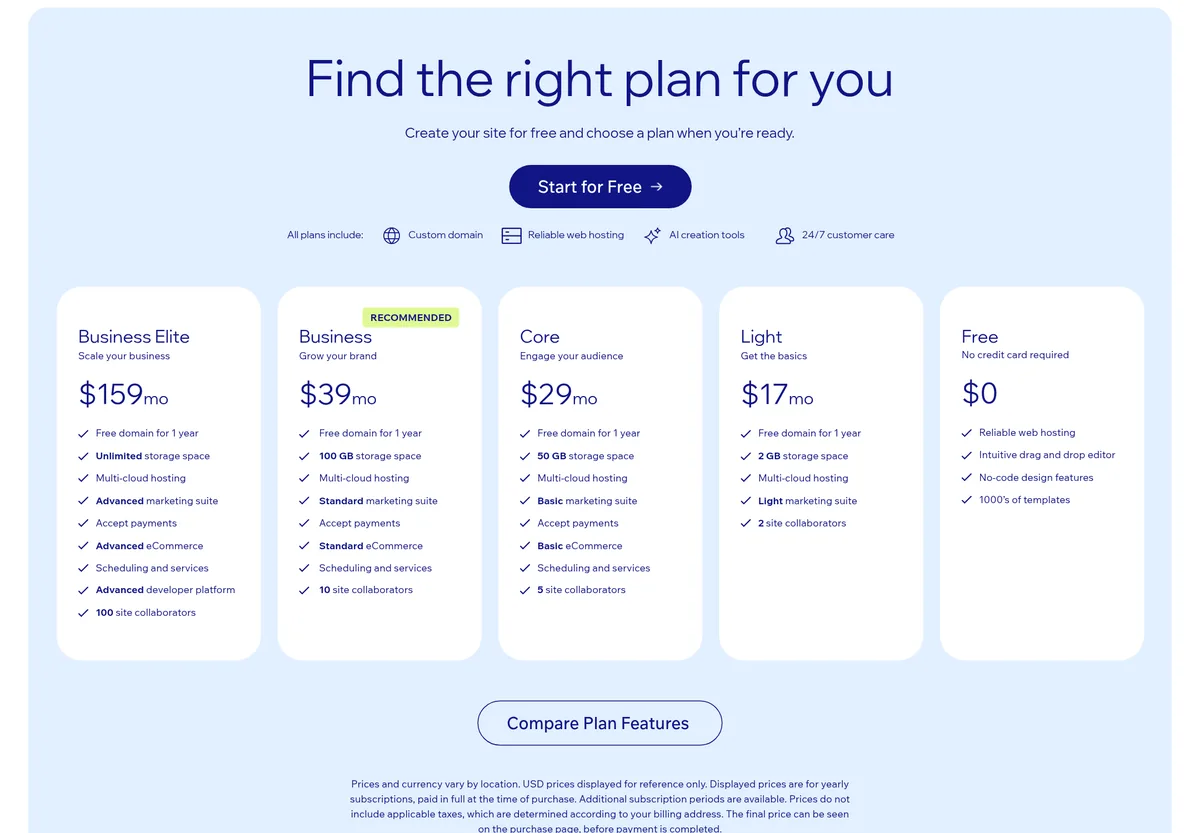
Wix says you can "Create your site from a single prompt and flow between AI generation and drag and drop to refine any detail."
Price: Wix has a free plan. Paid plans start with Light at $17 a month. Wix notes the prices shown "are for yearly subscriptions, paid in full at the time of purchase." Above Light are Core at $29, Business at $39, and Business Elite at $159.
Good fit if: you want a classic small business site with a drag and drop editor, and you want to stay inside one company for hosting and domains.
2. Squarespace
Squarespace lists "Built-in AI Tools" on its Basic plan. Its pricing page says "Free for 14 days. Pay annually to save up to 36%."
Price: no free plan, but a 14-day free trial. Basic is $19 a month when you pay annually. Core is $29, Plus is $49, and Advanced is $99 on the same basis.
Watch for: the Basic plan lists an online store transaction fee of 2% and a 7% fee on digital content and memberships, plus card rates. Check this if you plan to sell.
Good fit if: you care about clean templates and want a simple site you can trust to look tidy.
3. Framer
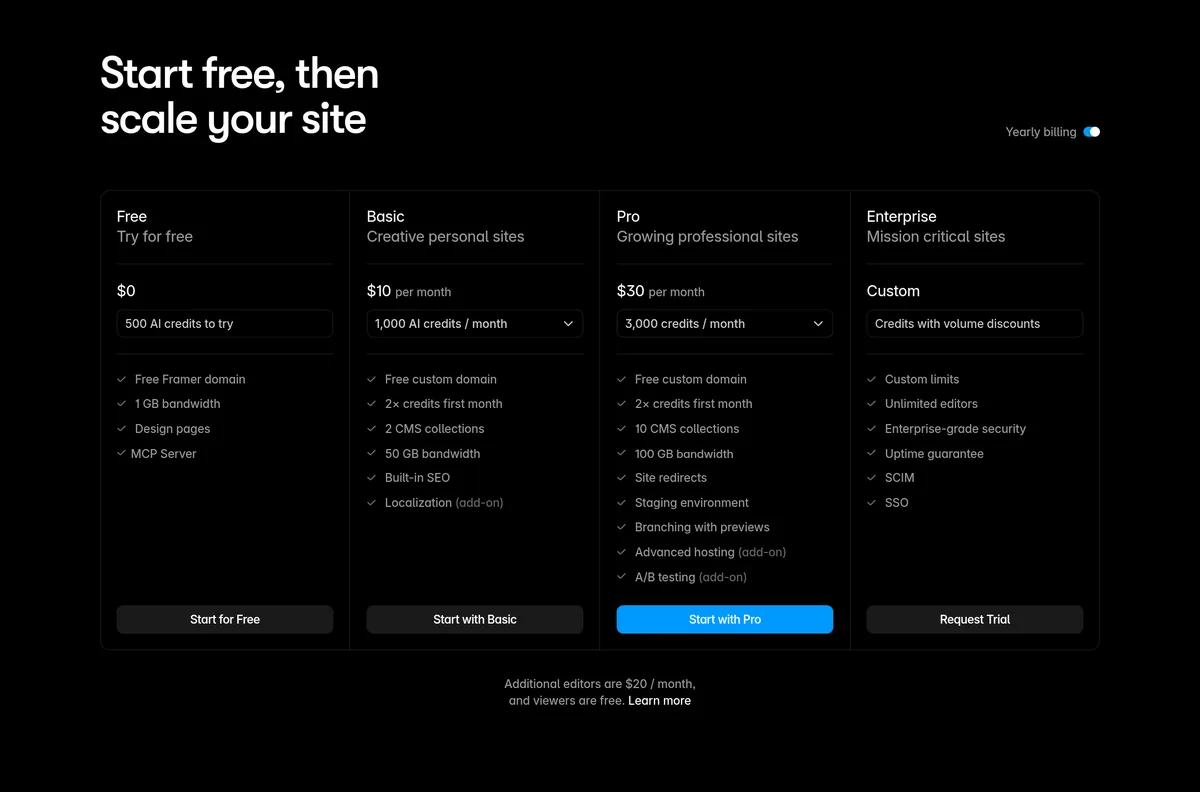
Framer is a design-first builder. Its pricing page says "Agents and other AI features consume credits," so AI use is metered.
Price: a free plan with 500 AI credits to try. Basic is $10 a month with 1,000 AI credits. Pro is $30 a month with 3,000 AI credits. Those are the yearly billing prices. Extra editors cost more.
Good fit if: you want a polished marketing site or portfolio and you like to design visually.
4. Lovable
Lovable is an AI app builder. You describe what you want in a chat, and it writes the code. Its own menu lists "Website builder" as one use.
Price: a free plan with no credit card needed. Pro is $25 a month billed monthly, with 100 monthly credits. Business is $50 a month billed monthly. The page has a yearly option that says "2 months free."
Good fit if: your site needs to do something, like take sign ups, show a dashboard, or let people log in. For a full price breakdown, see my Lovable pricing guide.
5. Overskill
Overskill is also an AI app builder. You describe your site or app and it builds it. I wrote a full intro in What is Overskill?
Price: there is no free plan, but the pricing FAQ says every new account "starts with 500 credits so you can build something real before choosing a plan." Starter is $25 a month billed monthly, with 2,500 credits. Studio is $99 a month billed monthly, with 12,000 credits. There is an annual option too.
Good fit if: you want to build by chatting and also keep options like a custom domain and private projects. The Starter plan lists "No watermark, private projects" and 1 custom domain per app.
See my Overskill pricing post for how the credits work.
How to choose the right one
Ask yourself one question first: Does my site need to do anything besides show information?
- No, it just shows info. A menu, hours, services, a contact form. Start with Wix, Squarespace, or Framer.
- Yes, it does things. Logins, saved data, a quote tool, a booking flow. Look at Lovable or Overskill.
Then ask two more:
- Do I want to design by hand? Framer is built for that.
- Do I need a free plan to start? Wix, Framer, and Lovable have one. Squarespace has a 14-day trial. Overskill has 500 starter credits.
If you are still not sure, read vibe coding vs no-code. It explains the difference in plain words. If you want to build sites for clients, see my guide to vibe coding jobs.
How to build your first site with AI
- Write a short brief. Who it is for, what you offer, and the one action you want visitors to take.
- Give the AI that brief. Paste it into the prompt box. Ask for a simple home page first.
- Fix the words. Replace any made-up facts, prices, or reviews with real ones.
- Add real photos. Your own photos show the real business.
- Test on your phone. Tap every button. Fill out every form.
- Connect your domain. Then share it.
My video: Why some apps built with AI break, and how to avoid it. Helpful before you build with Lovable or Overskill.
Any results mentioned in videos are not typical and are not a promise of income. Your results depend on your work and your market.
What AI does well, and what it does not
AI is good at the first draft. It can set up pages, write starter text, and pick colors that go together. That can save time.
It is not good at knowing your business. It does not know your real prices, your hours, or what your customers ask. It may fill gaps with guesses that sound right. So treat the draft like a helper's rough work, not a finished site.
Here is how I split the job:
- Let AI do: layout, first draft of headings, section ideas, and simple images or icons.
- You do: facts, prices, photos of you and your work, reviews from real customers, and the final read.
One more thing. If you build with an app builder, small changes can sometimes break other parts. Make one change at a time, then test. If something breaks, my guide on fixing an AI-built website after a change walks you through it.
Mistakes to avoid
- Trusting the first draft. AI can invent details. Read every line before you publish.
- Picking an app builder for a simple site. If you only need a few pages, a site builder may be simpler.
- Ignoring the billing basis. A yearly price paid up front is not the same as a monthly price.
- Forgetting fees. If you sell online, check transaction fees too.
Want to see what a site might cost to run over a year? Read how much an AI-built website costs. And if you want to build sites for others, see selling AI websites to local businesses.
Before you pick an AI website builder
Nothing you check here is sent or saved. Download it if you want to keep it.
Want to build by chatting?
If your site needs to do more than show info, try Overskill. New accounts start with 500 credits, so test one small idea first.
Try OverskillI earn a commission if you buy through this link. Overskill access may need an invite code or a waitlist spot. Plans and credits can change, so check the live pricing page before you buy.
Want to see how I build sites with AI first? Join my free AI workshop.
Frequently asked questions
What is the best AI website builder?
It depends on what your site needs to do. For a simple business site, Wix, Squarespace, or Framer can work. For a site with logins or data, look at an AI app builder like Lovable or Overskill.
Is there a free AI website builder?
Yes. On October 24, 2026, Wix, Framer, and Lovable had free plans. Squarespace had a 14-day free trial. Overskill gives new accounts 500 credits.
How much does an AI website builder cost?
Entry paid plans ran from $10 a month (Framer Basic, billed yearly) to $25 a month billed monthly (Lovable Pro and Overskill Starter) on October 24, 2026.
Can AI build a whole website for me?
It can build a first draft from a prompt. You still need to check the text, add real photos, and test every link and form.
Do I need to know how to code?
No. All five tools let you start without code. App builders write code for you, so it helps to test carefully.
Can I use my own domain?
Check each plan. For example, Overskill Starter lists 1 custom domain per app, and Framer lists a complimentary domain on yearly billing for some paid plans. Limits differ by tool.
Sources
Checked October 24, 2026. Plans, prices, and rules can change.
- Wix: Plans
- Squarespace: Pricing
- Framer: Pricing
- Lovable: Pricing
- Overskill: Pricing (overskill.com/pricing)
