
GoHighLevel · Automation guide
Workflows are where GoHighLevel saves you real time. Here is how they work, what they cost, and 5 simple workflows every business should build first.
If you only learn one part of GoHighLevel, make it workflows. This is the part that follows up with leads, reminds people about appointments, and sends texts while you sleep. It is also where most beginners get stuck, because there are so many options.
In this guide, I explain how Go High Level automation works in plain words, what it costs, and 5 starter workflows to build first. It is based on HighLevel's own help center, checked October 19, 2026.
Quick answer
GoHighLevel automation runs on workflows. A workflow starts with a trigger, like a form being submitted, then runs actions, like sending an email and a text. You can build workflows from scratch, from templates, or by describing them to the AI builder. Standard triggers and actions are part of your plan, while premium workflow features are billed per execution. Start with 5 simple workflows: new lead follow up, booking reminders, missed call text back, review requests, and payment thank yous.
How GoHighLevel workflows work
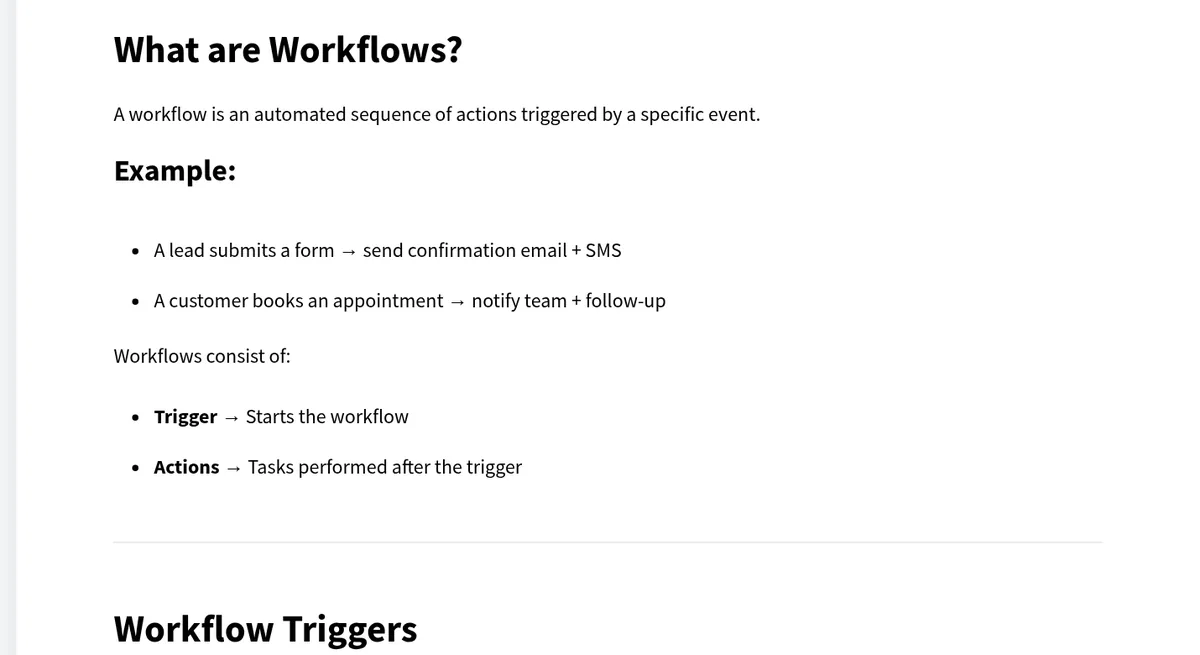
HighLevel's help center says a workflow is "an automated sequence of actions triggered by a specific event." There are three parts:
- Trigger: the event that starts the workflow.
- Filters: rules that decide when it should run. These are optional, but HighLevel recommends them.
- Actions: what happens after the trigger, like sending an email, a text, or creating a task.
HighLevel gives two simple examples. A lead submits a form, so the workflow sends a confirmation email and text. A customer books an appointment, so the workflow notifies your team and sends a follow up.
You can also split contacts into different paths based on conditions, connect workflows together, and use webhooks to talk to other apps.
3 ways to build a workflow
- Build using AI: HighLevel says you can "Describe your workflow and let AI generate it."
- Browse templates: start from a prebuilt workflow and edit it.
- Start from scratch: pick your own trigger and add actions one by one.
My advice for beginners: try the AI builder or a template first. Then open it up and read every step, so you understand what it does before you turn it on.
5 GoHighLevel workflows to build first
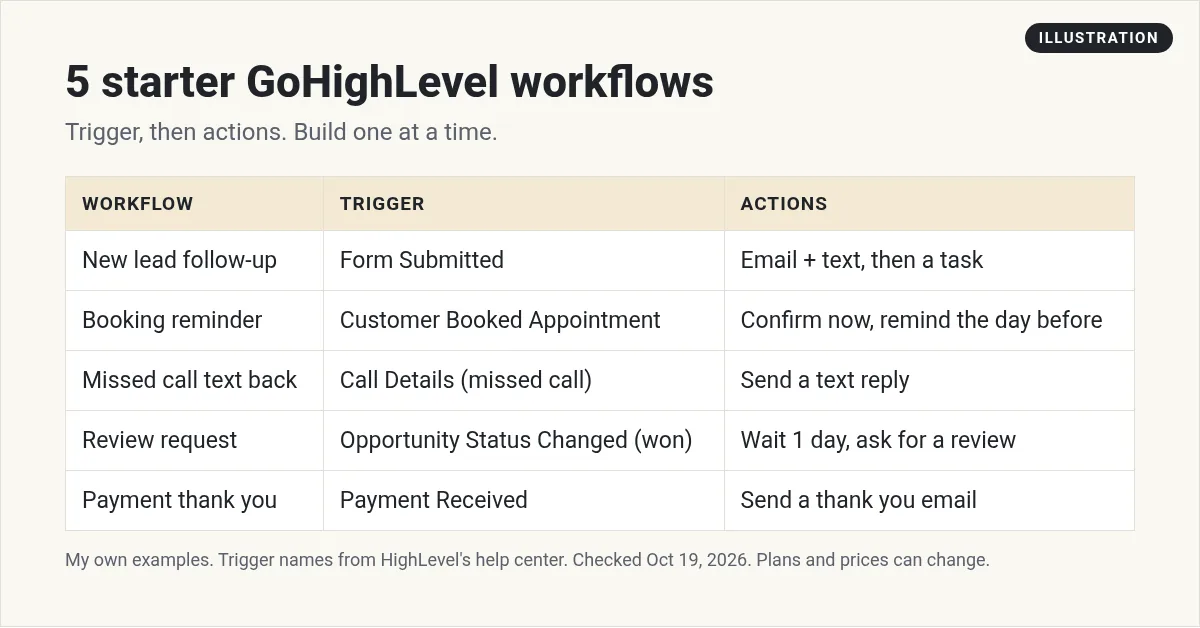
These are my own starter examples. The trigger names come from HighLevel's list of workflow triggers.
1. New lead follow up
Trigger: Form Submitted. HighLevel says this "Fires when a selected HighLevel form is submitted."
Actions: send a short welcome email and a text right away. Then create a task for you to call them.
Why it matters: fast follow up is one of the easiest wins in any business.
2. Booking confirmation and reminder
Trigger: Customer Booked Appointment.
Actions: send a confirmation now. Wait until the day before, then send a reminder text.
Why it matters: reminders help cut down on no shows.
3. Missed call text back
Trigger: Call Details. HighLevel says it "Fires when a call log matches selected details or outcomes," so you can set it for missed calls.
Actions: send a text like: Sorry I missed your call. How can I help?
Why it matters: a caller who gets a quick text is less likely to call the next business on the list.
4. Review request
Trigger: Opportunity Status Changed, set to won.
Actions: wait one day, then send a friendly text asking for a review with your review link.
5. Payment thank you
Trigger: Payment Received. HighLevel says it "Fires when a payment is successfully captured."
Actions: send a thank you email with what happens next.
How to write automated messages people like
An automation is only as good as the words it sends. These are my own rules for messages that feel human:
- Keep texts short. One or two sentences. Ask one clear question.
- Use their first name. HighLevel can fill it in for you from the contact record.
- Sound like you. Write the way you talk, not like a robot or a lawyer.
- Give an easy way out. Let people reply STOP to texts and unsubscribe from emails.
- Do not overdo it. Three follow ups that help beat ten that annoy.
Read every message out loud before you turn the workflow on. If it sounds strange to say, it will look strange on a phone.
Before you send texts: registration
Most of these workflows send texts. In the US, business texting usually needs A2P 10DLC registration first. That means registering your brand and your use case with the phone carriers. HighLevel has a help article on it. Plan for this early, because it can take time to get approved.
What GoHighLevel automation costs
Standard workflows are part of every HighLevel plan. Starter is $97 a month on HighLevel's pricing page, checked October 19, 2026. But there are a few usage costs to know.
- Premium workflow features: HighLevel's pricing guide lists these at "$0.01 per execution." It also says your agency "is not charged for free triggers and actions," only for the premium ones.
- AI actions: HighLevel notes that "Some premium Workflow actions, such as ChatGPT, have different pricing."
- Texts, calls, and emails: these are billed by use, on top of your plan.
Workflow Pro tiers
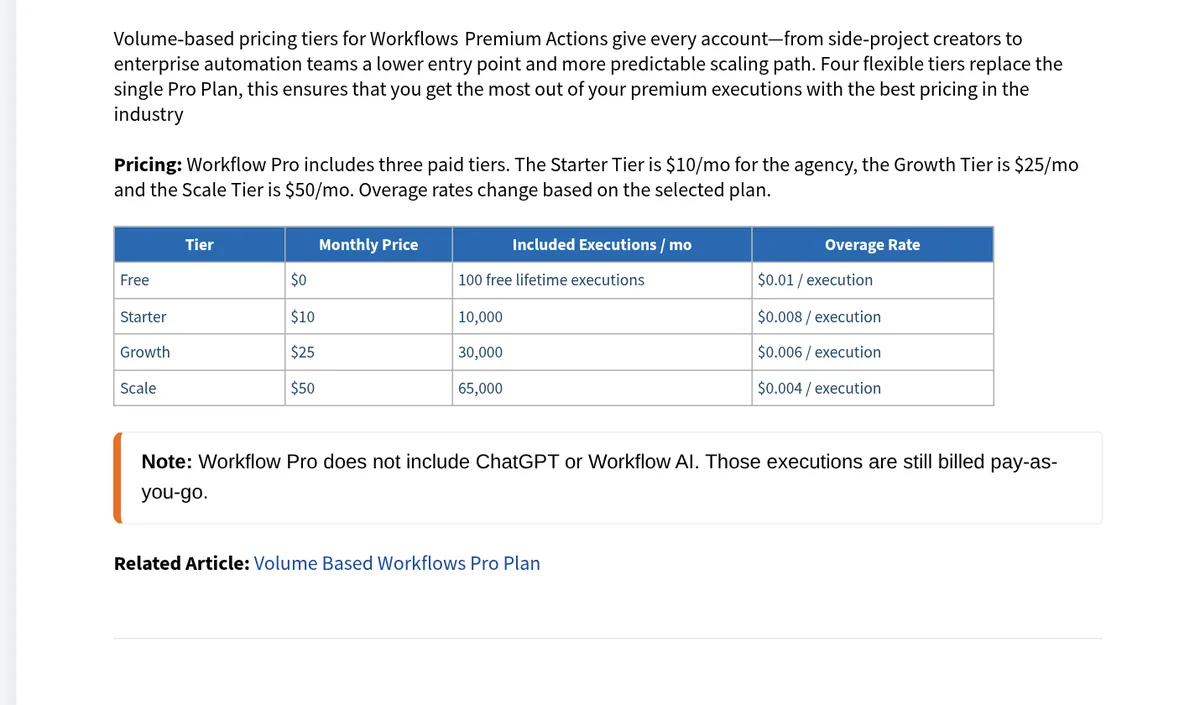
If you run a lot of premium actions, HighLevel offers Workflow Pro tiers with included executions.
| Tier | Monthly price | Included executions a month | Overage |
|---|---|---|---|
| Free | $0 | 100 free lifetime executions | $0.01 each |
| Starter | $10 | 10,000 | $0.008 each |
| Growth | $25 | 30,000 | $0.006 each |
| Scale | $50 | 65,000 | $0.004 each |
Source: HighLevel pricing guide, checked October 19, 2026. The same guide says the Starter tier is $10 a month "for the agency," and in another spot says "Price is per enabled sub-account." Check with HighLevel which applies to your account.
For the full plan breakdown, see my GoHighLevel review.
How to test a workflow before it goes live
HighLevel's troubleshooting tips are simple and worth following:
- Test with a fresh contact. Use a contact that has never been in the workflow.
- Check your filters. Make sure your test contact meets every condition.
- Check re-entry settings. Decide if the same person can go through it more than once.
- Read the execution logs. Look for skipped steps or errors.
And one more from HighLevel's FAQ: a workflow only runs automatically "as long as the workflow is published and the trigger conditions are met." Do not forget to publish it.
Build your first workflow in a trial
HighLevel's pricing page offers a 14-day free trial. New customers get 30 days through my partner link, checked October 19, 2026. Either way, billing begins when the trial ends unless you cancel. Here is my link: 30-day GoHighLevel trial (I earn a commission if you buy through this link.)
Use the trial to build workflow number one, the new lead follow up. Fill out your own form and watch it run. If you are still choosing a CRM, my GoHighLevel vs HubSpot comparison may help, and my GoHighLevel free trial guide covers the trial itself.
My first GoHighLevel workflow
Nothing you check here is sent or saved. Download it if you want to keep it.
Build your first GoHighLevel workflow
Start a trial and build one real workflow, like new lead follow up. Through my link, new customers get a 30-day trial instead of the standard 14 days, checked October 19, 2026.
Start my 30-day GoHighLevel trialI earn a commission if you buy through this link. Billing starts when the trial ends unless you cancel. Usage fees for phone, email, and AI can apply during the trial.
Want help using AI in your business? Join my free AI workshop.
Frequently asked questions
What is GoHighLevel automation?
It is the workflows tool inside HighLevel. A workflow starts with a trigger, like a form being submitted, and then runs actions, like sending emails, texts, or creating tasks, without you doing it by hand.
How do I create a workflow in GoHighLevel?
Pick a trigger, add optional filters, then add actions. You can start from scratch, use a template, or describe the workflow and let the AI builder create it. Then test it and publish it.
Does GoHighLevel automation cost extra?
Standard workflows are part of your plan. Premium workflow features are listed at $0.01 per execution, and some AI actions have their own pricing. Texts, calls, and emails are billed by use. Checked October 19, 2026.
What workflows should I build first in GoHighLevel?
Start with new lead follow up, booking reminders, missed call text back, review requests, and payment thank yous. Build one at a time and test each one.
Why is my GoHighLevel workflow not working?
Check that it is published, that your test contact meets the trigger filters, and the re-entry settings. Test with a fresh contact and read the execution logs.
Can GoHighLevel build workflows with AI?
Yes. HighLevel's workflows page has a Build using AI option, where you describe the workflow and the AI generates it. Review every step before you turn it on.
Sources
Checked October 19, 2026. Plans, prices, and rules can change.
- HighLevel help: Getting started with workflows
- HighLevel help: A list of workflow triggers
- HighLevel help: HighLevel pricing guide
- HighLevel help: What is A2P 10DLC brand and campaign registration
- HighLevel pricing
- My HighLevel trial page (affiliate): gohighlevel.com/montoya
