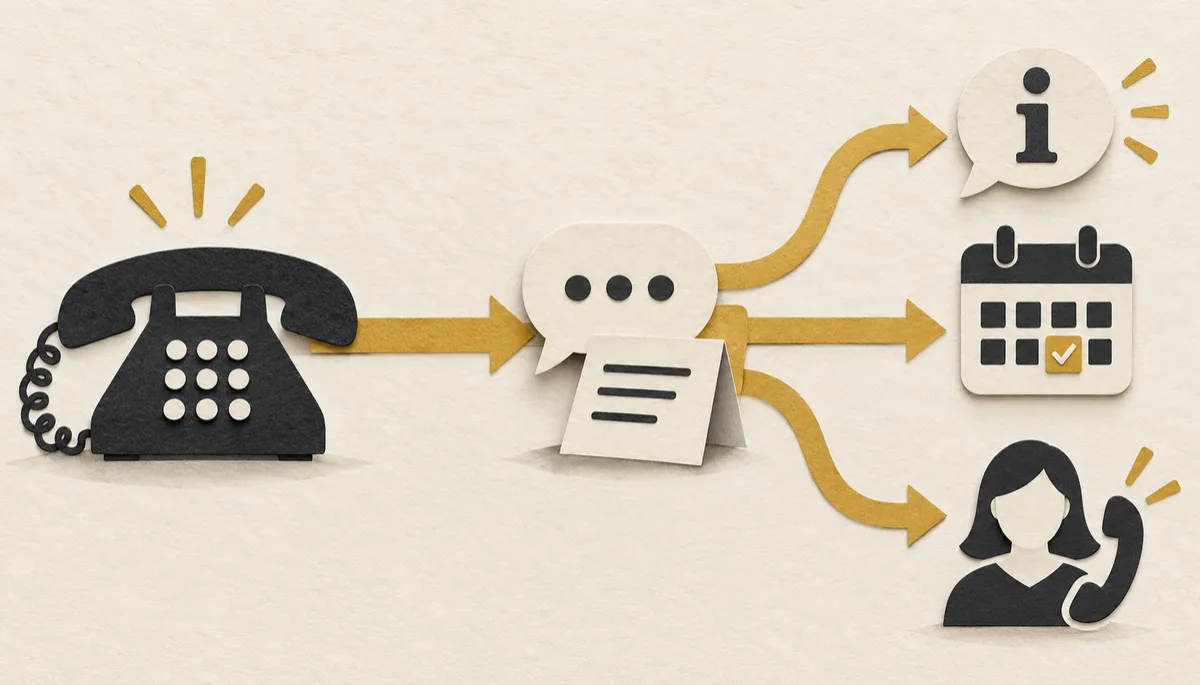
Follow one call, step by step
A customer calls while the owner is busy. AI asks what they need, collects the right details, and passes the request to the team. Follow one simple example, see what you must set up, and learn the difference between taking a request and confirming an appointment.
A customer calls a local business. The owner is busy. Instead of waiting for a callback, the customer speaks with software that can ask what they need, answer approved questions, and pass the request to the right person.
That is the basic idea behind AI call answering. You may also hear it called an AI receptionist: software that answers calls.
The useful part is easy to picture. The important part is making sure the software knows what it is allowed to say, what it should collect, and when a person needs to take over.
Follow one customer call
Imagine a customer looking for a house-cleaning estimate. They call after the owner has finished work for the day.
Nothing complicated has happened from the customer’s point of view. They asked a question and left a useful request. Behind the scenes, the business information, call settings, and handoff all needed to be correct.
Try it here · a practical planning tool
Follow a fictional call
Choose a situation to see the words, the information that should be saved, and the next human step. This is a written illustration, not a real call, product demo, or test result.
Fictional written simulation
A call helper can collect a request, confirm the details, and pass it to the team. This page does not place a call or deliver a message.
This tool does not submit your entries or store them between visits. Download any notes you want to keep.
Video walkthrough · Jonathan Montoya
Hear a sample call
Watch Jonathan’s plumbing-business call demo. Then follow the five parts of the call below and decide what should happen next.
This is a demonstration, not a completed test of your own setup.
The five parts of a useful call
1. The call reaches the assistant
Someone must decide when software answers: directly, as a backup, or during selected hours. The phone setup needs to send calls along that path.
HighLevel’s current deployment options include direct answering, backup answering, and schedules. It also notes that forwarding, timeouts, voicemail, and call-flow settings affect whether a call reaches the assistant. See the official creation and deployment guide.
For a first project, choose one clear path. An after-hours request-taking service is easier to explain than a promise to handle every caller in every situation.
2. The assistant uses approved business information
The software needs facts: business hours, service areas, services offered, and policies. In HighLevel, a connected knowledge base is a collection of information the assistant can use. Read about Voice AI knowledge-base integration.
The owner should approve that information. An old website may contain the wrong hours or an offer that has ended. Copying it into an assistant does not make it current.
For Example Cleaning, the approved information could say: “We offer regular and move-out cleaning in North Park and East Ridge. An owner reviews each estimate request. We do not quote a final price over the phone.”
3. It asks for the details needed to help
The assistant follows instructions about the conversation. Keep those instructions focused on a useful outcome.
For a callback request, that might mean the customer’s name, contact number, service needed, and preferred timing. Asking one question at a time gives the customer a simpler experience.
Confirm important details. “Was that 555-0102?” is useful when the whole next step depends on a callback number. Collecting a name does not help much if nobody can reach the customer.
4. It takes an action you have allowed
An action could be saving a request, sending a notification, arranging an appointment, or transferring the call. Give the assistant only the actions required for its job.
Appointment booking needs a real, configured calendar. HighLevel documents voice booking against eligible calendars and distinguishes the assistant’s answering hours from appointment availability. An assistant can answer at night while offering appointments only during the business’s approved hours. See HighLevel’s Voice AI booking guide.
For the cleaning example, collecting a preferred date is enough. The assistant should not call that a confirmed booking.
5. The business receives and handles the result
The service is not finished when the assistant says goodbye. The request must reach the right person in a form they can use.
A useful summary might read: “Jordan requests a move-out cleaning estimate in North Park for next Friday. Callback: [confirmed number]. Availability and price were not promised.”
Then the owner follows up. Agree who does that and what response time the business can actually support. Software can collect a request; it cannot make an unavailable owner return the call.
What should the assistant leave to a person?
Use this rule when designing a first service: if a wrong answer could create a serious problem, narrow the job or hand the conversation to a qualified person.
For ordinary local-service intake, you can make that practical:
- Unknown information: admit the answer is unavailable and offer a callback.
- Custom pricing: collect the details needed for a quote instead of guessing.
- Complaints or unusual requests: pass them to the person responsible.
- A request for a human: follow the agreed transfer or callback process.
- Urgent or specialist matters: follow owner-approved instructions; do not improvise advice.
This does not mean the service has failed. A clear handoff is part of a good service. The owner should know exactly where the assistant’s responsibility ends.
Also decide what happens when nobody answers a transfer, the business is closed, or the system cannot complete an action. A customer should receive a truthful next step rather than a promise nobody can fulfill.
The one-page information sheet to gather first
Before touching settings, ask the owner to fill in these fields:
| Field | Example entry |
|---|---|
| Primary job | Collect cleaning-estimate requests |
| Services and area | Owner-approved list, with exclusions |
| Hours and holiday changes | When the team works and when software answers |
| Answers allowed | Approved answers to ten common questions |
| Details to collect | Name, callback number, service, area, preferred timing |
| Promises to avoid | Final price, confirmed job date, guaranteed availability |
| Human handoff | Who receives calls or requests, and fallback when unavailable |
| Information owner | Person who approves facts and future changes |
The download includes a copy you can complete. Use fake contact information for practice. Keep real customer details within the business’s approved systems and access settings.
Test the whole journey before relying on it
A friendly voice is one part of the experience. Check that answers are accurate, requests arrive, and any promised action actually happens.
HighLevel provides browser-based and phone-based tests. Its documentation says browser testing does not validate the full phone-routing experience and does not support Call Transfer. Use a real phone path to verify routing and transfers. Read the official testing guide.
Start with these tests. Write the expected result before making the call, so a convincing answer does not distract you from the requirement.
| Test request | Expected result | Check afterward |
|---|---|---|
| “Do you clean in North Park?” | Matches the approved service area | No unsupported extra claims |
| “What will my cleaning cost?” | Explains the estimate process | No invented final price |
| “Can I have next Friday?” | Records a preference unless booking is enabled | No false booking confirmation |
| “I need to speak to someone.” | Uses the approved handoff | A real person or honest fallback receives it |
| Caller gives an unclear number | Asks for clarification | The saved number matches the confirmation |
| Caller asks an unknown question | Does not guess | The team receives the unanswered question |
Test silence, interruptions, a changed request, and an outside-hours call too. After changing an answer or rule, repeat the relevant test and one ordinary call. A change that fixes one path can affect another.
Do not launch with a known failure in a critical path. Correct it or temporarily remove that action. Taking an accurate callback request is a useful first service.
Does setup really take five minutes?
A template may make the first configuration quick. A dependable business service also needs approved information, call routing, testing, and owner sign-off.
Those jobs vary by business. A simple demonstration with fictional details is different from connecting a real phone number and letting customers rely on it.
Reusing your starting template can save work later. Each new business still has its own hours, services, phone setup, calendar, and handoff. Copy the structure, then verify the details.
What does it cost, and who looks after it?
Budget for the platform, the chosen AI arrangement, phone services, and your delivery time. Avoid treating “unlimited AI” as a complete phone-service quote. The cost guide explains the separate categories and includes a budget worksheet.
For ongoing care, agree how often someone checks a sample of calls, updates information, and responds to problems. Review useful outcomes such as accurate requests delivered and appointments correctly recorded. Do not count every conversation as a new customer.
Before live use, the owner should approve the greeting, caller notices, recording choices, and data access for their business. Keep those decisions in the setup sheet so they remain visible during future changes.
To move from this written example to a practice call, see Jonathan’s HighLevel trial page. Use the approved-information sheet to prepare your example before starting. Affiliate link: I may earn a commission if you sign up through it. Review the plan and checkout terms; subscription billing starts after the trial unless canceled, and phone, AI, or other usage can cost extra, including during a trial.
Your first useful action
Complete the information sheet for a fictional business. Write the greeting, five approved answers, and the handoff. Then rehearse the customer journey aloud. You will quickly see which instructions are missing.
Ready to turn this caller journey into a practice setup? My AI Agency Blueprint gives you a beginner learning path for $27 one-time, from choosing the service to building it and approaching businesses. Software, usage, and optional purchases are separate.
Take the next step on paper
AI Call Answering Setup and Test Sheet
A usable worksheet for the task in this guide. Download it, copy the text, or print this page with the worksheet open.
Open the complete worksheet text
AI CALL ANSWERING: SETUP AND TEST SHEET
Business (use fictional information for practice):
Approved by:
Date:

THE JOB
Main outcome:
When the assistant answers:
Opening greeting:
What it may promise:
What it must not promise:

BUSINESS FACTS
Services:
Service area:
Hours / holiday changes:
Pricing or estimate policy:
Booking rules, if enabled:
Common question 1 / approved answer:
Common question 2 / approved answer:
Common question 3 / approved answer:
Common question 4 / approved answer:
Common question 5 / approved answer:

REQUEST AND HANDOFF
Details needed:
How important details are confirmed:
Where the request arrives:
Who handles it:
Human transfer number, if enabled:
Fallback if that person is unavailable:
Unknown-question response:
Owner-approved urgent-request instructions:
Owner-approved caller notice / recording settings:
Who can access customer details:

TEST LOG
Scenario | Expected answer/action | Actual answer/action | Saved correctly? | Pass/fix | Retest date
Known service-area question:
Unknown service-area question:
Custom price request:
Preferred appointment date:
Booking unavailable:
Request for a human:
No answer on transfer:
Unclear callback number:
Silence:
Interruption:
Changed request:
After-hours call:

LAUNCH CHECK
[ ] Owner approved facts and greeting.
[ ] Phone path reaches the correct assistant.
[ ] Important details saved accurately.
[ ] Notifications received by the right person.
[ ] Actual calendar record checked if booking is enabled.
[ ] Transfer tested on a real phone path if enabled.
[ ] Unknown questions have an honest fallback.
[ ] No known critical-path failures remain.
[ ] Owner knows how to report a problem.
[ ] Review date and responsible person agreed.

This sheet does not certify a system as tested. Complete the actual tests and record results.
Sources and review notes
Official sources support the specific feature or rule cited beside it in the article. Calculations, worksheets, and fictional examples are editorial planning tools. Software features and prices can change.
- HighLevel Voice AI creation and deploymentChecked 2026-10-10
- HighLevel Voice AI knowledge-base integrationChecked 2026-10-10
- HighLevel Voice AI appointment bookingChecked 2026-10-10
- HighLevel Voice AI testingChecked 2026-10-10
Frequently asked questions
How does an AI receptionist answer calls?
It picks up the call, turns speech into text, uses an AI model with the business's information to choose a reply, and speaks the answer back.
Can AI call answering book appointments?
Yes, when it is connected to a calendar. It can offer open times and book or request an appointment.
What happens when the AI can't help?
It should take a message, transfer the call, or send the details to a person, depending on how it is set up.