
Vibe coding · Step by step
You built it. Now get it in front of people. Here are the three ways to publish an app, what each one costs, and the steps from Apple's and Google's own docs.
Building the app feels like the hard part. Then you try to publish it and hit accounts, reviews, and testing rules. I have seen a lot of people stall right here.
The good news is that the steps are clear once you see them laid out. There are three places to publish: the web, the Apple App Store, and Google Play. This guide covers each one, using Apple's and Google's own help pages, checked October 19, 2026.
Quick answer
To publish an app, pick where it will live. A web app can go live in minutes with a Publish button in tools like Lovable or Bolt, free to start. For the Apple App Store, join the Apple Developer Program ($99 a year), upload a build in App Store Connect, and submit it for review. For Google Play, pay a one-time US$25 fee, set up your app in Play Console, and, for new personal accounts, run a closed test with at least 12 testers for 14 days before you apply for production.
Step 1: Pick where your app will live
Before anything else, decide where people will use your app. It changes every step after this.
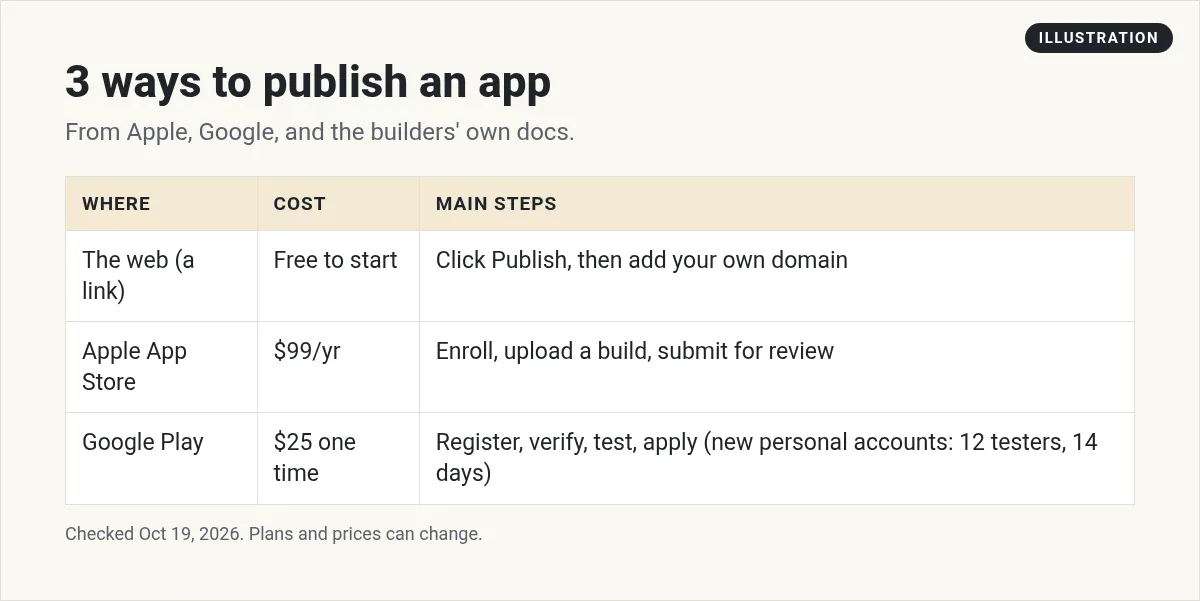
- The web. People open a link in any browser. This is the fastest and cheapest way to launch.
- Apple App Store. For iPhone and iPad users who want to download it.
- Google Play. For Android phone users who want to download it.
My advice for a first app: start on the web. You can test the idea with real users, then move to the stores once you know people want it.
How to publish a web app
If you built your app with an AI builder, publishing to the web is often just a button.
Lovable
Lovable's docs say: "Publishing takes two clicks, and the defaults work for most projects." You click Publish in the top right, then click Publish again. Lovable suggests "a website address ending in lovable.app" and runs a quick security scan. To push later changes, open the same menu and click Publish changes.
Bolt.new
Bolt's help center says you can publish "for free at a web address ending in bolt.host." Click Publish, then Publish again, and wait about a minute. One handy tip from Bolt: always use the Publish or Update button, "since these options don't use tokens." On the Free plan, all published sites are public. A custom domain needs a paid plan.
Want your own web address? Both tools let you connect a custom domain, usually on a paid plan.
How to publish an app on the App Store
1. Join the Apple Developer Program
Apple lists the program as a "$99 annual membership." To enroll, Apple says you need "an Apple Account with two-factor authentication turned on" and must be of legal age in your region.
If you enroll as an individual, your legal name is shown as the seller. If you enroll as a company, Apple asks for your legal entity name and a D-U-N-S Number. Apple says these are free in most places. Your company also needs a working public website.
2. Get your app ready for review
Apple reviews every app before it goes live. Its review guidelines say submissions should be "final versions with all necessary metadata and fully functional URLs included." Placeholder text and empty pages should be removed first.
Apple's checklist includes these points:
- Test your app for crashes and bugs on a real device.
- Make sure all app information is complete and accurate.
- If your app has a login, give the reviewer a working demo account.
Apple states it plainly: "We will reject incomplete app bundles and binaries that crash or exhibit obvious technical problems."
3. Upload and submit in App Store Connect
App Store Connect is Apple's site for managing your app. You add your app's listing, upload a build, and submit it for review. Apple's help says the review covers "every version of your app and its content," including in-app purchases.
How to publish an app on Google Play
1. Create a developer account and pay the fee
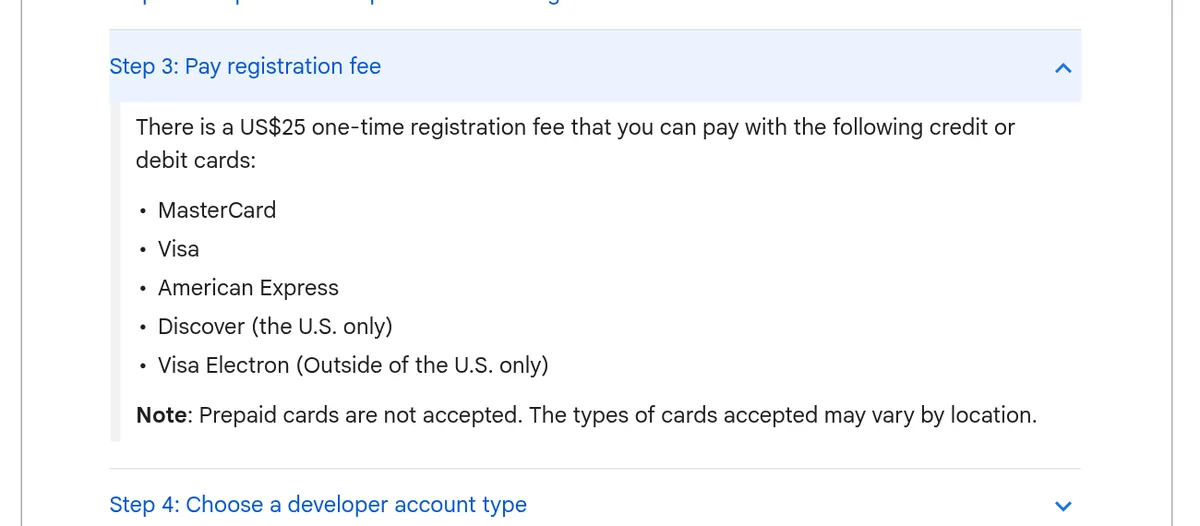
Google's help center says: "There is a US$25 one-time registration fee." You pay it with a credit or debit card when you sign up.
2. Set up your app in Play Console
Play Console is Google's site for managing apps. Google says you start by giving details about your app's content and filling in your store listing. Google Play uses Android App Bundles, so you "only need to build, sign, and upload a single app bundle."
3. Run a closed test (new personal accounts)
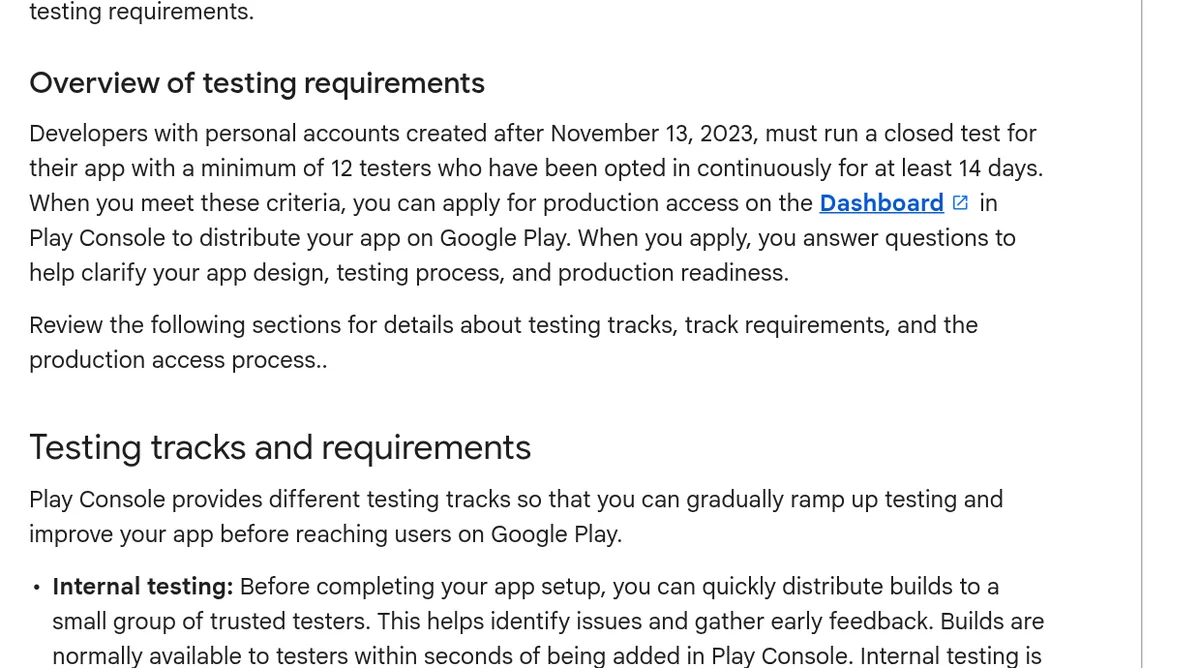
This step surprises a lot of people. Google says personal accounts created after November 13, 2023 "must run a closed test for their app with a minimum of 12 testers who have been opted in continuously for at least 14 days."
Google suggests finding testers through friends, family, coworkers, and online groups where your users hang out. Tell your testers to stay opted in for the full 14 days.
4. Apply for production access
Once your test meets the rules, you apply for production access from the Play Console dashboard. You answer questions about your app and your test. Google says review "usually takes seven days or less, but can occasionally take longer."
Can I publish an AI built app to the stores?
Yes, but there is an extra step. Most AI builders make web apps. The stores need a real app file, called a build, for each platform. You may need extra tools or a developer to turn your web app into a store app. That is one more reason to start on the web and move to the stores once the idea is proven.
After you publish: updates
Publishing is not a one time job. You will fix bugs and add features, and each store handles updates a little differently.
- Web apps. In Lovable or Bolt, you open the same Publish menu and push your changes. Bolt says a deploy takes about a minute.
- Apple. Each new version goes through App Review again, so leave time before a big launch.
- Google Play. Google says that when you prepare a release, "Clicking Publish pushes changes live immediately." If you click Save instead, your changes wait in a list until you send them for review.
Keep a simple log of what you changed in each update. It helps when a user reports a problem, and it helps the reviewers too.
Before you publish: a quick check
- Test it yourself. Click every button. Try it on your phone.
- Ask three people to try it. Watch where they get stuck.
- Remove placeholder text. No "lorem ipsum," no fake data.
- Add a privacy policy if you collect any user data.
- Write a clear listing. Say what your app does in one sentence.
Still planning your budget? My guide to pricing your first AI app helps you decide what to charge. If you are still building, my vibe coding with Claude guide walks through the process.
My app publishing checklist
Nothing you check here is sent or saved. Download it if you want to keep it.
Want to build and launch your first app with AI?
In my free AI workshop, I show regular people how to use AI tools to build simple apps and get them live, step by step.
Join my free AI workshopFree live workshop. No credit card needed.
Frequently asked questions
How much does it cost to publish an app?
A web app can start free on builders like Lovable and Bolt. The Apple Developer Program is $99 a year. Google Play has a one-time US$25 registration fee. Prices checked October 19, 2026.
How long does it take to publish an app on Google Play?
For new personal accounts, plan for at least 14 days of closed testing with 12 or more testers. Google says the production access review usually takes seven days or less.
Do I need 12 testers to publish on Google Play?
Yes, if you have a personal developer account created after November 13, 2023. You must run a closed test with at least 12 testers opted in for 14 days in a row before applying for production.
How do I publish an app on the App Store?
Join the Apple Developer Program, prepare your app and listing in App Store Connect, upload a build, and submit it for review. Test for crashes and give Apple a demo account if your app has a login.
Why would Apple reject my app?
Apple says it rejects incomplete apps and apps that crash or have obvious technical problems. Missing info, placeholder text, and no demo login are common reasons to get sent back.
Can I publish a web app without the app stores?
Yes. Tools like Lovable and Bolt host your app at a link for free to start. Anyone can open it in a browser. You can add a custom domain on a paid plan.
Sources
Checked October 19, 2026. Plans, prices, and rules can change.
- Lovable docs: Publish your Lovable project
- Bolt help: Publish your project to a live website
- Apple Developer Program
- Apple: Program enrollment
- Apple: App Review Guidelines
- Apple: Overview of submitting for review
- Google Play Console Help: registration fee
- Google Play Console Help: app testing requirements for new personal accounts
- Google Play Console Help: create and set up your app
- Google Play Console Help: prepare and roll out a release
