
Build with AI · Honest review
Most Lovable reviews come from a weekend test. Mine comes from running real software on it.
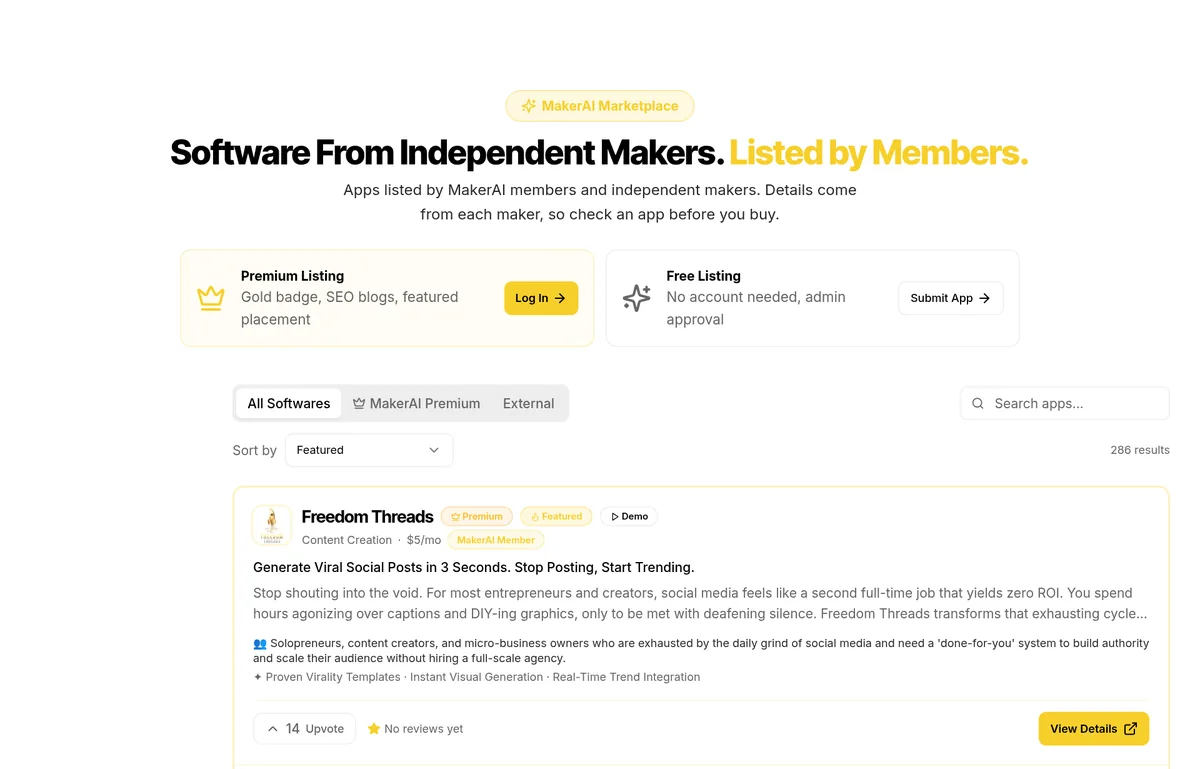
My own software, MakerAI, lives in Lovable. That includes the MakerAI Marketplace, a public directory of software built by MakerAI members and other makers. So when I review Lovable, I am reviewing a tool I depend on every day.
Lovable is also one of the two builders I recommend in my MakerAI course. But it has real downsides, and I will cover those too. The facts below come from Lovable's pricing page and help docs, checked on October 18, 2026.
Quick answer
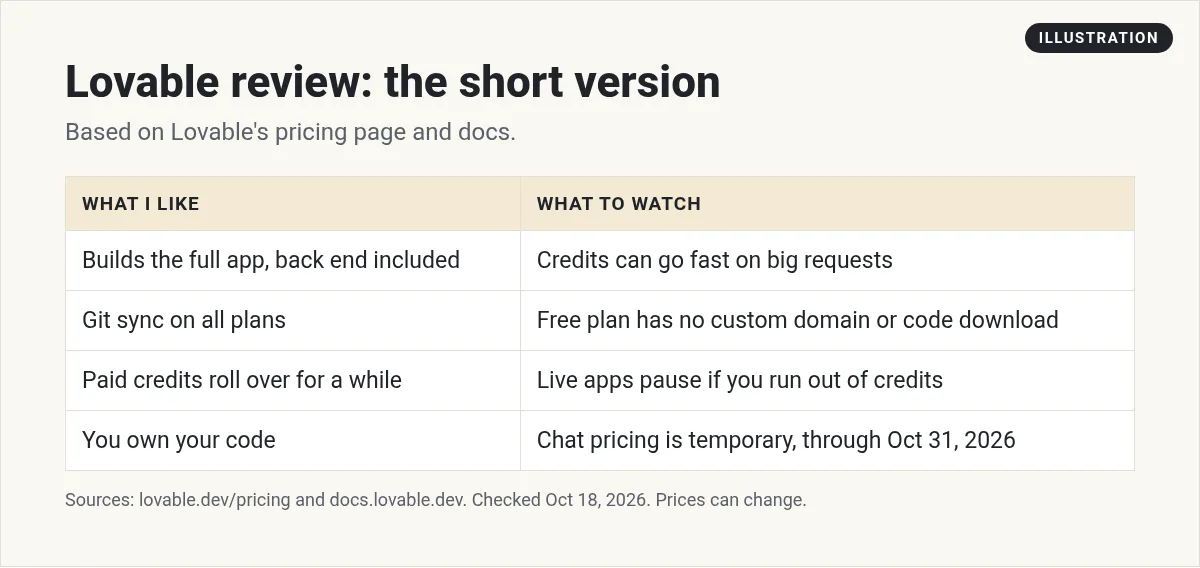
Lovable is one of the best AI app builders for people who do not code. It builds the full app, including the back end, from chat. It has a free plan, Pro from $25 a month, Git sync on all plans, and paid credits that roll over for a while. The main downsides are credits that can go fast on big requests, a free plan with no custom domain or code download, and live apps that pause if you run out of credits.
My verdict in one table
| Area | My rating | Why |
|---|---|---|
| Ease for beginners | Great | Chat to build, with a live preview |
| Back end built in | Great | Lovable Cloud covers database, storage, and sign-in |
| Owning your code | Great | Git sync on all plans, and "You own your code" |
| Cost control | Good | Clear per-message costs, but big asks add up |
| Free plan | Fair | Good for testing, but no custom domain |
| Live app safety | Watch it | Back end services pause at zero credits |
My ratings are my own opinion. Facts are from lovable.dev/pricing and docs.lovable.dev, checked October 18, 2026.
What Lovable is
Lovable is an AI app builder. You chat with it in your browser, and it writes the code, sets up the back end, and hosts your app. It has three ways to work in a project, per its docs:
- Build mode makes changes to your app.
- Plan mode helps you think and plan. It never changes your code.
- Chat mode answers questions using a daily chat allowance.
What Lovable does well
1. It builds the whole app
Lovable Cloud handles the database, storage, and sign-in. For a beginner, that removes the hardest setup steps. That is a big reason MakerAI runs on it.
2. You can see what each message costs
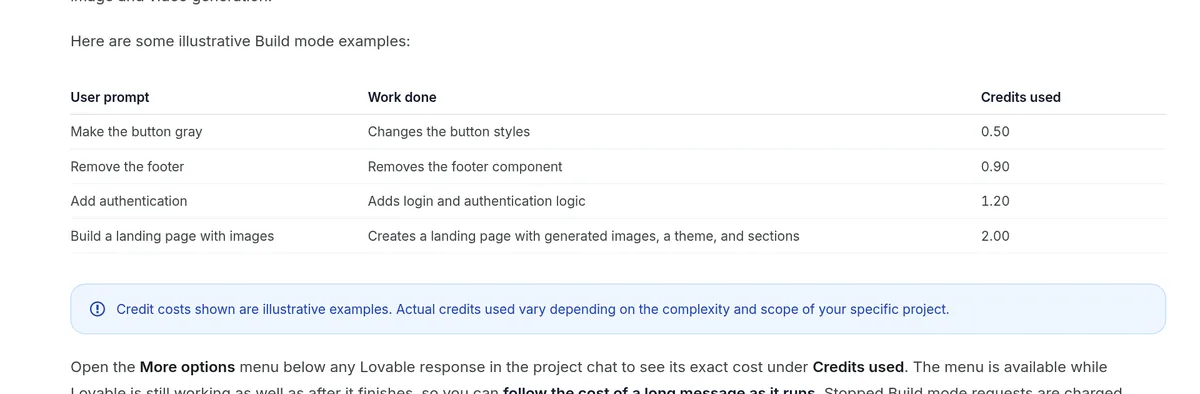
Lovable's docs show sample costs. "Make the button gray" used 0.50 credits. "Add authentication" used 1.20. You can open the menu under any reply to see the exact credits used.
3. You own your code
Lovable's FAQ says "You do. You own your code." Its GitHub integration is a two-way sync, so you can back up your code, work with a developer, or move elsewhere later.
4. Paid credits roll over
On paid plans, unused monthly credits roll over while your plan is active. On monthly plans they expire 2 months after they were issued.
5. Stopping early is fair
Lovable says a request you stop before it has made any change to your project is not charged. That saves you when you see it heading the wrong way.
What to watch out for
1. Big requests use more credits
Lovable says Build mode is usage based. Small, focused edits cost less. Big multi-step changes cost more. Pro starts with 100 monthly credits for $25 a month.
2. The free plan is for testing
Free gives you 5 daily build credits, up to 30 a month. It has no custom domain, and you cannot edit or download your code in Lovable on Free.
3. Live apps can pause
Per Lovable's docs, if your workspace runs out of credits, AI features in your live app stop working, and built-in back end services pause shortly after. Your data stays safe, but your users cannot use the app. Turn on auto top-up before you launch.
4. Some pricing is temporary
Lovable says its current chat pricing, including the daily chat allowance, applies through October 31, 2026. The free monthly Cloud and AI grants are also a temporary offer. Recheck the pricing page after that date.
Lovable price in short
| Plan | Starts at | Credits |
|---|---|---|
| Free | $0 | 5 daily build credits, up to 30 a month |
| Pro | $25 a month, or $250 a year | 100 monthly credits |
| Business | $50 a month, or $500 a year | 100 monthly credits |
| Enterprise | Custom | Volume based |
Source: lovable.dev/pricing and Lovable docs, checked October 18, 2026. Prices can change.
Pro or Business: which plan is worth it?
Both plans start with 100 monthly credits. The difference is team tools.
Pro ($25 a month) adds credit rollovers, top-ups, custom domains, user roles, per-member credit limits, removing the Lovable badge, and email support. That is enough for most solo builders and small teams.
Business ($50 a month) adds a team workspace, role-based access, internal publish, SSO, a security center, design templates, and priority support. Pick it if your company needs single sign-on or tighter control over who sees what.
My advice: start on Free, move to Pro when you need a custom domain or your code, and only move to Business when a team need forces it.
How Lovable compares, in one line each
- Base44 starts cheaper at $20 a month, but unused credits expire at each reset.
- Bolt Pro is also $25 a month, and unused tokens roll over to next month.
- Overskill has no free plan, but it is built for selling apps, with buyer credits for the AI in your app.
- Claude Code is a coding agent, not an app builder, so you handle hosting yourself.
Prices checked on each pricing page on October 18, 2026.
What I have built on it
MakerAI runs on Lovable, including the MakerAI Marketplace. The marketplace showed 286 listings when I checked it on October 18, 2026, from AI tools to finance to education.
The big lesson: why most Lovable apps fail
I made a video called "Why 99% of Lovable Apps Fail (And How to Be in the 1%)." The point is simple. It is not the tool. In the video I say, "Building the app was never the hard part." The hard part is knowing what to build, checking that people want it, and getting customers once it is live. So pick a real problem, test the idea with real people, and only then build.
My video: I explain why most Lovable apps fail to get users, and what the small group that succeeds does differently.
Any results mentioned in videos are not typical and are not a promise of income. Your results depend on your work and your market.
How to use Lovable well: 6 tips
- Start in Plan mode for anything big. It costs 1 credit a message and never changes code.
- Make one small change per message. It is cheaper and easier to fix.
- Connect GitHub on day one. It is your backup.
- Check the credits used under each reply for the first week.
- Set usage alerts in workspace settings.
- Turn on auto top-up before real users arrive.
Who should use Lovable?
Great fit: non coders, founders testing an idea, and small teams who want a real app fast.
Maybe not: developers who want to pick every part of the stack. Look at a coding agent instead.
Want options? Read my Overskill vs Lovable comparison and my Lovable vs Replit vs Bolt vs Cursor guide. If you plan to sell your app, Overskill (I earn a commission if you buy through this link.) is the other builder I recommend. And if you already built something, here is how to list your app on the MakerAI Marketplace.
Lovable starter checklist
Nothing you check here is sent or saved. Download it if you want to keep it.
Build it in Lovable, then get customers
In my free AI workshop, I show how I plan apps, build them, and get them in front of real buyers.
Join my free AI workshopFree live workshop. No credit card needed.
Frequently asked questions
Is Lovable any good?
Yes, for most non coders. It builds the full app with a back end, and you own your code. My own software, MakerAI, runs on it. Watch your credits on big requests.
Is Lovable free?
Yes. The Free plan gives 5 daily build credits, up to 30 a month, checked October 18, 2026. It has no custom domain or code download.
How much does Lovable cost?
Pro starts at $25 a month for 100 monthly credits, and Business starts at $50 a month, checked October 18, 2026. Enterprise is custom.
What are the downsides of Lovable?
Credits can go fast on big requests, the free plan is limited, and live apps that use Lovable Cloud pause if you run out of credits.
Is Lovable good for beginners?
Yes. You chat in your browser, see a live preview, and the back end is built in. Start in Plan mode and make one small change per message to keep credits low.
Is Lovable safe for a live app?
It can be, if you watch your credits. Turn on auto top-up and usage alerts, because back end services and AI features pause when a workspace hits zero credits.
Can I export my code from Lovable?
Yes. Lovable says you own your code, and it offers two-way GitHub sync. Code download needs a paid plan.
Sources
Checked October 18, 2026. Plans, prices, and rules can change.
