
Overskill · Publishing
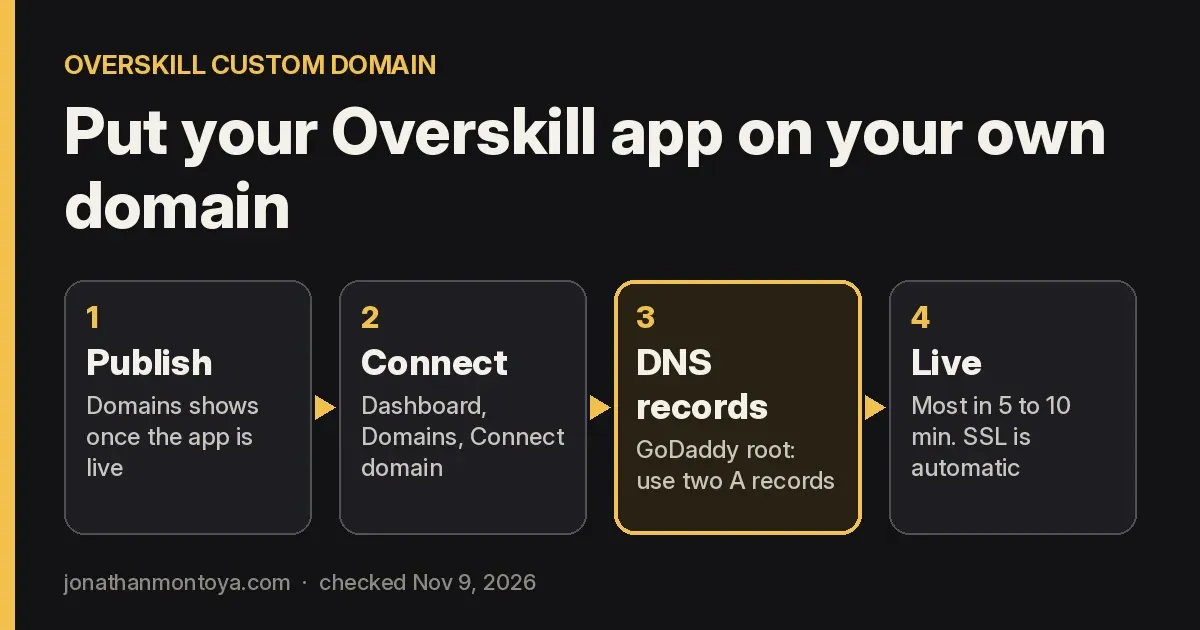
Overskill custom domains put your app at yourname.com instead of a long default address. Here is how to connect it, step by step, plus the one GoDaddy error almost everyone hits.
Every Overskill app (I earn a commission if you buy through this link) gets a free web address that looks like myapp.overskill.app. That is fine for testing. But when you share it with real people, your own domain looks more trustworthy.
The good news: Overskill says it takes about 5 minutes. This guide walks you through each step, checked against Overskill's help center on November 9, 2026. I also cover the GoDaddy error that stops a lot of people, and how many domains your plan allows.
Quick answer
To connect a custom domain in Overskill, publish your app, then open the Dashboard tab and click Domains. Click Connect domain and type your domain. If Overskill shows DNS records, add them at your registrar exactly as shown. Wait about 5 to 10 minutes. When the domain shows Live, SSL and the http to https redirect are set up for you.
Before you start
You need three things:
- A paid Overskill plan. Overskill's help center says custom domains need a paid plan. Without one, you see "Custom domains require a Pro plan or higher."
- A published app. Overskill says the domain option appears once your app is live in production.
- A domain you own, and the login for the place you bought it. That place is called your registrar.
One note on registrars. Overskill's help article still lists Google Domains as an example. Google Domains no longer exists as its own service. Google's own page says all Google Domains registrations moved to Squarespace, with every domain migrated by July 10, 2024. If you had a Google Domains name, you now manage it in Squarespace Domains.
The 5 steps to connect your domain
Step 1: Open domain settings
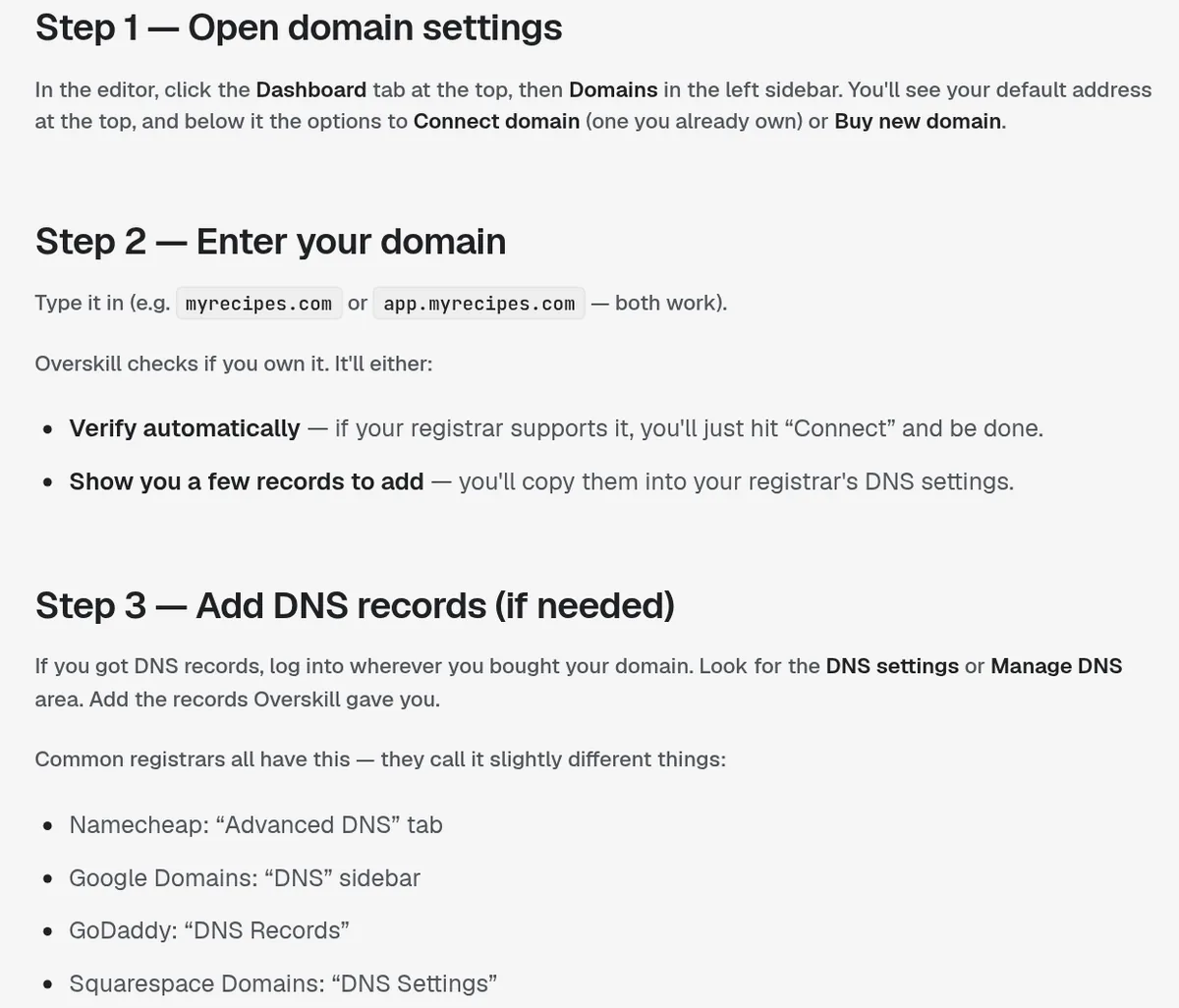
In the editor, click the Dashboard tab at the top, then Domains in the left sidebar. You will see your default address at the top. Below it are two buttons: Connect domain, for one you already own, and Buy new domain.
Step 2: Enter your domain
Type it in, like myrecipes.com or app.myrecipes.com. Both work. Overskill then does one of two things:
- It verifies automatically, if your registrar supports that. You click Connect and you are done.
- It shows you a few DNS records to add at your registrar.
Step 3: Add the DNS records
Log in where you bought your domain and find the DNS area. Each registrar calls it something a little different:
| Registrar | Where to add records |
|---|---|
| Namecheap | Advanced DNS tab |
| GoDaddy | DNS Records |
| Squarespace Domains (includes old Google Domains) | DNS Settings |
Labels from Overskill's help article "Connecting your own domain," checked November 9, 2026.
Overskill's advice is short and important: "Copy and paste exactly. Type, name, and value all matter."
Step 4: Wait
Overskill says DNS changes take anywhere from a few minutes to about an hour. Most people see it work in 5 to 10 minutes. Overskill checks for you and marks the domain Live when it is working.
Step 5: Visit your domain
Open your domain in a browser. You should see your live app. Overskill says it handles SSL, the lock icon, and the redirect from http to https on its own. SSL is usually ready within a minute after your DNS is verified.
The GoDaddy root domain fix
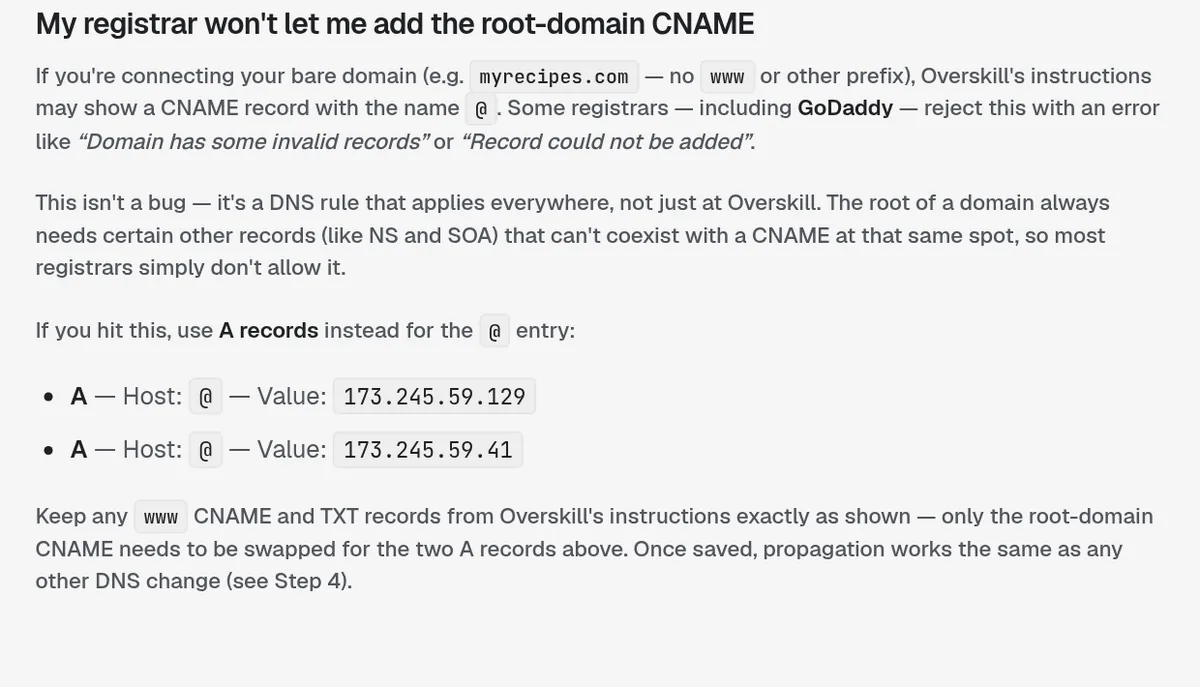
This is the error that stops most people. If you connect a bare domain like myrecipes.com, with no www in front, Overskill's records may include a CNAME record with the name @. Overskill says some registrars, including GoDaddy, reject that with an error like "Domain has some invalid records" or "Record could not be added."
It is not a bug. Overskill explains that it is a DNS rule everywhere: the root of a domain cannot hold a CNAME. The fix is to use two A records for the @ entry instead:
| Type | Host | Value |
|---|---|---|
| A | @ | 173.245.59.129 |
| A | @ | 173.245.59.41 |
Values from Overskill's help article, checked November 9, 2026. Always use the records your own Domains screen shows, and only swap the root CNAME.
Keep the www CNAME and any TXT records exactly as Overskill gave them. Only the root CNAME gets swapped for the two A records.
How many domains each plan allows
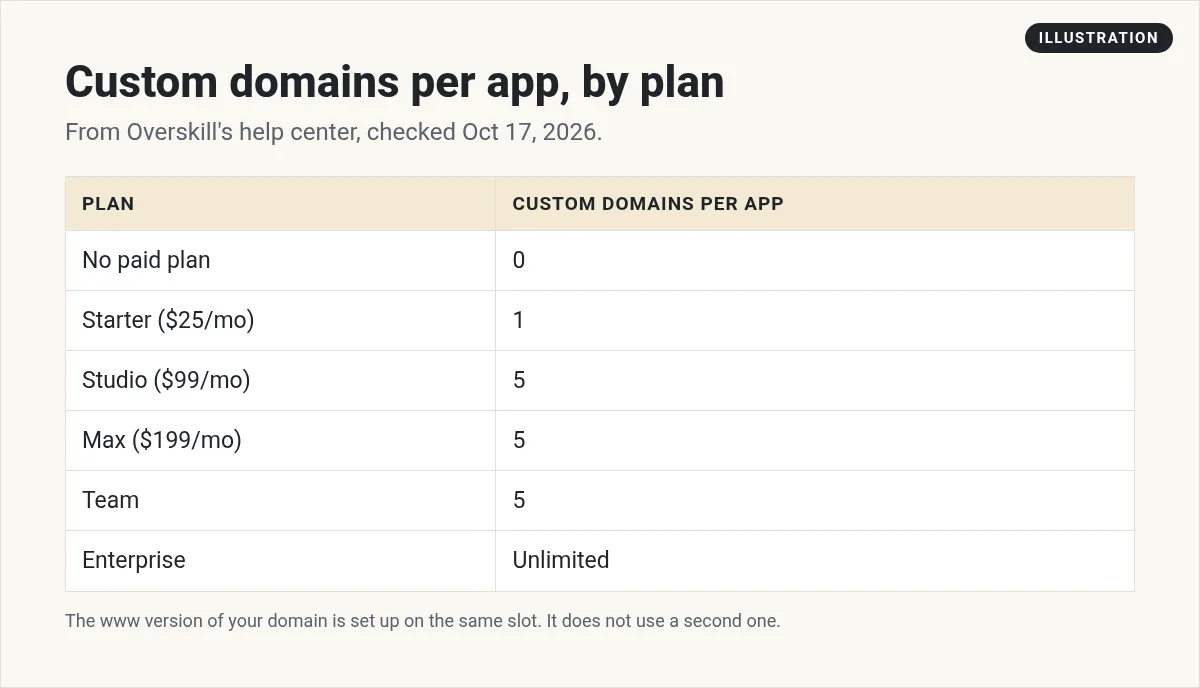
Overskill counts custom domains per app, not per account. Here is the allowance from its help center:
| Plan | Custom domains per app |
|---|---|
| No paid plan | 0 |
| Starter ($25/mo) | 1 |
| Studio ($99/mo) | 5 |
| Max ($199/mo) | 5 |
| Team | 5 |
| Enterprise | Unlimited |
From Overskill's help article "How many custom domains can I add?" Prices as listed there on November 9, 2026. For full plan details, see my Overskill pricing guide.
A few things trip people up:
- www is free. Connecting myrecipes.com sets up www.myrecipes.com on the same slot. You do not add it separately.
- A subdomain counts. app.mybiz.com uses one slot.
- "Pro plan" means Starter. Overskill says the limit message may say "1 for pro plan." That is the Starter plan under an older name.
- A second domain needs the Overskill API. Overskill says the Domains panel connects one domain per app. Even on a plan that allows 5, there is no "add another" button there. If you build with the Overskill API, you can add more domains there, up to your plan's limit. Support does not add extra domains by hand.
- No extra cost. Overskill says connecting a domain is included in your plan, along with the security certificate.
If it gets stuck
| Problem | What to do |
|---|---|
| Verification is stuck | Check that each record matches exactly. Wait longer. Overskill says if it has been more than 2 hours, see its troubleshooting article or open a ticket. |
| Registrar rejects the root CNAME | Use the two A records above for @. |
| No Domains option at all | Publish to production first. If it is live and still missing, contact support. |
| Wrong domain connected | In Dashboard, then Domains, click Cancel setup if it is still setting up, or click the x on its card and confirm Remove domain. Then connect the right one. Your overskill.app address keeps working. |
| "Custom domain limit reached" | You are at your plan limit. Upgrade from Account, then Billing. |
| Users cannot sign in right after | Overskill's help article on 401 errors says sign-in can briefly break while DNS propagates. Wait 5 to 10 minutes and check Domains for anything amber or red. |
Your domain and your email are separate
Connecting a domain changes your app's web address. It does not change who your app's emails come from. Overskill's help center says every app can send transactional emails, like signup confirmations, from a shared Overskill sender. Its email help lists a 100 a day cap for that sender, and its limits article describes a trust ladder, so check Billing, then Email Health, for your real limit.
If you want emails to come from your own address, Overskill says to connect Resend, SendGrid, or Postmark with your own account and verify your domain with them. Never paste a key into chat.
My take
I moved my own site, jonathanmontoya.com, to a new platform in October 2026. It was not an Overskill app, but the DNS part was the same idea: add the records exactly, wait, and test. The only time it gets painful is when people guess at records instead of copying them.
So copy, paste, wait 10 minutes, and test in a private browser window. Then share your link with confidence. If you are not at the publishing stage yet, start with my guide to building an app with Overskill.
Building for a local business? See app ideas for local businesses with Overskill.
Custom domain checklist
Nothing you check here is sent or saved. Download it if you want to keep it.
Ready to put your app on your own domain?
Custom domains come with every paid Overskill plan. Build it, publish it, and connect it in about 5 minutes.
Try OverskillI earn a commission if you buy through this link.
Want an AI team to help run your business? Meet AIM Agent, an AI Chief of Staff for business owners. I am a co-founder of AIM Agent and have a financial interest in the product.
Frequently asked questions
How do I connect a custom domain to Overskill?
Publish your app, open the Dashboard tab, click Domains, then Connect domain. Type your domain and add any DNS records Overskill shows at your registrar. Most domains go Live in 5 to 10 minutes.
Do I need a paid plan for an Overskill custom domain?
Yes. Overskill's help center says custom domains need a paid plan. Starter allows 1 per app, Studio, Max, and Team allow 5, and Enterprise is unlimited.
Why does GoDaddy reject my Overskill CNAME record?
The root of a domain cannot hold a CNAME record. Overskill says to use two A records for @ instead, pointing to 173.245.59.129 and 173.245.59.41, and keep the other records as shown.
Does www count as a second domain in Overskill?
No. Overskill says connecting myapp.com sets up www.myapp.com automatically on the same slot.
How long does an Overskill custom domain take to work?
Overskill says from a few minutes to about an hour, with most people seeing it in 5 to 10 minutes. SSL is usually ready within a minute after DNS is verified.
Does a custom domain cost extra in Overskill?
No. Overskill says connecting a domain is included in your paid plan, along with the security certificate.
Want an AI team to help run your app business?
Disclosure: I am a co-founder of AIM Agent and have a financial interest in the product.
AIM Agent is an AI Chief of Staff for business owners. It comes with an AI C-suite (COO, CMO, CFO, CRO and CTO), a Business Bot Builder and 100+ business skills, and it runs on AIM OS, a private vault that holds your notes and memory.
Here is what you get:
- An AI Chief of Staff that helps you plan and run your business
- An AI C-suite: COO, CMO, CFO, CRO and CTO
- A Business Bot for each business or project. Give it a real task and it brings the work back for you to review
- 100+ business skills for content, offers, research and more
- Step by step setup guides and email support
Sources
Checked November 9, 2026. Plans, prices, and rules can change. Links to overskill.com carry my referral code. I earn a commission if you buy through those links.
