
Vibe coding · Cost guide
The app store fees are small. The real cost is the time to build it. Here is how to price both, and how AI builders change the math.
When people ask me what an app costs, they want one number. The honest answer is that it depends on one big thing: who builds it. The fees to put an app in a store are small. The cost of the hours to build it is what gets big.
In this guide, I split the cost into two parts. First, the fixed fees you pay no matter what. Then, the build cost, which is where your choices matter. Every price comes from an official page, checked October 19, 2026.
Quick answer
App development cost has two parts. The fixed fees are small: Apple charges $99 a year for a developer account and Google Play charges a one-time $25 fee. The build cost is the big part, because it is mostly people's time. US software developers had a median pay of $64.44 an hour in 2025, per the BLS. Building a simple app yourself with an AI builder can start free, with paid plans around $25 a month.
The two parts of app cost
Think of app cost like a house. There are small fees you cannot skip, like permits. Then there is the build, which can be cheap or very expensive based on who does the work and how big it is.
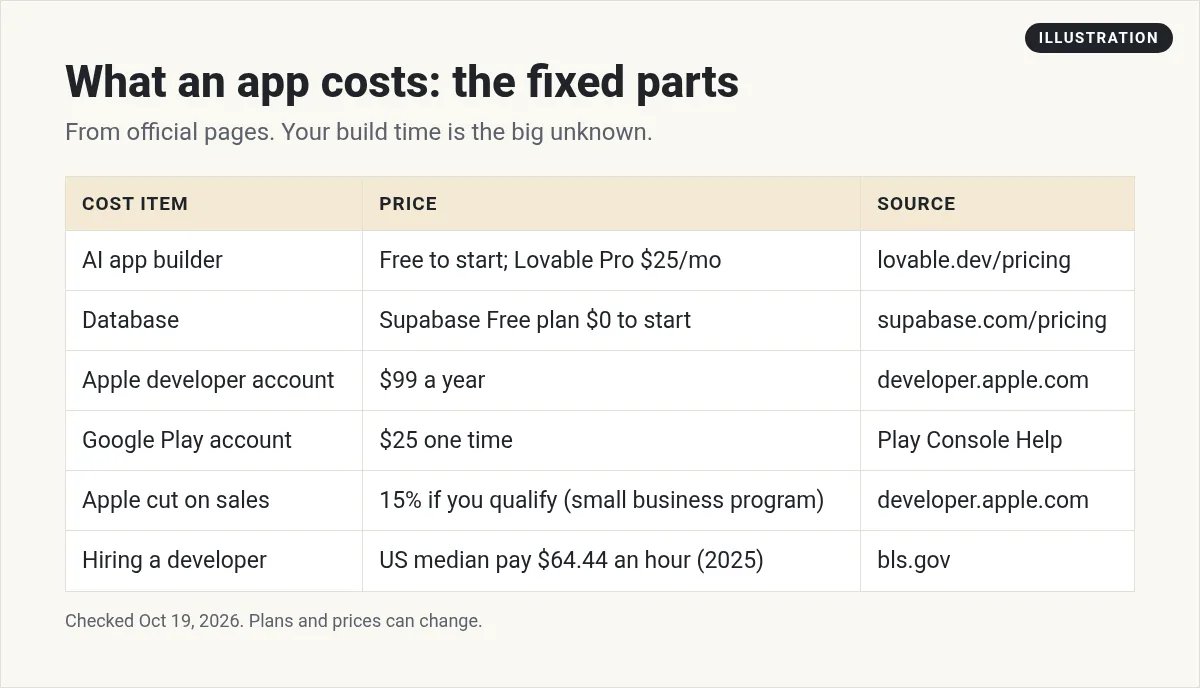
Let's go through each part.
Part 1: The fixed fees
Apple App Store
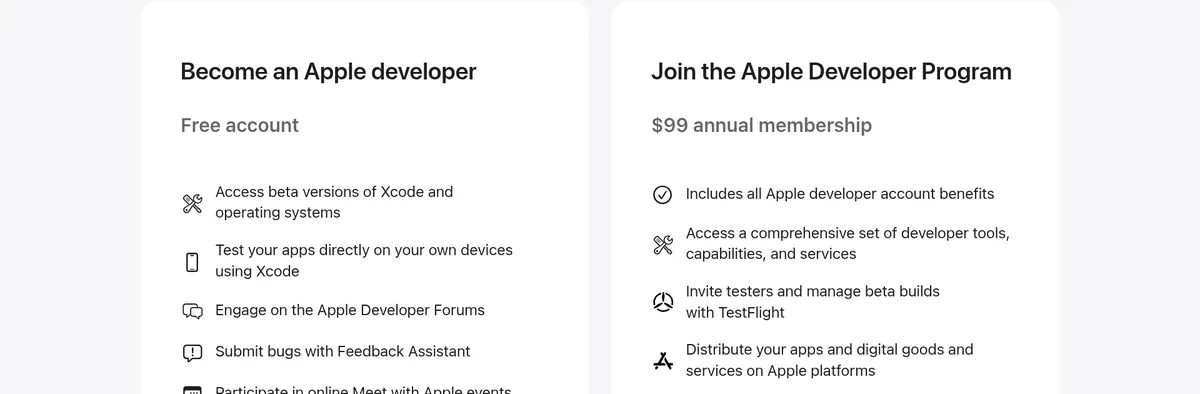
To put an app on the App Store, you need the Apple Developer Program. Apple lists it as a "$99 annual membership." Large companies that only share apps with their own staff can use the Enterprise Program at $299 a year.
Apple also takes a cut when you sell. Apple says its App Store Small Business Program has "a reduced commission rate of 15% on paid apps and Apple In-App Purchases." Developers new to the App Store can qualify, and so can those with up to 1 million USD in proceeds the year before. Above that, the standard rate applies.
Google Play
Google Play is cheaper to join. Its help page says: "There is a US$25 one-time registration fee." Google also takes a service fee on sales. Those fee rules are detailed and changed in the US in 2026, so check Google's service fee page before you set prices.
Hosting and data
Most apps need a place to store data, like user accounts. Supabase is a popular choice for small apps. Its pricing page lists a Free plan at $0, and Pro "From $25 / month," checked October 19, 2026. Supabase notes that free projects "are paused after 1 week of inactivity."
A web app, which runs in a browser, can skip the store fees completely. Many AI builders host it for you.
Part 2: The build cost
This is the part that swings the most. There are three main ways to get an app built.
Option 1: Hire a developer or agency
Here you pay for people's time. The US Bureau of Labor Statistics lists the 2025 median pay for software developers, QA analysts, and testers at $134,040 a year, or $64.44 an hour. That is what employees are paid. Freelancers and agencies set their own rates, and agencies add costs for design, project management, and testing.
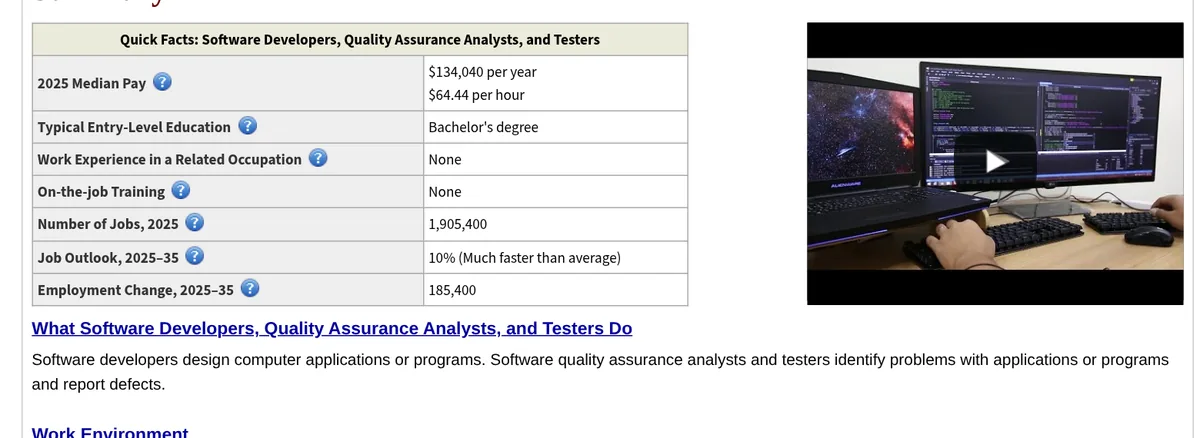
Here is a simple way to estimate. Multiply the hours by the hourly rate. For example, if a simple app took 200 hours at $64.44 an hour, the pay alone would be about $12,900. That is an illustration, not a quote. Real projects vary a lot, so get written quotes from at least three builders.
Option 2: Hire in-house
If software is your business, you may hire your own team. That is the biggest cost, because you pay salaries, benefits, and tools every month, not just for one project. It only makes sense when the app is the core of what you sell.
Option 3: Build it yourself with AI
This is the option that changed the most in the last two years. AI app builders let you describe your app in plain words and get a working version. You still need to test it and fix things, but you skip most of the coding.
| Builder | Free plan | Main paid plan (checked Oct 19, 2026) |
|---|---|---|
| Lovable | Yes | Pro $25 a month, 100 monthly credits |
| Bolt.new | Yes | Pro $18 a month, billed yearly |
| Claude (for Claude Code) | No Claude Code on Free | Pro $20 a month, or $17 a month billed yearly |
Sources: lovable.dev/pricing, bolt.new/pricing, and claude.com/pricing, checked October 19, 2026.
With this route, a simple first version can cost little more than a monthly plan and your own time. The trade off is that your time is not free, and complex apps still need real developers. My Lovable pricing guide goes deeper on how credits work. If you want to try Claude Code, start with my guide on how to use Claude Code.
What makes an app cost more
Whoever builds it, these things add time and money:
- More screens and features. Each one needs design, building, and testing.
- User accounts and payments. Login and checkout add security work.
- Both iPhone and Android. Two stores means two sets of rules and reviews.
- Custom design. A unique look takes longer than a clean template.
- Connections to other tools. Each outside service adds setup and testing.
- Upkeep. Apps need updates, fixes, and hosting every month after launch.
How to keep app cost down
- Start with a web app. No store fees and no app review. You can move to the stores later.
- Build one main feature first. Launch the smallest version that solves the problem.
- Use an AI builder for version one. Test the idea before you pay for a big build.
- Talk to users early. Building the wrong thing is the most expensive mistake of all.
- Get fixed quotes. If you hire out, ask for a clear scope and a written price.
If you want to see what a basic site costs with AI, read my guide on what an AI built website costs. If you plan to sell your app, my post on how to price your first AI app covers what to charge.
A simple budget worksheet
Fill this in for your own app. Leave a line blank if it does not apply.
- Builder plan: monthly cost times the months you will build.
- Database and hosting: monthly cost after any free plan.
- Apple: $99 a year, if you want the App Store.
- Google Play: $25 once, if you want Android.
- Store cut on sales: check Apple's and Google's current rates.
- Help: hours you will pay someone for, times their rate.
- Upkeep: a monthly amount for fixes and updates.
Once you have filled it in, add up the first year. Then add a cushion for surprises. Most first apps take longer than planned, so plan for that from the start.
Last, write down how the app will pay for itself. Will people pay a monthly fee, a one time price, or will it save your business time? If you cannot answer that yet, build the smallest version first and ask real users. That one step can save you more money than any tool or discount.
Before I spend money on an app
Nothing you check here is sent or saved. Download it if you want to keep it.
Want to build your first app with AI?
In my free AI workshop, I show regular people how to use AI tools to build simple apps and sites, without writing code from scratch.
Join my free AI workshopFree live workshop. No credit card needed.
Frequently asked questions
How much does it cost to build an app?
It depends on who builds it. The fixed fees are small: $99 a year for Apple and $25 once for Google Play. The build cost is the big part. Hiring is priced by hours, while building yourself with an AI builder can start free.
How much does it cost to put an app on the App Store?
Apple lists the Apple Developer Program as a $99 annual membership, checked October 19, 2026. Apple also takes a commission on paid apps and in-app purchases, which is 15% for developers who qualify for its Small Business Program.
How much does it cost to put an app on Google Play?
Google Play charges a US$25 one-time registration fee, per its help center, checked October 19, 2026. Google also takes a service fee on sales, so check its current fee page.
Can I build an app for free?
You can start for free. Lovable and Bolt.new list free plans, and Supabase lists a free database plan. Free plans have limits, and store accounts cost money if you want an app store listing.
Why does app development cost so much?
Most of the cost is people's time. Each screen, feature, login, payment, and connection needs design, building, and testing. Apps also need updates and hosting after launch.
Is it cheaper to build a web app or a mobile app?
A web app is usually cheaper to start, because there are no store fees or store reviews, and one version works in any browser. You can add store apps later.
Sources
Checked October 19, 2026. Plans, prices, and rules can change.
