
Build with AI · Beginner guide
Claude Code can read your project, write code, and run commands for you. Here is how to set it up and use it safely, even if you have never opened a terminal.
By the end of this guide, you will have Claude Code installed, you will know how to talk to it, and you will know how to undo its work if something goes wrong. That last part matters most.
I build a lot of apps, and I use more than one AI tool to do it. Claude Code is one of the strongest. It is also easy to misuse if nobody shows you the safety steps. I checked every step and price below on the official Claude Code docs and pricing page on October 19, 2026.
Quick answer
To use Claude Code, get a paid Claude plan (Pro is $20 a month, or $17 a month billed yearly), install it with one command in your terminal, open your project folder, and type claude. Then ask it questions in plain English before you let it change anything. Use plan mode for big jobs, save your work with Git, and press Esc twice to rewind a change you do not like.
What Claude Code is, in plain words
Claude Code is a coding helper made by Anthropic, the company behind Claude. Its docs call it "an agentic coding tool that reads your codebase, edits files, runs commands, and integrates with your development tools."
In plain words, you type what you want. Claude Code opens the right files, makes the changes, and can run commands to test them. You stay in charge. By default, it asks for your OK the first time it uses each tool, like editing files or running commands.
You can use it in four main places: your terminal, a code editor like VS Code, a desktop app, and the web. The docs call the terminal version "the full-featured CLI." This guide uses the terminal, but the ideas are the same everywhere.
What you need before you start
- A paid Claude plan or an API account. Claude Code is on Pro, Max, Team, and Enterprise. It is not on the Free plan. You can also use a Claude Console account that bills by usage.
- A computer that meets the basics. The setup page lists macOS 13.0 or newer, Windows 10 1809 or newer, or Ubuntu 20.04 or newer, with 4 GB of RAM or more.
- A project folder. This can be an app you started in another tool, or an empty folder for a tiny test.
- Git, if you can. Git saves versions of your work. On Windows, the docs recommend Git for Windows.
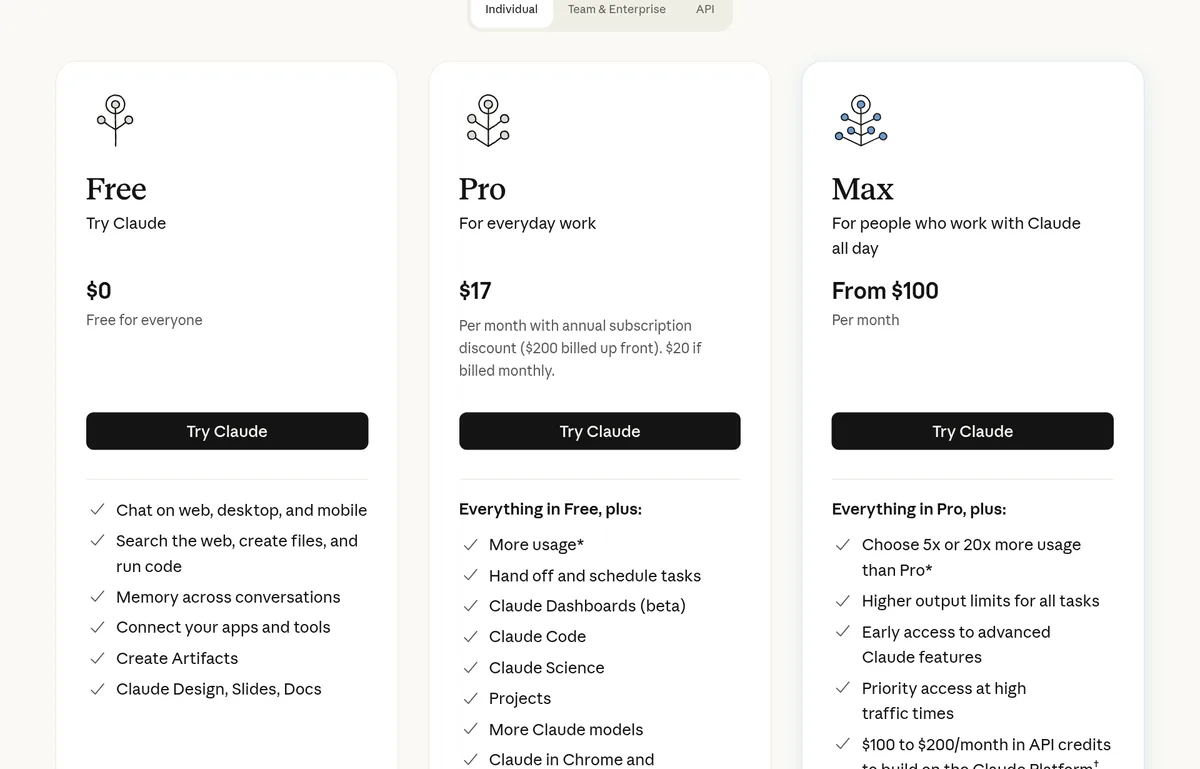
| Plan | Price (checked Oct 19, 2026) | Claude Code? |
|---|---|---|
| Free | $0 | No |
| Pro | $20 a month, or $17 a month billed yearly ($200 up front) | Yes |
| Max | From $100 a month (5x or 20x the usage of Pro) | Yes |
| Console (API) | Pay for what you use | Yes |
Source: claude.com/pricing and the Claude Code quickstart, checked October 19, 2026. Prices do not include tax.
Step 1: Install Claude Code
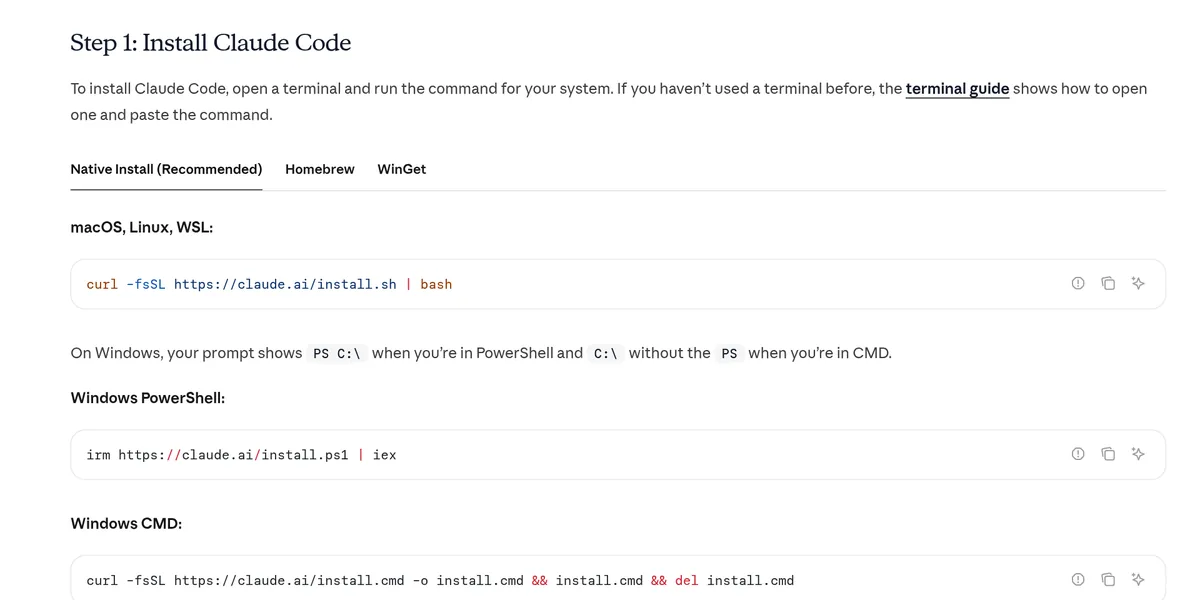
Open your terminal. On a Mac, search for Terminal. On Windows, open PowerShell. If you have never used a terminal, Anthropic has a terminal guide that shows how to open one and paste a command.
Then paste the one command for your system from the official quickstart:
The install shows no progress while it downloads, so give it a minute, then open a new terminal window and type claude --version. If you see a version number, you are set.
Step 2: Start your first session
Move into your project folder, then start Claude Code. The quickstart shows it like this:
Swap the path for your real folder. The first time, it asks you to log in. Follow the prompts in your browser with your Claude account. After that, it remembers you.
When it opens, you will see the version, the model, and the folder it is working in. Type /help to see the commands. Type /exit when you are done.
Step 3: Ask questions before you change anything
This is the step most beginners skip. Do not skip it. Let Claude Code look around first. The quickstart suggests starting with simple questions like these:
You do not need to point it at files. The docs say it "reads your project files as needed." If it gets the basics wrong, fix that now, before it writes any code.
For bigger jobs, use plan mode. The best practices page says to explore first, then plan, then code. Press Shift+Tab until the status bar shows plan mode. In plan mode, Claude reads files and answers questions but does not edit your source files. When the plan looks right, approve it and let it build.
Step 4: Make your first small change
Start tiny. Ask for one small, clear change. Say what done looks like. For example, ask it to add a line of text to your home page, or to fix one typo you found.
Claude Code shows you the change. If it asks before editing, pick Yes to approve. How often it asks depends on the permission mode. Press Shift+Tab to switch modes at any time.
| Mode | What it does | When to use it |
|---|---|---|
| Manual (default) | Asks the first time it uses each tool | Your first weeks |
| Plan | Reads and explores, but does not edit your source files | Before any big change |
| Accept edits | Approves file edits in your folder without asking | Once you trust the plan and have a backup |
| Bypass permissions | Skips prompts | Not for beginners. The docs say only in isolated setups like containers |
Source: Claude Code docs, Configure permissions, checked October 19, 2026.
Step 5: Save your work with Git and checkpoints
AI tools can change many files fast. You want a one-step way back. Claude Code gives you two.
Checkpoints. Claude Code saves the state of your code before each prompt you send. To go back, press Esc twice when the prompt box is empty, or type /rewind. You can restore the code, the chat, or both.
Git. Checkpoints are for quick undo inside one session. The docs say plainly that they are not a replacement for version control. Git keeps your history for good. The nice part is that you can ask Claude Code to handle Git for you in plain English:
Commit before every new task. If the task goes badly, go back to the last commit and try again with a clearer request.
Step 6: Teach it your project with CLAUDE.md
A file called CLAUDE.md gives Claude Code notes about your project. The docs say Claude reads these files "at the start of every session." Put in things like how to run your app, your rules, and your style.
You do not have to write it from scratch. Type /init. The docs say it "analyzes your codebase and creates a file with build commands, test instructions, and project conventions it discovers." Then add anything it could not guess, like who your users are or what you never want changed.
How to ask for better results
The quickstart's tips for beginners are short: be specific, use step by step instructions, and let Claude explore first. Here is what that looks like in practice.
- Name the goal and the finish line. Not just a contact form, but a contact form that saves name and email and shows a thank you message.
- Give one task at a time. Small tasks are easier to check and easier to undo.
- Give it a way to check its work. The best practices page puts this near the top. Ask it to run the tests, or to tell you exactly how to test the change yourself.
- Paste the exact error. If something breaks, paste the full error message into the chat and ask it to fix the root cause. The best practices page shows this same move.
- Clear the chat between tasks. The docs say to run
/clearbetween unrelated tasks to reset the context.
What it costs and how to watch your usage
On Pro or Max, Claude Code is part of your plan. Claude's pricing page says your activity across Claude on web, desktop, mobile, and Claude Code "all draws from the same pool." Limits reset on a rolling five-hour window, and paid plans add weekly limits.
Type /usage inside Claude Code to see where you stand. If you use a Console account instead, you pay by usage. Anthropic's cost docs say the average across company deployments is "around $13 per developer per active day." That is a company average, not a beginner budget.
If you want to compare Claude Code with Cursor before you pay, read my Cursor vs Claude Code guide.
If the terminal feels like too much
That is normal. Claude Code also runs as a desktop app and on the web, so you can skip the terminal. Or start with a no-code AI app builder and come back later. I compare those paths in Lovable vs Claude Code and vibe coding vs no-code.
I use both kinds of tools. My Freedom Launch Accelerator guide app runs on Next.js, Supabase, and Claude. If you want a gentle first project with Claude, try my vibe coding with Claude guide.
My video: my Claude tutorial from July 2026, about 7 minutes long. Start here if you are new to Claude itself.
Any results mentioned in videos are not typical and are not a promise of income. Your results depend on your work and your market.
From the JavaScript Mastery channel (not mine): a full Claude Code course by JavaScript Mastery. This video is not mine. It came out in September 2026 and runs about 2 hours 14 minutes, so it goes much deeper than this guide.
Any results mentioned in videos are not typical and are not a promise of income. Your results depend on your work and your market.
My first Claude Code session
Nothing you check here is sent or saved. Download it if you want to keep it.
Know what to build before you open the terminal
Claude Code is great at building. It cannot tell you what people will pay for. In my free AI workshop, I show how to pick an app idea, plan it, and get it in front of real customers.
Join my free AI workshopFree live workshop. No credit card needed.
Frequently asked questions
Is Claude Code free?
No. Claude Code is not on the Claude Free plan. It comes with Pro at $20 a month, or $17 a month billed yearly, and with Max from $100 a month, checked October 19, 2026. You can also pay by usage with a Claude Console account.
Do I need to know how to code to use Claude Code?
It helps, but you can start without it. You do need to be OK opening a folder, typing a few commands, and reading what Claude tells you. If that feels like too much, try the desktop app or a no-code builder first.
How do I undo a change Claude Code made?
Press Esc twice when the prompt box is empty, or type /rewind. Then pick the point to go back to and choose to restore the code, the chat, or both. For long term safety, also commit your work with Git.
What is plan mode in Claude Code?
Plan mode lets Claude read your files and answer questions without editing your source files. Press Shift+Tab until the status bar shows plan mode. Use it to agree on a plan before Claude writes any code.
Can I use Claude Code in VS Code?
Yes. The docs list the terminal, VS Code, JetBrains IDEs, a desktop app, and the web as places you can use Claude Code.
What is a CLAUDE.md file?
It is a notes file that Claude Code reads at the start of every session. It can hold how to run your project and your rules. Type /init to have Claude Code create a starter version for you.
Sources
Checked October 19, 2026. Plans, prices, and rules can change.
- Claude Code docs: Quickstart
- Claude Code docs: Overview
- Claude Code docs: Advanced setup (system requirements)
- Claude Code docs: Terminal guide
- Claude Code docs: Configure permissions
- Claude Code docs: Checkpointing
- Claude Code docs: Store instructions and memories (CLAUDE.md)
- Claude Code docs: Best practices
- Claude Code docs: Manage costs
- Claude pricing
