
Content Tools · Pricing
CapCut is free to start, but its paid plans add AI credits, premium templates, and storage. Here is what each plan costs, in both billing views, and what to watch out for.
CapCut calls itself an "AI-Powered Video Editor for Everyone." You can start for free. But once you want premium templates, more storage, or its AI video tools, you need a paid plan. And the price you see can change based on where you are and when you buy.
I checked CapCut's pricing page in both the Monthly and Yearly views, plus its help center, on October 27, 2026. Here is what I found.
Quick answer
On October 27, 2026, CapCut's pricing page (Monthly view, the default) showed Free at USD 0, Pro at USD 19.99 a month, Ultra at USD 79 a month, and Teams at USD 12.49 a month per seat. In the Yearly view, Pro was USD 179.99 a year, Ultra USD 900 a year, and Teams USD 107.5 a year per seat. CapCut says displayed pricing is for reference only, and the final price shows at checkout.
CapCut plans at a glance
The pricing page opens with the Monthly tab selected. Here is that default view:
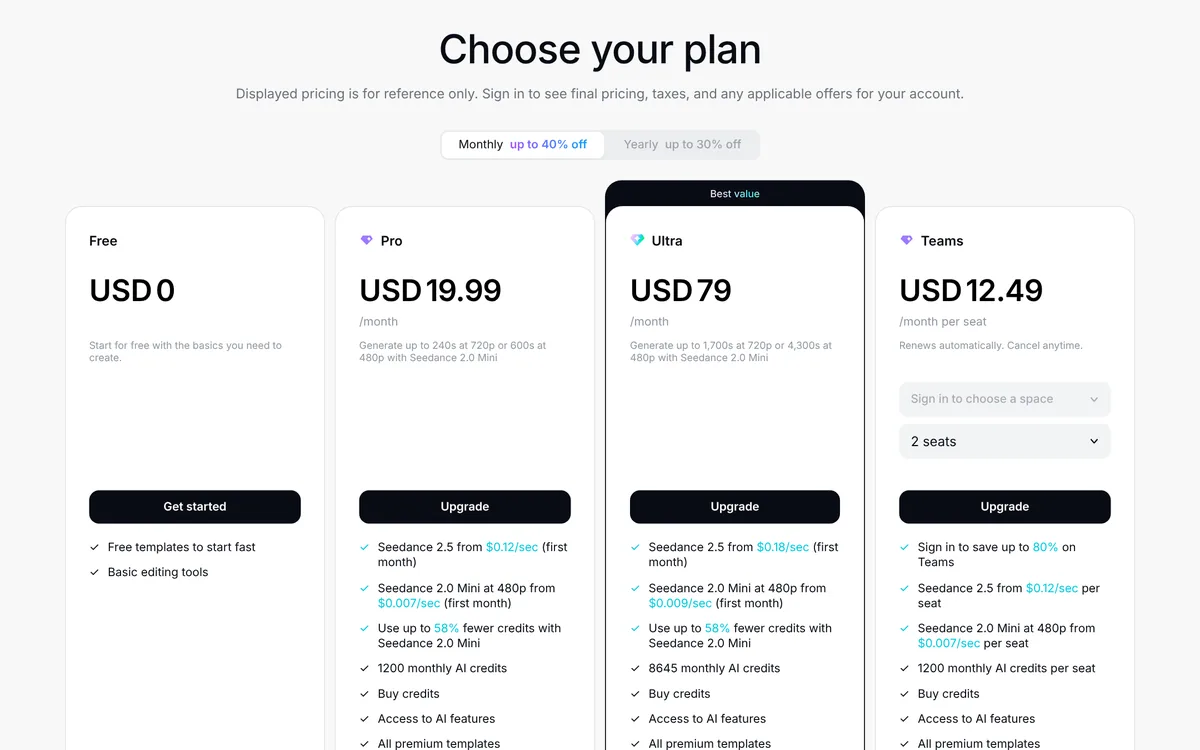
- Free: USD 0. "Free templates to start fast" and "Basic editing tools."
- Pro: USD 19.99 a month. 1200 monthly AI credits, all premium templates, all premium Pro features, and 1 TB of storage.
- Ultra: USD 79 a month. 8645 monthly AI credits, "Everything in Pro, plus exclusive AI features," and 1 TB of storage.
- Teams: USD 12.49 a month per seat, with 2 seats shown. 1200 monthly AI credits per seat, a brand kit, and Pro features for all seats.
Click the Yearly tab, and the prices change:
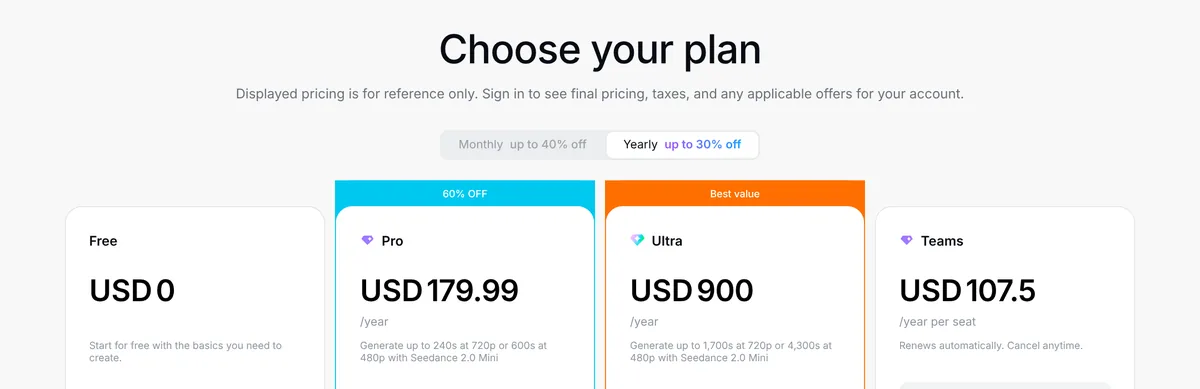
- Pro: USD 179.99 a year
- Ultra: USD 900 a year
- Teams: USD 107.5 a year per seat
Monthly vs yearly: my math
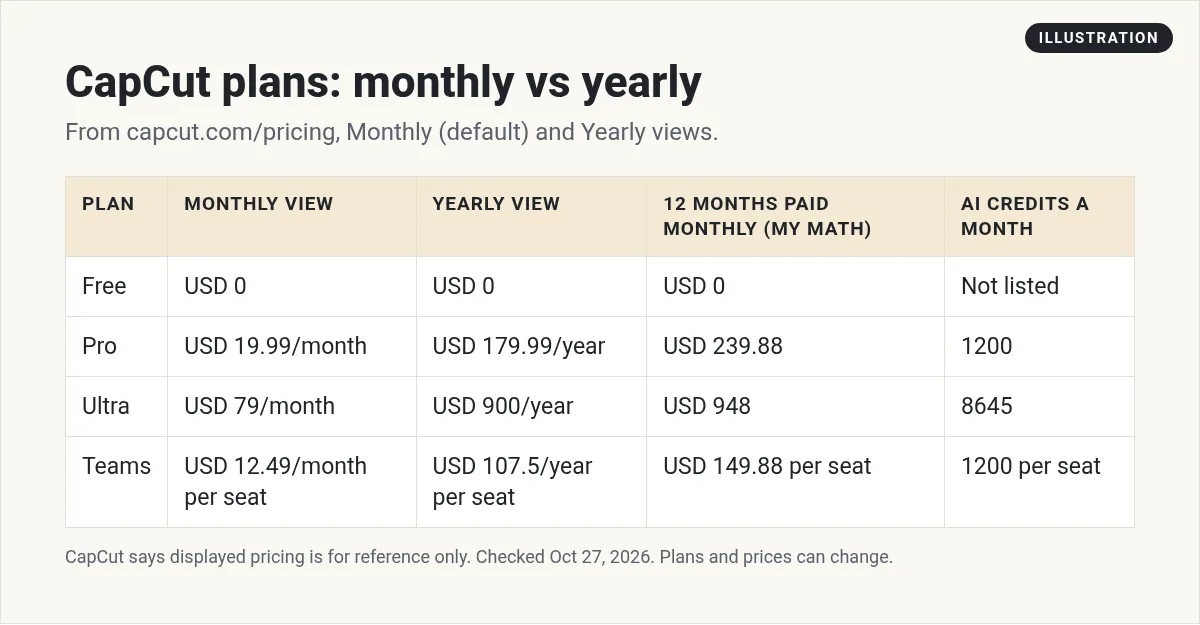
Here is what 12 months costs each way, using the prices shown on the page:
- Pro: 12 times USD 19.99 is USD 239.88. Yearly is USD 179.99. You save about USD 59.89.
- Ultra: 12 times USD 79 is USD 948. Yearly is USD 900. You save USD 48.
- Teams: 12 times USD 12.49 is USD 149.88 per seat. Yearly is USD 107.5. You save about USD 42.38 per seat.
By percent, yearly saves about 28% on Teams, about 25% on Pro, and only about 5% on Ultra. In dollars, Ultra yearly saves only USD 48 over a full year. That is a small gap for a big upfront payment. On Ultra, I would pay monthly until I was sure I needed it.
The discount labels do not line up
The tabs say "Monthly up to 40% off" and "Yearly up to 30% off." But in the Yearly view, the Pro card has a "60% OFF" badge. A Black Friday banner was also running at the top of the page. My read: these are promos that change often. Do not count on any one of them. Look at the final price at checkout.
Why your price may be different
This is the most important part. CapCut's pricing page says "Displayed pricing is for reference only. Sign in to see final pricing, taxes, and any applicable offers for your account."
The help center says the same thing in other words. It says "The pricing for CapCut Pro can vary depending on your region, device, and available promotions." It also says the final price "will be shown on the payment page, as it may vary depending on your region, platform, and applicable taxes."
So the price on your phone may not match the price on your computer. Check both before you pay.
Where you can use CapCut
CapCut comes in a few versions. The site lists CapCut Desktop, CapCut Online, CapCut Pad, and CapCut Mobile. Your plan and the price you see can depend on where you buy it, as the help center notes above.
The help center also says "CapCut offers different levels of cross-platform support based on whether you are using Pro or Standard." So if you edit on both your phone and your computer, check how your plan works on each one before you buy.
How AI credits work
The paid plans come with monthly AI credits. Pro has 1200, and Ultra has 8645. Teams has 1200 per seat. Every paid plan also lets you "Buy credits" if you run out.
Credits are used for AI video tools like Seedance. The Pro card says you can "Generate up to 240s at 720p or 600s at 480p with Seedance 2.0 Mini." The Ultra card says up to 1,700 seconds at 720p or 4,300 seconds at 480p.
Some AI prices on the page are marked "(first month)." For example, Pro lists "Seedance 2.5 from $0.12/sec (first month)." That suggests the rate may change after month one. If you plan to make a lot of AI video, test your real usage in the first month.
New users can also get a welcome bonus. The page said "Sign up and get 200 credits!"
A closer look at Teams
Teams is priced per seat. The card showed 2 seats selected, so my math says a 2-seat team pays USD 24.98 a month on the Monthly view, or USD 215 a year on the Yearly view.
Each seat gets 1200 monthly AI credits, all premium templates, and "Access to Pro features for all seats." Teams also adds a brand kit, so everyone uses the same logos, fonts, and colors.
The card also says "Sign in to save up to 80% on Teams." That is one more promo that may or may not apply to you. As with every plan, check the final price after you sign in.
Auto-renew and canceling
CapCut plans renew on their own. The Teams card says "Renews automatically. Cancel anytime." The help center says CapCut Pro and Teams "are set to auto-renewal."
Timing matters. The help center says "If you forget to cancel your subscription at least 24 hours before the renewal date, your account will be charged, and a new billing cycle will begin."
So if you only need Pro for one project, set a reminder for two days before your renewal date. About refunds, the help center says "The refund process depends on where and how you made your purchase." An app store purchase may follow that store's rules.
Simple ways to spend less on CapCut
- Start on Free. Use it until you hit a wall you can name, like a template you need.
- Try one month first. Pay monthly, see how many AI credits you really use, then decide on yearly.
- Compare devices. Check the price on your phone and on the web before you buy.
- Buy credits only when needed. If you run short once, compare the cost of extra credits with the cost of Ultra before you move up.
- Set a renewal reminder. Cancel at least 24 hours before renewal if you do not need another cycle.
Which CapCut plan should you pick?
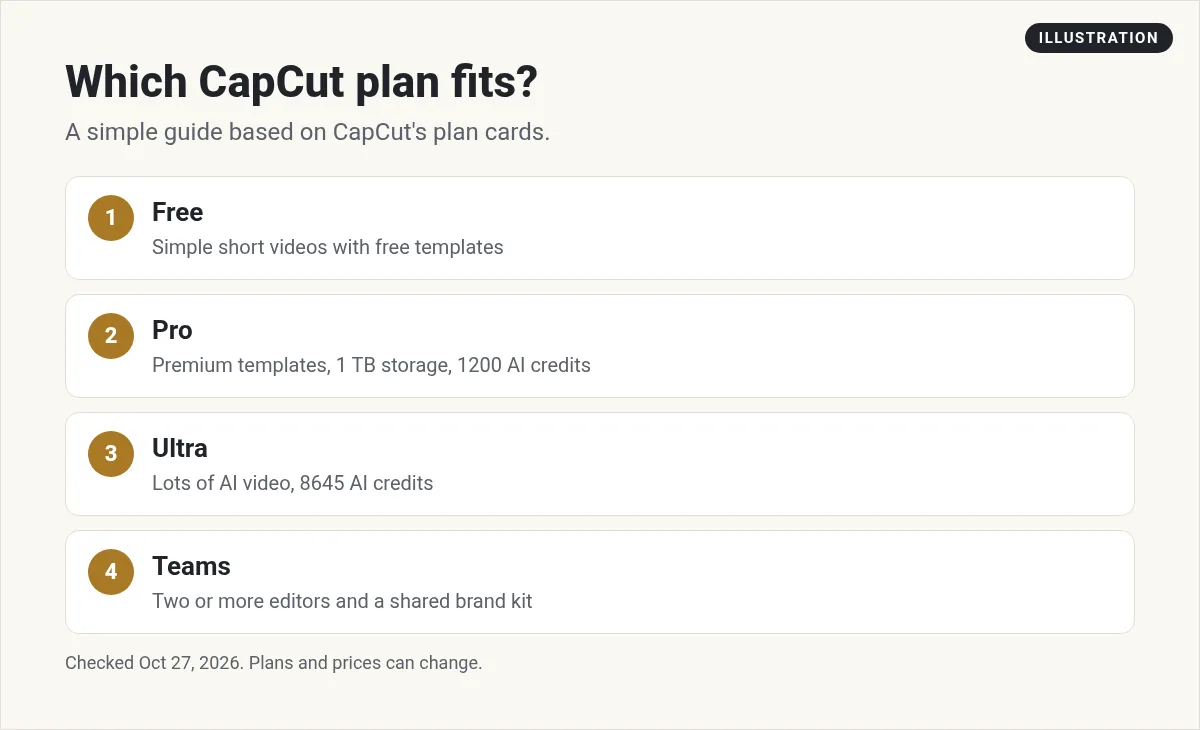
- Stay on Free if you edit simple short videos and the free templates are enough.
- Pick Pro if you want all premium templates, 1 TB of storage, and some AI credits each month.
- Pick Ultra only if you make a lot of AI video. It has about 7 times the credits of Pro, by my math, at about 4 times the monthly price.
- Pick Teams if two or more people edit for the same brand and need a shared brand kit.
If you make faceless content, see my guides to faceless YouTube Shorts and TikTok without showing your face. For thumbnails and graphics, compare Canva pricing.
Before you pay for CapCut
Nothing you check here is sent or saved. Download it if you want to keep it.
Make content faster with AI
Want to see how I use AI tools to plan and make content faster? Join my free AI workshop. I show it step by step.
Join my free AI workshopFree to join. No credit card needed.
Frequently asked questions
How much is CapCut Pro?
On October 27, 2026, the pricing page showed Pro at USD 19.99 a month or USD 179.99 a year. CapCut says displayed pricing is for reference only, and the final price shows at checkout.
Is CapCut free?
Yes. The Free plan is USD 0 and includes free templates and basic editing tools. Paid plans add premium templates, AI credits, and 1 TB of storage.
What is CapCut Ultra?
Ultra is CapCut's top personal plan. On October 27, 2026, it was USD 79 a month or USD 900 a year, with 8645 monthly AI credits and everything in Pro plus exclusive AI features.
Why is my CapCut price different?
CapCut's help center says Pro pricing can vary by region, device, and available promotions. The final price is shown on the payment page.
Does CapCut auto-renew?
Yes. The help center says Pro and Teams are set to auto-renew. Cancel at least 24 hours before the renewal date, or you will be charged for a new billing cycle.
How much is CapCut Teams?
On October 27, 2026, Teams was USD 12.49 a month per seat or USD 107.5 a year per seat, with 1200 monthly AI credits per seat and a brand kit.
Sources
Checked October 27, 2026. Plans, prices, and rules can change.
