
AI Tools · Design
Canva AI lets you describe a design and get a first draft in seconds. Here is what it does, how much AI each plan gets, and what it costs.
You need a post, a flyer, or a slide deck. You do not have hours, and you are not a designer. Canva AI is built for that moment.
I checked Canva's AI page and pricing page on October 25, 2026. Here is what Canva AI does, what you get for free, what the paid plans cost, and a simple way to get good results on day one.
Quick answer
Canva AI is the set of AI tools inside Canva. You describe what you want with text or voice, and it builds a design you can edit. On October 25, 2026, Canva Free included up to 20 Standard or Premium AI uses a month. Canva Pro was US$18 a month or US$144 a year for one person, with 10x more AI than Free. Business was US$25 a month or US$250 a year per person.
What is Canva AI?
Canva AI is the AI built into Canva, the online design tool. Canva calls it "AI that creates with you, and connects to your world."
Here is how Canva's page says it works:
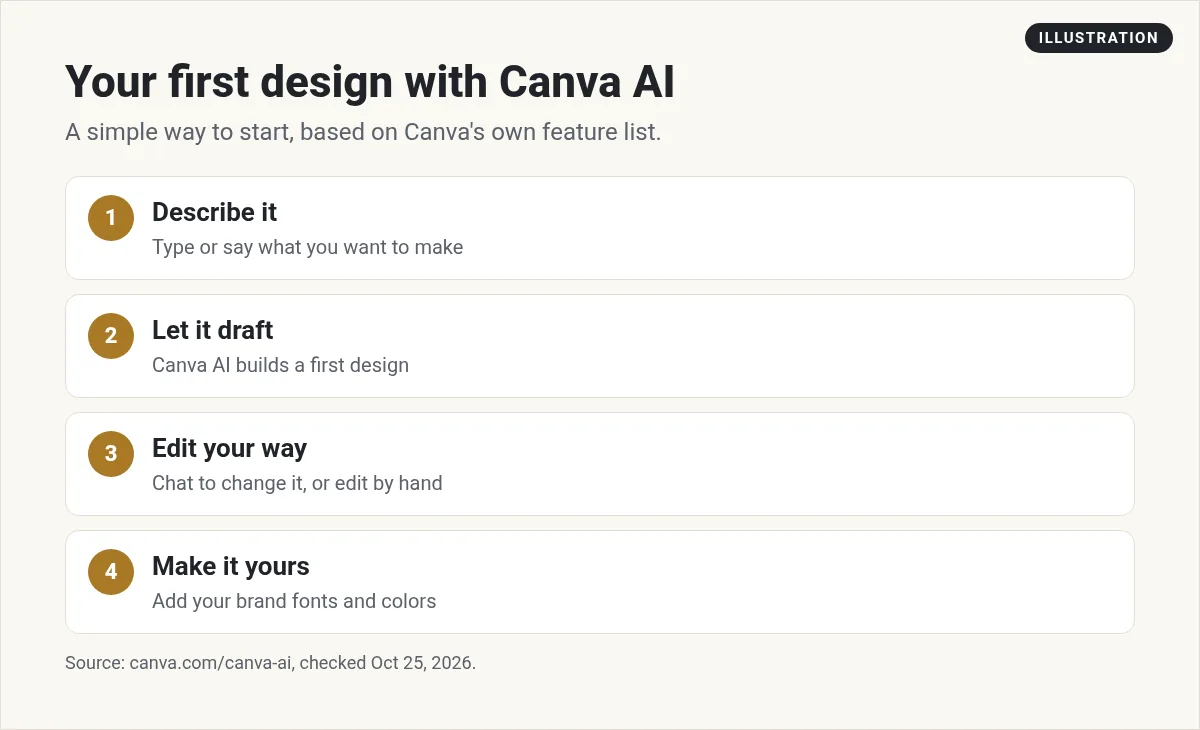
- Start with an idea. "Describe what you want to create with text or voice, and watch it come to life."
- Edit your way. You can chat with Canva AI to change the design, or make edits yourself. Canva says, "You're always in control."
- Generate elements. Ask for an image, a chart, or a headline, and add it to your design.
- Make it on brand. Canva says it learns your fonts, colors, and rules.
- Run web research. You can search for facts and bring them into the design.
- Schedule tasks. You can set Canva AI tasks to run later, or on a repeat schedule.
Canva also has its own image model, called Canva Craft. And the older tools you may know are still there. The page lists Magic Layers, AI-Powered Elements, and Canva Code.
Is Canva AI free?
Yes, with a limit. Canva's pricing page says the Free plan includes "Up to 20 Standard or Premium AI uses." The FAQ says your AI uses reset each month.
Free also gets you the drag and drop editor, 1.6M+ templates, and 5GB of cloud storage, per the plan card.
Twenty uses is enough to try it. It is not much if you plan to make content every day. That is where the paid plans come in.
Canva AI pricing
Canva does not sell its AI tools as a separate plan. You get more AI as you move up a plan. Here is what the pricing page showed on October 25, 2026, in US dollars:
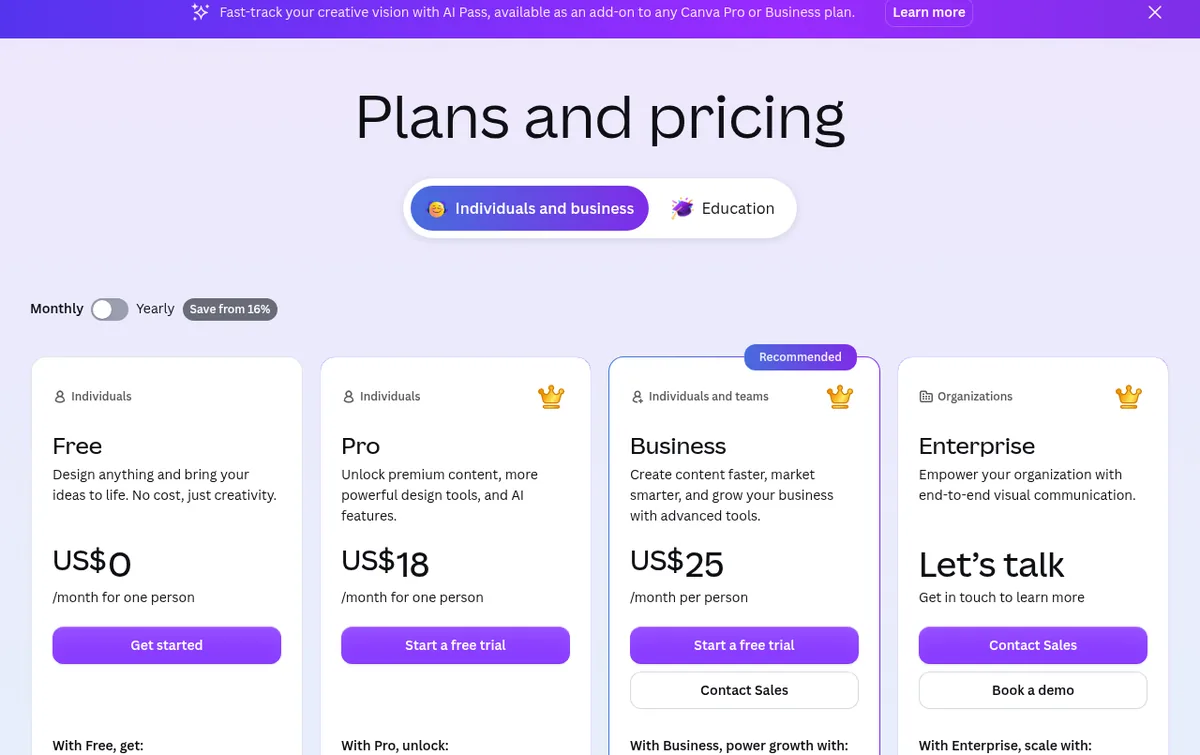
- Free: US$0. Up to 20 Standard or Premium AI uses.
- Pro: US$18 a month, or US$144 a year, for one person. The card says "10x more AI than Canva Free."
- Business: US$25 a month, or US$250 a year, per person. It adds team and admin tools.
- Enterprise: contact sales.
The page says yearly billing will "Save from 16%" and that "Prices exclude applicable tax." The math checks out. Pro billed monthly is US$18 x 12 = US$216 a year. Billed yearly it is US$144.
Pro and Business both offer a free trial, per the page. Prices can differ by country, so check the live page in your own currency.
How much AI does each plan get?
This part matters. Canva's FAQ splits its AI into two groups.
Tools that do not count. Some tools, like Translate and Magic Write, can be used "abundantly" on paid plans. Canva says they do not count toward your monthly AI allowance. The one exception is the Pro Lite plan, where Standard AI does draw from your allowance. Canva adds that fair use limits may apply.
Tools that share a pool. Other AI tools draw from one shared monthly pool. Canva sorts them as Standard, Premium, or Ultra. Higher tier tools use more of your pool.
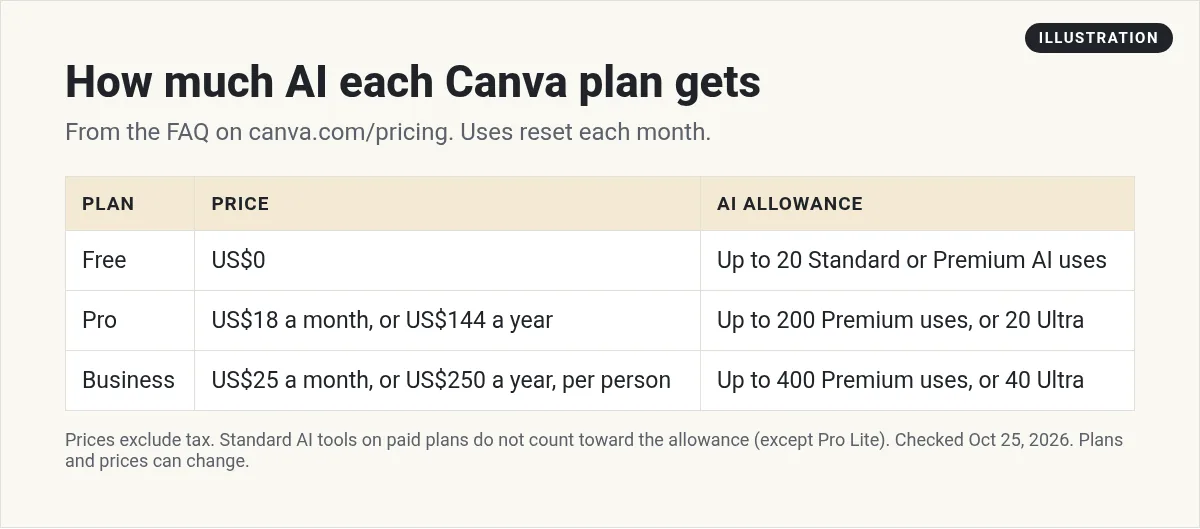
Here are Canva's own estimates, if you use only one type of tool:
- Free: up to 20 uses of Standard or Premium tools. No Ultra tools.
- Pro: up to 200 Premium uses, or up to 20 Ultra uses.
- Business: up to 400 Premium uses, or up to 40 Ultra uses.
- Enterprise: up to 400 Premium uses, or up to 40 Ultra uses.
Canva says complex tasks, or a mix of tools, can push you to the low end of those ranges. Also note this line from the FAQ: "AI allowance during trial is the same as Canva Free." You get the full Pro amount once you start paying.
How to get more AI in Canva
If you run out, Canva's FAQ lists three ways to get more:
- Upgrade your plan for a higher monthly allowance.
- AI Pass. A monthly add on for Pro and Business users who subscribe online. Canva calls it its "largest AI allowance."
- AI top ups. A one time buy for Business users who subscribe online. It gives the same amount as your monthly allowance, good for 30 days.
The pricing page lists AI Pass as an extra cost. Check the live page for the price before you add it.
How to use Canva AI, step by step
Here is a simple way to start. It follows the flow on Canva's own AI page.
- Open Canva AI. Sign in to Canva and open the Canva AI chat.
- Describe the design. Say what it is, who it is for, and the size. Example: A square Instagram post for a bakery's Saturday sale. Warm colors. Big headline.
- Look at the first draft. Do not expect it to be perfect. It is a start.
- Change one thing at a time. Ask for a new headline, or a new photo. Small asks get better results.
- Edit by hand. Drag, resize, and retype. You do not have to use chat for every fix.
- Add your brand. On paid plans, use your Brand Kit so the fonts and colors match.
Each AI request may use part of your allowance. So plan the design in your head first. One clear ask beats five vague ones.
Tips for better Canva AI results
- Name the format. Story, post, flyer, slide, or logo. Canva has 1,000+ design types.
- Name the reader. A design for new moms will look different from one for gym owners.
- Give real words. Paste the exact headline and offer you want. AI guesses less.
- Ask for options. Then pick one and refine it.
- Check facts and spelling. AI can make mistakes. Read every word before you post.
Want to write better prompts in any AI tool? I wrote a guide on prompts for vibe coding that uses the same ideas.
Who should pay for Canva Pro?
Stay on Free if you make a few designs a month and 20 AI uses is enough to test ideas.
Pick Pro if you post content every week, need premium templates, or want brand kits and social scheduling. Pro has 5 Brand Kits and 100GB of storage, per the plan card.
Pick Business if you have a team that needs to work in the same designs, with admin tools.
A simple test: use Free for two weeks. If you hit the AI limit or miss premium templates, try the Pro trial. Remember the trial has Free level AI, so judge the features, not the AI count.
What to watch out for
- Yearly vs monthly. US$144 is a yearly charge. US$18 is the monthly price. Do not mix them up.
- Per person pricing. Business is priced per person. A team of 3 pays 3 times the price.
- Tax. Canva says prices exclude tax.
- The trial AI limit. It matches Free until you pay.
- AI output is a draft. You are still the editor. Check every claim, price, and name.
Using Canva AI in your business
Design tools are just one part of using AI well. The bigger win is a simple system: one offer, content that teaches, and a clear next step for the reader. Canva AI can help with the content part.
If you run a small business, my guide to AI tools for small business shows where a design tool fits next to writing, email, and automation tools.
Before you pay for Canva Pro
Nothing you check here is sent or saved. Download it if you want to keep it.
Learn to use AI in your business
Want to see how I use AI tools to plan content, build offers, and save hours each week? Join my free AI workshop. I walk through it step by step.
Join my free AI workshopFree to join. No credit card needed.
Frequently asked questions
Is Canva AI free?
Yes, with a limit. On October 25, 2026, Canva Free included up to 20 Standard or Premium AI uses, and the allowance resets each month.
How much is Canva Pro?
On October 25, 2026, Canva Pro was US$18 a month, or US$144 a year, for one person. Prices exclude tax.
How much AI do you get with Canva Pro?
Canva says Pro has 10x more AI than Free. Its FAQ estimates up to 200 Premium AI uses or up to 20 Ultra AI uses a month.
What is Canva AI Pass?
AI Pass is a monthly add on for Pro and Business users who subscribe online. Canva says it gives its largest AI allowance. It costs extra.
Does the Canva Pro trial include full AI?
No. Canva says the AI allowance during a trial is the same as Canva Free. You get the full allowance when you start paying.
Do Magic Write and Translate use my AI allowance?
On paid plans, Canva says Standard AI tools like Translate and Magic Write do not count toward the monthly allowance, except on Pro Lite. Fair use limits may apply.
Sources
Checked October 25, 2026. Plans, prices, and rules can change.
