
AI for small business · Tool guide
You do not need 20 AI tools. You need the right one for the job that eats your time. Here are 8 picks, grouped by job, with today's prices.
Here is my advice before the list. Do not start with a tool. Start with a job you hate doing or never get to. Writing emails. Answering calls. Posting on social media. Then pick one AI tool that does that job, and learn it well.
I help regular people use AI to build and grow businesses, and this is the order I use. Below are 8 tools grouped by job, with prices from each company's own pricing page, checked October 19, 2026. None of the links in this post are affiliate links.
Quick answer
The best AI tools for a small business depend on the job. For writing and planning, try ChatGPT or Claude, both with free plans. For email and documents, Google Workspace and Microsoft 365 now include AI. For design, Canva. For automation, Zapier. For websites and simple apps, Lovable. For answering calls, an AI receptionist like Smith.ai. Start with one tool for your biggest time drain.
Start with the job, not the tool
The US Small Business Administration puts it simply: "Small businesses can use AI tools and applications to find solutions for all kinds of issues." The key word is issues. Find yours first.
Take five minutes and write down:
- The task that takes the most time each week.
- The task you keep putting off.
- The task that loses you money when it is missed, like a call or a follow up.
Now match each task to a job below. Pick one to start.
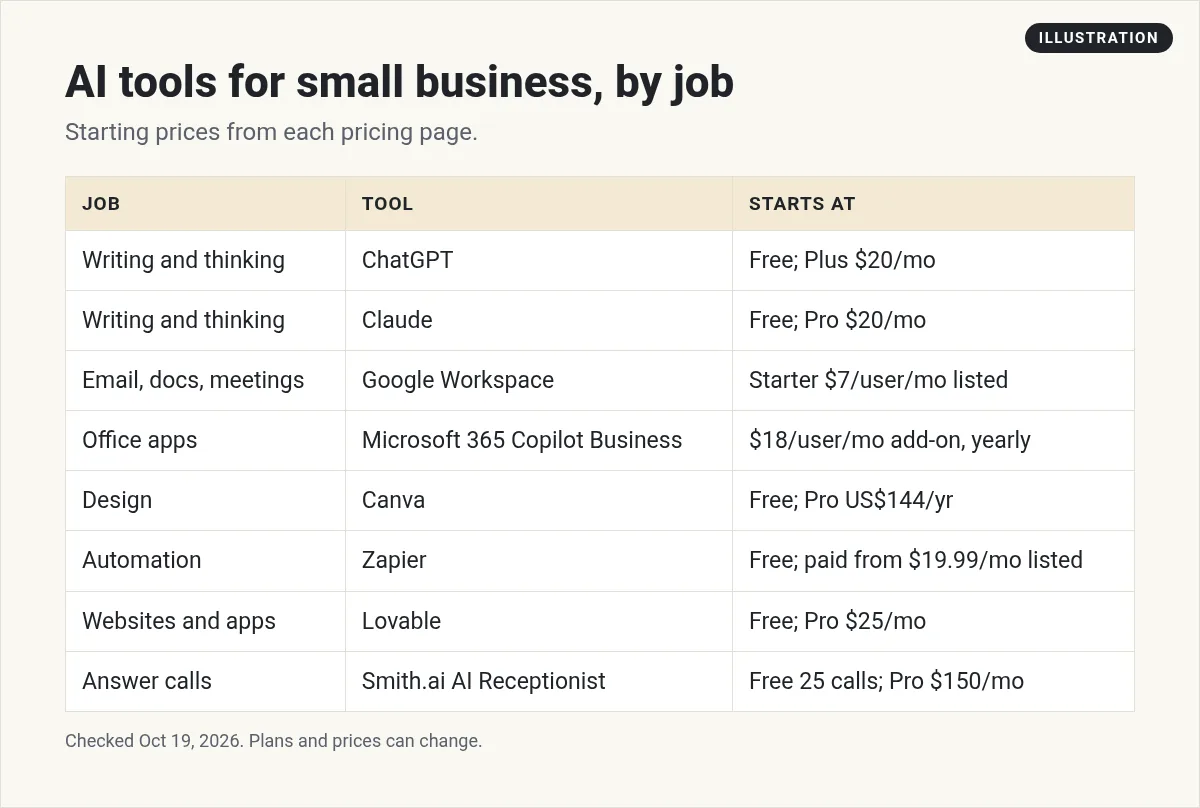
Writing and thinking: ChatGPT or Claude
These are general AI assistants. You type a request in plain words, and they write, summarize, plan, or answer questions. Small business owners use them for emails, product descriptions, job posts, social captions, and planning. If you mostly use AI to research questions on the web, see my Perplexity Pro guide.
| Tool | Free plan | Main paid plan (checked Oct 19, 2026) |
|---|---|---|
| ChatGPT | Yes | Go $8 a month; Plus $20 a month |
| Claude | Yes | Pro $20 a month, or $17 a month billed yearly |
Sources: chatgpt.com/pricing and claude.com/pricing, checked October 19, 2026. OpenAI's page notes the Go plan "may include ads."
Try this first: Paste in an email you need to send and ask it to make the email shorter and friendlier. Then read it before you send it. AI can be wrong, so you are still the editor.
Email, documents, and meetings
If your business already runs on Google or Microsoft, check what you pay for. Both now build AI into their business plans, so you may not need a separate tool.
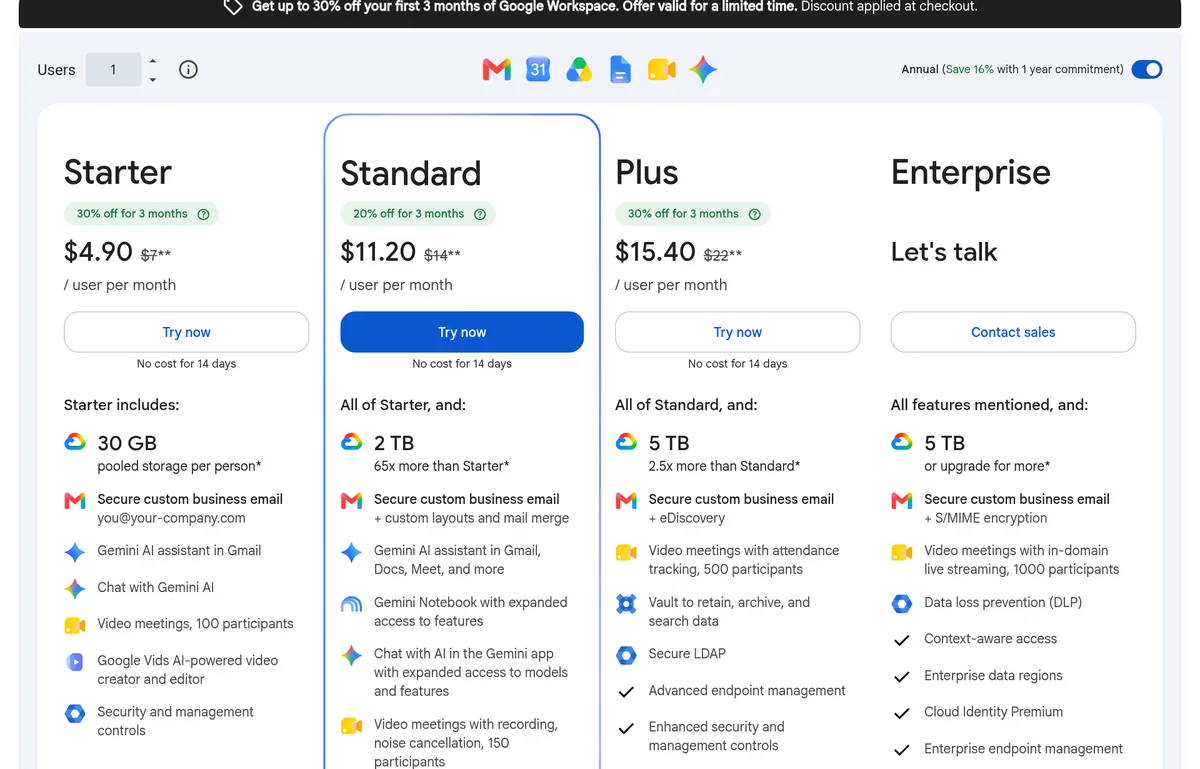
Google Workspace. The pricing page lists Starter at $7 per user a month with the "Gemini AI assistant in Gmail." Standard is listed at $14 and adds Gemini in "Gmail, Docs, Meet, and more." When I checked on October 19, 2026, the page also showed a limited-time discount for the first 3 months. Check the billing toggle, since prices change with a yearly commitment.
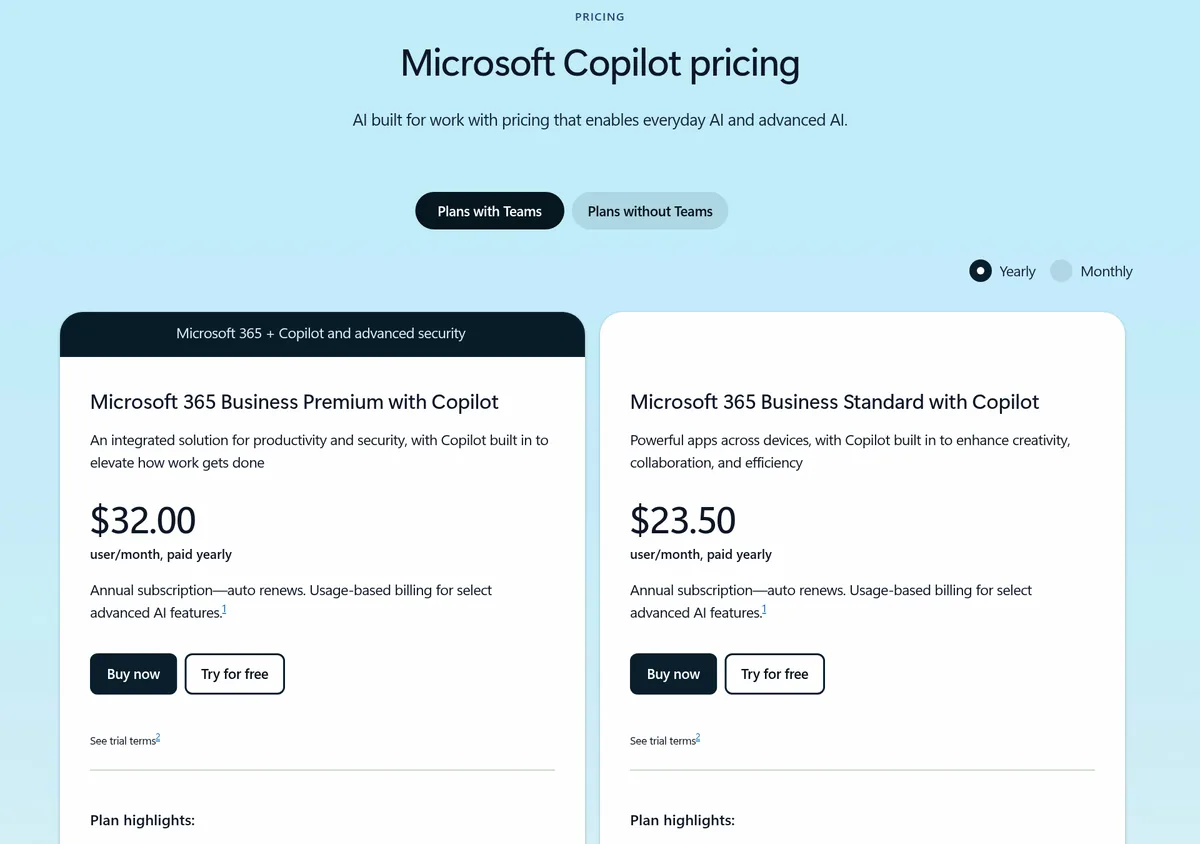
Microsoft 365 with Copilot. Microsoft's small business page lists Microsoft 365 Business Standard with Copilot at $23.50 per user a month, and Business Premium with Copilot at $32.00, both paid yearly. If you already have Microsoft 365, the Copilot Business add-on is listed from $18.00 per user a month paid yearly, down from $21.00. Copilot works inside Word, Excel, PowerPoint, Outlook, and Teams.
My take: Use the one that matches the email you already have. Switching your whole office for an AI feature is rarely worth it.
Design: Canva
Canva is a design tool for social posts, flyers, menus, and slides. It now has AI tools built in. The pricing page lists a Free plan and Pro at US$144 a year for one person, checked October 19, 2026. Pro adds AI tools like resize, translate, and background removal.
Try this first: Make one social post template in your brand colors. Reuse it every week instead of starting from scratch.
Automation: Zapier
Zapier connects your apps so work moves on its own. For example, when someone fills out a form, add them to your email list and send you a text. Zapier calls each automation a Zap.
The pricing page lists a Free plan with "100 tasks per month." Paid plans are listed from $19.99 a month for Professional and $69 a month for Team when billed yearly. Billed monthly, Professional is $29.99 a month. Checked October 19, 2026.
Try this first: Automate one boring copy and paste job. That is where most owners feel the time savings first.
If you want texting, booking, and follow ups in one place, an all-in-one platform like HighLevel can also do this. My honest GoHighLevel review covers who it fits.
Websites and simple apps: Lovable
AI app builders let you describe a website or tool in plain words and get a working version. Lovable is one of the best known. The pricing page lists a Free plan and Pro at $25 a month with "100 monthly credits," checked October 19, 2026. Credits are used as the AI builds.
This is great for a simple landing page, a booking form, or a small internal tool. For a full business website, you may still want a regular site builder. My Lovable pricing guide explains how credits work.
Answering calls: an AI receptionist
Missed calls are missed customers. An AI receptionist answers your phone, answers common questions, and books appointments. Smith.ai's AI Receptionist page lists a Free plan with 25 calls a month and "$3.00/call after that," and a Pro plan at $150 a month, checked October 19, 2026.
There are many options with very different pricing. Some charge per call and some per minute. I compared six of them in my guide to AI receptionist software.
How to choose your first AI tool
Use these four questions. If a tool fails one, skip it for now.
- Does it save me at least one hour a week? If not, it is a toy.
- Does it work with what I already use? Your email, calendar, and phone matter.
- Can I try it free first? Most tools above have a free plan or trial.
- Do I know the real monthly cost? Watch for per-user, per-call, and usage fees.
Use AI safely in your business
A few simple rules keep you out of trouble. This is my own advice, not legal advice.
- Check the facts. AI tools can make mistakes. Read everything before it goes to a customer.
- Protect private data. Do not paste customer card numbers, health details, or passwords into a chat tool. Check each tool's privacy settings and business plan terms.
- Be honest with customers. If an AI answers your phone or chat, it is good practice to say so.
- Keep a human in the loop. Let AI draft. Let a person approve anything important.
A simple 30 day plan
- Week 1: Pick your biggest time drain and one tool for it.
- Week 2: Use the free plan every day for that one job.
- Week 3: Write down the time it saved. Be honest.
- Week 4: Pay for it if it saved real time. Cancel if not. Then pick the next job.
Want project ideas once you have the basics? See my list of small business AI project ideas.
Picking my first AI tool
Nothing you check here is sent or saved. Download it if you want to keep it.
Want help putting AI to work in your business?
In my free AI workshop, I show regular business owners and beginners how to use AI tools to save time and build simple systems. No tech background needed.
Join my free AI workshopFree live workshop. No credit card needed.
Frequently asked questions
What is the best AI tool for a small business?
There is no single best tool. For writing and planning, start with ChatGPT or Claude. If you use Google Workspace or Microsoft 365, check the AI already in your plan. Pick the tool that fixes your biggest time drain.
Are there free AI tools for small business?
Yes. ChatGPT, Claude, Canva, Zapier, and Lovable all list free plans, checked October 19, 2026. Free plans have limits, so test them on one real task.
How much do AI tools cost for a small business?
Many start free. Paid plans in this guide range from $8 a month for ChatGPT Go to $150 a month for an AI receptionist plan, checked October 19, 2026. Watch for per-user and usage fees.
Can AI answer my business phone?
Yes. AI receptionist tools can answer calls, answer common questions, and book appointments. Pricing varies a lot, so compare per call and per minute plans before you pick one.
Is it safe to use AI tools with customer data?
Be careful. Do not paste sensitive data like card numbers or health details into chat tools, and check each tool's privacy settings and business terms before you use it with customer information.
How do I start using AI in my small business?
Pick one task that takes the most time each week. Try one AI tool on its free plan for two weeks. Keep it if it saves real time. Then move to the next task.
Sources
Checked October 19, 2026. Plans, prices, and rules can change.
