
AI receptionist · Software comparison
Every AI receptionist tool says it never misses a call. The real differences are how they charge, what is included, and who they are built for.
If you just want a quick pick: for a solo owner on a tight budget, start with a low-cost plan from Upfirst, Dialzara, or Rosie. If you want chat, texts, and a CRM in the same plan, look at My AI Front Desk. If you want to sell AI receptionists to other businesses, GoHighLevel Voice AI gives you the most control.
I teach people how to set up and sell AI receptionists, so I look at these tools a lot. Every price below comes from each company's own pricing page, checked on October 19, 2026. There are no affiliate links to these tools in this post. The biggest lesson: compare how each one charges, not just the headline price.
Quick answer
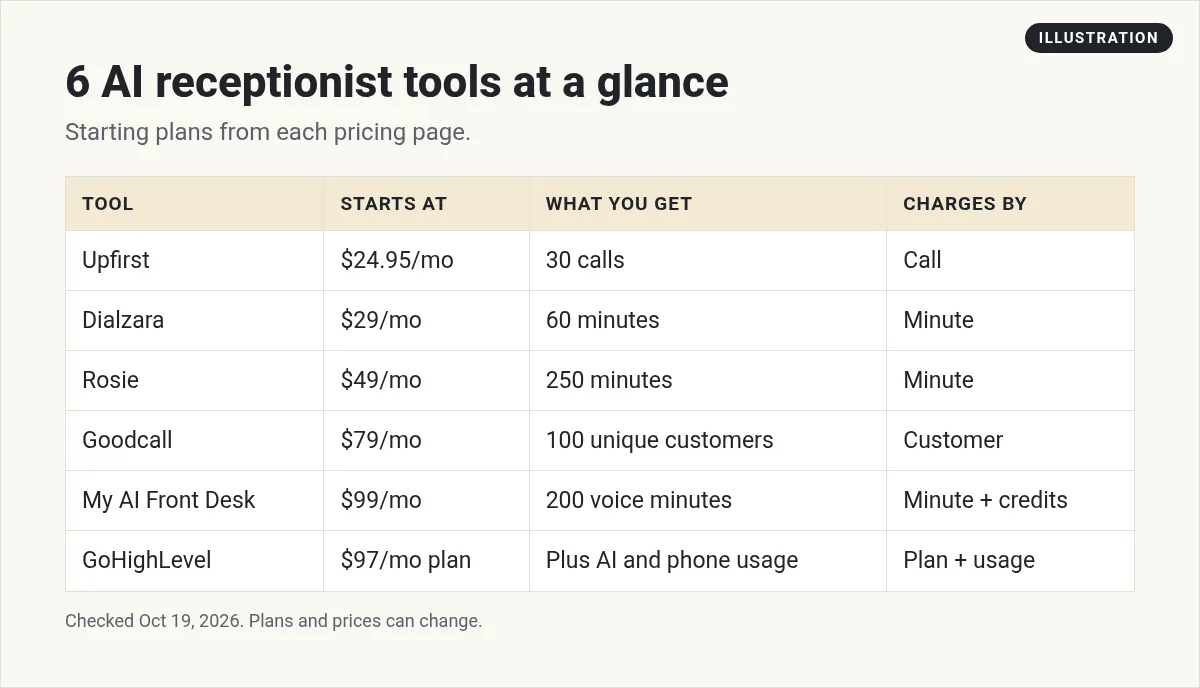
Popular AI receptionist software for small businesses includes Upfirst (from $24.95 a month for 30 calls), Dialzara (from $29 a month for 60 minutes), Rosie (from $49 a month for 250 minutes), Goodcall (from $79 a month for 100 unique customers), My AI Front Desk ($99 a month with 200 voice minutes), and GoHighLevel Voice AI for agencies. Prices checked October 19, 2026.
First, know how they charge
This is where most people get confused. The tools below use four different ways to count usage:
- Per minute. You get a set number of talk minutes. Dialzara, Rosie, and My AI Front Desk work this way.
- Per call. You get a set number of calls, no matter how long they last. Upfirst works this way.
- Per unique customer. Goodcall counts unique customers a month, so the same person calling twice counts once.
- Per use plus a plan. GoHighLevel charges a platform plan, then AI and phone usage on top.
So before you compare, check your phone bill. How many calls do you get a month, and how long do they last? That one number tells you which model is cheapest for you.
1. Upfirst: lowest starting price, priced per call

- Price: $24.95 a month for 30 calls, $59.95 for 90 calls, $159.95 for 300 calls, and $299 for 600 calls.
- Extra calls: from $1.50 each on the smallest plan, down to $0.70 on the largest.
- Trial: 14 days with full access to the plan you pick.
- Good to know: each extra agent, like a second location, is $9.95 a month. Human support runs weekdays, 9 a.m. to 6 p.m. Eastern.
Best for: solo owners who get a small number of calls that might run long.
2. Dialzara: low entry price, priced per minute

- Price: $29 a month for 60 minutes, $99 for 220, $199 for 500, and $349 for 1,000 minutes.
- Extra minutes: $0.48 a minute on the smallest plan, down to $0.35 on the largest.
- Trial: 7 days. No contract, cancel anytime.
- Good to know: warm transfer to your team starts on the $99 plan. Outbound calls, texts, and website chat are add-ons.
Best for: businesses with short calls that just need messages taken.
3. Rosie: generous minutes for the price
- Price: $49 a month for 250 minutes, $149 for 1,000 minutes, and $299 for 2,000 minutes.
- Booking: booking straight onto your calendar starts on the $149 plan. The $49 plan sends booking links by text.
- Every plan: English and Spanish on every call, call recordings and transcripts, and a Zapier connection.
- Trial: 7 days.
Best for: service businesses that want lots of minutes and simple setup.
4. Goodcall: priced by unique customers
- Price: $79 a month for 100 unique customers, $129 for 500, and $299 for 2,000.
- Good to know: since it counts people, not minutes, repeat callers do not use up your plan as fast.
Best for: shops where the same customers call back often, like auto repair or salons. Ask how it counts a new caller before you pick a plan, so you know what uses up your limit.
5. My AI Front Desk: phone, chat, and CRM together
- Price: $99 a month, or $79 a month billed yearly, with 200 voice minutes a month.
- Included: web chat, two-way texts, a CRM, and automations in the same plan.
- Extra usage: credits auto reload at $10 for 1,000 credits.
- Trial: 7 days.
- Bigger teams: Partner and Enterprise pricing is custom and set by monthly volume.
Best for: owners who want one simple tool for calls, chat, and follow-up.
6. GoHighLevel Voice AI: best for agencies and resellers
GoHighLevel is a full marketing platform, and Voice AI is one part of it. It is more work to set up than the tools above, but you control everything, and you can serve many businesses from one account. If you want to build your own AI phone agents on a per-minute platform instead, see my Bland AI guide or my Vapi AI guide.
- Platform: plans start at $97 a month.
- AI: pay per use, or an AI Employee plan per business: Growth at $50 a month or Unlimited at $97 a month.
- Phone: HighLevel's pricing guide says phone system charges still apply to calls, even on the Unlimited AI plan.
Best for: people who want to build and sell AI receptionists to local businesses. My Voice AI cost guide shows how to estimate the full bill, and how to build an AI receptionist walks through the setup.
My video: I set up a GoHighLevel AI voice agent that answers calls and books appointments for a local business. It came out in August 2026, so check current prices.
Any results mentioned in videos are not typical and are not a promise of income. Your results depend on your work and your market.
What about a human answering service?
Human services like Ruby use real receptionists. Ruby's pricing page says the only difference between its plans is the number of receptionist minutes. A human can handle tricky or emotional calls better. AI is usually cheaper and never gets tired. I compare both in AI receptionist vs answering service.
How to choose in 15 minutes
- Count your calls. Look at last month's calls and their average length.
- Pick the pricing model that fits. Few long calls favor per call pricing. Many short calls favor per minute pricing. Lots of repeat callers favor per customer pricing.
- List your must haves. Booking on your calendar? Spanish? Live transfers? Texts?
- Start a free trial. Forward a test line, not your main number, at first. Most trials here are only 7 to 14 days, so test right away.
- Test it like a customer. Use my checklist for testing AI call answering before real customers hear it.
Want to know what real owners say? I rounded up what small business owners on Reddit think. And if you are curious about what happens on a call, read how AI call answering works.
If it also makes calls, know the rules
Answering calls is one thing. Making calls is another. The FCC says the TCPA's rules on "artificial or prerecorded voice" cover AI voices too. Its consumer guide says, "AI-generated voice calls are illegal unless the consumer has agreed to receive them or the caller is exempt." So if your AI receptionist will call people back or reach out, get consent first.
Thinking of selling AI receptionists?
Many local businesses do not want to set this up themselves. That gap is a real business opportunity. If you want to do this for others, start with how to sell an AI receptionist, then read how to price AI call answering.
My AI receptionist buying checklist
Nothing you check here is sent or saved. Download it if you want to keep it.
Want to set up and sell AI receptionists?
In my free AI workshop, I show regular people how to use AI tools to build a simple service for local businesses. No tech background needed.
Join my free AI workshopFree live workshop. No credit card needed.
Frequently asked questions
What is the best AI receptionist software for a small business?
It depends on your calls. Upfirst and Dialzara have the lowest starting prices. Rosie gives many minutes for the price. My AI Front Desk bundles chat, texts, and a CRM. GoHighLevel Voice AI is best if you want to serve many businesses.
How much does an AI receptionist cost?
On the pricing pages checked October 19, 2026, starting plans ranged from $24.95 a month (Upfirst, 30 calls) to $99 a month (My AI Front Desk, 200 minutes). Bigger plans cost more, and extra minutes or calls are billed on top.
Can an AI receptionist book appointments?
Yes, most can. Check the plan, though. For example, Rosie books straight onto your calendar on its $149 plan, while its $49 plan sends booking links by text.
Is an AI receptionist better than a human answering service?
AI is usually cheaper and always available. A human service like Ruby can handle tricky or emotional calls better. Some businesses use AI first and transfer hard calls to a person.
Is it legal for an AI receptionist to make calls?
Answering calls is common. For outgoing calls, the FCC says AI voices fall under the TCPA, so you generally need the person's consent first.
Can I resell AI receptionist software?
Some platforms are built for it. GoHighLevel lets agencies run many businesses from one account and, on its $497 plan, rebill AI usage.
Sources
Checked October 19, 2026. Plans, prices, and rules can change.
