
AI Tools · Pricing
Canva has a strong free plan, and the paid plans are priced per person. Here is what Pro and Business cost, yearly and monthly, and what you actually get for the money.
Canva is a design tool for social posts, slides, videos, and more. You can use it free. If you want premium templates, more AI, or team tools, you pay for Pro or Business.
The price changes a lot based on one switch: yearly or monthly. Canva's pricing page opens on Yearly. I checked both views on October 27, 2026. Here is what each plan costs and who it fits.
Quick answer
Canva has four plans. Free is US$0. Pro is US$144 a year or US$18 a month for one person. Business is US$250 a year or US$25 a month per person. Enterprise has custom pricing, so you contact sales. Prices exclude tax. Pro is for one person only. Business is for individuals and small teams, with more AI, brand tools, and team features.
Canva plans and prices
Canva's pricing page has a Monthly and Yearly switch. It opens on Yearly. Here are both views.
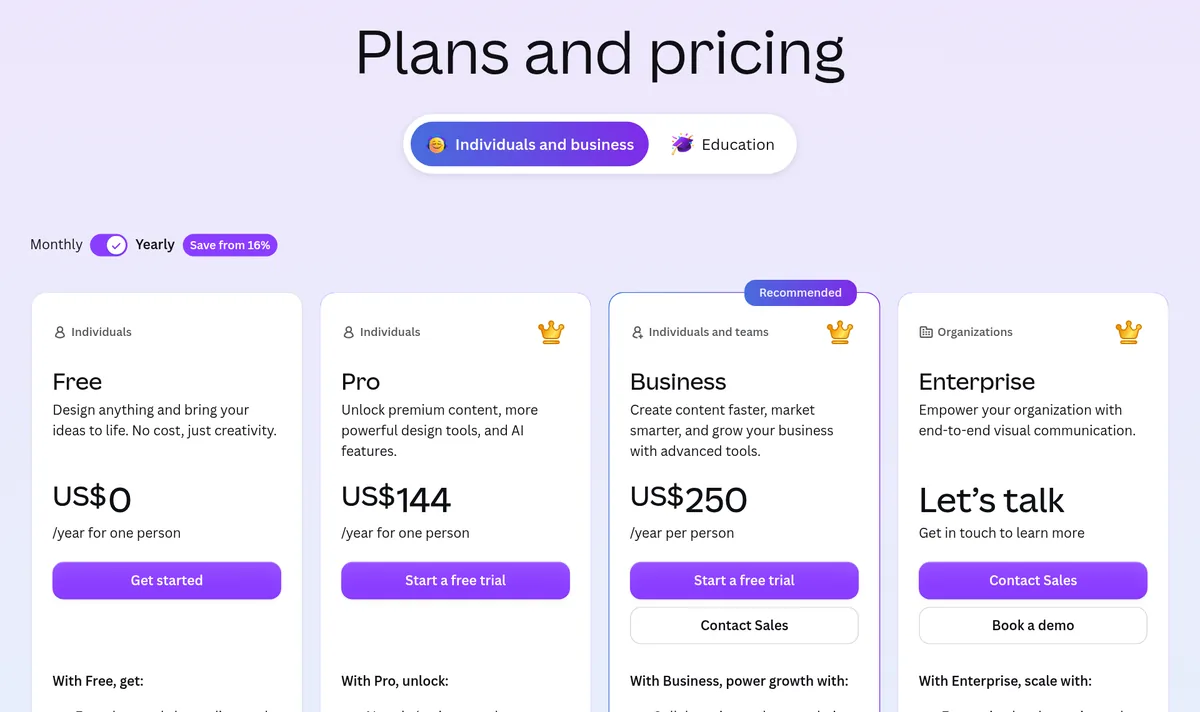
Paid yearly
- Free: US$0.
- Pro: US$144 a year for one person.
- Business: US$250 a year per person.
- Enterprise: "Let's talk." You contact sales.
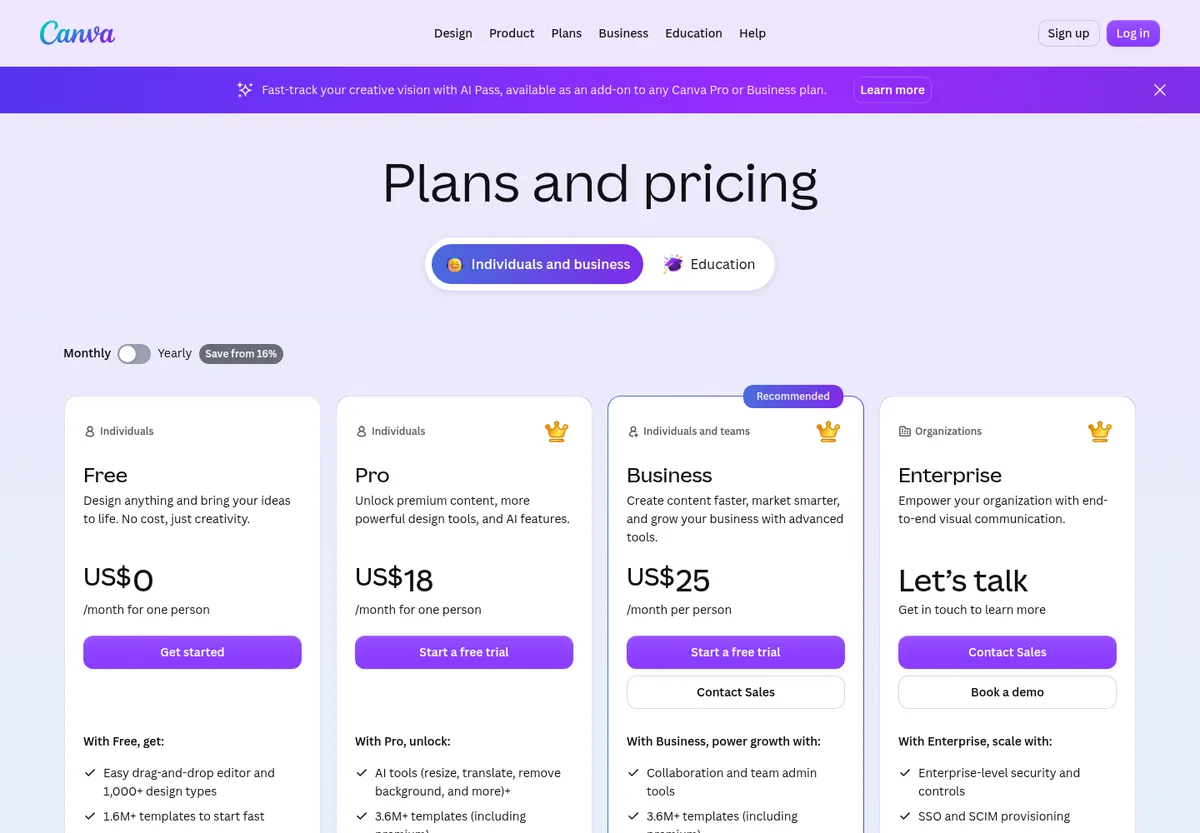
Paid monthly
- Free: US$0.
- Pro: US$18 a month for one person.
- Business: US$25 a month per person.
The switch says "Save from 16%" for yearly. Here is my math. Pro monthly is $18 x 12 = $216 a year, so yearly at $144 saves $72. Business monthly is $25 x 12 = $300 a year, so yearly at $250 saves $50, about 16.7%.
The page also says "Prices exclude applicable tax." In the US, Canva says it applies sales tax "where required, based on your billing address."
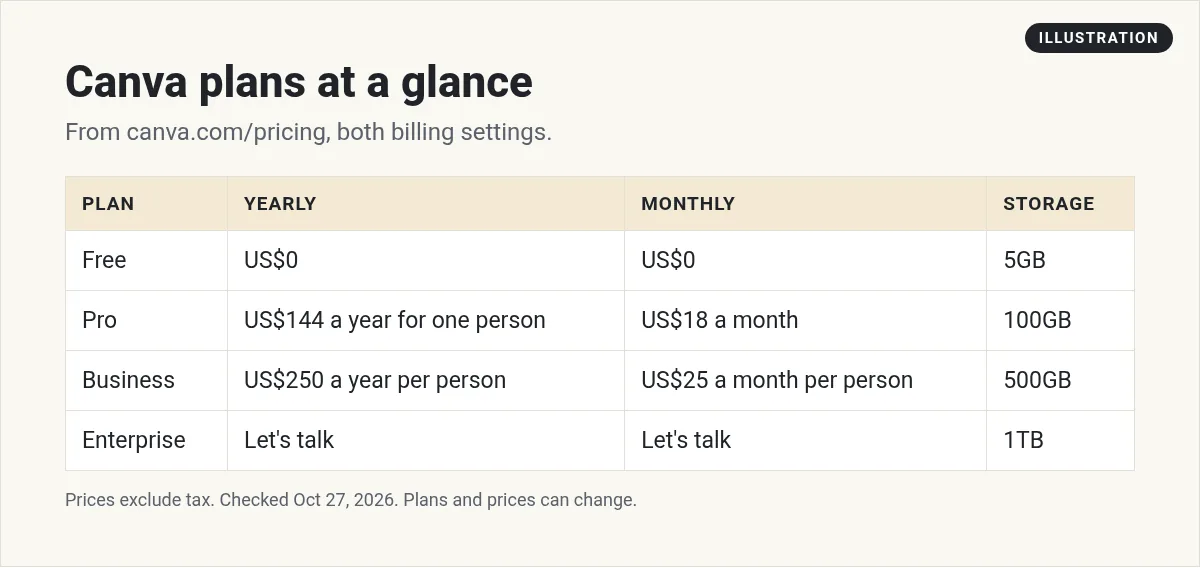
What Canva Free includes
Canva Free is a real plan, not just a trial. The pricing page lists:
- "Easy drag-and-drop editor and 1,000+ design types"
- "1.6M+ templates to start fast"
- "4.7M+ photos, videos, graphics, and audio"
- 1 Brand Kit (3 colors only)
- 5GB of cloud storage
- "Up to 20 Standard or Premium AI uses"
If you post a few times a week and do not need premium templates, Free may be all you need.
What Canva Pro adds
Pro is for one person. The FAQ says "Only one person can use a Canva Pro account." The pricing page lists:
- "AI tools (resize, translate, remove background, and more)"
- "3.6M+ templates (including premium)"
- "141M+ premium photos, videos, graphics, and audio"
- 5 Brand Kits
- Social content scheduling
- 100GB of cloud storage
- "10x more AI than Canva Free"
In my view, the big wins for a solo creator are background remover, resize, premium templates, and scheduling. If you use those every week, Pro is worth a look.
What Canva Business adds
The FAQ says Business is "designed for both individuals and small teams." It has everything in Pro, plus:
- "Collaboration and team admin tools"
- "100 Brand Kits and approvals"
- Access to Flourish, a data chart tool
- "10% discount on print orders" where Canva Print is offered
- 500GB of cloud storage
- "20x more AI than Canva Free"
Business is billed per person. The FAQ says "you only pay for the team members who accept your invitation." On monthly billing, "You'll only be charged for the members you have in your team at the next monthly renewal."
A note on Canva Teams: the FAQ says "Canva Teams is no longer available for new sign-ups or upgrades." If you see old posts about Canva Teams pricing, that plan has been replaced by Business for new users.
Pro vs Business: the real difference
Canva's FAQ puts it this way. Pro is "the perfect plan for solo creators who want premium editing tools and templates." Business is "built for individuals, and growing teams who need more AI access, enhanced brand management, smarter marketing with ad analytics, and a shared workspace."
Here is the side by side, from the pricing page:
- People: Pro is for one person. Business is per person, for one or more.
- Brand Kits: 5 on Pro. 100 with approvals on Business.
- Storage: 100GB on Pro. 500GB on Business.
- AI: 10x Free on Pro. 20x Free on Business.
- Price yearly: US$144 for Pro. US$250 per person for Business.
If you work alone and manage one brand, Pro covers it. If you run many brands, or need teammates in the same workspace, Business is the one built for that.
What a small team pays
Here is my math for 3 people on Business. Yearly: US$250 x 3 = US$750 a year. Monthly: US$25 x 3 x 12 = US$900 a year. Paying yearly saves US$150 in this example.
On yearly billing, Canva handles new members on a schedule. The FAQ says "billing is adjusted monthly, or quarterly if you're on an annual subscription." It also says Canva will "email the team admin to let them know about any upcoming charges."
How AI limits work
AI is a big part of the price difference. The FAQ says some tools "like Translate and Magic Write can be used abundantly," and do not count toward your monthly AI allowance on paid plans. Other tools share a monthly allowance that "resets each month."
Here is the estimated allowance the FAQ lists:
- Free: "Up to 20 uses of Standard AI tools, or Premium AI tools." No Ultra AI.
- Pro: "Up to 200 uses of Premium AI tools, or up to 20 uses of Ultra AI tools"
- Business: "Up to 400 uses of Premium AI tools, or up to 40 uses of Ultra AI tools"
Canva says complex tasks use more, so "actual usage may be lower." If you need more, AI Pass is an add-on for Pro and Business at extra cost.
One catch for trials: the FAQ says "AI allowance during trial is the same as Canva Free." You get the full amount once your paid plan starts. Want to know which AI tools are worth it? See my guide to Canva AI.
Free trial, payment, and special plans
- Free trial. The FAQ says "You can start a free trial of Canva Pro or Canva Business." On a Business trial, "You won't be billed at all during your trial period." The pricing page did not list the trial length, so check it when you sign up.
- Payment. Canva accepts "Paypal and credit cards by major providers such as Visa, Mastercard, and American Express."
- Nonprofits. The FAQ says "Nonprofits can get a free subscription with all the premium features of Canva Pro, plus team and collaboration tools, for one team of up to 50 users."
- Schools. Canva Education is for K-12 educators, students, and schools. The page says "K-12 educational organizations and not-for-profits can enjoy most premium features for free."
Ways to pay less for Canva
- Start on Free. Use it for a few weeks. Write down which locked features you keep reaching for.
- Test monthly, then go yearly. Monthly costs more over a year, but it lets you quit fast if Canva is not a fit.
- Only invite active members. Business bills per person who accepts, so do not invite people who rarely design.
- Check the free programs. Nonprofits and K-12 schools may qualify for free premium features.
- Watch your AI use. If you hit the AI limit often, compare the cost of AI Pass with moving up a plan.
Which Canva plan should you pick?
- Just starting out? Use Free. It has 1.6M+ templates and basic AI.
- Solo creator posting often? Pro. Pay monthly at US$18 to test. Switch to yearly at US$144 once you know you will keep it.
- Small team, or need many brand kits? Business at US$250 a year per person.
- Big company with 150+ seats? Talk to Canva about Enterprise.
If you use Canva to make products to sell, like templates, see my list of digital products to sell. For more ideas, see my AI side hustles guide.
Before you pay for Canva
Nothing you check here is sent or saved. Download it if you want to keep it.
Use AI to make content faster
Want to see how I use AI tools to plan and make content in less time? Join my free AI workshop. I walk through it step by step.
Join my free AI workshopFree to join. No credit card needed.
Frequently asked questions
How much is Canva Pro?
Canva Pro is US$144 a year or US$18 a month for one person, per Canva's pricing page on October 27, 2026. Prices exclude tax.
How much is Canva Business?
Canva Business is US$250 a year or US$25 a month per person. You only pay for team members who accept your invitation.
Is Canva free?
Yes. Canva Free costs US$0 and includes a drag-and-drop editor, 1.6M+ templates, 5GB of cloud storage, and up to 20 Standard or Premium AI uses.
Can more than one person use Canva Pro?
No. Canva's FAQ says only one person can use a Canva Pro account. For teams, Canva points you to Business.
Does Canva have a free trial?
Yes. Canva says you can start a free trial of Canva Pro or Canva Business. During the trial, your AI allowance is the same as Canva Free.
What happened to Canva Teams?
Canva says Canva Teams is no longer available for new sign-ups or upgrades. Existing Teams users stay on their plan unless they switch or cancel.
Sources
Checked October 27, 2026. Plans, prices, and rules can change.
