
Online Business · Guide
A digital product is something you make once and deliver by download or login. Here are 15 ideas, what each platform charges to sell them, and how to launch your first one this week.
A digital product is anything people can buy and get online. There is nothing to ship and nothing to store. You make it once, and the platform delivers it.
That is why it is a simple place to start. But the idea is only half of it. You also need to pick where to sell. On October 23, 2026, I checked the fee pages for Gumroad, Payhip, and Etsy so you can see what each one really takes.
Quick answer
Good digital products to sell include templates, ebooks, printables, presets, checklists, spreadsheets, prompt packs, mini courses, and memberships. The best one solves a clear problem for a specific group of people. On October 23, 2026, Gumroad charged 10% + $0.50 per direct sale, Payhip had a free plan with a 5% fee, and Etsy charged a 6.5% transaction fee plus payment processing.
What is a digital product?
A digital product is a file or online access that people pay for. They download it, open it, or log in to use it.
Gumroad's FAQ lists the main types it supports: digital products, e-books, courses, tutorials, and memberships. Payhip's site lists digital downloads, online courses, coaching, and memberships.
The big win is that you make it once. After that, each new sale does not need more work from you to make or ship.
15 digital products to sell
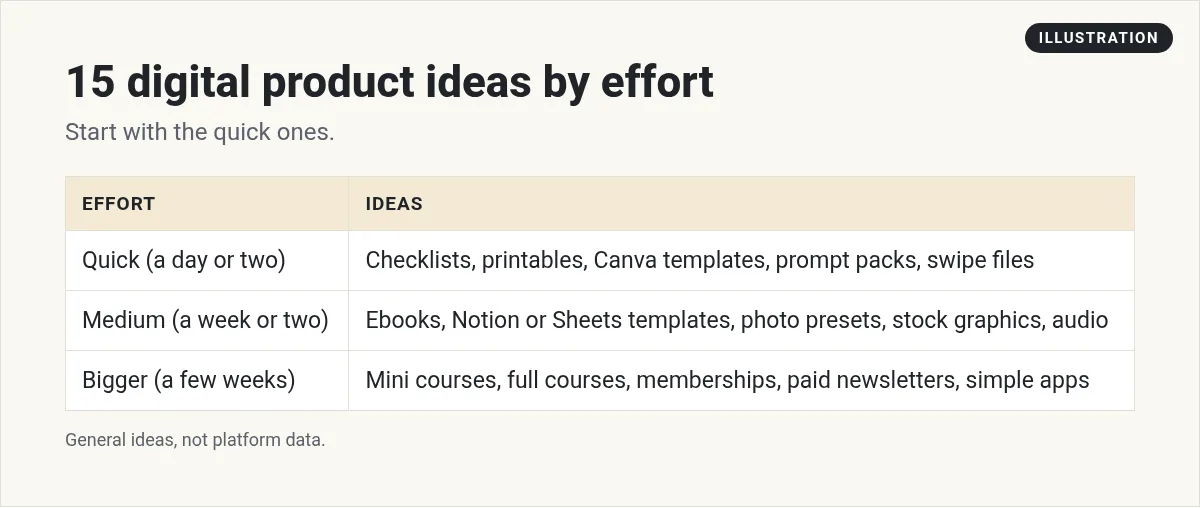
Here are ideas grouped by how much work they take to make.
Quick to make (a day or two):
- Checklists. A one page list that walks someone through a task, like a moving checklist or a launch checklist.
- Printables. Planners, trackers, and worksheets people print at home.
- Canva templates. Social posts, flyers, or slide decks people can edit.
- Prompt packs. Tested AI prompts for one job, like writing listings for real estate agents.
- Swipe files. Example emails, scripts, or captions people can adapt.
Medium effort (a week or two):
- Ebooks and guides. A short, focused guide that solves one problem.
- Notion or Google Sheets templates. Budgets, content calendars, client trackers.
- Photo presets. Lightroom presets for a certain look.
- Stock photos or graphics. Images, icons, or mockups for a niche.
- Audio. Music loops, sound effects, or guided audio.
Bigger projects (a few weeks or more):
- Mini courses. A few short videos that teach one skill.
- Full online courses. A step by step program with lessons and worksheets.
- Memberships. Paid access to new content or a community each month.
- Paid newsletters. Regular content behind a subscription.
- Simple software or apps. Small tools built with AI app builders.
How to pick the right product
The best digital product is not the fanciest one. It is the one that solves a clear problem for a clear group of people. Ask yourself:
- Who is it for? New moms, real estate agents, small gyms. Be specific.
- What problem does it solve? Saving time, getting organized, learning a skill.
- Do people already pay for this? Search the platforms below. If similar products sell, that is a good sign.
- Can I make it well? Use what you know from your job, hobby, or life.
Where to sell digital products: real fees
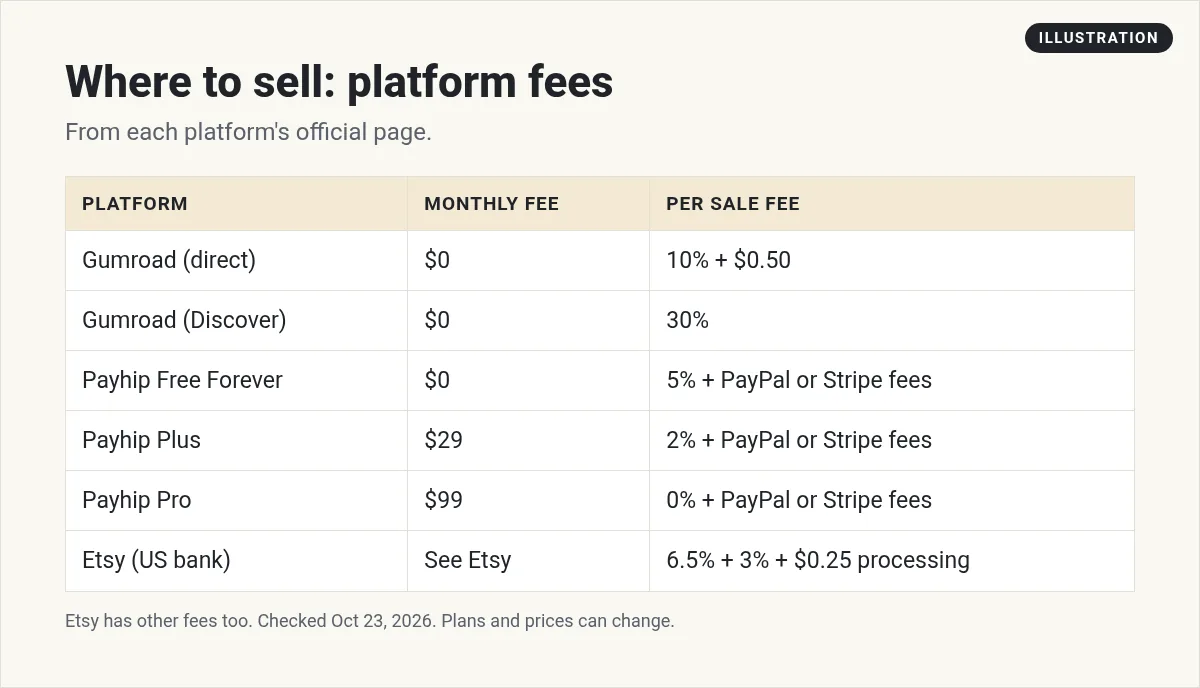
Here is what each platform's official page said on October 23, 2026.
Gumroad
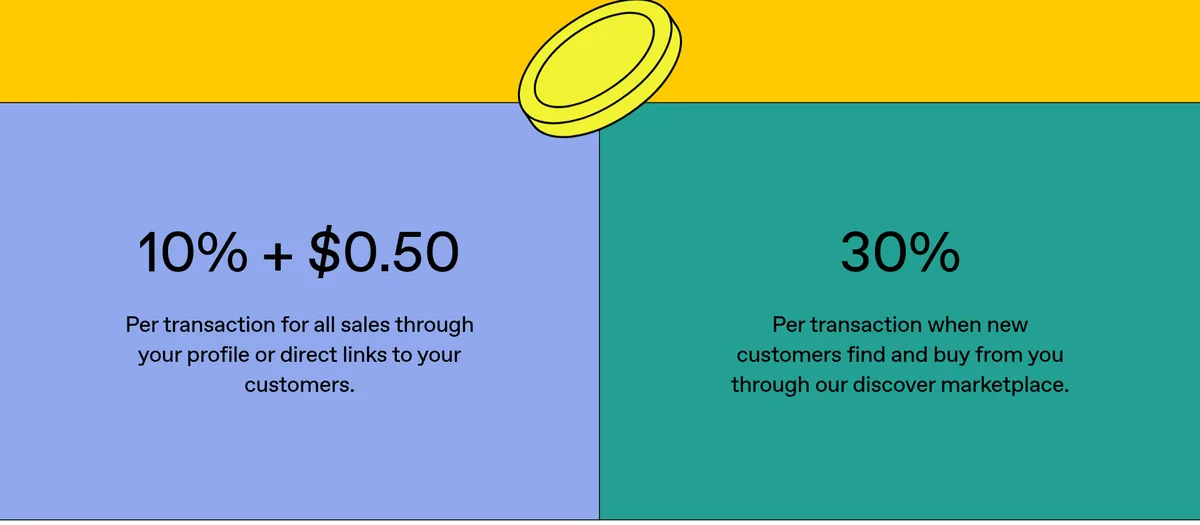
- 10% + $0.50 per sale through your profile or direct links.
- 30% per sale when new customers find you through Gumroad's Discover marketplace.
- No monthly fee.
- Since January 1, 2025, Gumroad is the merchant of record. That means it handles sales tax for you.
Payhip
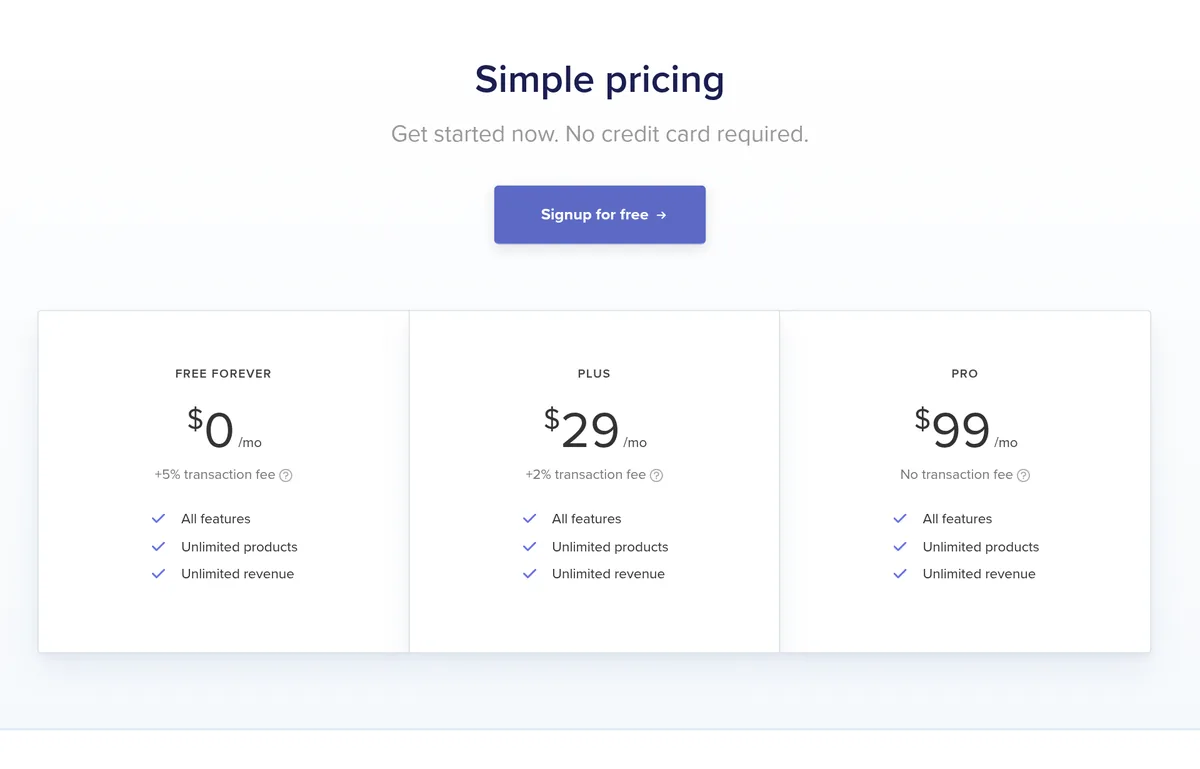
- Free Forever: $0 a month plus a 5% transaction fee.
- Plus: $29 a month plus a 2% transaction fee.
- Pro: $99 a month with no transaction fee.
- All plans get the same features. PayPal and Stripe still charge their normal fees on top.
- Payhip says it collects and pays EU and UK VAT and US and Canadian sales tax for you.
Etsy
- A 6.5% transaction fee on the whole order.
- Payment processing on top. For a US bank account, it was 3% + $0.25 per sale.
- Etsy has other fees too, so read its fee policy before you list.
What the fees look like on a $20 sale
Here is a simple example using the numbers above. It is just the platform fee, not tax.
- Gumroad, direct link: 10% is $2.00, plus $0.50. The fee is $2.50.
- Payhip, free plan: 5% is $1.00, plus the PayPal or Stripe fee.
- Etsy, US shop: 6.5% is $1.30, plus processing of 3% and $0.25, which is $0.85. That is $2.15 before Etsy's other fees.
Fees are not the only thing that matters. Etsy and Gumroad Discover can bring you buyers. A direct link only works if you bring your own traffic. Pick based on where your buyers will come from.
How to price your first digital product
Pricing can feel hard at first. Here is a simple way to think about it.
- Look at what is already selling. Search your platform for products like yours. Note the low, middle, and high prices.
- Price by the problem, not the page count. A one page checklist that saves someone hours can be worth more than a long ebook.
- Start in the middle. Too cheap can look low quality. Too high is hard with no reviews yet.
- Count the fees. Use the fee numbers above so you know what you keep on each sale.
- Raise it as you improve it. Add reviews, bonuses, or updates, then test a higher price.
You can also offer a small, low cost product first. If people like it, a bigger product can come later. You can grow this way, one step at a time.
How to sell your first digital product
- Pick one problem and one audience. Write it in one sentence.
- Make the smallest useful version. A template, checklist, or short guide.
- Use AI to speed up, not replace you. Let AI help with outlines and first drafts. Then add your own know how and check every fact.
- Pick a platform. Gumroad or Payhip for direct sales. Etsy if you want a marketplace with buyers already looking.
- Write a clear product page. Who it is for, what is inside, and what problem it solves. Add real screenshots of the product.
- Tell people. Share it on social media, in your email list, or in groups where it is allowed.
- Listen and improve. Ask buyers what they liked and what was missing. Update the product.
My video: My beginner walkthrough of getting started online.
Any results mentioned in videos are not typical and are not a promise of income. Your results depend on your work and your market.
Common mistakes to avoid
- Making something for everyone. A planner for busy nurses beats a planner for everyone.
- Spending months before your first sale. Launch small, then grow it.
- Selling AI output with no checks. Buyers notice. Review and improve everything.
- Using things you do not own. Only use fonts, photos, and content you have the rights to.
- Ignoring fees and taxes. Know what each platform takes and who handles sales tax.
Where to go next
If you plan to sell courses or memberships, compare Kajabi pricing, Skool pricing, and my Systeme.io review. If you want to sell through a newsletter, read Beehiiv vs Substack. And if you have seen resell rights products, read my post on master resell rights first.
Want to see how I use AI to create content and build simple online businesses? I walk through it in my free AI workshop.
Want to build simple online income streams with AI?
In my free workshop, I show how regular people use AI tools to create content and build simple online businesses.
Join my free AI workshopFree to join. No credit card needed.
Frequently asked questions
What digital products sell best?
Pick products that solve a clear problem for a specific group. Common types include templates, printables, ebooks, presets, courses, and memberships.
Where can I sell digital products?
Options include Gumroad, Payhip, and Etsy. Course and community platforms like Kajabi and Skool work for bigger products.
How much does Gumroad charge?
On October 23, 2026, Gumroad charged 10% + $0.50 per sale through your profile or direct links, and 30% for sales through its Discover marketplace. There is no monthly fee.
Does Payhip have a free plan?
Yes. Payhip's Free Forever plan is $0 a month with a 5% transaction fee. Plus is $29 a month with 2%, and Pro is $99 a month with no transaction fee.
What are Etsy's fees for digital products?
Etsy charges a 6.5% transaction fee plus payment processing. For a US bank account, processing was 3% + $0.25 per sale. Etsy has other fees too.
Can I use AI to make digital products?
Yes, AI can help with outlines and drafts. Add your own know how, check every fact, and only use content you have the rights to.
Do I need a website to sell digital products?
No. Gumroad, Payhip, and Etsy all host your product page for you. A website helps later, but you can start with just a platform link.
Who handles sales tax on digital products?
It depends on the platform. Gumroad says it has been the merchant of record since January 1, 2025, so it handles sales tax. Payhip says it collects and pays EU and UK VAT and US and Canadian sales tax for you.
How long does it take to make a digital product?
A simple checklist or template can take a weekend. A full course can take weeks. Start with something small you can finish fast, then build from there.
Sources
Checked October 23, 2026. Plans, prices, and rules can change.
