
Course Platforms · Pricing
Kajabi is an all-in-one platform for courses, communities, email, and a website. It is not cheap, so here is exactly what each plan costs and what you get.
Kajabi is a platform for selling courses, coaching, and memberships. It puts your website, email, checkout, and community in one place.
On October 23, 2026, I went through Kajabi's pricing page with both monthly and annual billing, plus its full feature table and FAQ. Here is what each plan costs, the fees on top, and how to pick.
Quick answer
On October 23, 2026, Kajabi had three plans. Basic was $179 a month, Growth was $249 a month, and Pro was $499 a month on monthly billing. Annual billing cut those to $143, $199, and $399 a month, a 20% savings. Kajabi takes no revenue share, but there are card processing fees, and an extra fee if you use an outside payment provider. There is a 14-day free trial.
Kajabi plans and prices
Here is what Kajabi's pricing page showed on October 23, 2026:
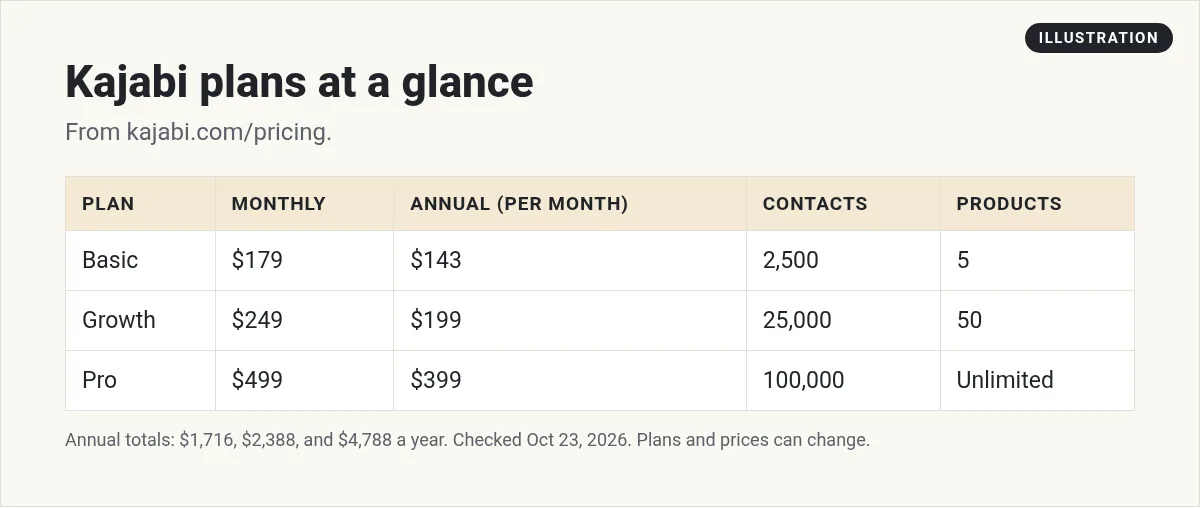
- Basic: $179 a month, or $143 a month billed annually ($1,716 a year).
- Growth: $249 a month, or $199 a month billed annually ($2,388 a year).
- Pro: $499 a month, or $399 a month billed annually ($4,788 a year).
The page says annual billing will "Save 20%." On Basic, it showed "Save $432/year."
Every plan starts with a free trial. The page says "14 days free." The FAQ also says "every plan has a 30-day money-back" policy, and you can upgrade, downgrade, or cancel when you like.
What each plan includes
The biggest differences are how many products, contacts, and team members you get. Here is the full feature table, side by side:
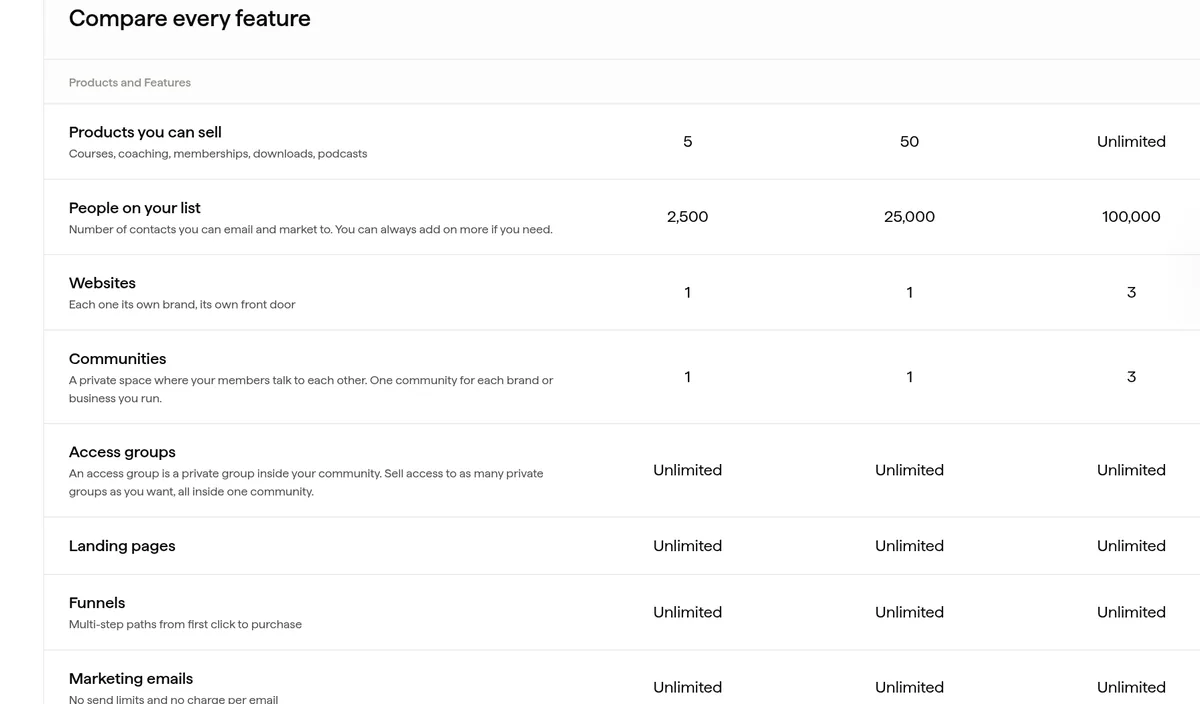
| Feature | Basic | Growth | Pro |
|---|---|---|---|
| Products | 5 | 50 | Unlimited |
| Contacts | 2,500 | 25,000 | 100,000 |
| Websites | 1 | 1 | 3 |
| Communities | 1 | 1 | 3 |
| Admin users | 2 | 11 | 26 |
| AI credits | 0 | 500 | 1,000 |
All plans include unlimited landing pages, funnels, and marketing emails.
What Growth adds
Growth adds tools you need once you are selling: an affiliate program so others can promote you, advanced automations, webhooks, and the option to remove Kajabi branding.
What Pro adds
Pro adds a branded mobile app, which the page lists as a "$199/mo value," plus the API and a custom code editor. It also gives you three websites and three communities, which helps if you run more than one brand.
Kajabi fees on top of the plan
This is the part to read closely. The FAQ says, "Kajabi does not take a revenue share as a platform." So Kajabi does not take a cut of each sale just for using it. But there are still payment fees.
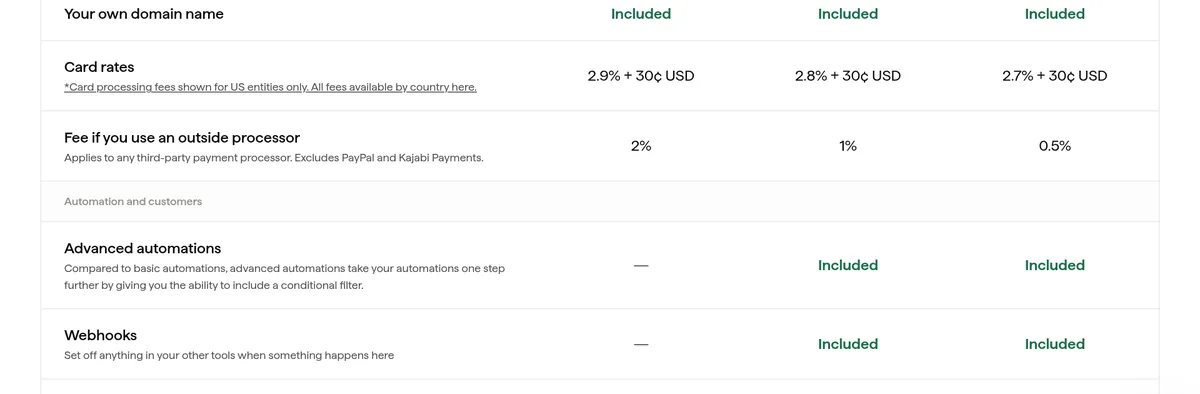
Kajabi Payments card fees (US)
- Basic: 2.9% + 30 cents per sale.
- Growth: 2.8% + 30 cents.
- Pro: 2.7% + 30 cents.
Those rates are for US businesses. Kajabi says fees differ by country.
Fees if you use another payment provider
If you skip Kajabi Payments and use an outside provider, Kajabi adds its own fee:
- Basic: 2%
- Growth: 1%
- Pro: 0.5%
The page says this "Excludes PayPal & Kajabi Payments," and that your provider may charge its own fees too. So on Basic with an outside processor, you pay your provider's fee plus 2% to Kajabi.
A simple cost example
Prices and percentages are hard to picture, so here is a made-up example. Say you are on Basic, billed monthly, and you sell 10 copies of a $100 course in a month using Kajabi Payments in the US.
- Plan: $179.
- Card fees: 2.9% of $100 is $2.90, plus 30 cents, so $3.20 per sale. Ten sales is $32.
- Total cost to Kajabi that month: $211.
Now say you use an outside payment provider instead. Kajabi's 2% fee on Basic is $2 per $100 sale, so $20 for ten sales. You would also pay your provider's own fee on top. That is why Kajabi Payments is often the cheaper choice on Basic.
This is only an example to show how the fees stack. It is not a promise of any sales.
Monthly vs annual: how much you save
Here is the yearly math, using the prices on the page:
- Basic: $179 x 12 is $2,148 a year on monthly billing, versus $1,716 on annual. That is $432 less, which matches the page.
- Growth: $249 x 12 is $2,988, versus $2,388 on annual. That is $600 less.
- Pro: $499 x 12 is $5,988, versus $4,788 on annual. That is $1,200 less.
The FAQ says you can "go from monthly to annual at any time." So there is no rush. Start monthly, and switch once you are sure.
Extra costs to plan for
- More contacts: the FAQ says, "Contacts come in blocks of 25,000 for $125 a month, at any size."
- More AI credits: the page says you can buy 500 AI credits for $15 a month.
- Your domain: Kajabi supports custom domains, but you buy the domain itself elsewhere.
The contact limit is the one that catches people. Basic only allows 2,500 contacts. If you are building an email list with free lead magnets, you can pass that faster than you think.
Which Kajabi plan should you pick?
Kajabi's own FAQ gives a simple rule. Basic is for people who "haven't sold anything yet." Growth makes sense once sales are coming in and your list is past a few thousand people. Pro is for anyone running more than one brand, or who wants their own app.
Here is how I would think about it:
- Pick Basic if you are launching your first course or coaching offer and have a small list.
- Pick Growth if you want affiliates, need more than 2,500 contacts, or need a team.
- Pick Pro if you need a branded app, the API, or more than one site.
Start on monthly while you test. Once you know you will stay, annual billing saves you 20%.
Four questions to answer before you choose
- How many people are on my email list today? If it is near 2,500, Basic will be tight soon.
- How many products will I sell this year? Basic allows 5. Count each course, coaching offer, and membership.
- Will other people promote me? If yes, you need Growth for the affiliate program.
- Who else needs to log in? Basic allows 2 admin users. A coach, editor, or assistant may push you to Growth.
Answer those four, and the right plan is usually clear.
If you are stuck between two plans, pick the smaller one. Kajabi lets you upgrade at any time, and it will tell you when you hit a limit. Paying for room you do not use yet is an easy way to overspend on tools like this.
Is Kajabi worth the price?
Kajabi is not the cheapest option. Its FAQ even admits that if you just want a course delivery tool, it can seem expensive. Its point is that you get the website, email, community, and checkout in one place.
Kajabi makes sense if you:
- Want everything in one tool and do not want to connect five apps.
- Sell courses, coaching, or memberships as your main business.
- Want a polished look without hiring a designer.
Look at other options if you:
- Are just testing an idea and want to spend less.
- Mostly want a community, not a full course platform.
- Already pay for a CRM and email tool you like.
If you are comparing, my Skool pricing guide and Systeme.io review cover two cheaper ways to start.
How to use the free trial well
Fourteen days goes fast. Here is how I would use it:
- Day 1: Set up your website and pick a template.
- Days 2 to 5: Build one small product, like a mini course or a paid workshop.
- Days 6 to 8: Set up checkout and a simple email sequence.
- Days 9 to 12: Invite a few people and test the buying process yourself.
- Days 13 and 14: Decide. Do you like the tool enough to pay for it every month?
Set a reminder for the day before your trial ends so the charge does not surprise you.
Want to see how people use AI to plan and build a course or offer much faster? I walk through it in my free AI workshop.
Want to build your offer faster with AI?
In my free workshop, I show how regular people use AI tools to plan, create, and sell simple online products.
Join my free AI workshopFree to join. No credit card needed.
Frequently asked questions
How much is Kajabi per month?
On October 23, 2026, Kajabi Basic was $179 a month, Growth was $249, and Pro was $499 on monthly billing. Annual billing cut those to $143, $199, and $399 a month.
Does Kajabi have a free trial?
Yes. Kajabi's pricing page showed 14 days free on October 23, 2026.
Does Kajabi take a percentage of sales?
Kajabi says it does not take a revenue share. You still pay card fees with Kajabi Payments, and an extra 2%, 1%, or 0.5% if you use an outside payment provider.
What is the Kajabi contact limit?
Basic allows 2,500 contacts, Growth 25,000, and Pro 100,000. Extra contacts come in blocks of 25,000 for $125 a month.
Which Kajabi plan has an affiliate program?
Growth and Pro include affiliate programs. Basic does not.
Can I cancel Kajabi?
Yes. Kajabi says you can upgrade, downgrade, or cancel when you like, and every plan has a 30-day money-back policy.
Sources
Checked October 23, 2026. Plans, prices, and rules can change.
