
Online Business · Review
Skool puts your community, courses, and calendar in one simple place. Here is what it does well, where it falls short, and what it really costs once you count fees.
Skool has become one of the most talked about places to run an online community. I run some of my own communities on Skool, so I get asked about it a lot.
For this review, I went back to the source. I read Skool's pricing page, about page, and help center on October 20, 2026. Here is what you get, what it costs, and who it fits.
Quick answer
Skool is a simple all-in-one platform for paid or free online communities. It puts a community feed, courses, a calendar for live calls, and leaderboards in one place. There are two plans: Hobby at $9 a month with a 10% + 30c fee per sale, and Pro at $99 a month with a 2.9% + 30c fee (3.9% + 30c above $900), checked October 20, 2026. Both start with a 14-day free trial, and Skool does not give refunds on plan fees. It is a great fit if you want simple and social. It is a weaker fit if you need deep design control or your own Stripe account.
What is Skool?
Skool's about page says it "is a community platform. You can discover communities or create your own. Some communities are free, some are paid."
It also says Skool is all-in-one, so "you don't need to integrate any tools for it to work." Skool was founded in 2019 by Sam Ovens and Daniel Kang. It is based in Los Angeles.
With Skool, you can build a community, courses, and events. You can charge a monthly membership or sell a course one time. Members can use it on the web or on their phone.
The main features
Skool's help center groups its features into a few simple areas. Here they are in plain words.
- Community: a feed where members post, comment, and like. This is the heart of Skool.
- Classroom: where your courses and videos live.
- Calendar: where you list live calls and events, so members know when to show up.
- Leaderboards: members earn points when others like their posts. More on this below.
- Discovery: a public directory where people can find communities to join.
- Affiliates: on Pro, your members can earn by referring new members.
What I like most is that it is simple. There are not many settings to get lost in. Your members do not need a guide to find their way around.
Points and levels: Skool's secret weapon
This is the feature that makes Skool feel different. Skool's help center says "Points are earned when others like your posts, comments, and replies. 1 like = 1 point for the post or comment author."
As members earn points, they level up. Level 2 takes 5 points. Level 9 takes 33,015 points. Each member's level shows next to their name, and there is a leaderboard for each group.
Here is the clever part. Skool says admins can set courses to unlock at certain levels. So you can say, for example, post and help others to unlock the bonus course. That gives members a reason to join in, which keeps the community alive.
How to start a Skool community the smart way
- Pick one clear topic and one type of person you want to help.
- Start on Hobby with the 14-day free trial.
- Add one short course with a quick win in the first lesson.
- Put one live call a week on the calendar.
- Invite your first 10 members yourself and ask them to post an intro.
Skool pricing and fees
Skool has two plans. Here they are, checked October 20, 2026.
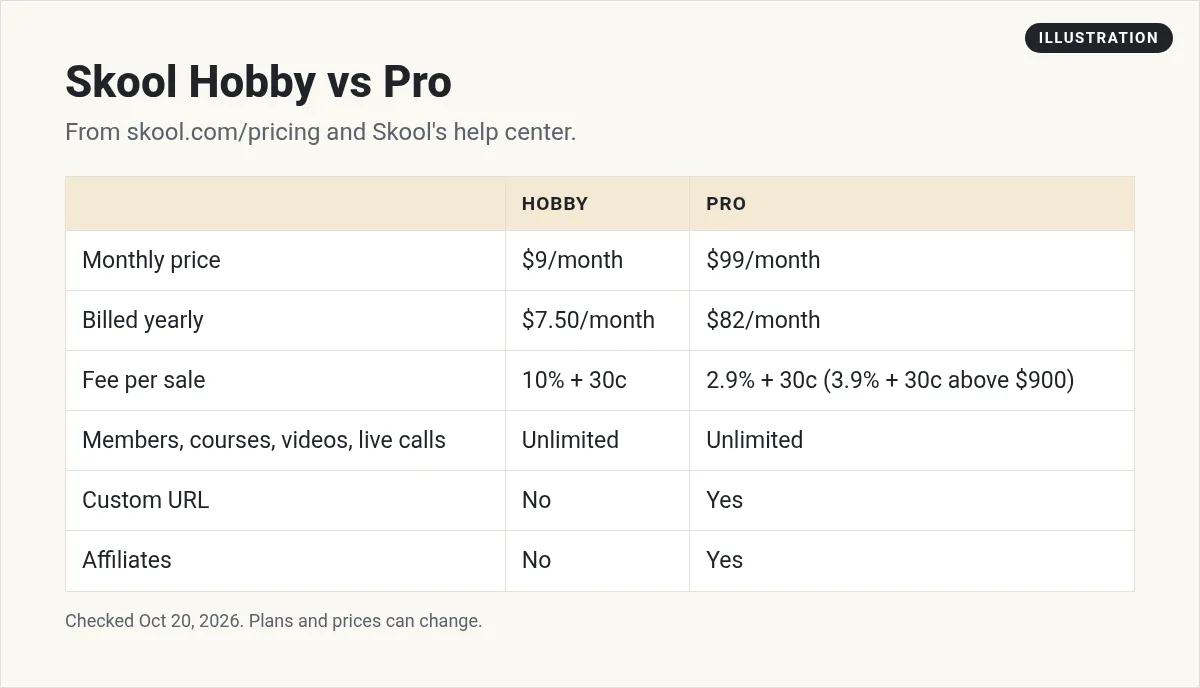
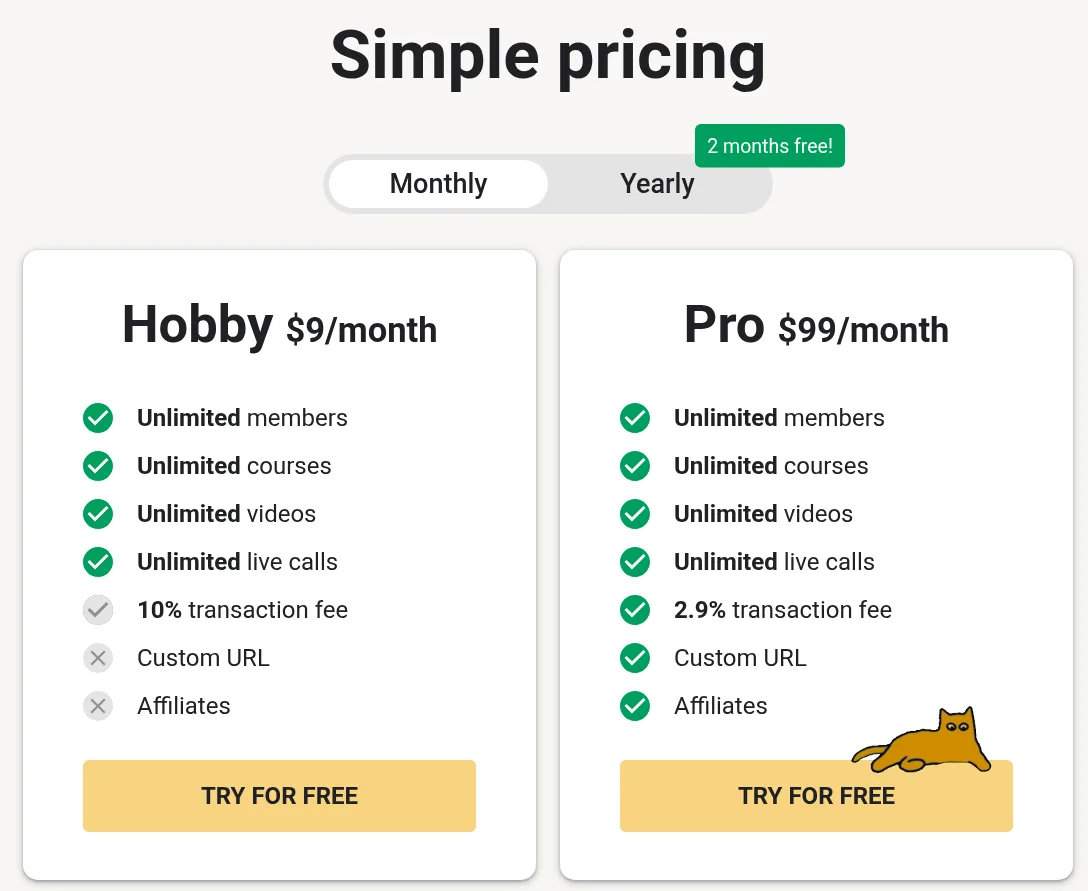
On yearly billing, Skool says you get 2 months free. Billed yearly, Hobby is $7.50 a month and Pro is $82 a month.
The transaction fees matter more than the plan price
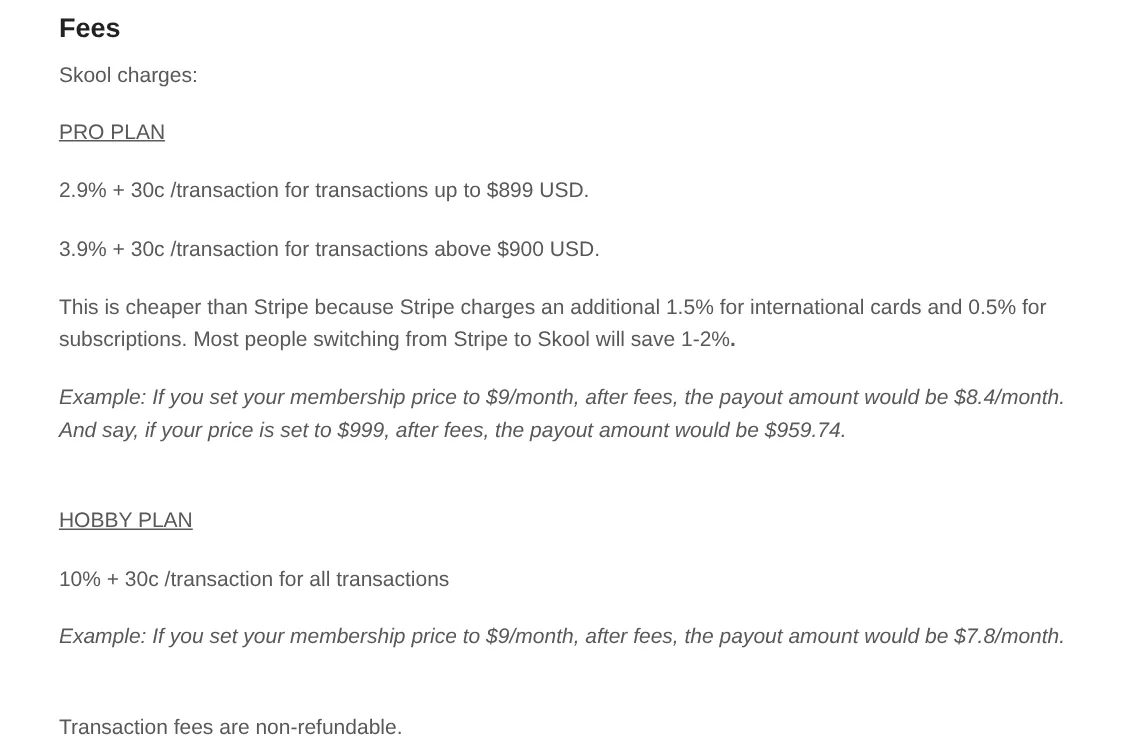
Skool takes a fee each time a member pays you. Skool's help center gives these examples:
- On Pro, a $9 a month membership pays you $8.40 after fees.
- On Hobby, the same $9 membership pays you $7.80.
- On Pro, a $999 sale pays you $959.74.
So when should you move to Pro? Do the simple math. Pro costs $90 more a month than Hobby. The fee gap is about 7% of your sales (10% vs 2.9%). Once members pay you more than about $1,270 a month, Pro costs less overall. That is my own math from Skool's listed prices and fees, not a Skool number.
How you get paid
Skool handles the payments for you. Here are the key facts from its payments FAQ:
- Payouts: your balance is paid out every Wednesday to your bank account. Skool says US bank deposits usually take 1 to 3 business days, and international ones 3 to 5. Your first payout can take longer because of extra checks.
- Fees on refunds: Skool says transaction fees are non-refundable. If you refund a member, you do not get the fee back.
- Currency: prices are set in US dollars. Payouts go out in your local currency.
- Stripe: you cannot use your existing Stripe account. Skool makes a new Stripe Express connection for payouts.
- Taxes: Skool says it acts as the merchant of record and handles sales tax collection, filing, and payment.
- Raising prices: if you raise your price, current members keep the price they pay now.
Growth Boost: Skool can find members for you
Skool has a feature called Growth Boost. Skool says it can show your group at the top of search results and run ads off Skool to promote it. "Skool does all the work and fronts the cost. You only pay a 30% commission if Skool gets you a customer."
It is on by default. You can turn it off in Settings, then Discovery. If you bring a member yourself, Skool only takes the normal fee.
Skool pros and cons
| Pros | Cons |
|---|---|
| Very simple for you and your members | 10% fee on Hobby adds up fast |
| Unlimited members, courses, and videos on both plans | No refunds on plan fees, per Skool's terms |
| Weekly payouts, and Skool handles sales tax | You cannot connect your own Stripe account |
| Discovery and Growth Boost can bring new members | Custom URL and affiliates are Pro only |
| Leaderboards help members stay active | All prices are in US dollars |
My own summary, based on Skool's pricing page and help center, checked October 20, 2026.
What happens if you cancel?
This is important, so read it before you start. Skool's payment terms say you keep access until the end of your billing period. After that, "the group will be archived, and the current content will be available read-only; no new content may be added."
Skool's terms also say no refunds are given for full or partial billing periods. So set a reminder before your 14-day free trial ends if you are not sure.
Who should use Skool?
Skool is a great fit if:
- You want a simple place for a paid community with a course inside it.
- Your members care more about talking to each other and to you than about fancy design.
- You want to start fast without connecting a bunch of tools.
Look elsewhere if:
- You need full control over how your pages look.
- You must keep payments in your own Stripe account.
- You want your community, funnels, CRM, and email in one tool. An all-in-one tool like HighLevel may suit you better. I show how some creators use both in my Skool and HighLevel setup guide.
Thinking about what to sell inside your community? My guide to AI side hustles has ideas you can teach.
Is Skool right for me?
Nothing you check here is sent or saved. Download it if you want to keep it.
Want ideas for what to teach in your community?
In my free workshop, I show how people use AI to build simple products and offers they can share with a community.
Join my free AI workshopFree to join. No credit card needed.
Frequently asked questions
Is Skool worth it?
It is worth it if you want a simple place to run a community with courses and live calls. It may not be worth it if you need full design control or your own Stripe account.
How much does Skool cost?
Hobby is $9 a month and Pro is $99 a month, checked October 20, 2026. Billed yearly, they are $7.50 and $82 a month.
What are Skool's transaction fees?
Hobby charges 10% + 30c per sale. Pro charges 2.9% + 30c per sale up to $899, and 3.9% + 30c above $900.
Does Skool have a free trial?
Yes. Skool's payment terms say both plans start with a 14-day free trial, then renew.
Does Skool give refunds?
Skool's payment terms say no refunds are given for full or partial billing periods. You can cancel anytime to stop future billing.
Can I use my own Stripe account with Skool?
No. Skool's help center says you cannot use your existing Stripe account. Skool creates a Stripe Express connection to pay you.
Sources
Checked October 20, 2026. Plans, prices, and rules can change.
