
AI Tools · Pricing
Notion has four plans, and the price changes if you pay monthly or yearly. Here is every plan as of October 26, 2026, how Notion AI credits work, how seats are billed, and which plan fits.
Notion's pricing looks simple until you add AI, a team, and the monthly vs yearly switch. Then it gets confusing fast.
I checked Notion's pricing page in both billing modes, plus its help pages on billing and AI credits, on October 26, 2026. Here is what each plan costs and what you get.
Quick answer
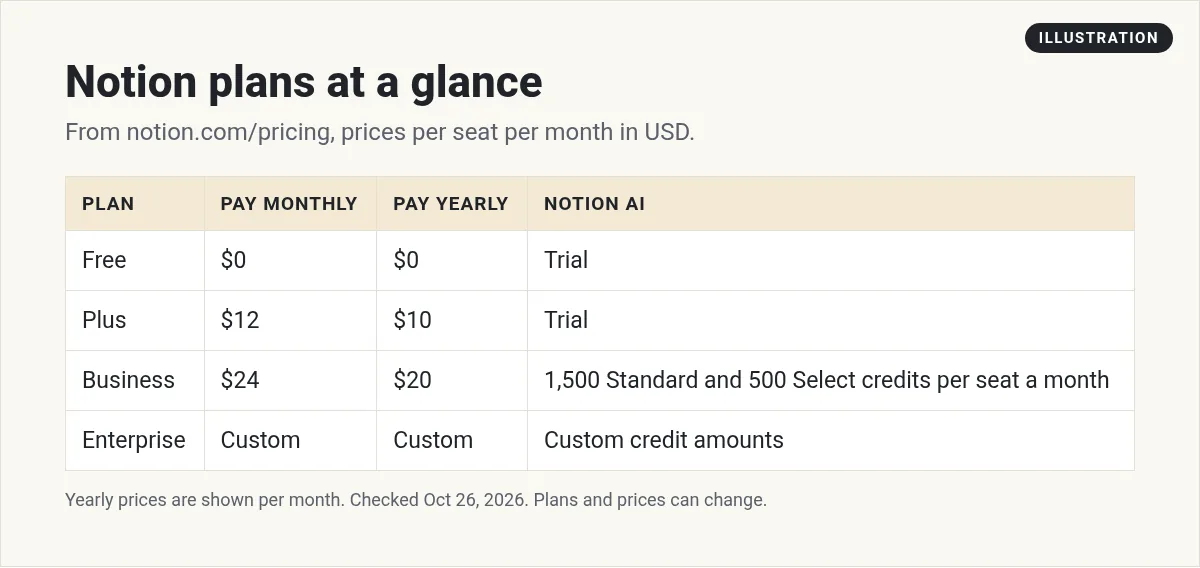
As of October 26, 2026, Notion has four plans. Free is $0. Plus is $12 per seat a month billed monthly, or $10 billed yearly. Business is $24 per seat a month billed monthly, or $20 billed yearly, and includes 1,500 Standard and 500 Select AI credits per seat each month. Enterprise is custom priced. Free and Plus only get a limited trial of Notion AI.
Notion plans and prices
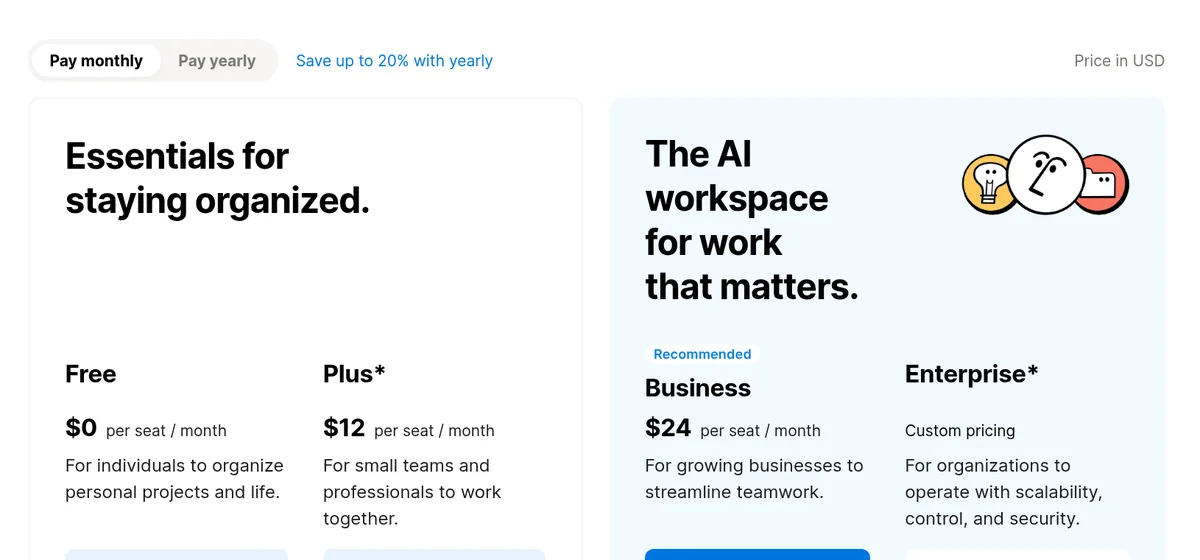
Notion's pricing page has a switch for pay monthly or pay yearly. Here are both, in USD per seat per month:
- Free: $0. For individuals to organize personal projects.
- Plus: $12 a month billed monthly, or $10 a month billed yearly. For small teams.
- Business: $24 a month billed monthly, or $20 a month billed yearly. Notion marks it as recommended.
- Enterprise: custom pricing. For big companies that need more control and security.
The page says "Save up to 20% with yearly." The math checks out: $10 is about 17% less than $12, and $20 is about 17% less than $24. That is my math. So you save a bit less than 20% on these two plans.
Notion also notes that Plus and Enterprise "may not be available for every workspace."
What changes between plans
Here are the limits that matter most, from the pricing table:
- Blocks. Free is unlimited for one person, but limited for 2 or more members. The other plans are unlimited.
- File uploads. Free caps each file at 5 MB. Paid plans are unlimited.
- Page history. 7 days on Free, 30 on Plus, 90 on Business, and unlimited on Enterprise.
- Guests. Free allows 10 outside guests. Paid plans have unlimited guests.
- Forms and sites. Free gets basic forms and sites. Plus adds custom forms and custom sites.
- Security. Business adds SAML SSO and private teamspaces. Enterprise adds SCIM, audit logs, and more controls.
If you use Free with a team, Notion's FAQ says you can add a limited number of blocks before you have to upgrade. When you hit the limit, you can still read and edit, but not add new blocks.
How Notion AI credits work
This is the part that changed most. Free and Plus get a "Limited Trial" of Notion AI. Business gets 1,500 Standard credits and 500 Select credits per seat each month. Enterprise gets custom amounts.
Notion's help page explains the two kinds:
- Standard credits are for work where Notion picks the model for you. Notion calls its model picker Auto.
- Select credits are for work where you pick the model yourself, or use a Custom Agent you set up for yourself.
The two are separate. Using one does not touch the other. The help page says you "can't combine them or transfer them between members." Each resets monthly, and unused credits do not roll over.
If you run out, an admin can turn on Notion credits. The pricing page says admins "can purchase Notion credits for their workspaces to cover additional AI usage."
Timing matters too. The help page says new Business and Enterprise workspaces move to this credit system starting October 19, 2026. For existing workspaces, it takes effect on November 2, 2026. So if you already pay for Business, expect this change soon.
What Business adds for AI
Business is where Notion AI really opens up. The pricing page lists these on top of Plus:
- Notion Agent. Chat, generate, autofill, and translate inside your pages.
- Custom Agents. Agents you set up to do repeat work for your team.
- AI Meeting Notes. Notes and summaries from your calls.
- Enterprise Search. Search across Notion and connected apps, marked beta.
Notion says it lets you know when you are close to using up your Standard or Select credits. That gives you time to ask an admin for more.
Cost examples for a small team
Here is what a team of 5 would pay, using my math from the list prices:
- Plus, monthly: 5 seats times $12 is $60 a month.
- Plus, yearly: 5 seats times $10 is $50 a month, or $600 for the year.
- Business, monthly: 5 seats times $24 is $120 a month.
- Business, yearly: 5 seats times $20 is $100 a month, or $1,200 for the year.
Extra Notion credits for AI would be on top. And remember, guests do not count, so a team of 5 members can still share pages with clients for free.
How seats and billing work
Notion charges per member. The FAQ says "you will be charged a fee per member." Guests are free, but they can only see the pages you invite them to.
Here is what to know about seats, from Notion's FAQ and billing help:
- You pay up front. The billing help says you always pay at the start of your billing interval.
- Adding people costs right away. New members mid cycle create a prorated charge.
- Removing people does not refund. You keep the seat for the rest of the period and can give it to someone else.
- Seats reset at renewal. Your paid seat count matches your member count each time billing starts.
- Each workspace bills on its own. If you have two paid workspaces, you pay for each one.
My tip: invite clients and helpers as guests, not members, when you can. Notion's billing help warns that adding members to a paid workspace is a billable action.
Upgrading, downgrading, and payment
If you upgrade, the FAQ says you are charged right away, minus a credit for the time left on your old plan. If you downgrade, the change happens at the end of your billing cycle.
Downgrades can switch things off. Notion's downgrade help says Custom Agents are turned off, but not deleted, if you move to Free or Plus. On Free, a workspace with two or more people can use up to 1,000 blocks.
For payment, the FAQ says Notion accepts "all major credit and debit card brands."
Student discount
Students and teachers get a nice deal. The FAQ says "The Plus Plan (with a 1-member limit) is free for students and educators." Sign up with your school email address. Notion says many school email domains work, not just .edu.
Which Notion plan should you pick?
- Pick Free if you use Notion alone for notes, tasks, and personal projects.
- Pick Plus if you have a small team that needs unlimited blocks, bigger files, and custom forms, but you do not need much AI.
- Pick Business if you want Notion AI every day, AI meeting notes, Custom Agents, or SSO.
- Pick Enterprise if you need SCIM, audit logs, zero data retention with AI providers, or custom AI credits.
Pay yearly once you are sure you will stay. Start monthly if you are still testing.
Notion AI and your data
The FAQ says "Notion AI will not use your data to train our models unless you opt in." It also says Notion has contracts with its AI partners that ban them from training on customer data.
Enterprise goes further, with zero data retention with LLM providers. Other plans list 30 day retention.
If you are comparing tools for a small team, see my list of AI tools for small business. If you want to connect Notion to other apps, my Zapier pricing guide and Make vs Zapier comparison can help.
Before you pick a Notion plan
Nothing you check here is sent or saved. Download it if you want to keep it.
See how I use AI to stay organized
Want to see how I use AI tools to plan and run my business? Join my free AI workshop. I walk through it step by step.
Join my free AI workshopFree to join. No credit card needed.
Frequently asked questions
How much does Notion cost?
As of October 26, 2026, Notion Free is $0. Plus is $12 per seat a month billed monthly or $10 billed yearly. Business is $24 billed monthly or $20 billed yearly. Enterprise is custom.
Is Notion AI included in the Plus plan?
Plus includes a limited trial of Notion AI. Business includes 1,500 Standard and 500 Select AI credits per seat each month.
Is Notion free for students?
Yes. Notion says the Plus Plan with a 1-member limit is free for students and educators who sign up with a school email.
Do Notion AI credits roll over?
No. Standard and Select credits reset monthly, and unused credits do not roll over.
Does Notion charge for guests?
No. Guests are free, but they can only access the pages they are invited to. Free allows 10 guests.
How much do you save with Notion yearly billing?
Notion says up to 20%. On Plus and Business, the yearly price is about 17% lower than monthly, by my math.
Sources
Checked October 26, 2026. Plans, prices, and rules can change.
