
AI Automation · Pricing
Zapier's price depends on one thing more than any other: tasks. Here is what each plan costs and how to keep your task count low.
Zapier is one of the easiest ways to connect your apps so work happens on its own. But the price on the plan card is only part of the story. What you really pay for is tasks.
On October 22, 2026, I went through Zapier's pricing page with both the monthly and yearly toggles, plus its help article on how tasks are counted. Here is what it costs and how to avoid surprises.
Quick answer
Zapier has a Free plan with 100 tasks a month and two-step Zaps. Professional starts at $29.99 a month paid monthly, or $19.99 a month paid yearly. Team starts at $103.50 a month paid monthly, or $69 a month paid yearly, for 25 users. Enterprise is priced by sales. Paid prices go up as you pick more tasks. A task is any successful action, and triggers, filters, and paths do not count. Checked October 22, 2026.
Zapier plans and prices
Zapier has four plans. Here is what each one costs on October 22, 2026, with the "Pay monthly" toggle on:
- Free, $0: 100 tasks a month. You get unlimited Zaps, Tables, and Forms, but only two-step Zaps.
- Professional, from $29.99 a month: multi-step Zaps, unlimited Premium apps, webhooks, and email and live chat support.
- Team, from $103.50 a month: 25 users, shared Zaps and folders, shared app connections, SAML SSO, and priority support.
- Enterprise, contact sales: unlimited users, advanced admin controls, and annual task limits.
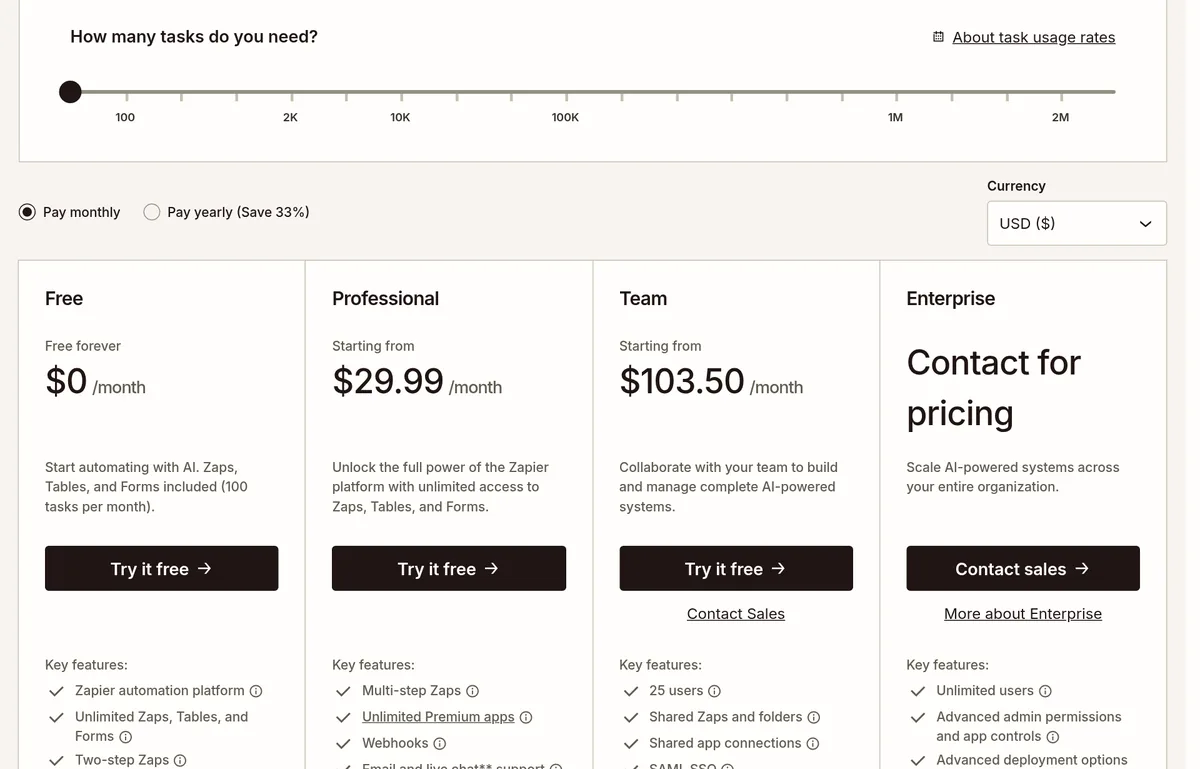
Pay yearly and the page says you save 33%. With that toggle on, Professional starts at $19.99 a month and Team starts at $69 a month.
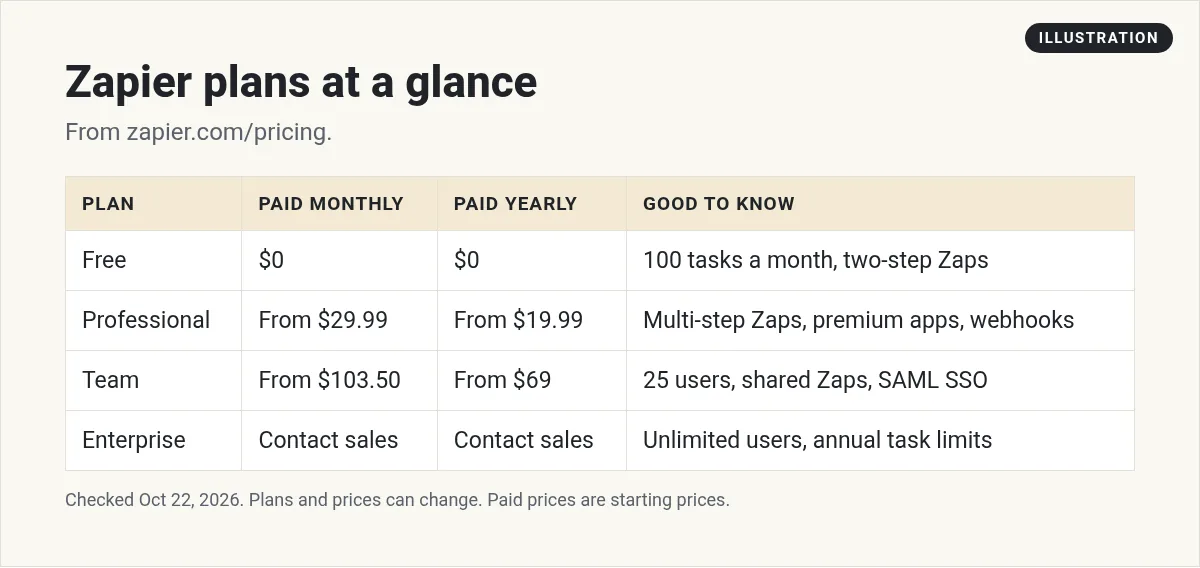
Notice the words "Starting from." Those prices are for the smallest task tier. The page has a task picker that runs from 750 tasks a month up to 2 million. More tasks means a higher monthly price.
What is a Zapier task?
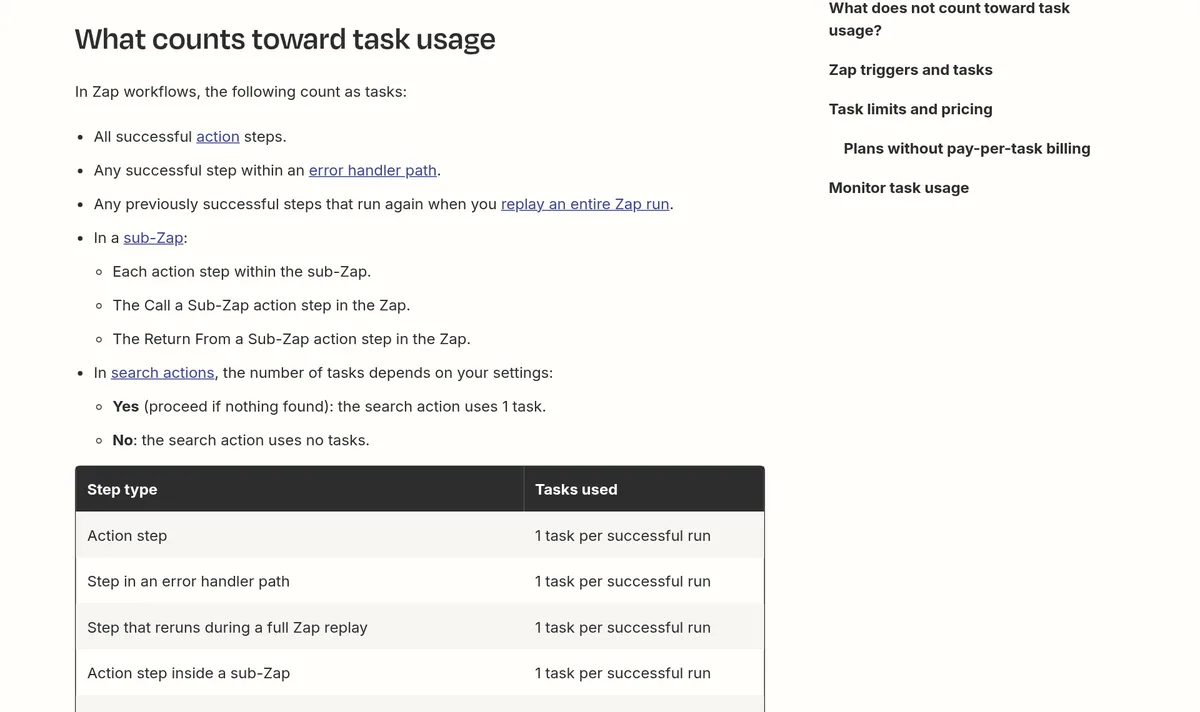
This is the most important thing to understand. Zapier's help center says, "A task is any successful action that runs in Zapier. Only successful actions count toward your task usage."
Here is a simple way to think about it. A Zap has a trigger, then one or more actions. The trigger is the thing that starts it, like a new form fill. Each action after that, like adding a contact or sending a message, is a task when it works.
What does not count
The pricing page FAQ says, "Triggers don't count toward your task limit." The help article adds more free steps:
- Any Filter or Paths step.
- Action steps that error or halt.
- Zapier Tables and Zapier Forms steps.
- Formatter, Delay, Looping, and some other built-in Zapier tools.
Zapier also says it "never charges you a task to check for new data." So a Zap checking your inbox every few minutes costs nothing until it actually does something.
What counts more than once
A few newer tools use more tasks per run. From Zapier's help article:
- Zapier MCP: each successful tool call counts as 2 tasks.
- Zapier Lead Router: each lead routed counts as 5 tasks.
- AI by Zapier: depends on the AI model tier you pick.
- Code by Zapier: 1 task per run, more if you extend the runtime.
A simple task math example
Say you have a Zap that runs when someone fills out a form. It does three things: a filter checks the email, then it adds the person to your email list, then it sends you a Slack message.
- The trigger: 0 tasks.
- The filter: 0 tasks.
- Add to email list: 1 task.
- Slack message: 1 task.
That is 2 tasks each time it runs. If 300 people fill out the form in a month, that is 600 tasks. The Free plan's 100 tasks would not be enough, and Free does not allow multi-step Zaps anyway. The smallest paid tier on the picker, 750 tasks, would cover it.
Where to check your task usage
Don't guess how many tasks you use. Zapier shows it in your account. Its help article points to two places: the Task Usage page and Zap History. Zap History shows each run, so you can see which Zaps use the most tasks.
One thing to know if you use Lead Router. The help article says that starting July 21, 2026, Lead Router usage shows up on these pages. Before that date, it still counted, but it was not shown. So if you look at a date range that crosses July 21, you may see a sudden jump. Zapier says that jump means it "started displaying that usage, not that you used more tasks."
My advice: check your usage after your first full week. Then pick your task tier based on what you see, plus some room to grow.
What happens when you run out of tasks?
Zapier emails you when you are close to your limit and again when you hit it. After that, it depends on a setting called pay-per-task billing:
- If it is on: your Zaps keep running, but extra tasks cost more. The FAQ says pay-per-task billing "is charged at a higher per-task rate than your base subscription tasks."
- If it is off: your Zaps pause until your next usage period starts.
Even with pay-per-task on, there is a maximum. Once you hit it, your Zaps pause until the next period. The pricing page also says you will be switched to pay-as-you-go "unless you turn it off or move up to a higher tier." So check this setting in your account if you want a firm cap on your bill.
Free trial, discounts, and canceling
- Free trial: new accounts get a "free 14-day trial" of Professional. "No credit card is required."
- Nonprofits: Zapier offers a 15% discount on any paid plan, not counting pay-per-task charges.
- Upgrades: happen right away, and you pay a prorated amount.
- Downgrades: take effect at the end of your billing cycle.
- Canceling: you keep your paid plan until the end of the billing cycle.
Is Zapier worth it?
Zapier's big strength is reach. The pricing page says its SDK connects to "9,000+ apps." If your tools are popular apps, Zapier probably connects them in a few clicks.
The weak spot is cost at high volume. Since every successful action is a task, busy Zaps add up. That is why some people move heavy workflows to n8n, which counts one whole workflow run as one execution. I compare them in n8n vs Zapier, and I list other options in Zapier alternatives.
My take: start on the free trial, build your real Zaps, then look at the task usage page before you pick a tier.
My video: I talk about building automations for businesses. Results vary a lot, and tools and prices have changed since I recorded it, so use this post for current Zapier prices.
Any results mentioned in videos are not typical and are not a promise of income. Your results depend on your work and your market.
Which Zapier plan should you pick?
- Just testing? Free works for simple two-step Zaps and 100 tasks a month.
- Running your own business? Professional is the first plan with multi-step Zaps and webhooks. Most solo owners land here.
- Working with a team? Team adds 25 users, shared Zaps, and shared app connections.
- Large company with strict rules? Talk to sales about Enterprise.
Whatever you pick, start with the smallest task tier that covers your real usage. You can move up later. The FAQ says upgrades happen right away, so you are never stuck.
Zapier vs n8n on cost
The way each tool counts usage changes the math a lot. Take the form example above, with 2 paid actions per run. At 300 runs a month, Zapier counts 600 tasks. n8n counts each full workflow run as one execution, so the same work would be 300 executions.
That does not make n8n cheaper for everyone. Its prices and plans are different, and it can take more work to set up. But if your workflows have many steps, it is worth comparing. I go deeper in n8n vs Zapier. To see what each n8n plan costs, read my n8n pricing guide.
How to keep your Zapier bill low
- Use filters early so paid steps only run when needed.
- Use Formatter, Paths, and Delay freely. They don't use tasks.
- Pay yearly once you know your needs. The page says you save 33%.
- Watch MCP and AI steps, since they can use more than 1 task.
- Check your pay-per-task setting so you are never surprised.
Before I pick a Zapier plan
Nothing you check here is sent or saved. Download it if you want to keep it.
Want to automate your business with AI?
In my free workshop, I show how regular people use AI and automation tools to build simple online businesses, step by step.
Join my free AI workshopFree to join. No credit card needed.
Frequently asked questions
Is Zapier free?
Yes. The Free plan costs $0 and includes 100 tasks a month with two-step Zaps. Multi-step Zaps need a paid plan.
How much is Zapier Professional?
Professional starts at $29.99 a month paid monthly, or $19.99 a month paid yearly, checked October 22, 2026. The price goes up with more tasks.
What counts as a task in Zapier?
A task is any successful action. Triggers, filters, paths, and failed steps do not count. Formatter, Delay, Tables, and Forms steps don't count either.
What happens when I hit my Zapier task limit?
If pay-per-task billing is on, your Zaps keep running at a higher per-task rate. If it is off, your Zaps pause until your next usage period.
Does Zapier have a free trial?
Yes. New accounts get a free 14-day trial of the Professional plan, and no credit card is required.
How much does Zapier MCP cost?
Zapier MCP is available to all accounts. Each successful tool call uses 2 tasks from your plan.
Sources
Checked October 22, 2026. Plans, prices, and rules can change.
