
AI Automation · Pricing
n8n charges for whole workflow runs, not steps. Here is what each plan costs, what the free version leaves out, and how to pick.
n8n is the automation tool a lot of AI builders love, because it can do almost anything and it has a free version you can run yourself. But the pricing page mixes cloud plans, self-hosted plans, and a free edition, so it can be confusing.
On October 22, 2026, I went through n8n's pricing page with both the monthly and yearly toggles, its pricing FAQ, and its self-hosting docs. Here is the plain English version.
Quick answer
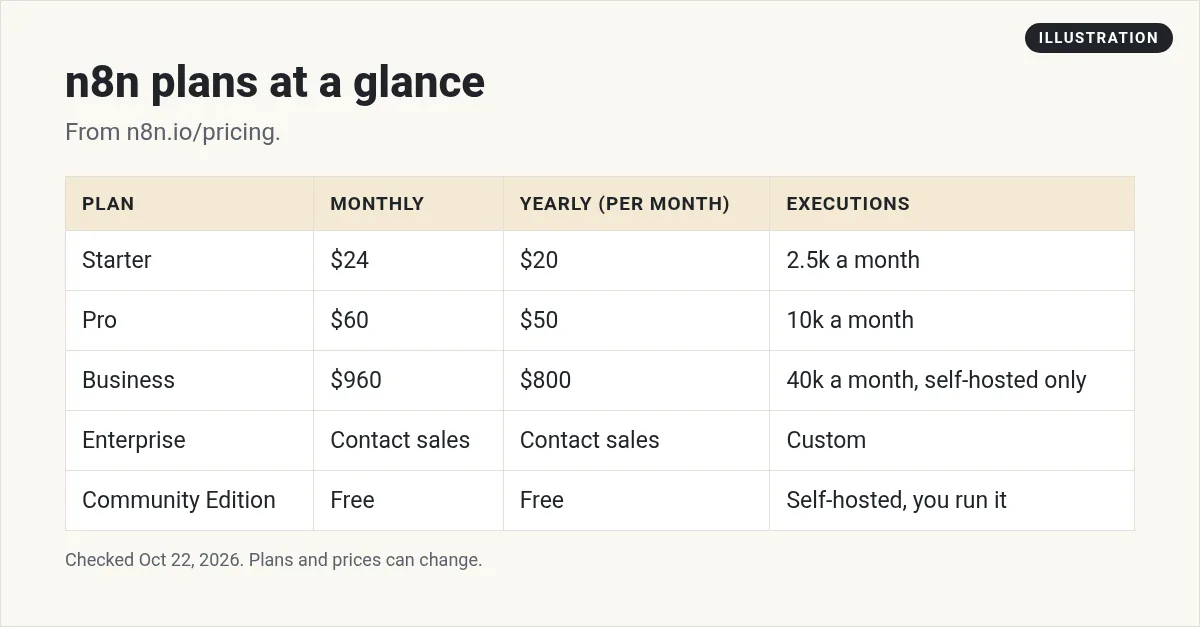
n8n Cloud has three self-serve plans. Starter is $24 a month, or $20 a month billed yearly, for 2,500 workflow executions. Pro is $60 a month, or $50 a month billed yearly, for 10,000 executions. Business is $960 a month, or $800 a month billed yearly, for 40,000 executions, and it is self-hosted only. Enterprise is priced by sales. The Community Edition is free if you host it yourself. Checked October 22, 2026.
n8n plans and prices
The pricing page says, "All plans include unlimited users & workflows and every integration." What changes from plan to plan is how many workflow executions you get each month, plus some team features.
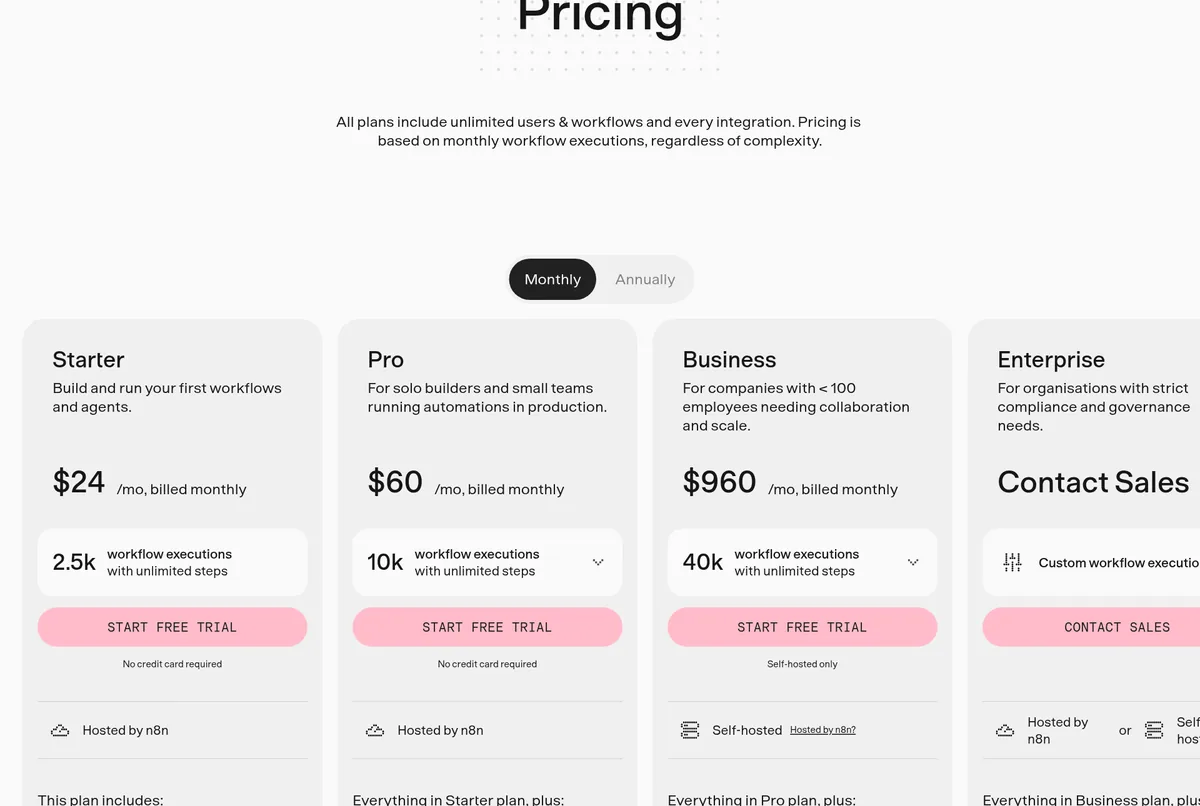
Here is what each plan costs on October 22, 2026, with the Monthly toggle on:
- Starter, $24 a month: 2,500 executions, 1 shared project, 5 concurrent executions, and 1,600 Assistant credits a month. Hosted by n8n.
- Pro, $60 a month: 10,000 executions, 3 shared projects, up to 50 concurrent executions, admin roles, and workflow history. Hosted by n8n.
- Business, $960 a month: 40,000 executions, SSO, multiple environments, and version control with Git. Self-hosted only.
- Enterprise, contact sales: custom executions, 200+ concurrent executions, and dedicated support with an SLA.
Monthly vs yearly billing
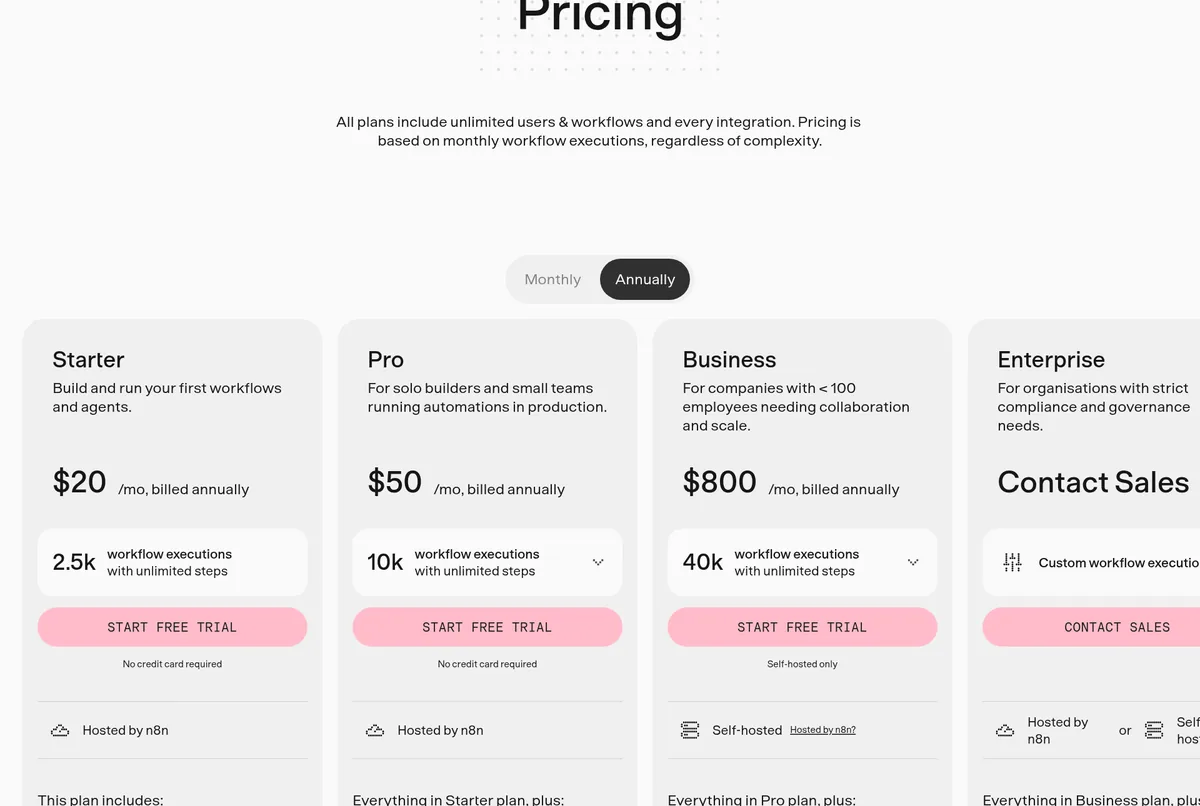
Switch the toggle to Annually and the page says you save 17%. Here is how that works out per month:
- Starter: $20 a month, billed yearly.
- Pro: $50 a month, billed yearly.
- Business: $800 a month, billed yearly.
Quick math on Starter: $24 times 12 is $288 a year. $20 times 12 is $240 a year. So paying yearly saves you $48.
What is an n8n execution?
This is the big reason people pick n8n. The FAQ says, "An execution is a single run of your entire workflow." It does not matter how many steps are in it or how much data it moves.
Compare that with tools that charge per step. Zapier, for example, counts each successful action as a task. In n8n, a 20-step workflow that runs once is one execution. I explain the difference in n8n vs Zapier, and I list other tools in Zapier alternatives. To see what each Zapier plan costs, read my Zapier pricing guide.
n8n also says, "If it doesn't run, you don't pay." You only pay when a workflow runs from start to finish.
How many executions do you need?
n8n's FAQ gives a simple way to guess. Count how often each workflow runs in a month:
- A workflow that runs once a day uses 30 or 31 executions a month.
- A workflow that runs every 5 minutes uses about 8,600 to 8,900 a month.
- A webhook workflow uses one execution each time the event happens.
So one workflow every 5 minutes is already too much for Starter's 2,500. It fits inside Pro's 10,000.
What "concurrent executions" means
You will see this on every plan card. Concurrent executions are how many workflows can run at the same moment. Starter allows 5. Pro allows up to 50. Enterprise lists 200+.
For most small businesses, 5 is plenty, because most workflows finish in seconds. It matters more if many things trigger at once. For example, if 100 people fill out your form within one minute after an email goes out, more concurrency means less waiting. If you expect spikes like that, Pro is the safer choice.
Is n8n free? The Community Edition
Yes, if you host it yourself. The pricing page says, "A standard, self-hosted version of n8n is available on GitHub." n8n's docs call this the Community edition. It is "what n8n runs without a license key." I walk through the setup in my n8n self-hosted guide.
The docs say it "includes almost the complete feature set of n8n." Here is some of what it leaves out:
- Projects and sharing workflows with teammates.
- SSO (SAML, LDAP).
- Environments and version control with Git.
- Log streaming and external secrets.
You can also register your Community edition with your email for a free license key that unlocks a few extras. It is still free.
The catch: "free" means you run the server. You pay for hosting, and you handle updates, backups, and security. If that sounds hard, start on Cloud. New to n8n? Read what is n8n first.
The n8n free trial
Starter and Pro both say "No credit card required" for the trial. The FAQ lists what the Cloud trial includes:
- 1,000 executions and 5 concurrent executions.
- A 180-second execution timeout and 1 team project.
- 800 Assistant credits, plus 100 AI credits.
The Business trial is different. It gives you full Business features for 14 days, and it is the only trial that needs a credit card.
Assistant credits
n8n's AI Assistant, which is in preview, helps you build workflows. Each Cloud plan gets a monthly credit allowance. The FAQ says it is "1,600 on Starter and 4,000 or 9,600 on Pro, depending on your plan size."
Unused credits do not roll over, and you can buy extra. On self-hosted n8n, you bring your own AI key, so no credit limits apply.
Business and Enterprise details
Business is not on n8n Cloud yet. The FAQ answers "Is the Business plan available on n8n Cloud?" with "Not yet." You get a license key and run it on your own server.
A few other facts from the FAQ:
- Start-up Plan: companies with under 20 employees may qualify for 50% off Business.
- Going over: on Business, overage prices are "4,000 EUR for extra buckets of 300,000 executions." Your workflows keep running.
- Support: Business uses the community forum. Dedicated support is for Enterprise.
- Canceling Business: on a monthly plan, it ends at the close of your billing cycle. On a yearly plan, it ends at the end of the year term. n8n does not offer pro-rata refunds.
Where n8n stores your data
For hosted plans, the FAQ says data is stored in the EU, "on servers located in Frankfurt, Germany." If you self-host, your data lives wherever you put your server.
A simple cost example
Say you run a small business with three workflows:
- A daily report that runs once a day: about 30 executions a month.
- A new lead workflow that fires about 40 times a day from a webhook: about 1,200 executions a month.
- A weekly cleanup workflow: about 4 or 5 executions a month.
That adds up to about 1,235 executions a month. Starter's 2,500 covers it with room to spare, at $24 a month or $20 a month billed yearly. And it does not matter if the lead workflow has 3 steps or 30. Each run is still one execution.
Common n8n pricing mistakes
- Forgetting schedules that run often. One workflow every 5 minutes uses about 8,600 to 8,900 executions a month.
- Planning on Business in the cloud. It is self-hosted only for now.
- Thinking self-hosted means free of cost. The software is free, but the server and your time are not.
- Counting on unused Assistant credits. They do not roll over.
Which n8n plan should you pick?
- Learning or testing? Start the free Cloud trial. No card needed.
- A few workflows for your business? Starter at $24 a month, or $20 billed yearly.
- Workflows that run all day? Pro, for the 10,000 executions and more concurrency.
- Comfortable running a server? The free Community Edition.
If you want to turn automation skills into a service, see my guide to starting an AI automation agency.
My video: How I think about starting an AI automation agency. Results vary a lot, and tools and prices have changed since I recorded it, so use this post for current n8n prices.
Any results mentioned in videos are not typical and are not a promise of income. Your results depend on your work and your market.
Before I pay for n8n
Nothing you check here is sent or saved. Download it if you want to keep it.
Want to automate your business with AI?
In my free workshop, I show how regular people use AI and automation tools to build simple online businesses, step by step.
Join my free AI workshopFree to join. No credit card needed.
Frequently asked questions
Is n8n free?
Yes, if you host it yourself. The Community Edition is free on GitHub. n8n Cloud plans are paid, with a free trial that needs no credit card.
How much is n8n Cloud?
Starter is $24 a month, or $20 a month billed yearly. Pro is $60 a month, or $50 a month billed yearly. Prices checked October 22, 2026.
What counts as an execution in n8n?
An execution is a single run of your entire workflow. The number of steps does not matter.
Is the n8n Business plan on Cloud?
Not yet. n8n says the Business plan is currently only available for self-hosted n8n.
What does the n8n free trial include?
The Cloud trial includes 1,000 executions, 5 concurrent executions, 1 team project, and 800 Assistant credits plus 100 AI credits.
Does n8n give refunds?
n8n says it does not offer pro-rata refunds. If you cancel a monthly Business plan, it ends at the close of your current billing cycle.
Sources
Checked October 22, 2026. Plans, prices, and rules can change.
