
AI Automation · Comparison
Zapier is the easy, popular choice. n8n is the flexible one that can cost less at scale. Here is how they really differ, and how to choose without overthinking it.
Both n8n and Zapier connect your apps and do the boring steps for you. On the surface they look alike. Under the hood, they charge in very different ways, and that changes which one is cheaper for you.
I checked both pricing pages and help docs on October 21, 2026. Here is a plain side by side: cost, ease of use, apps, self-hosting, and a simple way to decide.
Quick answer
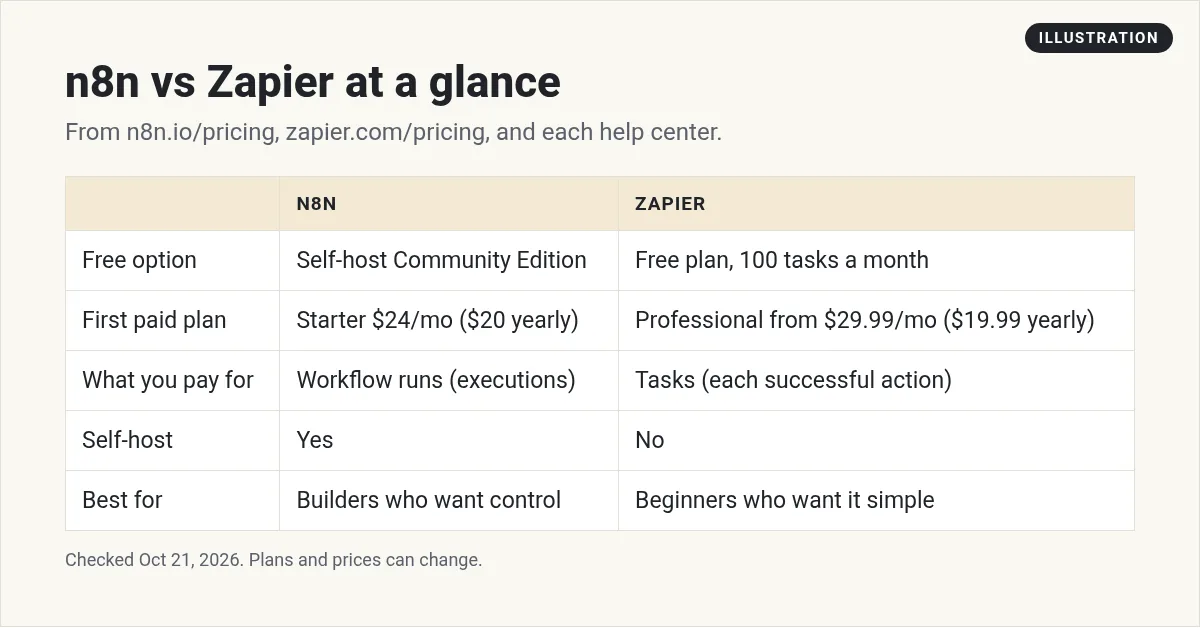
Zapier is easier for beginners and connects to 9,000+ apps. It has a free plan with 100 tasks a month, and Professional starts at $29.99 a month, or $19.99 billed yearly. Zapier counts every successful action as a task. n8n is more flexible, lists 1500+ integrations, and charges per full workflow run. n8n Cloud starts at $24 a month, or $20 billed yearly, and you can self-host the free Community edition. Pick Zapier for the simplest start. Pick n8n for complex or high-volume workflows, or to self-host. Checked October 21, 2026.
The short answer
- New to automation and want it easy? Start with Zapier.
- Need lots of steps, lots of runs, or AI agents? Look hard at n8n.
- Want to host it yourself? Only n8n lets you.
- Need an app nobody else supports? Zapier's list is bigger.
The big difference: how they charge
This is the part that matters most, so take a minute here.
Zapier charges per task. Its help center says a task is any successful action that runs in Zapier. So a Zap with five action steps uses five tasks every time it runs.
n8n charges per execution. One execution is one full run of a workflow, no matter how many steps. n8n's pricing page says pricing is based on monthly workflow executions, regardless of complexity.
So the more steps your workflows have, the more n8n's model tends to help you. For simple two step jobs, the gap is small.
There is one more detail on each side. Zapier says only successful actions count, so a step that fails does not use a task. n8n's pricing page says if a workflow does not run from start to finish, you do not pay for it. Both rules are fair. They just count different things.
A quick example (my math)
Say you have one workflow with five action steps, and it runs 1,000 times a month. This is my own math from each company's rules, not a quote from either one.
- Zapier: 5 actions times 1,000 runs is about 5,000 tasks a month.
- n8n: 1,000 executions a month. That fits inside n8n's Starter plan, which lists 2.5k.
Zapier's price goes up with the number of tasks you pick on its pricing page. So for this example, check what 5,000 tasks costs on the slider the day you buy.
Prices side by side
Here are the starting prices, checked October 21, 2026. For full plan details, see my n8n pricing and Zapier pricing guides.
| Plan | Zapier (monthly / yearly) | n8n Cloud (monthly / yearly) |
|---|---|---|
| Free | $0, 100 tasks a month | No free Cloud plan. Free self-hosted Community edition. |
| Entry | Professional from $29.99 / $19.99 | Starter $24 / $20 (2.5k runs) |
| Next | Team from $103.50 / $69 | Pro $60 / $50 (10k runs) |
| Big | Enterprise, contact sales | Business $960 / $800 (self-hosted only), Enterprise by contact |
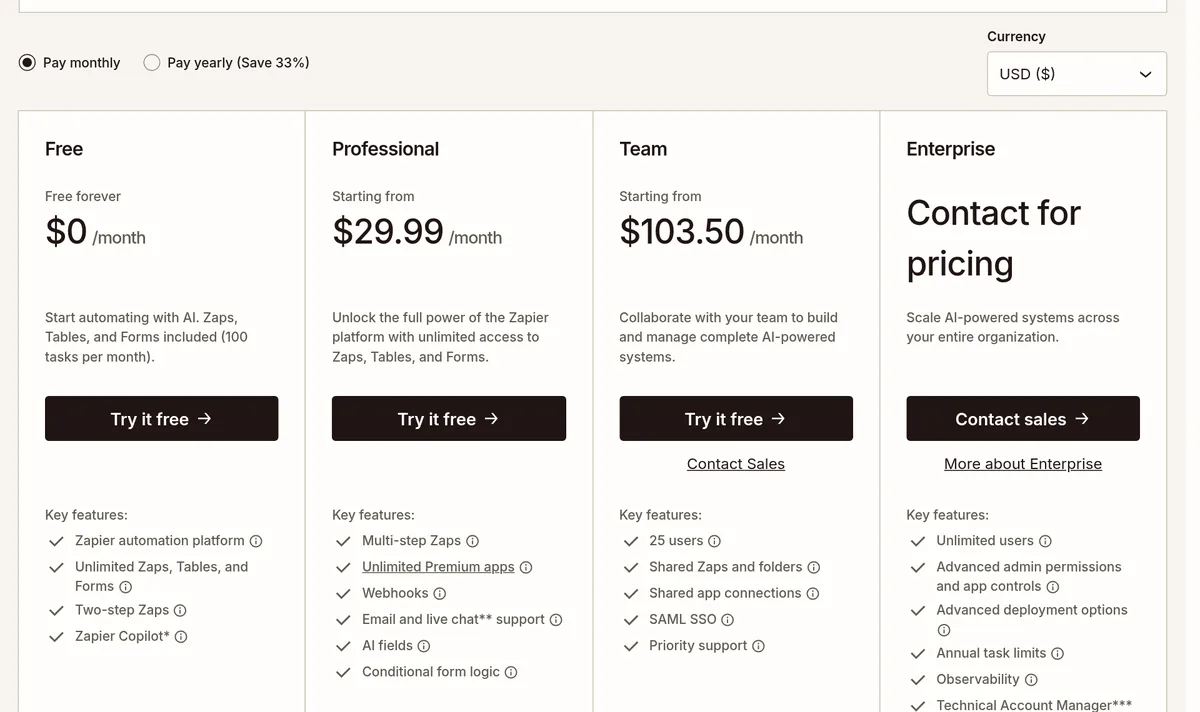
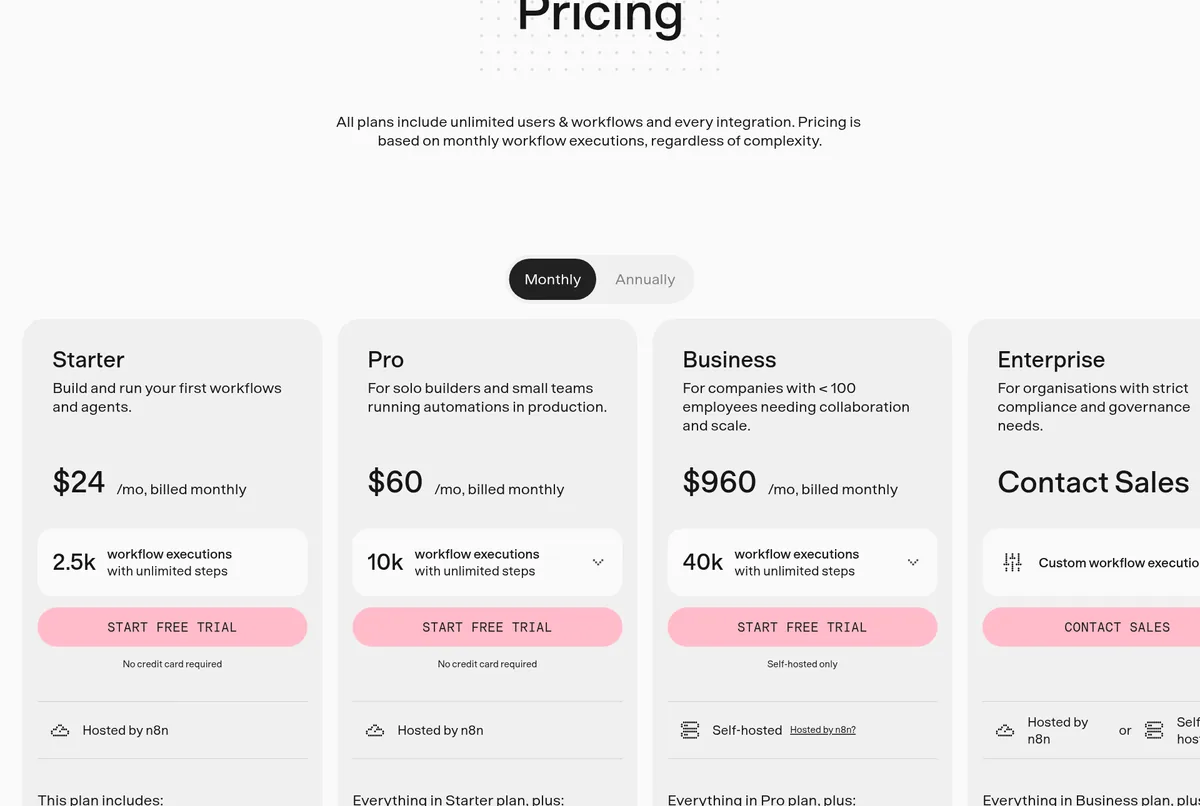
Both have trials. Zapier says new accounts get a free 14-day trial of Professional with no credit card. n8n lists a free trial with no credit card on Starter and Pro.
Ease of use
Zapier is built for people who have never automated anything. You pick a trigger app, pick an action app, and fill in the blanks. It also has Zapier Copilot on every plan to help you build.
n8n gives you a canvas with boxes and lines. It is visual, but there is more to learn. You will see terms like nodes, executions, and expressions. n8n's own docs point people without technical skills to n8n Cloud rather than self-hosting.
My honest take: if you get frustrated easily by tech, Zapier will feel better on day one. If you like to tinker, n8n rewards you.
Apps and integrations
Zapier says it connects to 9,000+ apps. n8n's GitHub page lists 1500+ integrations and 9,000+ workflow templates.
That is a real gap. Before you choose, list the apps you use most and search for each one in both tools. If an app you need is only on Zapier, that may decide it for you. n8n also lets you call almost any service that has an API, but that takes more setup.
Self-hosting and control
This is n8n's biggest edge. You can run n8n on your own server. New to n8n? Start with my guide to what n8n is. n8n's docs say the Community edition is free and includes almost the complete feature set.
Zapier is cloud only. You cannot host it yourself.
Self-hosting gives you control over your data and no per-run fees. But you take on setup, updates, backups, and server costs. Also know that n8n's license limits use to your own internal business, personal, or non-commercial purposes.
AI features
Both tools now lean hard into AI.
- Zapier calls itself an AI orchestration platform. Its plans include AI fields, Zapier MCP, and add-ons for agents and chatbots. AI steps use tasks like any other step.
- n8n lists agents, MCP, and AI nodes on every Cloud plan. Starter includes 1,600 Assistant credits a month and AI models without your own API keys.
If AI agents are the main reason you want automation, n8n's per-run pricing can make long AI workflows easier to budget.
What your first week looks like
Here is what I would expect on each tool, based on how each one is built. This is my take, not a promise from either company.
Zapier, day one: you sign up, pick a template or a trigger app, connect your accounts, and turn on your first Zap in under an hour. Most of the week is spent adding a few more Zaps and learning filters.
n8n, day one: you sign up for Cloud, open the canvas, and start from a template. You spend more time learning how data moves from one node to the next. By the end of the week, you can build things that would take many separate Zaps.
Neither path is wrong. Zapier gets you a quick win. n8n asks for more patience up front and gives you more room to grow.
Common mistakes when choosing
- Comparing the cheapest plans only. What matters is the plan you will need at your real volume.
- Forgetting multi-step Zaps need a paid plan. Zapier's Free plan lists two-step Zaps only.
- Self-hosting too early. Free software still needs a server and your time. Start on Cloud.
- Not checking apps first. Make sure every app you rely on is supported.
- Building ten workflows at once. Get one working well, then add more.
Who should pick which
Pick Zapier if:
- You want the fastest, easiest start.
- You run a few simple workflows.
- You need a less common app.
- You never want to think about servers.
Pick n8n if:
- Your workflows have many steps or run often.
- You want AI agents inside your workflows.
- You want the option to self-host.
- You enjoy learning how things work.
And if you already use a CRM with built in automations, you may not need either one yet. See my guide to GoHighLevel automation.
How to decide in one afternoon
- Pick one real task you repeat each week.
- Build it in Zapier's free trial.
- Build the same task in n8n's free trial.
- Note which one felt easier and which one fits your budget at your volume.
- Keep that one. Cancel the other trial.
Thinking about selling automations to local businesses? Read my guide to starting an AI automation agency and my breakdown of AI service business costs.
Before I choose n8n or Zapier
Nothing you check here is sent or saved. Download it if you want to keep it.
Want to build with AI, not just connect apps?
In my free workshop, I show how regular people use AI tools to build simple apps and products, step by step.
Join my free AI workshopFree to join. No credit card needed.
Frequently asked questions
Is n8n cheaper than Zapier?
Often, for workflows with many steps or many runs, because n8n charges per full run and Zapier charges per action. For a few simple workflows, the gap is small.
Is n8n harder to use than Zapier?
Yes, a bit. Zapier is built for total beginners. n8n has more to learn but gives you more control.
Does Zapier have a free plan?
Yes. Zapier's Free plan includes 100 tasks a month and two-step Zaps. New accounts also get a 14-day trial of Professional.
Can I self-host Zapier?
No. Zapier is cloud only. n8n can be self-hosted, and its Community edition is free.
How many apps do n8n and Zapier connect to?
Zapier says 9,000+ apps. n8n's GitHub page lists 1500+ integrations.
What is a task in Zapier?
Zapier's help center says a task is any successful action that runs in Zapier. A Zap with five actions uses five tasks each run.
Sources
Checked October 21, 2026. Plans, prices, and rules can change.
