
AI Automation · Explainer
n8n is a tool that connects your apps and does the boring steps for you. Here is what it is, how it works, what it costs, and whether a beginner should start with it.
You fill out a form. Then someone copies it into a sheet, sends a welcome email, and pings the team. Every single time. Tools like n8n do those steps for you, on their own, all day.
I read n8n's docs, pricing page, and license on October 21, 2026. Here is the plain English version: what n8n is, how a workflow runs, the two ways to use it, what it costs, and who should pick something simpler.
Quick answer
n8n is a workflow automation tool. You connect apps on a visual canvas, and n8n runs the steps for you when something happens, like a new form entry. It also has AI steps that can read and write text. You can use n8n Cloud, which starts at $24 a month ($20 billed yearly), or host the free Community edition on your own server. n8n calls itself fair-code. The code is public, but its license has limits on commercial use. Checked October 21, 2026.
What is n8n, in plain words?
n8n's docs call it a fair-code licensed workflow automation tool that combines AI features with business process automation. That is a mouthful. Here is my version.
n8n is a robot helper for your apps. You tell it: when this happens, do these steps. Then it does them every time, without you.
You build each job on a canvas. Each box is a step. You draw lines between the boxes to set the order. n8n's GitHub page says it connects to 1500+ integrations. Its template library lists over 13,000 workflow templates (as of October 2026) that you can start from. I show how to find and import them in my n8n templates guide.
What about the name? n8n's GitHub page says it means nodemation, and you say it as n-eight-n. The founder, Jan Oberhauser, says the first part comes from Node.js and the rest comes from automation. He shortened it to n8n because the long name was too much to type.
How an n8n workflow works
Every n8n workflow has the same basic shape.
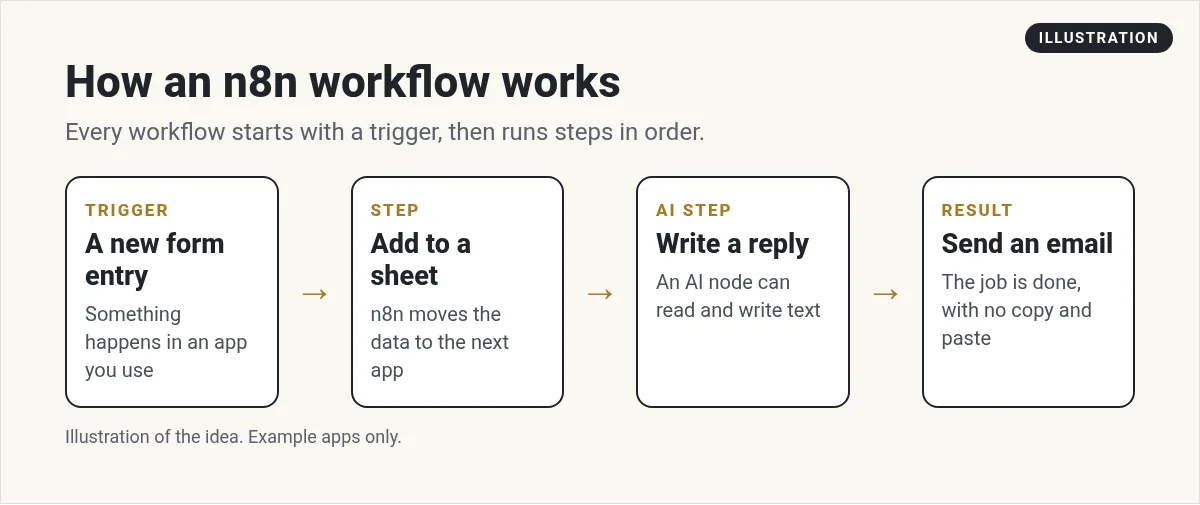
- A trigger. Something that starts the job. A new form entry, a new email, or a set time like every morning at 8.
- Steps. Each step does one thing. Add a row to a sheet. Look up a contact. Send a message.
- Logic. You can add if this, then that. For example, only email people who checked a box.
- AI steps. An AI step can sum up a long message, sort a lead, or draft a reply.
n8n's own homepage shows a simple example. Every morning at 8, it fetches news headlines, merges them, sums them up with AI, and emails the briefing. That is the idea. One trigger, a few steps, a finished result.
Words you will see in n8n
n8n uses a few words that can be confusing at first. Here they are in plain terms.
- Workflow: one full job, from start to finish. For example, new lead to welcome email.
- Node: one box on the canvas. Each node is one step, like an app action or a bit of logic.
- Trigger: the first node. It decides when the workflow starts.
- Execution: one run of a workflow. This is what n8n Cloud counts for billing.
- Credentials: the saved logins that let n8n talk to your apps. Treat them like passwords.
- Template: a ready-made workflow you can copy and change.
Once these words click, the rest of n8n makes a lot more sense. Most of your time goes into picking the right trigger and testing each node one at a time.
What can you automate with n8n?
Here are a few jobs a small business might hand to n8n. These are example ideas, not stories from real customers.
- New leads: when someone fills out a form, add them to your CRM and send a welcome email.
- Daily summary: each morning, pull yesterday's sales into a short report in your inbox.
- Support sorting: when an email comes in, have AI tag it as billing, sales, or help.
- Content: when you post a video, save the link to a sheet and draft a social post.
n8n's docs also show how to connect it to AI coding tools like Claude Code through MCP. That lets an AI assistant use your workflows as tools. It is an advanced use, so skip it for now if you are new.
n8n Cloud vs self-hosted
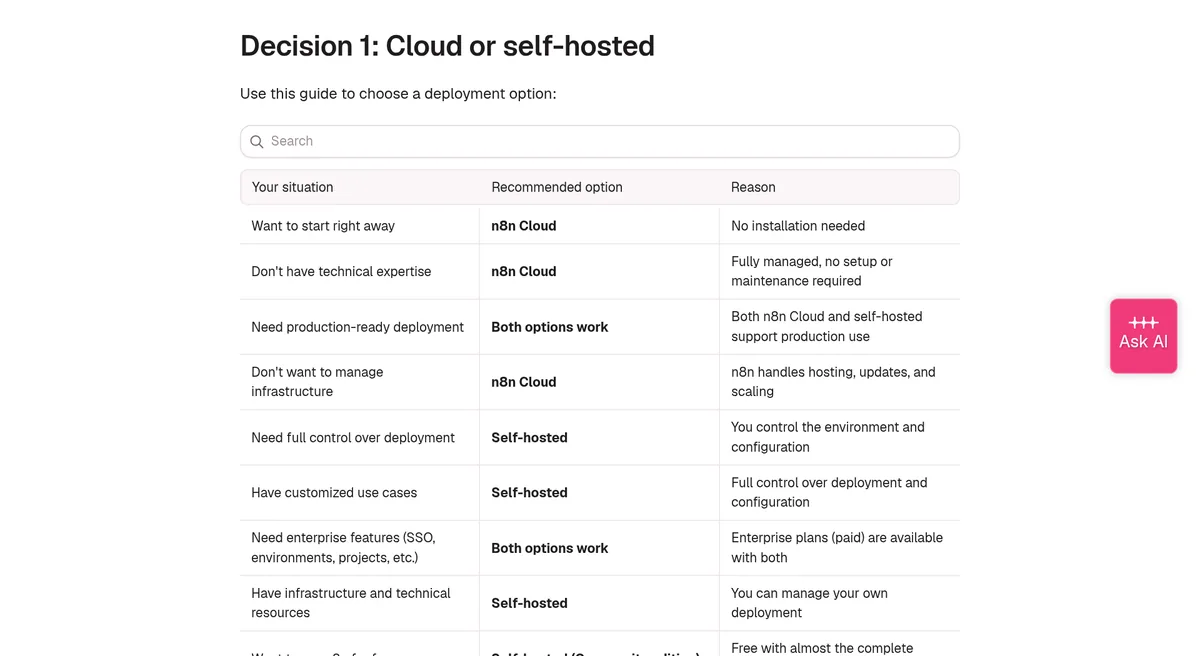
There are two ways to use n8n. This is the first choice you make.
- n8n Cloud: n8n runs it for you. You sign up and start building. n8n handles hosting, updates, and scaling.
- Self-hosted: you run n8n on your own server or computer. You get full control, but you handle setup and updates.
n8n's docs have a simple guide. If you do not have technical skills, they point you to n8n Cloud. If you want to run n8n for free, they point you to the self-hosted Community edition.
How much does n8n cost?
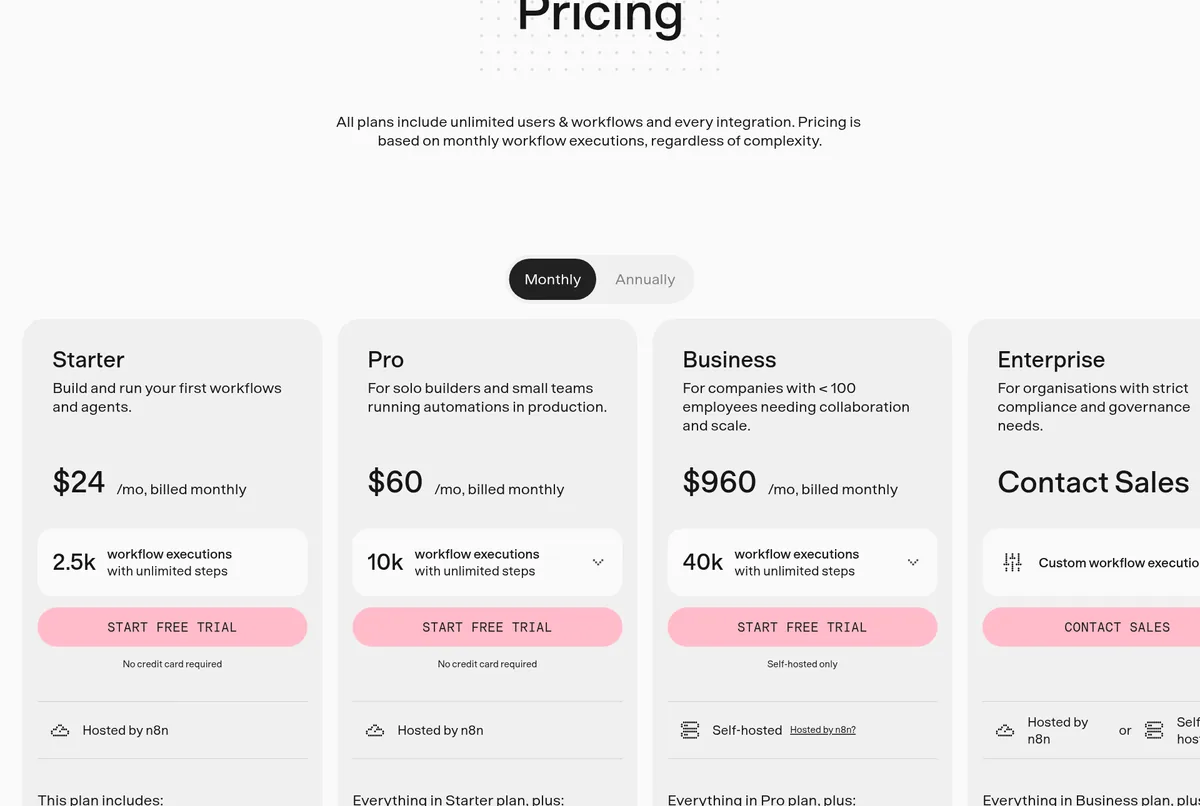
n8n Cloud charges by workflow runs, which it calls executions. One run is one full pass through a workflow, no matter how many steps it has. Here are the plans, checked October 21, 2026.
| Plan | Monthly | Billed yearly | Runs per month |
|---|---|---|---|
| Starter | $24/mo | $20/mo | 2.5k |
| Pro | $60/mo | $50/mo | 10k |
| Business | $960/mo | $800/mo | 40k (self-hosted only) |
| Enterprise | Contact sales | Custom | |
All plans include unlimited users, unlimited workflows, and every integration. Starter and Pro list a free trial with no credit card needed. n8n's pricing page puts it simply: "If it doesn’t run, you don’t pay."
n8n also lists a Start-up Plan. Companies under 20 people may qualify for 50% off Business.
Is n8n free?
Yes and no. The self-hosted Community edition is free. n8n's docs say it includes almost the complete feature set. A few team features are left out, such as projects, sharing, single sign on, and version control with Git.
But free software is not the same as zero cost. You still need a server to run it, and someone has to keep it updated and backed up. For many beginners, the $20 to $24 Cloud plan is cheaper than their own time. For every plan and how executions count, see my n8n pricing guide.
What fair-code means for you
n8n's code is public on GitHub. But it is not open source in the usual sense. Most of it uses n8n's Sustainable Use License.
That license says you may use or change the software only for your own internal business purposes, or for non-commercial or personal use. So you can run your own business on it. But reselling n8n itself as a hosted service is not what the free license allows. If you plan to build a product on top of n8n, read the license first.
Who should use n8n?
n8n is a good fit if:
- You like to see how things work and do not mind a learning curve.
- You want AI steps inside your automations.
- You run a lot of workflows and want to pay per run, not per step.
- You want the option to self-host later.
Pick something simpler if:
- You only need two or three small automations.
- You want the easiest setup and do not care about control. My n8n vs Zapier guide compares the two.
- Your CRM already has the automations you need built in.
That last point matters. If you already use a CRM with workflows, start there. I cover that in my guide to GoHighLevel automation.
How to start with n8n this week
- Write down one boring task you do more than once a week.
- Start a free trial of n8n Cloud.
- Look for a template that matches your task.
- Run it with test data first, not real customers.
- Turn it on, then check the results for a few days.
Start small. One working workflow teaches you more than ten half-built ones.
My video: I explain how people use automation tools to start an AI automation agency. It is a business overview, not an n8n setup guide.
Any results mentioned in videos are not typical and are not a promise of income. Your results depend on your work and your market.
If you want to turn automation into a service for local businesses, read my guide to starting an AI automation agency.
My first n8n workflow
Nothing you check here is sent or saved. Download it if you want to keep it.
Want to build with AI, not just automate?
In my free workshop, I show how regular people use AI tools to build simple apps and products, step by step.
Join my free AI workshopFree to join. No credit card needed.
Frequently asked questions
What is n8n used for?
n8n connects your apps and runs steps for you when something happens. People use it to move leads into a CRM, send emails, build daily reports, and add AI steps that sort or draft messages.
Is n8n free?
The self-hosted Community edition is free, but you need your own server. n8n Cloud starts at $24 a month, or $20 a month billed yearly, checked October 21, 2026.
Is n8n open source?
n8n calls itself fair-code. The code is public, but most of it uses the Sustainable Use License, which limits use to internal business, personal, or non-commercial purposes.
Is n8n hard for beginners?
It has a learning curve. n8n's docs point people without technical skills to n8n Cloud, since you skip setup. Start with one small workflow and a template.
How does n8n pricing work?
n8n Cloud charges by executions. One execution is one full run of a workflow, no matter how many steps it has.
What does n8n stand for?
n8n's GitHub page says it means nodemation, and you say it as n-eight-n.
Sources
Checked October 21, 2026. Plans, prices, and rules can change.
