
AI Automation · Alternatives
Zapier is easy, but it can get pricey as your workflows grow. Here are six real alternatives, what each one costs, and who each one is best for.
Zapier is the tool most people start with, and for good reason. It is simple, and it connects to 9,000+ apps. But Zapier charges per task, and every successful action counts as a task. Busy workflows with many steps can get expensive.
So I checked six alternatives on October 21, 2026. For each one I looked at the pricing page, how it charges, and who it fits. One quick note: I am not saying Zapier is bad. For a few simple workflows, it is still a great pick.
Quick answer
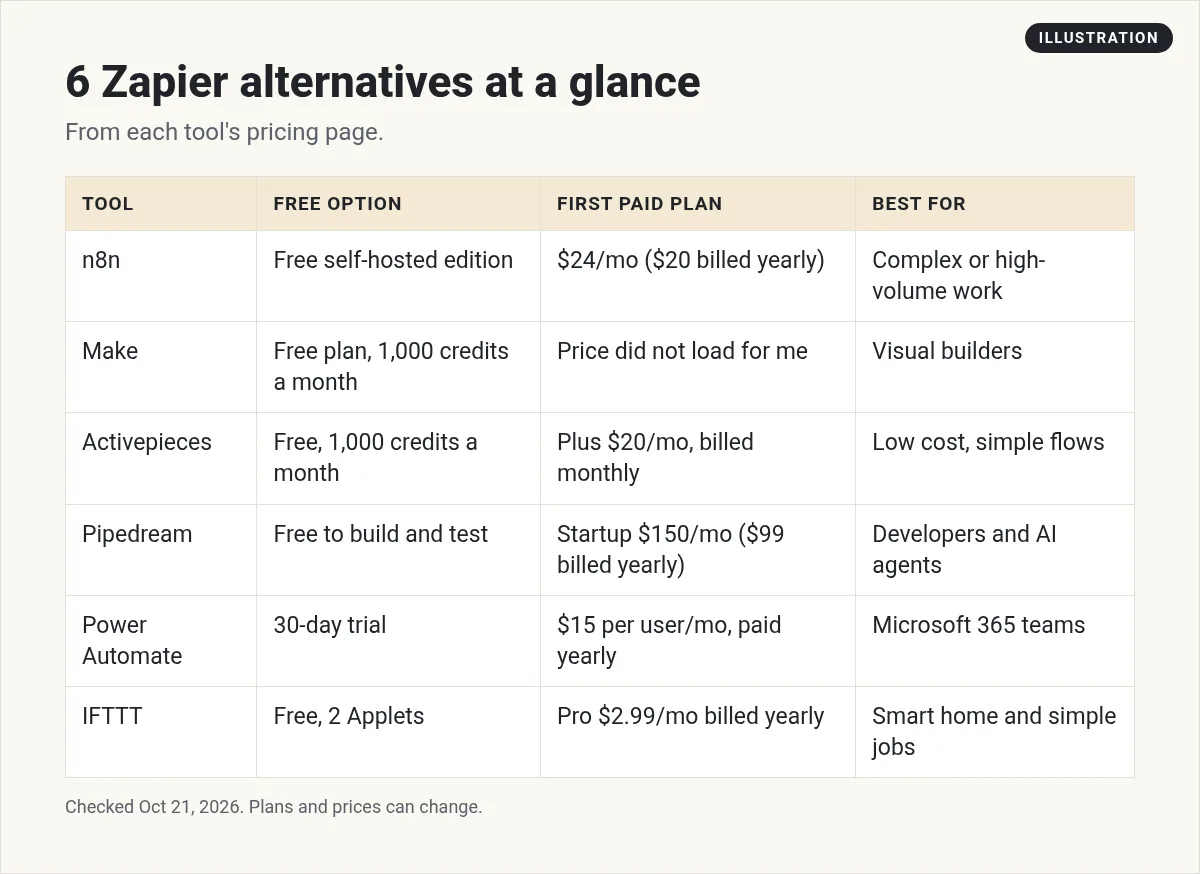
The best Zapier alternative for most people is n8n if you have complex or busy workflows, since it charges per full workflow run and you can self-host it for free. Make is a strong visual builder with a free plan of 1,000 credits a month. Activepieces has a free plan and a $20 a month Plus plan. Pipedream suits developers. Power Automate fits Microsoft 365 teams at $15 per user a month, paid yearly. IFTTT is the cheapest for simple jobs, from $2.99 a month billed yearly. Checked October 21, 2026.
Why people leave Zapier
Zapier's Free plan gives you 100 tasks a month and two-step Zaps. Professional starts at $29.99 a month, or $19.99 a month billed yearly. Team starts at $103.50 a month, or $69 billed yearly. All checked October 21, 2026. For every plan and how tasks work, see my Zapier pricing guide.
The catch is the task count. A Zap with five actions uses five tasks every time it runs. Here are the reasons I hear most for switching:
- The bill grows fast as workflows get longer.
- You want to host the tool yourself.
- You need more control, like custom code or AI agents.
- You only need something tiny and cheap.
1. n8n: best for complex or busy workflows
n8n charges per execution, which is one full run of a workflow, no matter how many steps it has. Its pricing page says pricing is based on monthly workflow executions, regardless of complexity.
- Free option: the self-hosted Community edition.
- Starter: $24 a month billed monthly, or $20 billed yearly, with 2.5k executions.
- Pro: $60 a month billed monthly, or $50 billed yearly, with 10k executions.
- Apps: n8n lists 1500+ integrations.
Watch out: self-hosting is free software, not free work. You handle the server, updates, and backups. n8n has more to learn than Zapier. But if your workflows have many steps, it can cost a lot less. New to it? Start with my guide to what n8n is, then my full n8n vs Zapier comparison.
2. Make: best for visual builders
Make lets you build workflows, which it calls scenarios, on a visual map. Make now bills in credits. Its pricing page says most actions use 1 credit, and some AI features may use more.
- Free option: a Free plan with 1,000 credits a month.
- Paid plans: Core, Pro, and Teams. Make says paying yearly is cheaper than paying monthly.
- Apps: more than 1,000.
To be upfront: Make's plan prices would not load for me on October 21, in two different browsers. Only the FAQ came through. So I am not listing Make's paid prices here. Check make.com/pricing yourself before you buy.
3. Activepieces: best low-cost pick for small teams
Activepieces is a simple builder that runs on its cloud or on your own servers. It charges in credits, with a flat monthly price.
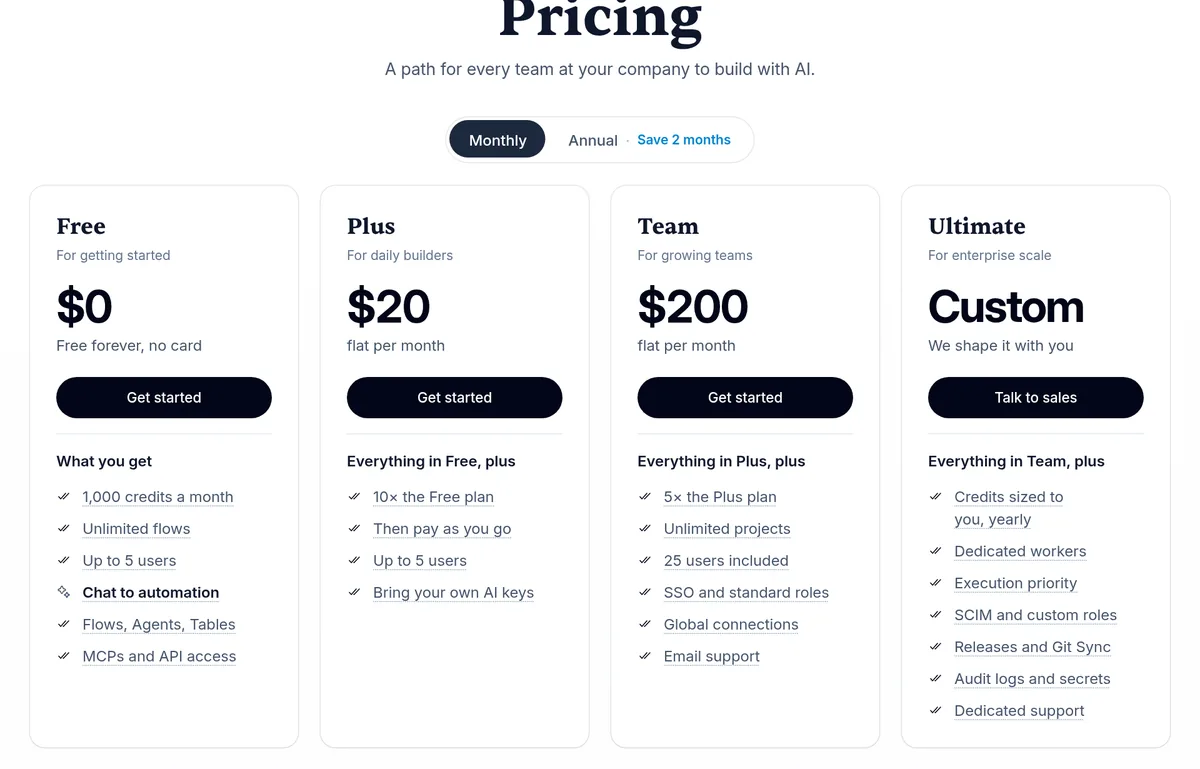
- Free: $0, with 1,000 credits a month, unlimited flows, and up to 5 users. If you run out, the page gives two answers: its plan table says Free waits for tomorrow, but its FAQ says you wait until the next month.
- Plus: $20 a month billed monthly, with 10,000 credits a month, then pay as you go.
- Team: $200 a month billed monthly, with 50,000 credits and 25 users.
- Yearly billing: the page says it saves 2 months.
4. Pipedream: best for developers and AI agents
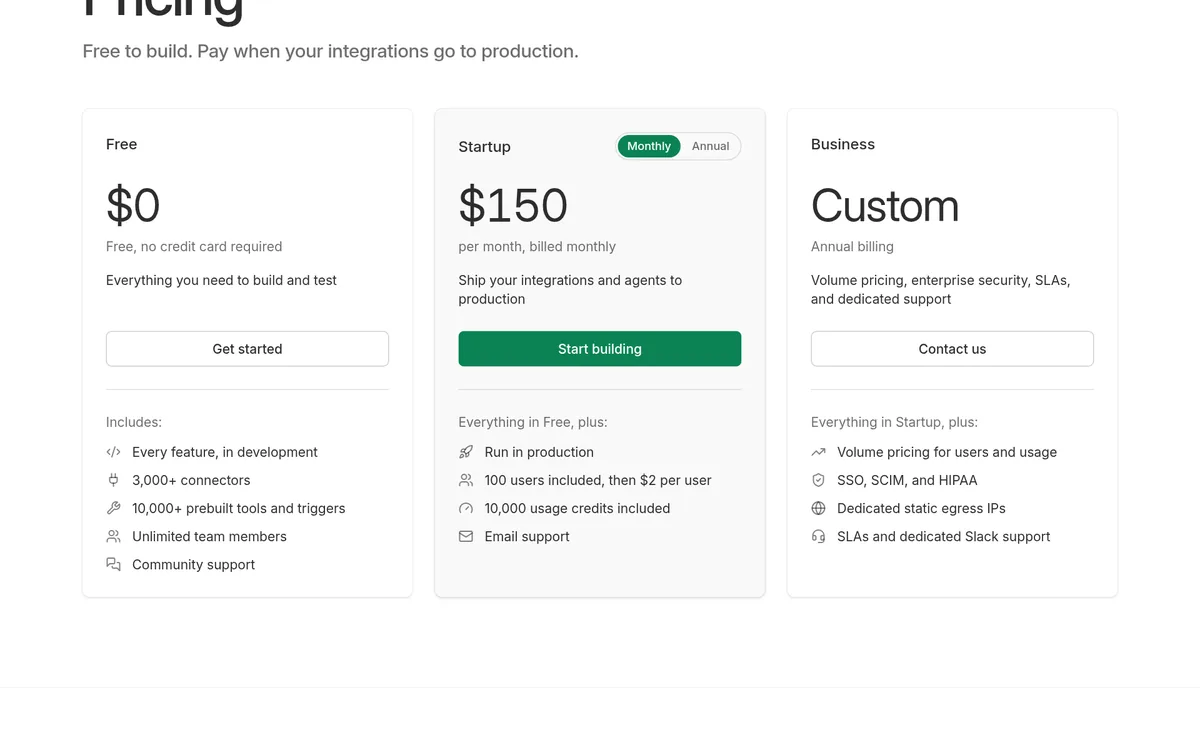
Pipedream is built for people who write some code. Its tagline is free to build, and you pay when your integrations go to production.
- Free: $0, no credit card, with every feature in development.
- Startup: $150 a month billed monthly, or $99 a month billed yearly. It includes 10,000 usage credits and 100 users, then $2 per user.
- Apps: 3,000+ connectors and 10,000+ prebuilt tools and triggers. MCP servers are on every plan.
Watch out: the jump from Free to Startup is big for a solo builder. If you are not a developer, skip this one. If you are building an AI agent that needs to log in to many apps, look closely.
5. Power Automate: best if your team lives in Microsoft 365
Power Automate is Microsoft's automation tool. It shines if your work is in Outlook, Teams, Excel, and SharePoint.
- Free trial: 30 days, with cloud flows and standard connectors.
- Premium: $15 per user a month, paid yearly.
- Process: $150 per bot a month, paid yearly, for unattended automation.
Watch out: Microsoft notes that prices shown are for marketing, and your actual price shows at checkout. The free trial only covers standard connectors, so check that the apps you need are included before you count on it.
6. IFTTT: best for simple, cheap jobs
IFTTT connects apps and smart home devices with small automations called Applets. It is the simplest tool on this list.
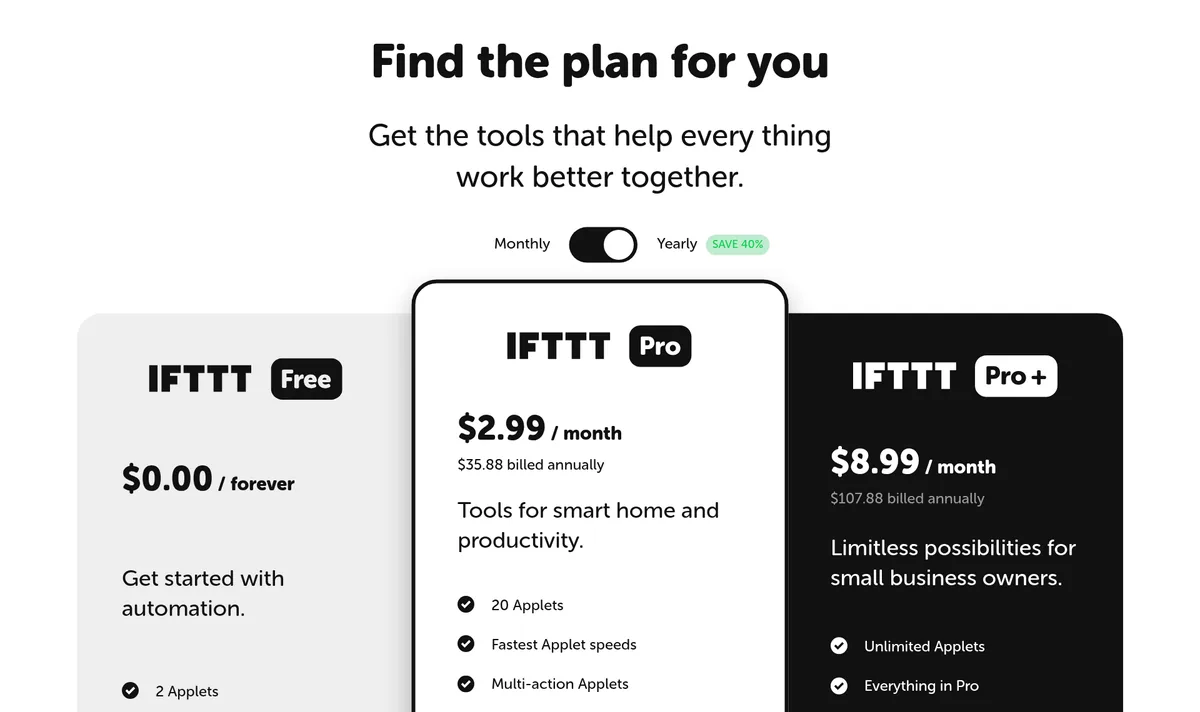
- Free: $0 with 2 Applets.
- Pro: $2.99 a month, which is $35.88 billed yearly, with 20 Applets, multi-action Applets, and webhooks.
- Pro+: $8.99 a month, which is $107.88 billed yearly, with unlimited Applets, AI services, and filters.
Those are yearly prices. The page says yearly saves 40%, and I did not capture the monthly prices.
A quick example (my math)
Say you have one workflow with five actions, and it runs 1,000 times a month. This is my own math from each company's rules, not a quote from any of them.
- Zapier: 5 actions times 1,000 runs is about 5,000 tasks a month. That is far past the Free plan's 100 tasks.
- n8n: 1,000 executions a month. That fits inside Starter, which lists 2.5k.
- Make or Activepieces: credits depend on the steps and features you use. If each action used 1 credit, that would be about 5,000 credits, more than either free plan includes.
The lesson: the more steps your workflows have, the more the pricing model matters. Do this math with your own numbers before you pick.
What if you already use a CRM?
Many CRMs now have automation built in. If your leads, emails, and texts already live in one tool, you may not need Zapier or any of these at all. For example, see my guide to GoHighLevel automation.
Who should stay on Zapier
Switching takes time, and time costs money too. I would stay on Zapier if:
- You run a handful of short workflows and the bill is fine.
- You rely on an app that only Zapier supports.
- Your team already knows it and nobody wants to learn a new tool.
In that case, trim the waste instead. Turn off Zaps you no longer need, and add filters so Zaps stop early when there is nothing to do.
How to choose in 15 minutes
- List your top three workflows. Count the steps and how often each runs.
- Check your apps. Make sure every app you rely on is supported.
- Do the math. Per task (Zapier), per credit (Make, Activepieces), or per run (n8n) can give very different bills.
- Decide on hosting. Want it on your own server? Look at n8n or Activepieces.
- Try the free plan. Build one real workflow before you pay.
How to switch without breaking things
- Move one workflow at a time. Start with the one that costs you the most tasks.
- Run both side by side for a week. Turn off the Zapier version only after the new one works.
- Write down every login. You will need to reconnect each app in the new tool.
- Test with fake data first. Do not send test emails to real customers.
Before I switch from Zapier
Nothing you check here is sent or saved. Download it if you want to keep it.
Want to build with AI, not just connect apps?
In my free workshop, I show how regular people use AI tools to build simple apps and products, step by step.
Join my free AI workshopFree to join. No credit card needed.
Frequently asked questions
What is the best Zapier alternative?
For complex or busy workflows, n8n, because it charges per full run and can be self-hosted. For simple jobs on a budget, IFTTT. For Microsoft 365 teams, Power Automate.
Is there a free Zapier alternative?
Yes. n8n has a free self-hosted edition. Make and Activepieces each have a free plan with 1,000 credits a month. IFTTT has a free plan with 2 Applets.
Is n8n cheaper than Zapier?
Often, when workflows have many steps. Zapier counts each action as a task. n8n counts one execution per full workflow run.
Why did you not list Make's prices?
Make's plan prices did not load for me on October 21, 2026. I only list prices I could check that day, so check make.com/pricing before you buy.
Can I host a Zapier alternative myself?
Yes. n8n has a free self-hosted Community edition, and Activepieces can run on your own servers. Zapier itself is cloud only.
Should I switch from Zapier?
Only if the bill or the limits hurt. For a few simple workflows, Zapier is still easy and fine. Move your most expensive workflow first and test it.
Sources
Checked October 21, 2026. Plans, prices, and rules can change.
