
Automation · Comparison
Make and Zapier both connect your apps so work happens on its own. They charge in different ways. Here is how they compare on price and limits.
If you want your apps to talk to each other, you will hit this choice fast: Make or Zapier?
Both can send a new lead to your email list, post a form reply to a sheet, or ping you when a sale comes in. The big differences are how they charge and how you build. I checked both pricing pages on October 24, 2026. Here is the plain comparison.
Quick answer
Make and Zapier both automate work between apps. Make charges in credits and uses a visual map builder. Zapier charges in tasks and uses a step by step builder. On October 24, 2026, Make's free plan gave 1,000 credits a month and Zapier's gave 100 tasks a month. Billed yearly, $12 a month got you Core on Make at 10,000 credits a month. Zapier Professional started from $19.99 a month billed yearly.
The quick comparison
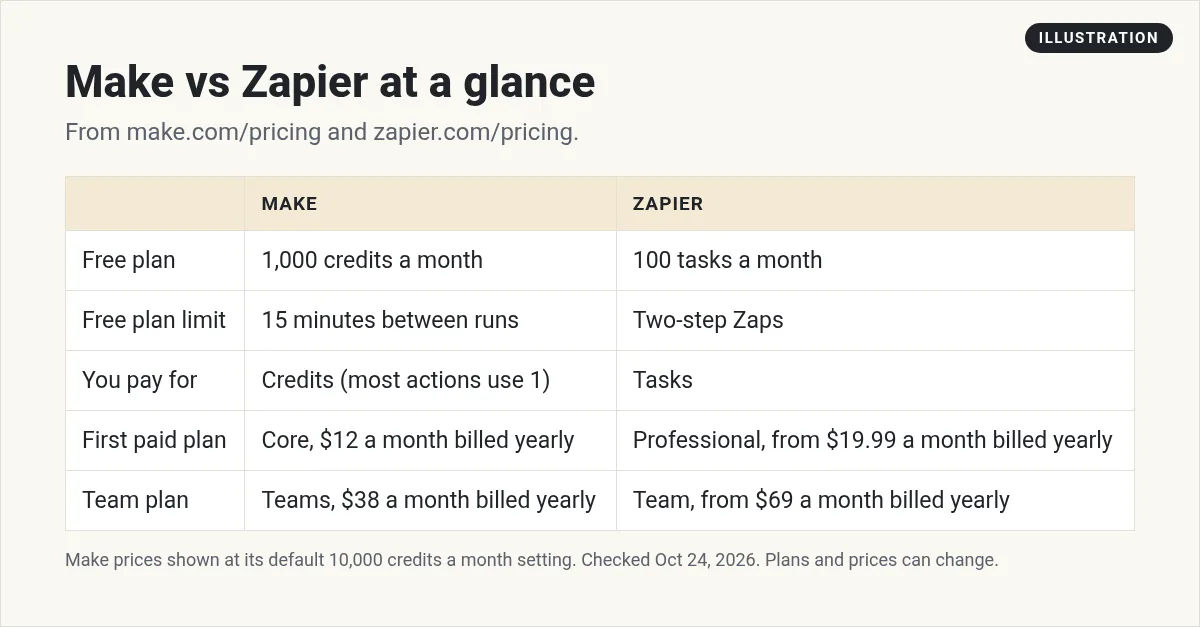
Every number in this table came from the two pricing pages on October 24, 2026, using yearly billing. Make's prices are at its default setting of 10,000 credits a month. If you pick more credits, the price goes up.
What Make and Zapier do
Both tools watch for an event in one app, then do something in another app. That is called an automation.
Here is a simple example. Someone fills out a form on your site. The tool adds them to your email list, saves them in a sheet, and sends you a text. You set it up once. Then it runs on its own.
Zapier calls these automations Zaps. Make calls them scenarios.
How building feels
Zapier is built as a list of steps. First this happens, then that. It reads top to bottom. If you are new, this can feel simple.
Make uses a visual map. Each app is a circle, and you connect them with lines. You can split paths with routers and filters. This is helpful when your flow splits into several paths.
Neither is right or wrong. Try both free plans and see which one makes sense to your brain.
What about AI features?
Both tools now let you add AI steps to your flows. Make's pricing page lists AI agents and Make AI apps. Zapier lists Zapier Copilot on its free plan and AI fields on Professional.
AI steps can use more of your allowance than a normal step. On Make, some AI features use more than 1 credit. On Zapier, AI steps draw from the same task pool. So test an AI step on a free plan and check your usage before you rely on it.
Free plans compared
Make free plan
It costs $0 and includes 1,000 credits a month, 3,500+ apps, routers and filters, and a 15-minute minimum interval between runs. So a scheduled scenario can run at most every 15 minutes.
Zapier free plan
It also costs $0. Zapier says "Zaps, Tables, and Forms included (100 tasks per month)." The free plan is limited to Two-step Zaps. That means one trigger and one action.
If you need more than two steps for free, Make has more room. If you only need simple one-to-one handoffs, Zapier Free can work.
Credits vs tasks: how each one counts
This part can be confusing, so let me keep it simple.
Make counts credits. Make's page says "As of August 27, credits are the billing unit in Make." It also says most actions use 1 credit. Some AI features can use more. The Router module and error handler modules count no credits. Make also says "Credits expire at the end of the term."
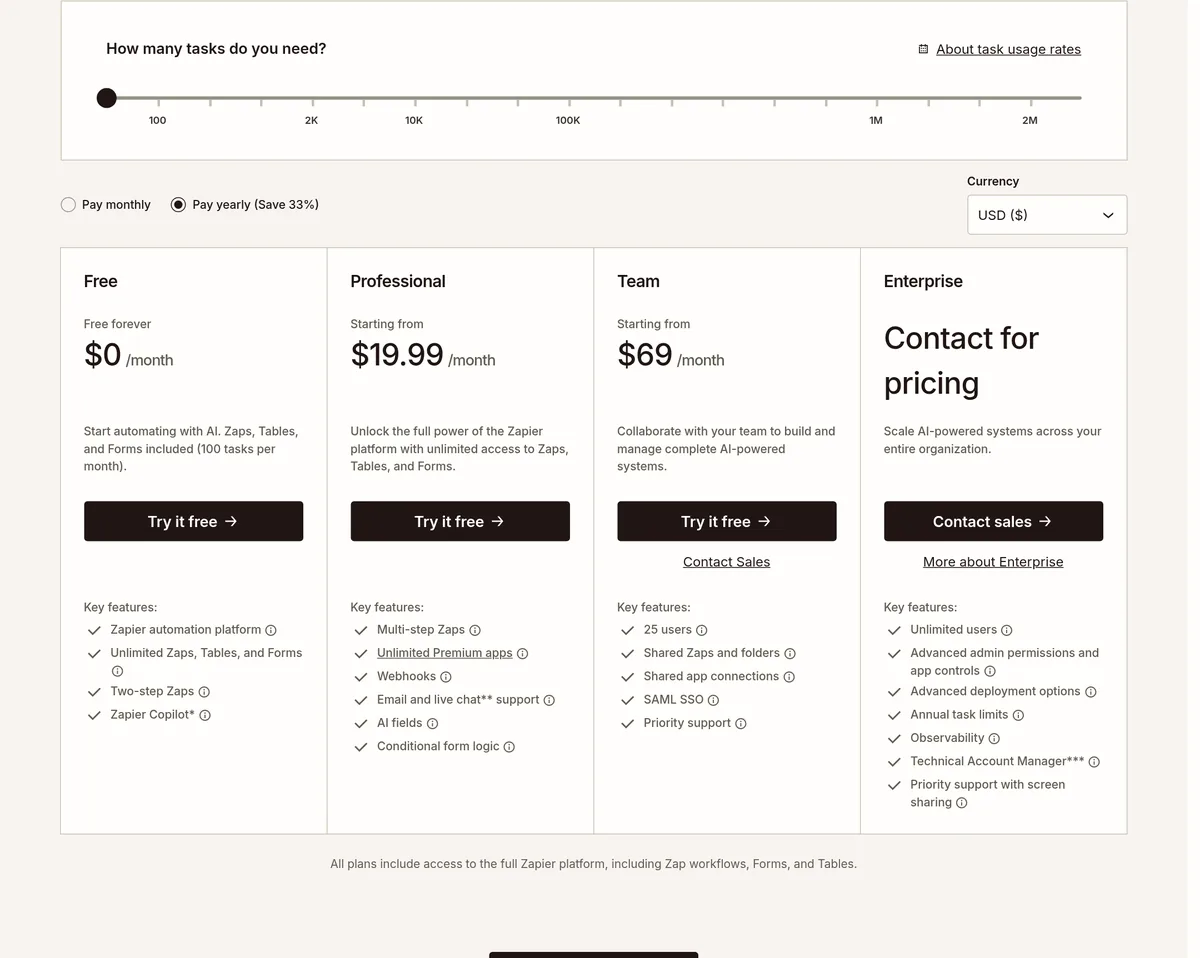
Zapier counts tasks. Zapier says its AI steps, code, and SDK "now all follow the same task-based pricing model." It also says tasks come from a shared pool across your account. If you hit your limit on a paid plan, Zapier says you will be switched to pay-as-you-go unless you turn it off or move up a tier.
The units are not the same, so do not compare 1,000 credits to 100 tasks as if they match. A good test is to build your real workflow on both free plans and watch how fast you use them up.
Paid plans compared
Here are the first paid plans, billed yearly, on October 24, 2026.
Make
- Core: $12 a month ($16 billed monthly). Unlimited active scenarios, scheduling down to the minute, and access to the Make API.
- Pro: $21 a month ($28 billed monthly). Adds priority runs, custom variables, and full-text log search.
- Teams: $38 a month ($51 billed monthly). Adds team roles and shared templates.
- Enterprise: custom pricing.
Make shows "Save 25%" for yearly billing. Prices change with the credit level you pick; these are at 10,000 credits a month.
Zapier
- Professional: starting from $19.99 a month billed yearly. Multi-step Zaps, unlimited Premium apps, webhooks, and AI fields.
- Team: starting from $69 a month billed yearly. 25 users, shared Zaps and folders, and SAML SSO.
- Enterprise: contact for pricing.
Zapier shows "Pay yearly (Save 33%)." If you pay monthly, both tools cost more. For a deeper look, see my full Zapier pricing guide.
App count
Make's free plan card lists 3,500+ apps. Zapier's page mentions 9,000+ apps in its line about connecting AI agents. Both cover common tools like Gmail, Google Sheets, and Slack. Before you pick, search each app directory for the exact tools you use.
Which one should you pick?
Here is how I would decide:
- Pick Zapier if you want a step by step builder, your flows are simple, and you need an app that only Zapier connects to.
- Pick Make if you want more free room, like a visual map, and your flows have branches.
- Look at n8n if you are a bit technical and want to self-host. My n8n vs Zapier guide covers that.
Still not sure? Build the same small workflow on both free plans. Use the one that felt easier. That is the one you will keep using.
Your first automation in 15 minutes
- Pick one boring task. Something you do the same way every day.
- Write it as a sentence. When this happens in app A, do this in app B.
- Build it on a free plan. Connect both apps and map the fields.
- Test with fake data. Check that it lands in the right place.
- Turn it on and watch it for a week. Check your usage so you know which plan you need.
Simple automations to try first
Here are a few starter ideas that work on either tool:
- New lead to email list. A form reply adds the person to your email tool.
- Sale alert. A new payment sends you a message in Slack or by email.
- Backup to a sheet. New form replies or orders get saved to Google Sheets.
- AI summary. A long email gets summarized by an AI step and sent to you.
- Calendar follow up. A booked call sends a reminder email the day before.
Each one saves a few minutes. Together, they add up to real time back each week.
How to watch your usage
Both tools show how much you have used. Check it often in the first few weeks.
On Make, watch your credits. On Zapier, watch your tasks. If a flow runs on a schedule, it may use more than you think. A filter early in the flow can stop runs that do not need to happen.
If you get close to your limit, you have three choices. Make the flow leaner, run it less often, or move up a plan.
Can you switch later?
Yes, but there is no magic button to move flows from one tool to the other. You rebuild them by hand. That is one more reason to test both before you build a lot. If you already use Zapier and want options, see my list of Zapier alternatives.
Turning automation into a service
Once you can build these, local businesses may pay you to set them up. I explain the model here:
My video: How an AI automation agency works. Tools like Make and Zapier are part of the stack.
Any results mentioned in videos are not typical and are not a promise of income. Your results depend on your work and your market.
Read my AI automation agency guide for the full steps.
Mistakes to avoid
- Comparing credits to tasks one to one. They count different things.
- Forgetting the billing basis. Yearly prices are paid up front.
- Building a giant flow first. Start with one small automation that works.
- Not watching usage. Check your usage page in the first week.
Make or Zapier: my test plan
Nothing you check here is sent or saved. Download it if you want to keep it.
Learn to automate with AI
Want to see how I use AI and automation together? Join my free AI workshop. I walk through real builds step by step.
Join my free AI workshopFree to join. No credit card needed.
Frequently asked questions
Is Make cheaper than Zapier?
On October 24, 2026, billed yearly, $12 a month got you the first paid plan on Make, at 10,000 credits a month. Zapier's first paid plan started from $19.99 a month billed yearly. They count usage in different units, so test your real workflow on both.
What is the difference between Make and Zapier?
Make uses a visual map and charges in credits. Zapier uses a step by step list and charges in tasks.
Do Make and Zapier have free plans?
Yes. Make Free includes 1,000 credits a month. Zapier Free includes 100 tasks a month and Two-step Zaps.
What is a credit in Make?
Make says credits are its billing unit and most actions use 1 credit. Some AI features use more, and routers and error handlers use none.
Which has more apps?
Make's free plan lists 3,500+ apps. Zapier's page mentions 9,000+ apps. Check that your exact tools are covered.
Is Make good for beginners?
It can be. The visual map takes a little getting used to. Zapier's step list can feel simpler at first.
Sources
Checked October 24, 2026. Plans, prices, and rules can change.
