
Website Builders · Tools
Carrd builds simple one-page sites for free, and Pro plans are priced per year, not per month. Here is what each plan gets you and how to build your first page.
Carrd is a tool for building one-page websites. Think of a simple profile page, a link-in-bio page, or a page that collects emails. It is free to start, and the paid plans are priced by the year.
I read Carrd's homepage and its Pro page on October 27, 2026. Here is what the free plan does, what Pro adds, and which plan fits which job.
Quick answer
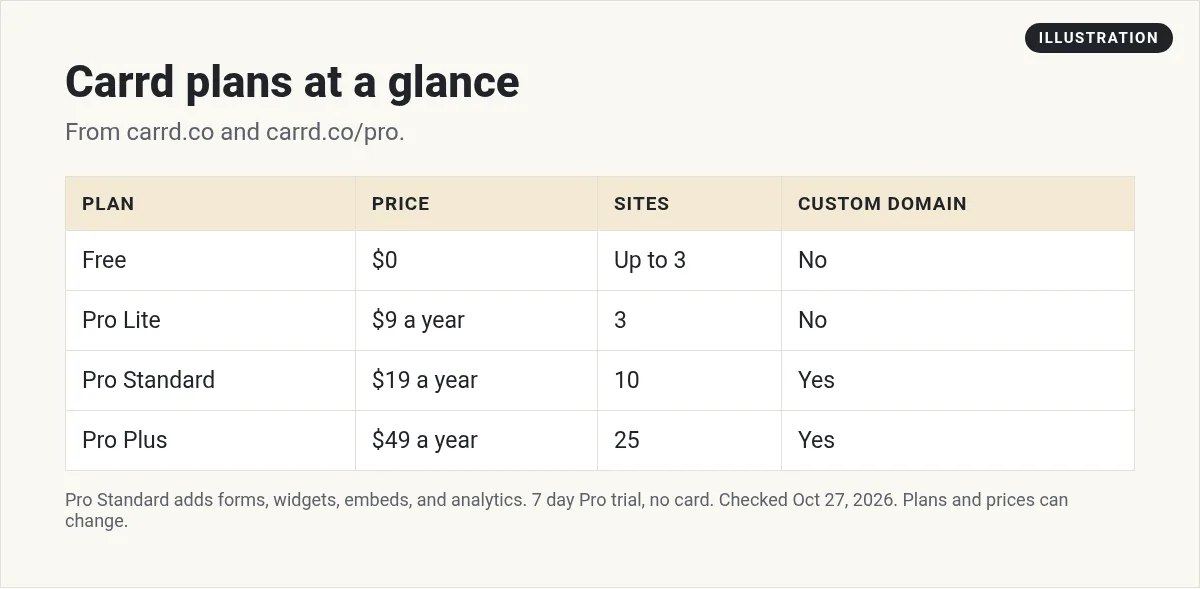
Carrd is a website builder for simple, mobile-friendly one-page sites. The free plan lets you build up to three sites per account with Carrd's core features. Pro plans are yearly: Pro Lite is $9 a year for 3 sites, Pro Standard is $19 a year for 10 sites with custom domains, forms, and embeds, and Pro Plus is $49 a year for 25 sites with advanced features. You can try Pro free for 7 days with no credit card.
What Carrd is
Carrd's homepage calls it "Simple, free, fully responsive one-page sites for pretty much anything." Responsive means the page looks right on phones, tablets, and computers.
Carrd says it works for "a personal profile, a landing page to capture emails, or something a bit more elaborate." You start from a template or a blank page and make it your own.
You do not need to know code. You click on a part of the page, change the words or the picture, and move on.
The key word is one-page. Carrd is not built for a big blog or a full online store. It is built for one clear page that does one job well.
What the free plan includes
The homepage says you can "Build up to three sites per account and use all of Carrd's core features," for free. You can start without an account. The page says "No signup required."
Free sites have limits. They show the "Made with Carrd" branding in the footer, and they do not get custom domains, forms, or embeds. For that, you need Pro.
Carrd Pro pricing
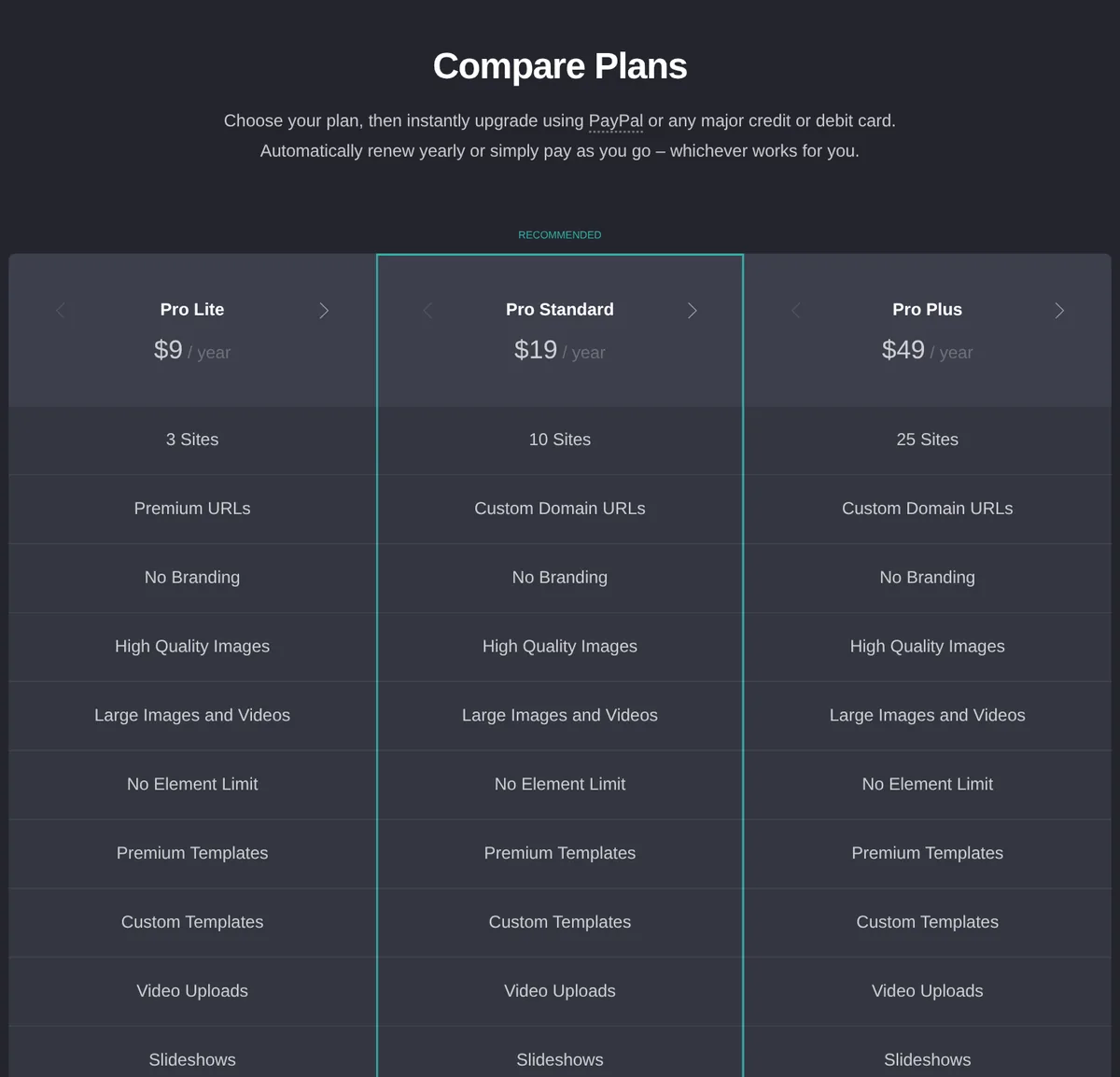
Carrd's Pro page lists three plans in its Compare Plans table. All are priced per year:
- Pro Lite: $9 a year. 3 sites, premium URLs, no branding, high quality images, video uploads, and more.
- Pro Standard: $19 a year. 10 sites, custom domain URLs, plus forms, widgets, embeds, analytics, and meta tags.
- Pro Plus: $49 a year. 25 sites, plus advanced forms, password protection, redirects, site downloads, and more.
The page also says sites go "from 10 sites on a Standard plan to 25 sites on a Plus plan (and beyond)." So there are bigger options past Plus. I did not see their prices on the page, so I am leaving them out.
Why the homepage says $19
The homepage says "Go Pro from just $19 / year (yup, per year)." The Pro page starts at $9. Both are right. The homepage list is about custom domains, forms, and embeds, and those start on Pro Standard at $19. Pro Lite at $9 removes branding but does not include custom domains.
How you pay
The Pro page says you can "instantly upgrade using PayPal or any major credit or debit card." It also says "Automatically renew yearly or simply pay as you go." So you can set it to renew, or pay one year at a time.
The free trial
Carrd says "Try Pro free for 7 days." The Pro page says the trial lets you test "custom domains and advanced forms" with "no payment or credit card required."
What Pro adds, in plain words
The Pro page lists a lot of features. Here are the ones that matter most for a first site:
- Bigger media. Upload "images/GIFs up to 16MB and videos up to 64MB."
- Site icons. Your own small icon in the browser tab, also called a favicon.
- Share images. Your own picture when someone shares your page on social media, instead of a screenshot.
- No element limit. The page says "Build sites with an unlimited number of elements."
- Analytics. Carrd offers its "native, cookie-free analytics service," or you can connect Google Analytics and others.
Which Carrd plan should you pick?
Here is how I would choose, based on the plan lists:
- Just testing an idea? Use Free. You get up to three sites.
- Want no branding and nicer media, but no own domain? Pro Lite at $9 a year.
- Want your own domain, an email signup form, or a payment button? Pro Standard at $19 a year. In my view, this is the one to start with if you want your own domain.
- Need password protection, redirects, or a lot of sites? Pro Plus at $49 a year.
Note that the domain itself is not included. You buy it from a domain seller, then connect it. Carrd says custom domains come "with full SSL support (via Let's Encrypt)."
Good ways to use Carrd
Here are jobs that fit a single page well:
- A link-in-bio page. One page with your photo, a short line about you, and buttons to your best links.
- An email signup page. Pro forms connect to email tools. The Pro page lists Mailchimp, Kit, beehiiv, MailerLite, and many more.
- A simple product page. Carrd lets you embed widgets from "Stripe, PayPal, Gumroad, Typeform, and more." So you can add a buy button from a tool like Stripe or Gumroad.
- A page for an event or workshop. The date, what you will learn, and one button to sign up.
- A personal profile. Who you are and how to reach you, on your own domain.
If you need a full site with a blog and many pages, Carrd is not the best fit. See my guide to AI website builders for other options.
How to build a Carrd site
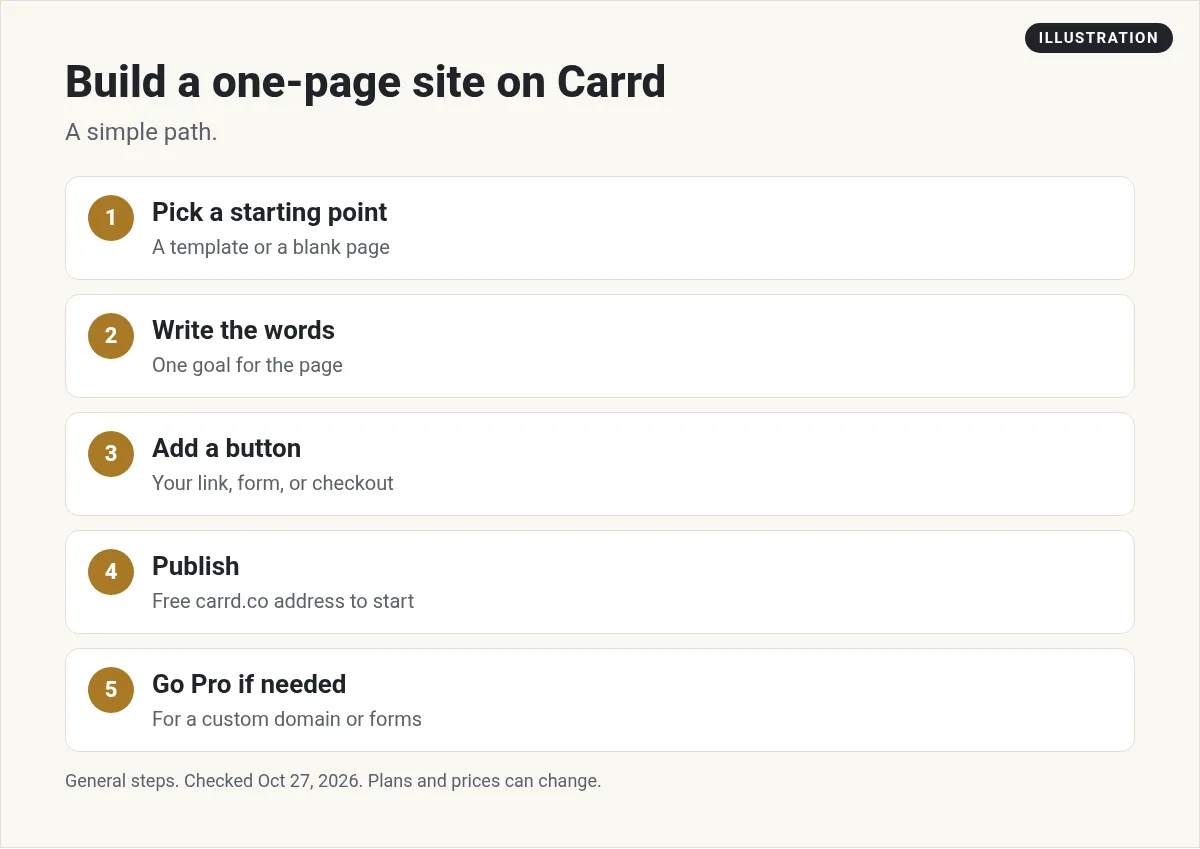
- Pick a starting point. Go to carrd.com and choose a template or a blank page.
- Write the words first. One headline, two or three short lines, and one main action. Keep it short.
- Add one button. Point it to the one thing you want people to do, like join your list or book a call.
- Publish. On Free, you get a Carrd address. Make an account to save and publish.
- Go Pro if needed. Add your domain, a form, or an embed when you are ready.
Use AI to help with the words. Ask it for five headline ideas, then pick one and edit it in your own voice. AI is good at drafts. You are better at knowing what is true about you.
Carrd vs a full website builder
A full website builder does more, and it costs more. For example, I checked Squarespace's pricing page on October 27, 2026. Its Basic plan is $19 a month when you pay yearly. Carrd Pro Standard is $19 a year.
That does not make one better. Squarespace gives you many pages, a blog, and a store. Carrd gives you one clean page. Pick the tool that matches the job you have today. You can always move to a bigger builder later, once you know what you need. If all you need is one page with one button, Carrd is hard to beat on price.
What Carrd costs over a year
Because Carrd is priced per year, the math is easy. Here it is per month, using my math on the listed prices:
- Pro Lite: $9 a year is about $0.75 a month.
- Pro Standard: $19 a year is about $1.58 a month.
- Pro Plus: $49 a year is about $4.08 a month.
Add the cost of your domain on top, since Carrd does not sell it. If you want to see how other site costs stack up, read my guide on what a website costs to build with AI.
Before you build on Carrd
Nothing you check here is sent or saved. Download it if you want to keep it.
Meet AIM Agent
AIM Agent is an AI Chief of Staff for business owners. You give it a real task, and it brings the work back for you to review. You stay the one who approves.
Meet AIM AgentI am a co-founder of AIM Agent and have a financial interest in the product.
Frequently asked questions
What is Carrd?
Carrd is a website builder for simple, mobile-friendly one-page sites, like profiles, link-in-bio pages, and landing pages that capture emails.
Is Carrd free?
Yes. Carrd's homepage says you can build up to three sites per account and use all of Carrd's core features for free. Free sites show Carrd branding.
How much is Carrd Pro?
Carrd's Pro page lists Pro Lite at $9 a year, Pro Standard at $19 a year, and Pro Plus at $49 a year.
Can I use my own domain on Carrd?
Yes, on Pro Standard and Pro Plus. Pro Lite does not include custom domain URLs. You buy the domain from a domain seller and connect it.
Does Carrd have a free trial?
Yes. Carrd says you can try Pro free for 7 days with no payment or credit card required.
How do I pay for Carrd?
Carrd says you can upgrade using PayPal or any major credit or debit card, and either renew yearly or pay as you go.
Sources
Checked October 27, 2026. Plans, prices, and rules can change.
