
Creator Tools · Link in Bio
Beacons gives you a link in bio page, a store, a media kit, and email in one place. Here is what each plan costs, what Beacons takes from a sale, and how to set it up.
If you post on social media, you need one link that sends people to everything you do. Beacons is one of the tools built for that. It also lets you sell products, send emails, and pitch brands from the same page.
The big question is cost. Beacons has a free plan, but the fee you pay on each sale changes by plan. I read the Beacons pricing page, its homepage, and its help center on October 27, 2026. Here is the plain version, with the numbers.
Quick answer
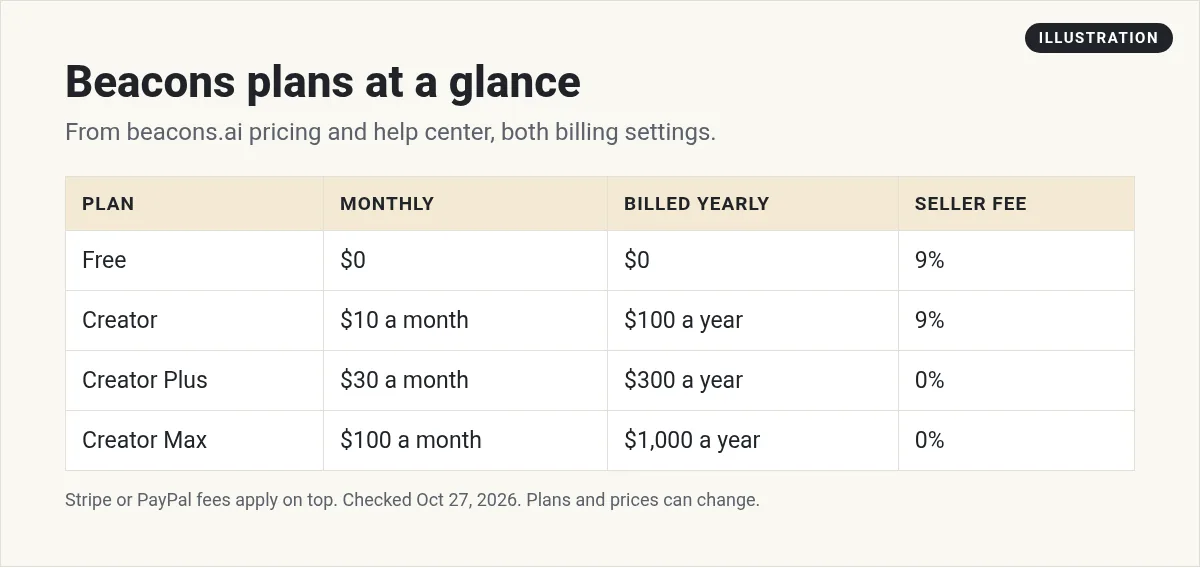
Beacons (beacons.ai) is a creator platform with a link in bio page, an online store, a media kit, and email marketing. It has four plans. On October 27, 2026, with monthly billing, they were Free at $0, Creator at $10, Creator Plus at $30, and Creator Max at $100 a month. Paid yearly, they were $100, $300, and $1,000 a year. Free and Creator charge a 9% seller fee on sales. Creator Plus and Creator Max charge 0%. Stripe or PayPal fees apply on top.
What Beacons is
Beacons is a link in bio tool with extra parts. Its homepage says you can "Join 10M+ creators" and run your business from "one streamlined business hub." Here is what you get in one place:
- Link in bio page. One page with all your links, styled to match your brand.
- Store. Sell digital products, courses, and memberships from that page.
- Media kit. A page for brands that updates with your stats.
- Email. Send newsletters to people who sign up.
- AI credits. Each plan comes with AI credits for writing and design help.
Beacons also shows an AI teammate called Beam on its homepage. Some Beam features, like help with deals and rates, are marked "Coming soon." So I would not pick Beacons for Beam alone yet.
Beacons plans and prices
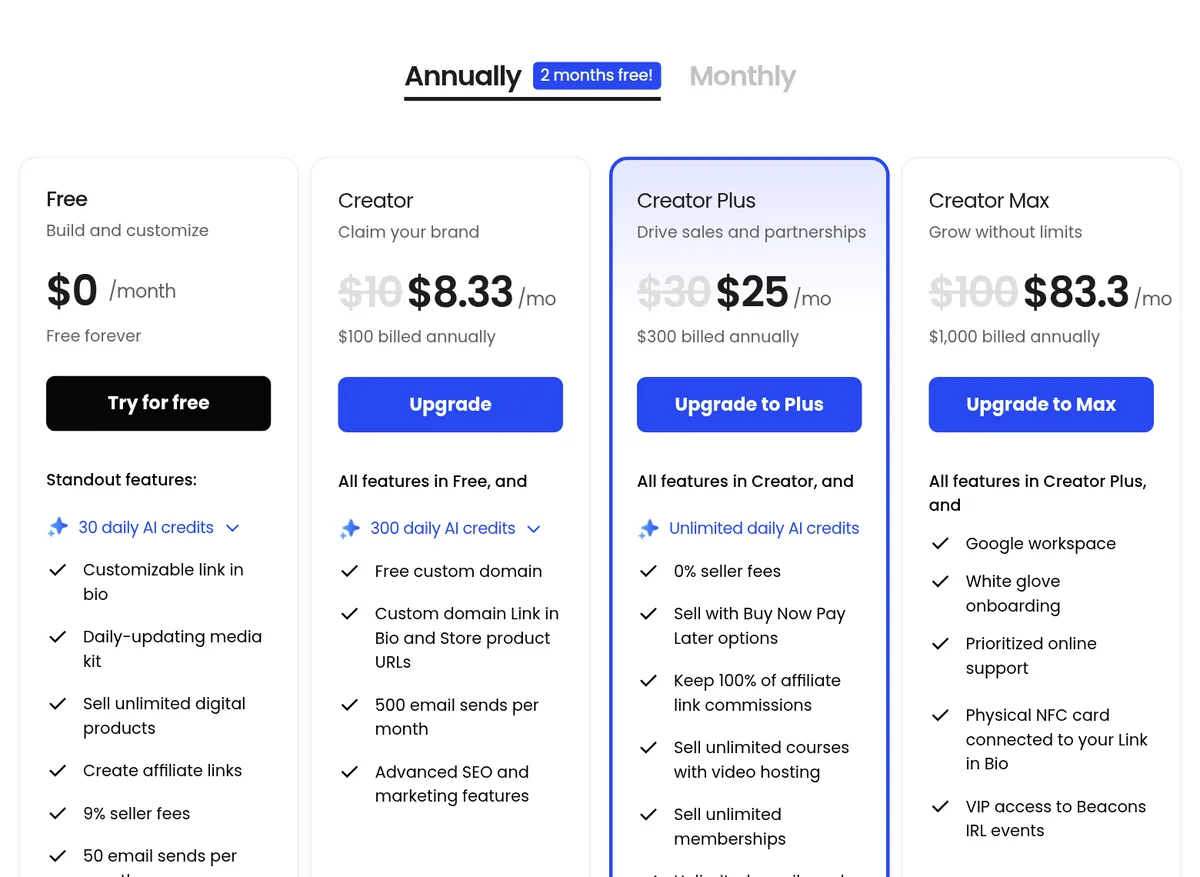
The pricing page opens on the Annually setting, with a "2 months free!" label. Here is what it shows by default.
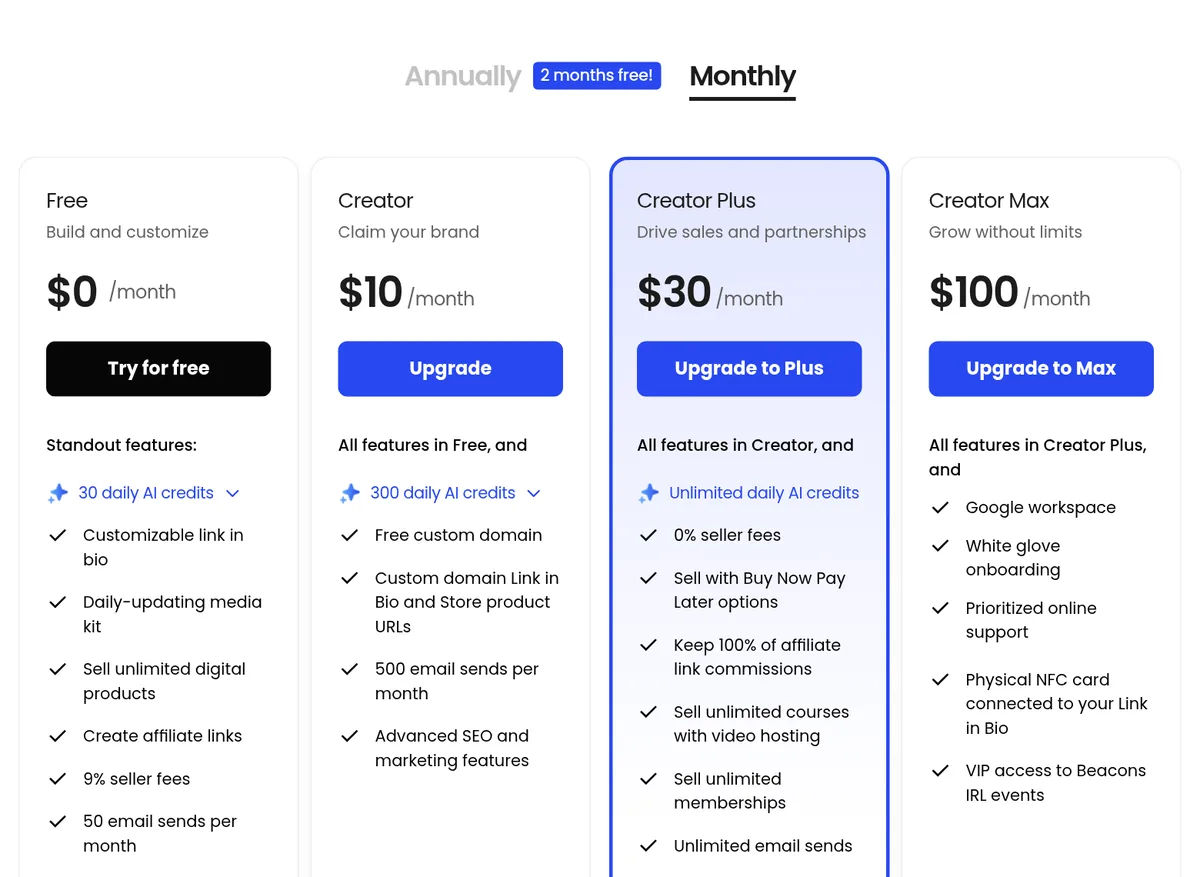
When you click Monthly, the prices change. Here is that view.
Here are both views side by side:
- Free: $0. It includes 30 daily AI credits, a 9% seller fee, and 50 email sends a month.
- Creator: $10 a month, or $100 billed yearly (shown as $8.33 a month). It adds 300 daily AI credits, a custom domain, and 500 email sends a month.
- Creator Plus: $30 a month, or $300 billed yearly (shown as $25 a month). It adds unlimited AI credits, a 0% seller fee, Buy Now Pay Later, and unlimited courses, memberships, and email sends.
- Creator Max: $100 a month, or $1,000 billed yearly (shown as $83.3 a month). It adds Google Workspace, white glove onboarding, and an NFC card that links to your page.
Beacons' help center lists the same prices: Creator at "$10/month or $100/year," Creator Plus at "$30/month or $300/year," and Creator Max at "$100/month or $1,000/year."
Monthly or yearly?
Here is my math for Creator Plus. Paying monthly, 12 months at $30 is $360. Paying yearly, it is $300. That saves $60, which matches the "2 months free!" label. For Creator, it is $120 a year paying monthly vs $100 paying yearly.
My advice is simple. Start monthly while you test. Switch to yearly once you know you will stay. Saving $20 or $60 is not worth much if you quit in month three.
One small catch on the custom domain
The pricing page lists a "Free custom domain" on Creator. But the help center plan guide says the custom domain is "Free for your first year." I am showing both. Plan on paying for the domain after year one.
What Beacons takes from each sale
This part is easy to miss. The plan price is not the only cost. Beacons also takes a seller fee on sales, on some plans.
Beacons' fee help article says it plainly. The "Free and Creator Plan" pay a "9% Transaction Fee." "Creator Plus and Creator Max" pay a "0% Transaction Fee." The same article says the 9% fee "applies to users on the free plan or the $10/month Creator plan."
Then the payment company takes its own cut. The help article lists Stripe at "2.9% + $.30 per transaction" and PayPal at "3.49% + fixed fee based on the currency of the transaction."
The homepage says something different
The Beacons homepage says "No platform fees on the free plan." But a box lower on that same homepage lists the free plan with "Sell with 9% Seller Fees." The pricing page and the help center also list a 9% seller fee on Free. Three places say 9%, so I would plan on the 9% fee if you sell on the free plan.
A quick example
Here is my math for one $50 digital product, paid with Stripe:
- Free or Creator: The 9% seller fee is $4.50. Stripe takes 2.9% of $50, which is $1.45, plus $0.30. That is $1.75. You keep about $43.75.
- Creator Plus: No seller fee. Stripe still takes $1.75. You keep about $48.25. But you also pay $30 a month for the plan.
So when does Creator Plus pay for itself? My math says 9% of about $334 in sales is $30. If you sell more than about $334 a month, Creator Plus can cost less than paying 9% on Free. If you sell less, Free is likely cheaper.
How you get paid
For direct sales, Beacons' help center says the money goes "immediately" into your connected Stripe or PayPal account. From there, you move it to your bank on Stripe's or PayPal's schedule.
Affiliate commissions work a bit differently. The help center says "Commission payouts are through PayPal only!" You can hit cash out right after a sale. But Beacons says it aims to send commission payments "within 5-7 business days."
How to set up Beacons
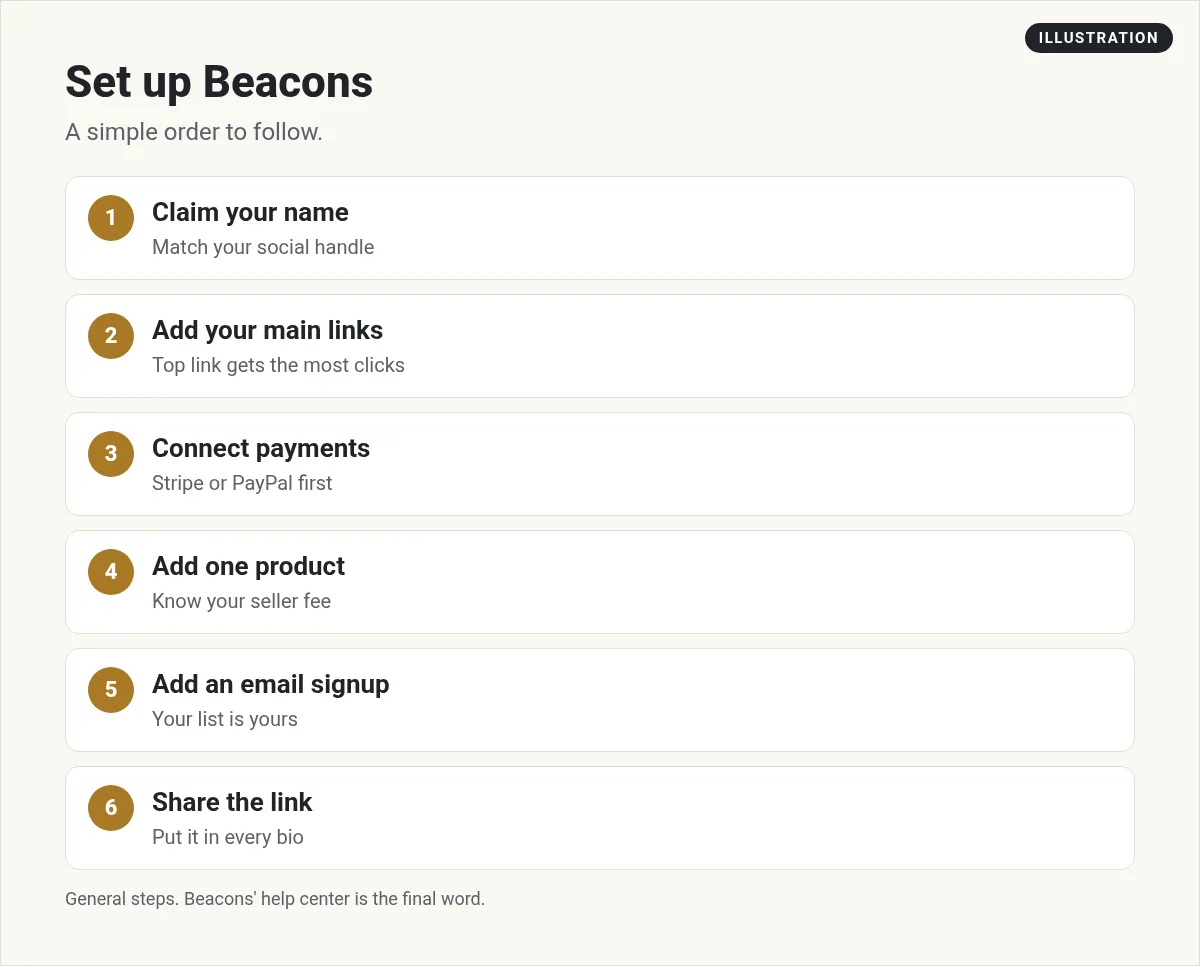
You can have a page live in one sitting. Here is the order I would follow:
- Claim your name. Pick a username you also use on social media. Your page will live at beacons.ai/yourname.
- Add your main links. Keep it short. Put the one thing you most want people to click at the top.
- Connect payments. Link Stripe or PayPal before you add a product, so buyers can pay right away.
- Add one product. A simple guide or template is enough to start. Know your seller fee before you set the price.
- Add an email signup. Your list is yours, even if a social app changes its rules.
- Share the link. Put it in every bio you have.
Need product ideas? See my list of digital products to sell.
Is Beacons right for you?
Beacons is a good fit if you want your link, store, email, and media kit in one place. The free plan is fine for testing. It costs nothing until you sell, and then 9% of each sale goes to Beacons.
It may not fit if you only want a simple store with no seller fee and no monthly plan. Then compare it with other tools. See my guides to Stan Store, Gumroad, and Carrd. Run the same $50 math for each one.
If you earn from affiliate links, Beacons lets you add them to your page. My guide on what an affiliate link is covers the basics.
Before you pick a Beacons plan
Nothing you check here is sent or saved. Download it if you want to keep it.
Meet AIM Agent
AIM Agent is an AI Chief of Staff for business owners. You give it a real task, and it brings the work back for you to review. You stay the one who approves.
Meet AIM AgentI am a co-founder of AIM Agent and have a financial interest in the product.
Frequently asked questions
What is Beacons AI?
Beacons (beacons.ai) is a creator platform. It gives you a link in bio page, an online store, a media kit for brands, email marketing, and AI credits, all in one account.
Is Beacons free?
Yes, there is a Free plan at $0. It includes 30 daily AI credits and 50 email sends a month. Sales on the Free plan carry a 9% seller fee, plus Stripe or PayPal fees.
How much does Beacons cost?
On October 27, 2026, monthly prices were Creator $10, Creator Plus $30, and Creator Max $100. Paid yearly, they were $100, $300, and $1,000 a year.
Does Beacons take a cut of sales?
On Free and Creator, Beacons charges a 9% seller fee. On Creator Plus and Creator Max, the seller fee is 0%. Stripe charges 2.9% + $0.30, and PayPal charges 3.49% plus a fixed fee.
When do I get paid on Beacons?
Beacons says direct sale money goes right into your connected Stripe or PayPal account. Affiliate commissions are paid through PayPal only, within 5 to 7 business days.
Does Beacons include a custom domain?
Paid plans include one. The pricing page says free custom domain on Creator, while the help center says it is free for your first year.
Sources
Checked October 27, 2026. Plans, prices, and rules can change.
