
AI for Business · Guide
ChatGPT can take a lot of small writing and thinking jobs off your plate. Here is where it helps most, which plan makes sense, and what to never paste into it.
If you run a small business, you wear every hat. You answer emails, write posts, train staff, and plan the week. A lot of that is writing and thinking. That is exactly what ChatGPT is good at.
But many owners try it once, get a bland answer, and give up. Others paste in private customer info without thinking. This guide fixes both. I checked OpenAI's pricing page and help center on October 20, 2026.
Quick answer
ChatGPT helps small businesses most with writing and thinking jobs: replying to emails, writing posts, making FAQs, planning, and turning notes into checklists. Start with the Free plan or Plus at $20 a month. When more than one person needs it, ChatGPT Business costs $20 per seat a month billed yearly, or $25 monthly, checked October 20, 2026. OpenAI says it does not train on Business data by default. On personal plans, turn off model training in Settings, then Data controls. Always check the answer before you use it.
7 jobs ChatGPT can help with right now
Start with jobs you already do every week. That is where you will save the most time.
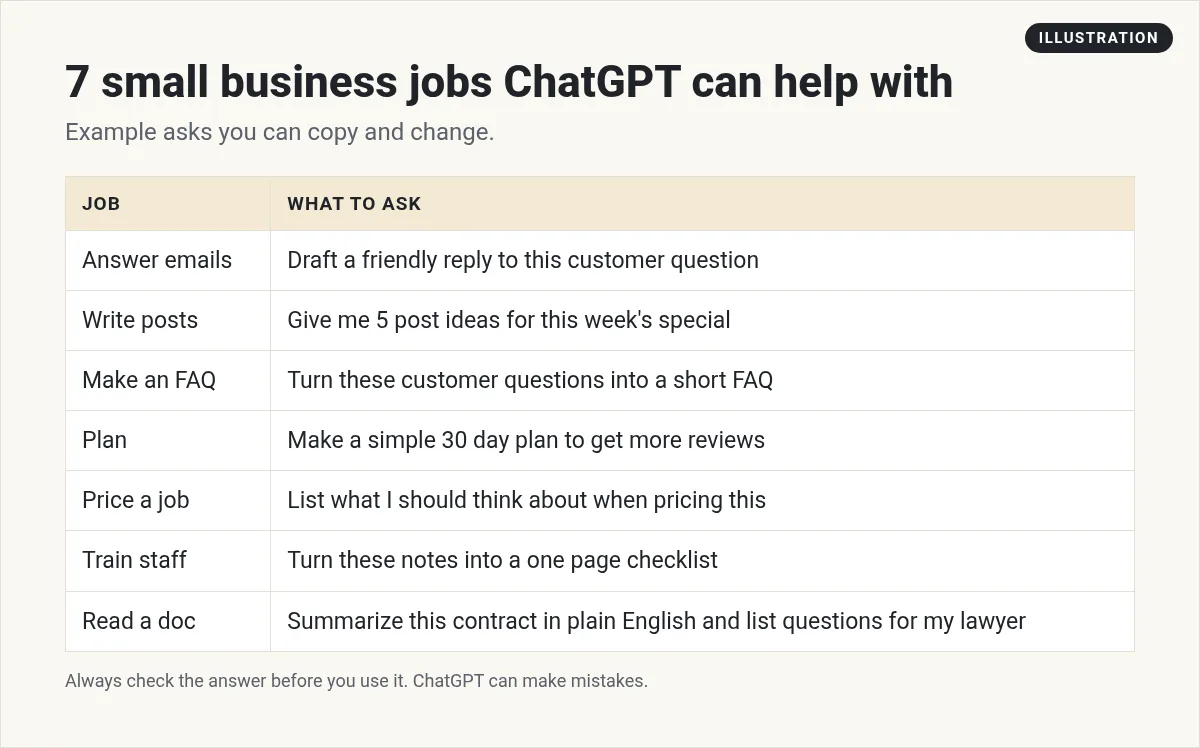
Notice what these have in common. You give it the raw stuff, like a customer question or your rough notes. It gives you a clean first draft. You fix it up and use it.
For more ideas, see my list of AI tools for small business and these small business AI project ideas.
How to get good answers, not bland ones
Most bad answers come from short asks. A one line ask like write a post about my bakery gets you something generic. Here is a simple formula I use, with a made up bakery as the example:
- Who it is for: My customers are busy parents in a small town.
- What you want: Write a short post about our new after school snack box.
- The facts: paste the price, hours, and what is in the box.
- The style: Friendly, no hype, under 80 words.
- Ask for options: Give me 3 versions.
Then keep going. Ask it to make it shorter, warmer, or clearer. Treat it like a fast helper, not a one shot machine.
Which ChatGPT plan should a small business use?
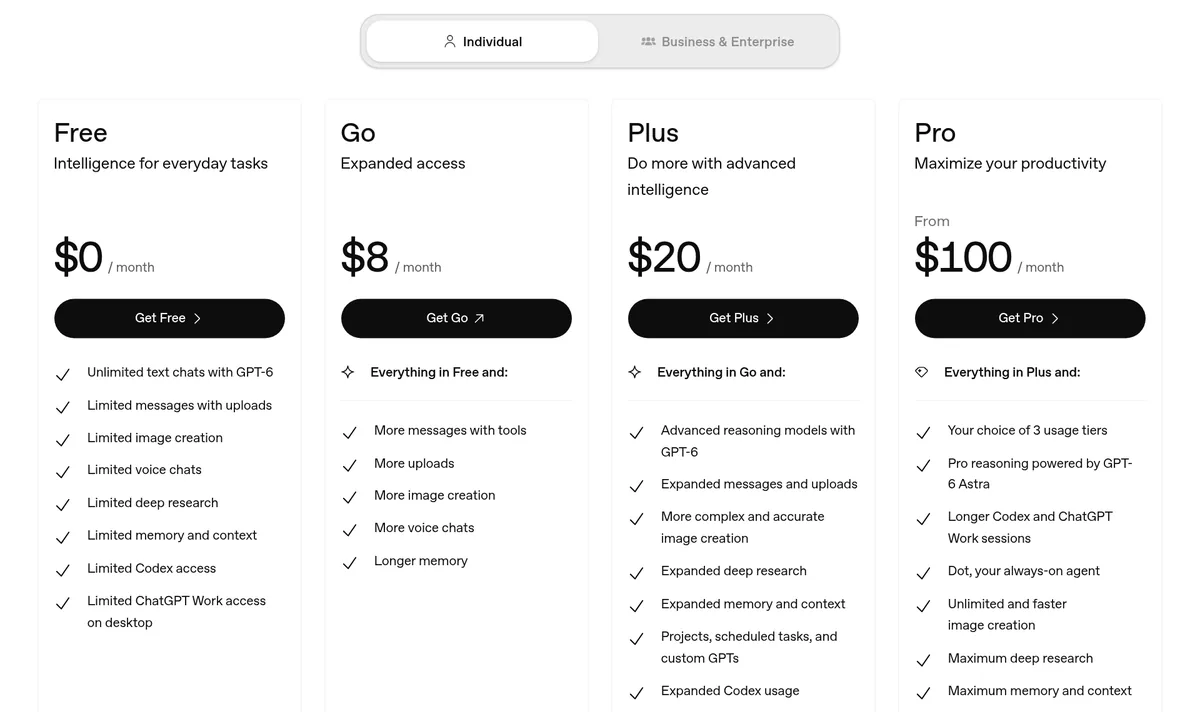
Here are OpenAI's plans, checked October 20, 2026.
Personal plans
- Free: $0, with limits on uploads, images, and more.
- Go: $8 a month for more messages and uploads. OpenAI notes this plan may include ads.
- Plus: $20 a month. Adds projects, scheduled tasks, and custom GPTs.
- Pro: from $100 a month, for very heavy use.
ChatGPT Business
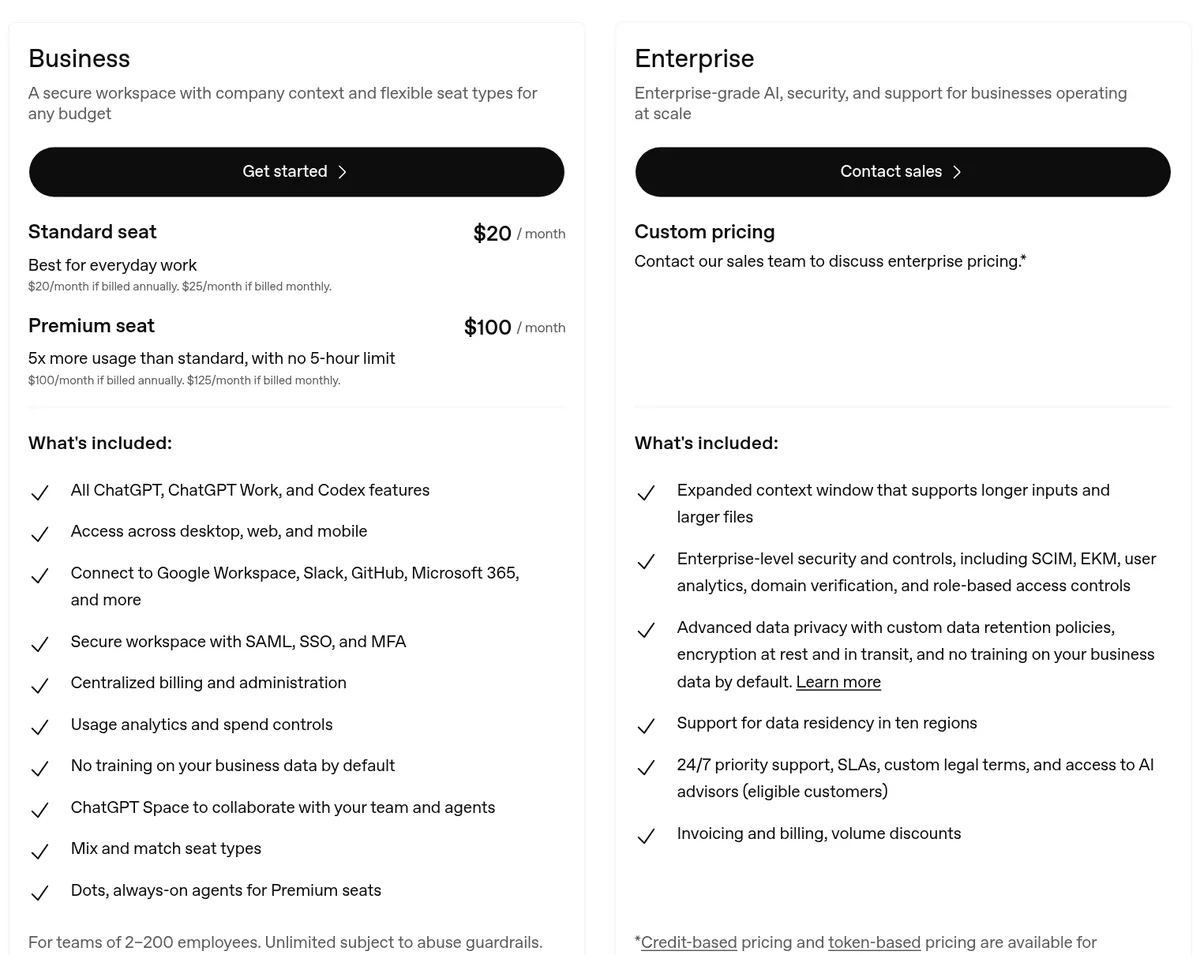
Business is built for teams of 2 to 200 people. A Standard seat is $20 a month billed yearly, or $25 billed monthly. A Premium seat with more usage is $100 a month billed yearly, or $125 monthly.
The pricing page lists things that matter for a business, like connecting to Google Workspace, Slack, and Microsoft 365, central billing, and "No training on your business data by default."
| Your situation | Start with |
|---|---|
| Just you, trying it out | Free |
| Just you, using it every day | Plus ($20 a month) |
| You and at least one team member | Business ($20 to $25 per seat a month) |
| Strict rules about customer data | Business, and talk to your lawyer or advisor |
My own suggestions, based on OpenAI's pricing page, checked October 20, 2026.
Rolling ChatGPT out to your team
If you have staff, here is what to know about ChatGPT Business, from OpenAI's help center, checked October 20, 2026.
- You need at least 2 seats. OpenAI says a Business workspace requires at least 2 Standard or Premium seats.
- Each person has their own chats. OpenAI says each user has their own chat history, and other members do not see those chats by default.
- Sharing stays inside. Shared links only work for people in your workspace. Someone outside cannot see the shared chat.
- It used to be called Team. OpenAI says ChatGPT Team was renamed to ChatGPT Business on August 29, 2025.
- The API is separate. A Business plan does not include API use. That is billed on its own.
- Some needs require a sales plan. OpenAI says if you need things like a BAA, which some health businesses need, or invoice billing, use a contracted plan instead of self serve Business.
My advice: write a one page list of do and do not rules before you invite anyone. For example, what data is OK to paste, and who checks customer facing writing before it goes out. Then hold a short training where everyone tries the same task together.
Also note that prices can vary by country. OpenAI says to check the pricing page for your currency.
Keep customer data safe
This is the part most owners skip. Please do not.
OpenAI's help center says that on its plans for individuals (Free, Plus, Pro), "we may use your content to train our models." You can opt out. Turn off Improve the model for everyone under Settings, then Data controls.
On Business, OpenAI says "Business data is excluded from training by default and is encrypted in transit and at rest."
OpenAI also offers temporary chats. Its help center says these "are not used to improve OpenAI models while they remain temporary," and they do not show up in your history.
3 more mistakes to avoid
What ChatGPT is not the right tool for
Knowing where to stop matters as much as knowing where to start. In my experience, ChatGPT is a poor fit for:
- Final legal, tax, or medical answers. Use it to prepare questions, then ask a real expert.
- Facts about your own business it has not been told. It does not know your prices or hours unless you paste them in.
- Anything you will not read before it goes out. If no person checks it, do not send it.
Used this way, it is a helper that makes you faster. It does not replace your judgment.
Going further: projects and custom GPTs
Once you have a few prompts that work, save time with the tools on paid plans. Plus lists projects and custom GPTs. A project keeps files and chats for one topic together. A custom GPT can hold your instructions, so you do not paste them every time.
For example, you could make one custom GPT that knows your services, prices, and tone, and use it for every customer reply. If you want to go even further and have AI answer the phone, read what small business owners say about AI receptionists. And if you do outreach, see how to use ChatGPT for cold email.
My first week with ChatGPT
Nothing you check here is sent or saved. Download it if you want to keep it.
Want more ways to use AI in your business?
In my free workshop, I show simple ways to use AI tools to save time and build new offers.
Join my free AI workshopFree to join. No credit card needed.
Frequently asked questions
How can a small business use ChatGPT?
Use it for writing and thinking jobs: replying to emails, writing posts, making FAQs, planning, pricing checklists, and turning notes into training guides. Always check the answer before you use it.
Is ChatGPT free for small businesses?
There is a Free plan with limits. Plus is $20 a month. ChatGPT Business is $20 per seat a month billed yearly, or $25 monthly, checked October 20, 2026.
What is ChatGPT Business?
It is OpenAI's plan for teams of 2 to 200 people. It adds a shared workspace, admin and billing tools, app connections like Google Workspace and Slack, and no training on business data by default.
Does ChatGPT use my business data for training?
On Free, Plus, and Pro, OpenAI may use your content to train models unless you turn it off in Settings, then Data controls. On Business, data is excluded from training by default.
Is it safe to put customer information into ChatGPT?
Be careful. Turn off model training or use Business, and never paste things like card numbers, passwords, or private health details. Remove names when you can.
What is the best ChatGPT plan for a small business?
If it is just you, start with Free or Plus. If two or more people need it, ChatGPT Business is built for that.
Sources
Checked October 20, 2026. Plans, prices, and rules can change.
