
Affiliate Marketing · Review
ClickBank is a long-running affiliate marketplace. Sign up is free, but there are fees and rules that surprise new affiliates. Here they are in plain English.
ClickBank has been around a long time. It is a marketplace where sellers list digital and physical products, and affiliates promote them for a commission.
On October 23, 2026, I read ClickBank's affiliate page and its support articles on fees, payments, payment thresholds, and its accounting policy. Here is my honest review of how it works and the rules that trip people up.
Quick answer
ClickBank is a legit affiliate marketplace. Signing up is free. Affiliates pay a $5.00 processing fee on each payment, and $45 per wire if they choose wire transfers. The default payment threshold is $100. Before you get any payment, you must make at least 5 sales that meet ClickBank's Customer Distribution Requirement. Payments go out on Fridays, weekly or every two weeks. Accounts with no activity for 90 days or more get dormant fees.
What is ClickBank?
ClickBank is an affiliate marketplace. It has two sides:
- Sellers list their products and set a commission.
- Affiliates pick products, share a tracking link, and get a cut of each sale.
ClickBank handles the checkout, the tracking, and the payments. Its affiliate page says, "Over 100,000 affiliates worldwide choose ClickBank as their preferred marketplace." It also says the marketplace has "more than 4,000 quality products listed by thousands of sellers." Those are ClickBank's own numbers.
ClickBank fees for affiliates
The support article on fees opens with this: "Signing up for a ClickBank account is free." But there are fees once you start getting paid.
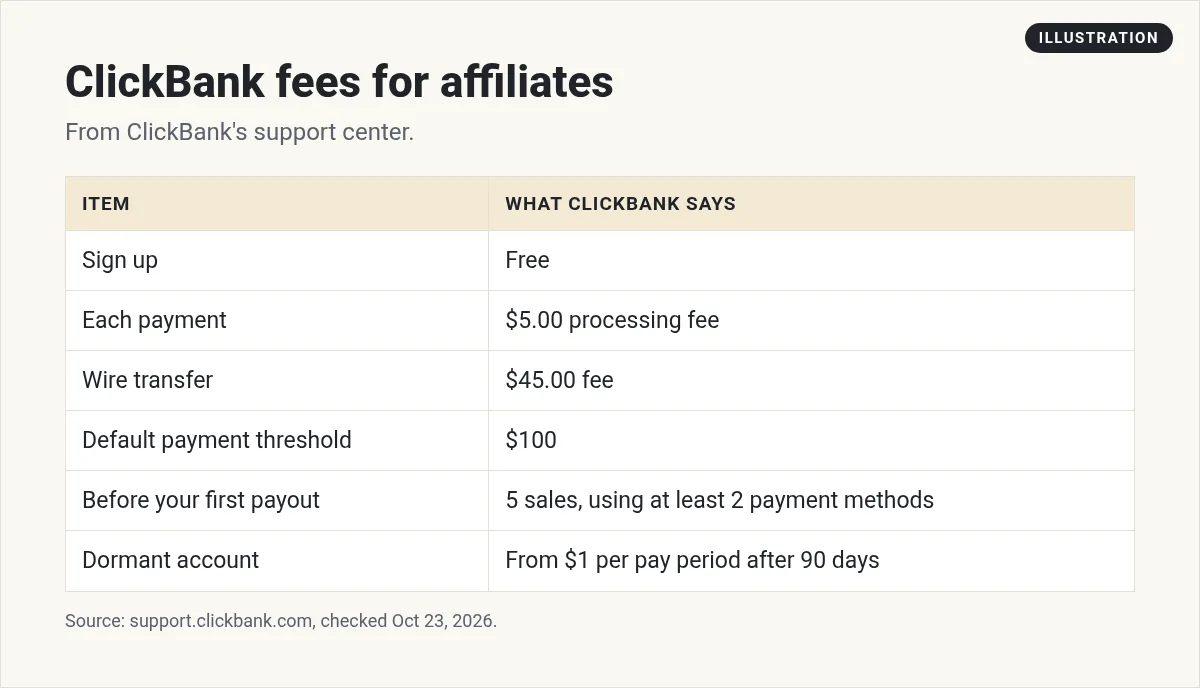
- Payment processing fee: the article says "there is a $5.00 pay period processing fee for every payment that is issued." So each payment you get has $5 taken off.
- Wire fee: the accounting policy says "The additional cost for a wire payment is $45 per wire sent."
- Dormant account fees: covered below.
These fees went up in 2024. The accounting policy says that effective 10/24/2024, "ClickBank paycheck fees are increasing from $2.50 to $5.00, and wire transfer fees are increasing from $35.00 to $45.00." So if you read an older review that says $2.50, it is out of date.
How ClickBank takes its cut
On top of affiliate fees, ClickBank takes a share of each sale before the commission is split. The fees article says ClickBank buys each product from the seller "at 92.5% of sale price + $1." That means ClickBank keeps 7.5% plus $1 of each sale.
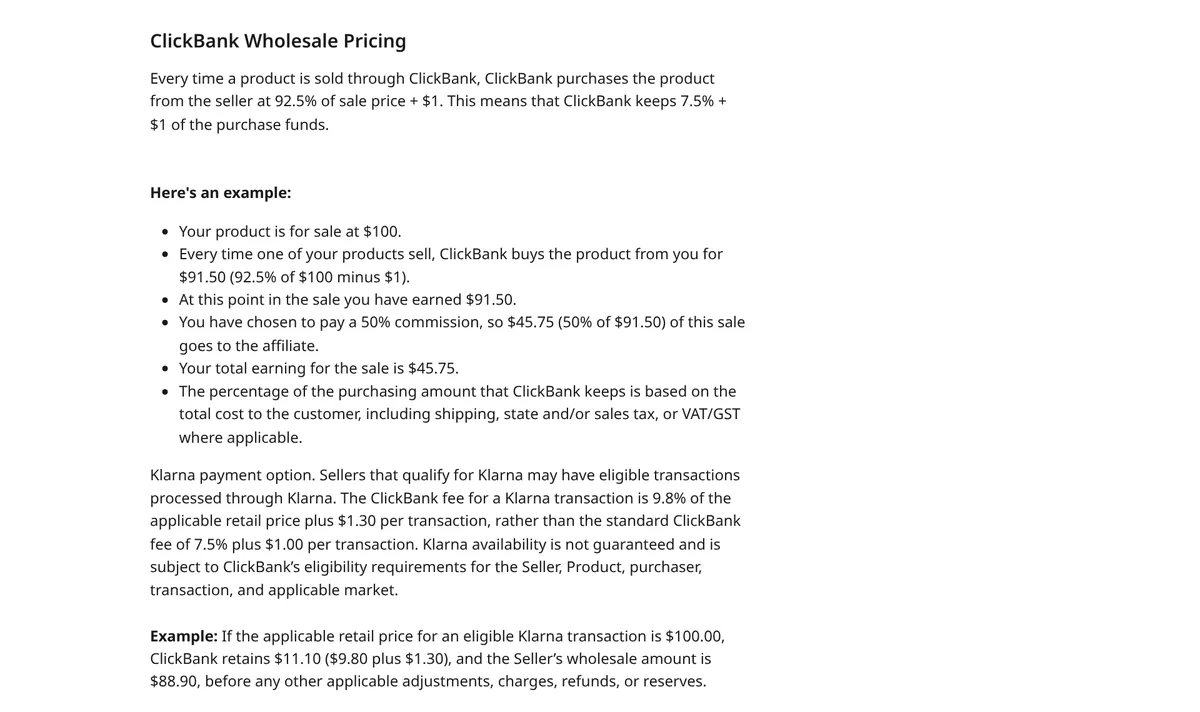
The article walks through a $100 product. ClickBank keeps $8.50, and $91.50 is left. If the seller offers a 50% commission, the affiliate gets 50% of that $91.50, which is $45.75. So the commission is figured on what is left after ClickBank's cut, not on the full price.
The payment threshold
Your payment threshold is how much has to build up in your account before ClickBank pays you. The default is $100.
Here is a conflict to know about. Two support articles say you can set it anywhere from $10 to $1,000,000. But the accounting policy says, "You may select an amount from $50 to $1,000,000." I could not tell which one is current, so check the setting in your own account. Wires must be at least $50 either way.
The 5-sale rule (Customer Distribution Requirement)
Read this rule closely. You do not get paid at all until you meet it.
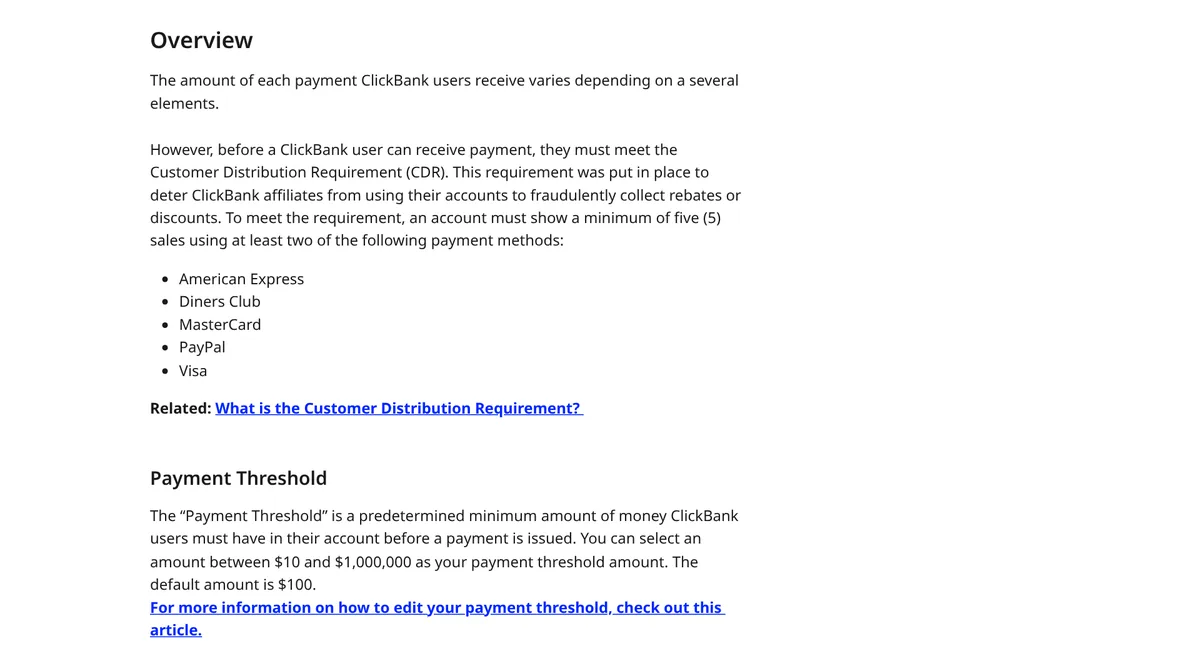
A support article says your account "must show a minimum of five (5) sales using at least two of the following payment methods": American Express, Diners Club, MasterCard, PayPal, and Visa.
The accounting policy adds more detail. It says the criteria include "at least five sales made by unique customers, each sale being more than 14 days old," and sales made with more than one payment method.
Why does this exist? ClickBank says it is "to deter ClickBank affiliates from using their accounts to fraudulently collect rebates or discounts." In other words, you cannot just buy through your own link to get a discount.
When does ClickBank pay?
The support article says payments "are issued to ClickBank users on Friday, two days after the end of the pay period." Pay periods end on Wednesdays.
- Direct deposit or wire: you can pick weekly or every two weeks.
- Check: every two weeks only.
Your bank may take a little longer to show the money after it is sent.
The return allowance
ClickBank also holds back part of what you get each pay period. The standard return allowance is 10%. It is released back to your account after 12 weeks, about 84 days. This covers late refunds and chargebacks.
Refunds come out of your account
When a customer gets a refund, the support article says the payout from that sale is taken back out of the matching ClickBank account. So a refund after you were paid comes out of your next payment.
Dormant account fees
If your account has a positive balance but no activity for a long time, ClickBank charges a fee each pay period:
- $1 per pay period after 90 days dormant.
- $5 per pay period after 180 days dormant.
- $50 per pay period after 365 days dormant.
So if you stop using ClickBank, do not leave a balance sitting there. Close the account or get it paid out.
How tracking works, and the fine print
ClickBank decides who gets credit for a sale with its own tracking system. The accounting policy says, "Any decision made by this system is final and not subject to petition or appeal."
That means if a customer clicks your link but the sale is not tracked to you, there is no one to appeal to. It is a good reason to send people straight from your content to the offer, with as few steps as you can.
How to get started as a ClickBank affiliate
- Sign up for a free account. Fill in your payment and tax details right away so nothing holds up a payment later.
- Pick your payment method. Direct deposit lets you choose weekly payments. Check your threshold setting while you are there.
- Browse the marketplace. Look for products that match the people you already help.
- Get your link. Each product gives you a tracking link tied to your account.
- Make helpful content. A review, a how-to video, or an email that solves a real problem works better than just posting the link. For one place to share that content, see my Pinterest affiliate marketing guide.
- Track the 5-sale rule. Until you meet it, your balance builds up but is not paid out.
ClickBank pros and cons
Pros:
- Free to sign up.
- Many products in one marketplace.
- Clear, written payment rules.
- Weekly payments are an option.
Cons:
- You must hit 5 qualifying sales before any payment.
- A $5 fee on every payment, and $45 for wires.
- Dormant fees if you stop using it.
- Tracking decisions are final.
- Product quality varies a lot. Some offers have pushy sales pages.
How to pick a good ClickBank product
- Buy or test it if you can. Never promote something you would not want a friend to buy.
- Read the sales page as a customer. If it makes wild promises, skip it. Your name is on the recommendation.
- Check the refund terms. Refunds come back out of your account.
- Match it to your audience. A good product your audience does not need is still a bad fit.
- Disclose your link. The FTC says "Paid link" right next to an affiliate link "should be an adequate disclosure."
My verdict
ClickBank is a real, long-running marketplace with clear rules. It can be a fine place to learn affiliate marketing. Just go in knowing the 5-sale rule, the fees, and the dormant charges. And be picky about the products you promote, because quality varies.
If you want more choices, my guides to affiliate programs for beginners and finding high-ticket affiliate products cover other options.
My video: My older look at ClickBank. Fees and rules have changed since, so use the numbers in this post.
Any results mentioned in videos are not typical and are not a promise of income. Your results depend on your work and your market.
Want a step-by-step plan for choosing offers and getting traffic? I walk through it in my free AI workshop.
Want a simple affiliate plan?
In my free workshop, I show how regular people use AI tools to create content, pick offers, and build simple online businesses.
Join my free AI workshopFree to join. No credit card needed.
Frequently asked questions
Is ClickBank legit?
Yes. ClickBank is a long-running affiliate marketplace with written fee and payment policies. Product quality varies, so review each offer before you promote it.
Is ClickBank free to join?
Yes. ClickBank's fees article says signing up is free. Affiliates pay a $5.00 processing fee on each payment and $45 per wire.
What is ClickBank's minimum payout?
The default payment threshold is $100. Support articles say you can set it from $10, while the accounting policy says from $50. Check your account.
Why am I not getting paid on ClickBank?
A common reason is the Customer Distribution Requirement. You need at least 5 qualifying sales using at least two payment methods before any payment.
When does ClickBank pay?
On Fridays, two days after the pay period ends on Wednesday. Direct deposit and wire can be weekly or every two weeks. Checks are every two weeks.
Does ClickBank charge for inactive accounts?
Yes. Dormant accounts with a balance pay $1 per pay period after 90 days, $5 after 180 days, and $50 after 365 days.
Sources
Checked October 23, 2026. Plans, prices, and rules can change.
- ClickBank: Affiliates page
- ClickBank Support: What are ClickBank's fees? (Aug 26, 2026)
- ClickBank Support: How is my payment amount determined?
- ClickBank Support: How do I edit my payment threshold?
- ClickBank Support: When do I get paid
- ClickBank Support: ClickBank Accounting Policy (Sep 10, 2026)
- FTC: FTC's Endorsement Guides: What People Are Asking
