
GoHighLevel Ask AI lets you run your HighLevel account by chat. You ask in plain words, it shows you a plan, and nothing changes until you say yes.

Disclosure: I earn a commission if you buy HighLevel through my links, at no extra cost to you. I am not HighLevel and do not speak for it.
Key takeaways
- Ask AI is the built-in helper inside HighLevel. It can read data, create records, write content and run bulk actions from one chat.
- Agency admins and agency users get it with no extra fee on every agency plan, with fair use limits.
- It always asks before it writes, updates or deletes anything.
- Some areas are still read only, like workflows and campaigns. Plan around that.
- Start in a test sub-account and give it one small, clear task.
What is GoHighLevel Ask AI?
Ask AI is an AI helper built into HighLevel. Instead of clicking through many menus, you type or say what you want. Ask AI then does the work in your account.
HighLevel says it can read data, create records, update settings, write content and run bulk actions. It is connected to more than 50 parts of the platform, from contacts to calendars to invoices.
You can open it in a side panel while you work, or in a full screen workspace for bigger jobs. You can also talk to it. Just click the microphone.
What can Ask AI do?
HighLevel groups the work into three types: making content and images, taking actions in the CRM, and pulling or updating data. Here is what that looks like in real life.
| Job | Example request | Good for |
|---|---|---|
| Write on brand content | Write a Facebook ad post using my brand voice | Emails, posts, ads, blogs |
| Make or edit images | Make a hero image for a dental landing page | Pages, emails, social |
| Manage contacts | Tag everyone from last month's campaign as Q3 Lead | Clean up and sorting |
| Check your pipeline | Show all open deals in my Sales pipeline | Quick answers |
| Build a funnel | Make a lead magnet funnel for a coaching business | Fast first drafts |
| Set up AI agents | Create a chat agent for my dental office | Conversation AI and Voice AI |
| Summarize a contact | What should I know before I call this lead? | Sales prep |
| Schedule tasks | Send me a contacts report every Monday at 9am | Repeat reports |
Examples adapted from the HighLevel Ask AI help article.
Who gets Ask AI, and what does it cost?
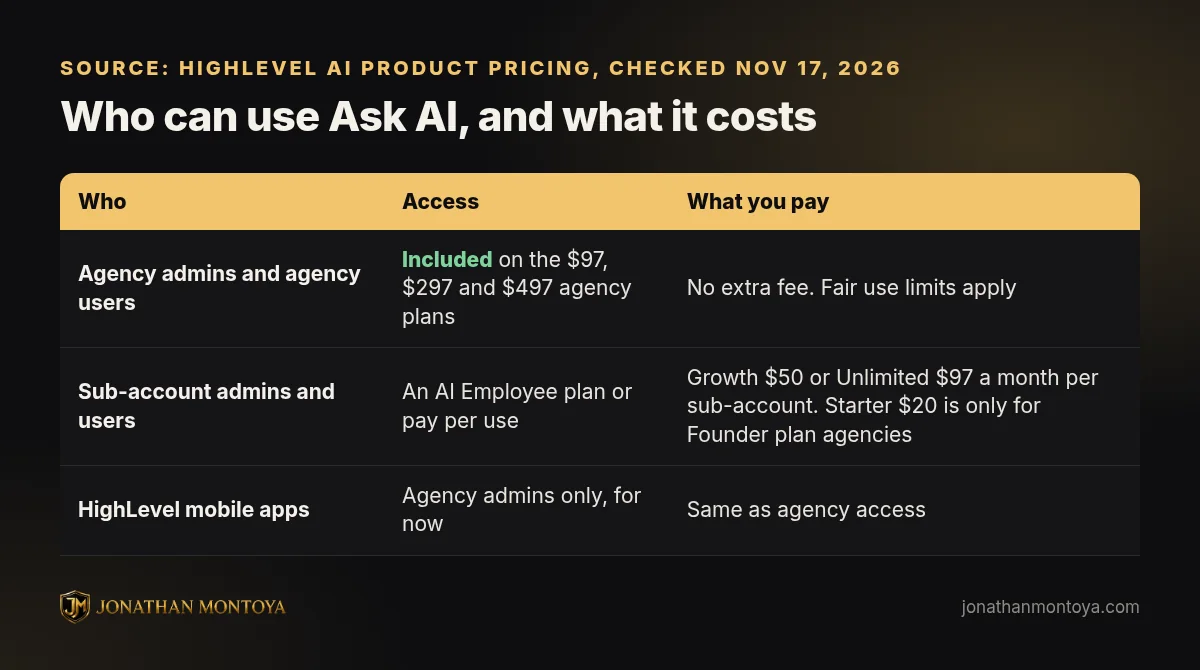
This changed at HighLevel's LevelUp 2026 event. Ask AI used to need a $20 a month add-on for agencies. HighLevel retired that plan. Now agency admins and agency users get Ask AI with no extra fee on the $97, $297 and $497 agency plans. Fair use limits apply, and use is counted in rolling five hour windows.
Your clients are different. Sub-account users get Ask AI through an AI Employee plan or pay per use.
New to HighLevel? Ask AI comes with every agency plan. Start your HighLevel trial through my link, then try the prompts below.
Start HighLevelWhat Ask AI cannot do yet
Ask AI is growing fast, but it does not reach everything yet. HighLevel lists these limits right now:
- Workflows are read only. It can find your workflows but cannot build or edit the steps.
- Campaigns are read only. It can list them but not change them.
- Website builder is not connected. It can work with Funnels, but not the full Sites builder.
- No chat widget setup, and no IVR or call routing setup.
- Affiliate Manager and listings are not connected yet.
How to use Ask AI, step by step
- Set your Brand Voice firstGo to Marketing, then Brand Boards, then Brand Voice. Ask AI uses this for anything it writes, so your content sounds like you.
- Open Ask AIClick the Ask AI icon in the top bar. For bigger jobs, click Ask AI in the left menu to open the full screen workspace.
- Ask for one clear taskUse real names. Say which pipeline, which tag and which dates. HighLevel says more detail gives better results.
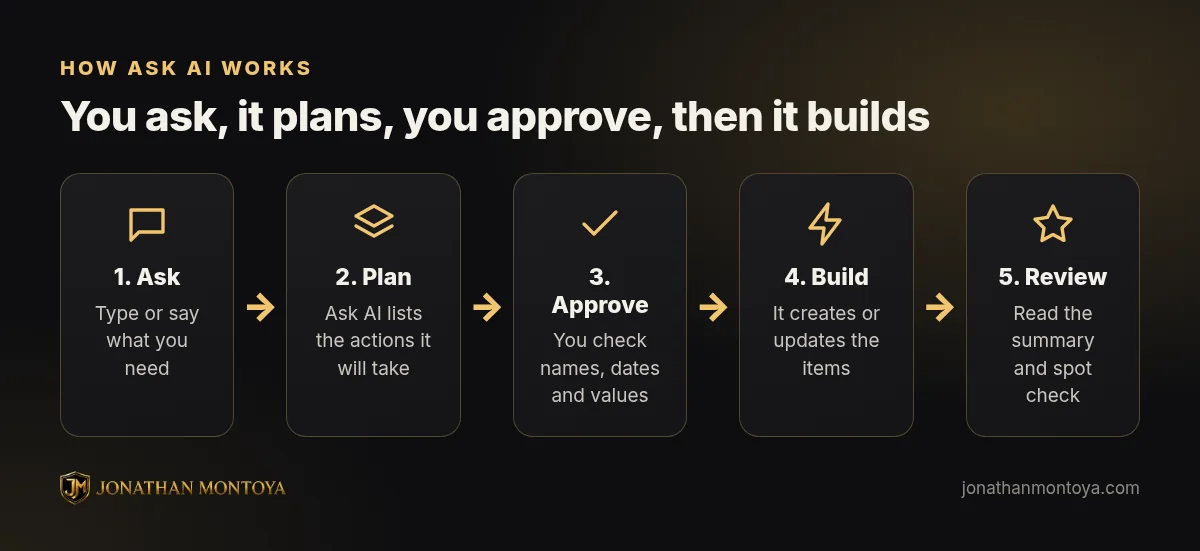
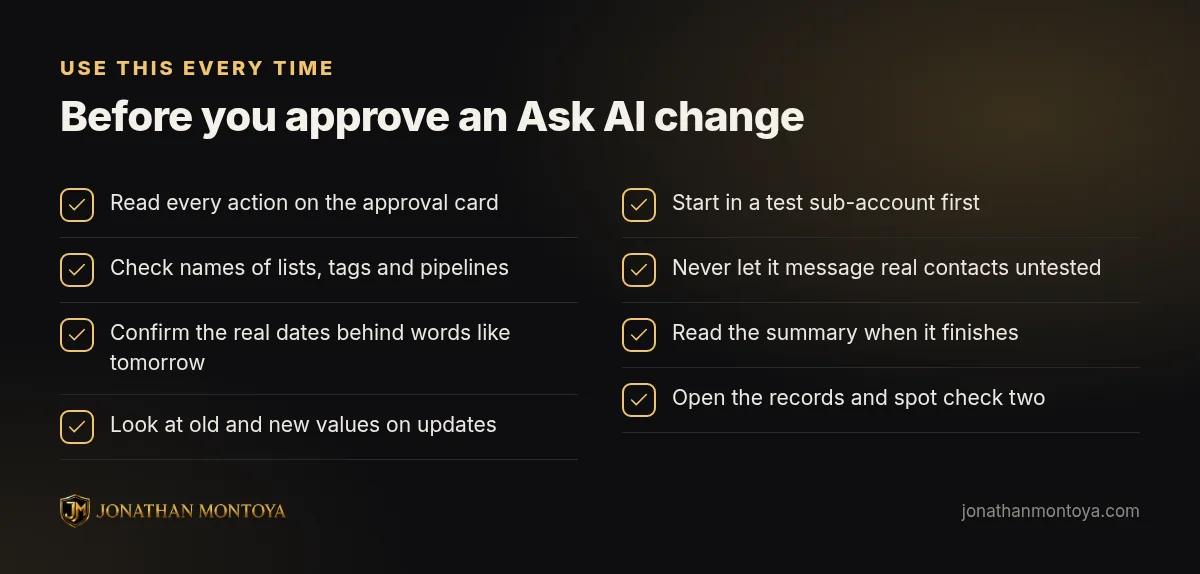
- Read the approval cardBefore any change, Ask AI shows what it will do. Check names, dates and old versus new values. Words like tomorrow get turned into real dates, so confirm them.
- Approve, then check the workAfter you approve, read the summary. Then open two of the records it touched and make sure they look right.
Video walkthrough by Dominic Baptist on YouTube. Features shown may have changed since it was recorded.
5 prompts to try first
Start with jobs that are easy to check. Copy these, then swap in your own names.
- Get a quick answer: Show me all open opportunities in my Sales pipeline worth over 1,000.
- Prep for a call: Summarize this contact and tell me what to know before I follow up.
- Clean up tags: Find contacts with no tags who came in this month and list them.
- Draft content: Write 5 blog title ideas for a roofing company, using my brand voice.
- Set a report: Send me a new leads report every Monday at 9am.
What are Ask AI Spaces?
Spaces are project workspaces inside Ask AI. HighLevel added team features to them in November 2026. Your team can work on an AI draft together, leave comments and ask for a review before anything goes out. Read more on the HighLevel blog.
Ask AI also works with HighLevel's Project Management tool, which is in private beta. You can describe a project, like a client onboarding plan, and Ask AI lays out the tasks for your approval. See HighLevel's guide.
Mistakes to avoid
- Testing on real clients. Try new requests in a test sub-account first.
- Vague requests. Contact my leads could mean anyone. Name the tag, pipeline or date range.
- Skipping the approval card. It is your safety net. Read it every time.
- Bulk texts without a check. Ask AI can send bulk SMS. Make sure you have consent and A2P set up first.
- Mixing up Ask AI and AI agents. Ask AI helps your team. Conversation AI and Voice AI talk to customers, and they are billed on their own.
Want the bigger picture? Read What Is GoHighLevel?, compare plans in GoHighLevel Pricing, and build your first automations with GoHighLevel Automation.
Try Ask AI in your own HighLevel account
Ask AI is included for agency users on every HighLevel agency plan. The easiest way to learn it is to try one small task in a test sub-account.
When you start HighLevel through my link, you also get my GHL Clone for free. It is a done-for-you affiliate system I spent 11 months building. You can copy it in about 5 minutes, add your own affiliate link and share it. There is no website to build and no emails to write.
Start HighLevelGet the free GHL CloneMy HighLevel link shows a 30-day free trial on HighLevel's own offer page (checked Nov 17, 2026). HighLevel's standard pricing page lists 14 days. Disclosure: I earn a commission if you buy HighLevel through my link, at no extra cost to you. The GHL Clone is my own system, and I earn a commission if you later pay for HighLevel. What anyone earns depends on their own work, and no one can promise a result.
Want to start an AI agency? My free program, Freedom Launch Accelerator, shows you how to offer AI services like these to local businesses.
See the free programFAQ
Is GoHighLevel Ask AI free?
For agency admins and agency users, yes. HighLevel says Ask AI is included on the $97, $297 and $497 agency plans with no extra fee, subject to fair use limits. Sub-account users need an AI Employee plan or pay per use.
Can Ask AI change things without asking me?
No. HighLevel says Ask AI shows a confirmation screen before any write, update or delete action. Nothing changes until you approve it.
Can Ask AI build workflows?
Not yet. HighLevel lists workflows as read only in Ask AI right now. It can find and list workflows, but it cannot build or edit workflow steps. Use the Workflow AI Builder for that.
What is the difference between Ask AI and Conversation AI?
Ask AI helps you and your team get work done inside HighLevel. Conversation AI and Voice AI are agents that talk to your customers by chat and phone. Ask AI can help you set those agents up.
Does Ask AI work on the mobile app?
Yes, for agency admins. HighLevel says Ask AI is on the HighLevel, LeadConnector and white label mobile apps for agency admins right now.
Where do I find Ask AI?
Click the Ask AI icon in the top bar, or click Ask AI in the left menu to open the full screen workspace. It works in both the agency view and sub-accounts.
Sources, checked Nov 17, 2026
Affiliate disclosure: I earn a commission if you buy HighLevel through my links, at no extra cost to you. Freedom Launch Accelerator and the GHL Clone are my own programs. HighLevel is a trademark of HighLevel, Inc. This site is not run by or affiliated with HighLevel.
