
GoHighLevel · Basics
GoHighLevel is an all-in-one tool for getting leads, following up, and closing sales. Here is what it does, who it is for, and what it costs, with no hype.
You have probably heard people talk about GoHighLevel. Maybe in a Facebook group, maybe in a YouTube ad. It can sound like it does everything. So what is it, really?
I read HighLevel's home page, pricing page, and help docs on October 20, 2026. Here is a plain English answer, plus who should use it and who should not.
Quick answer
GoHighLevel, now usually called HighLevel, is an all-in-one sales and marketing platform. It puts a CRM, websites and funnels, email and text marketing, booking calendars, workflow automation, AI chat and phone agents, and courses in one account. Agencies use it to run their clients' marketing, and many small businesses use it for their own. Plans start at $97 a month, with $297 and $497 plans for agencies, checked October 20, 2026. Phone, email, and AI use can cost extra.
GoHighLevel in one sentence
HighLevel calls itself "The AI-powered business operating system." Its home page says it has "All the tools you need to capture, nurture and close new leads into bookings, sales, reviews and repeat customers!"
Here is my plain version. It is one login that replaces a bunch of separate tools you might pay for now. HighLevel's own FAQ says most users replace their CRM, funnel builder, email tool, scheduler, SMS tool, and review tool. If you already have an account, my GoHighLevel login guide shows where to sign in.
The company name is HighLevel. Many people still say GoHighLevel because the website is gohighlevel.com. They are the same thing.
What does GoHighLevel do?
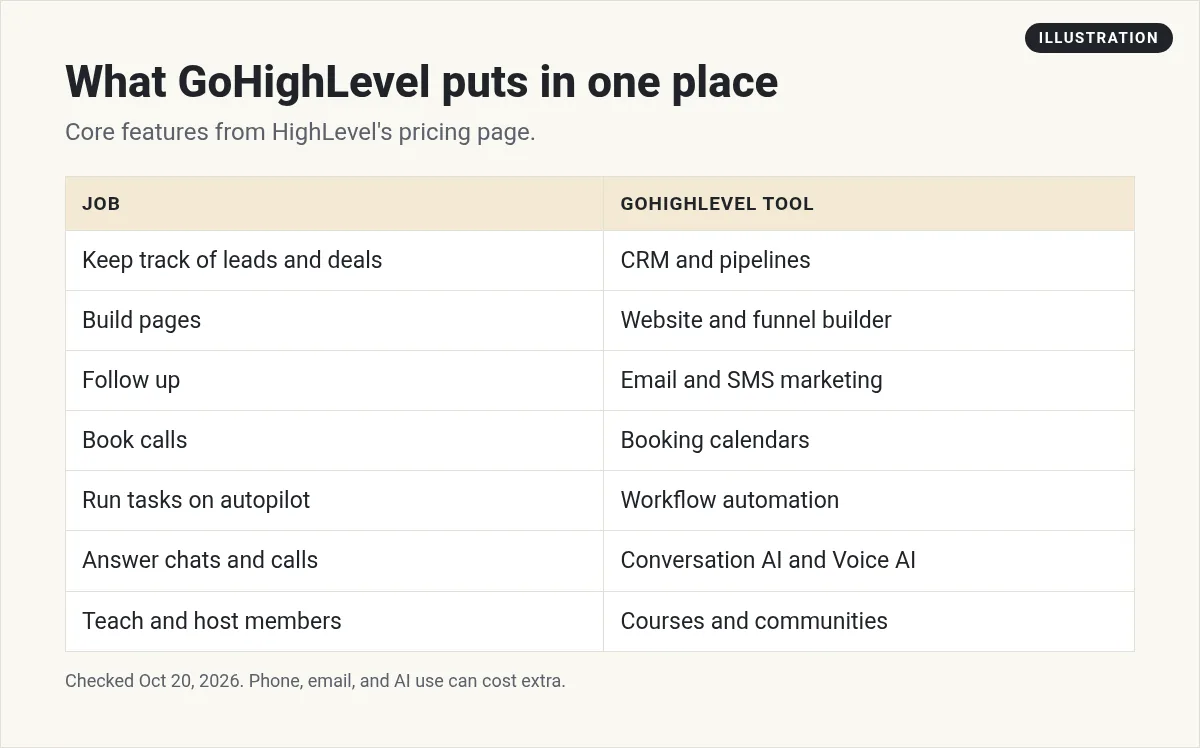
HighLevel groups its tools by the steps of a sale. Its home page uses five words: Capture, Nurture, Close, Evangelize, and Reactivate. Here is what that looks like in real life.
- Capture: a lead finds your page or ad and fills out a form.
- Nurture: they get a text and an email, right away.
- Close: they book a call on your calendar and pay you.
- Evangelize: after the job, they get a review request.
- Reactivate: months later, they get a check in message.
All of that can run in one place. That is the whole idea.
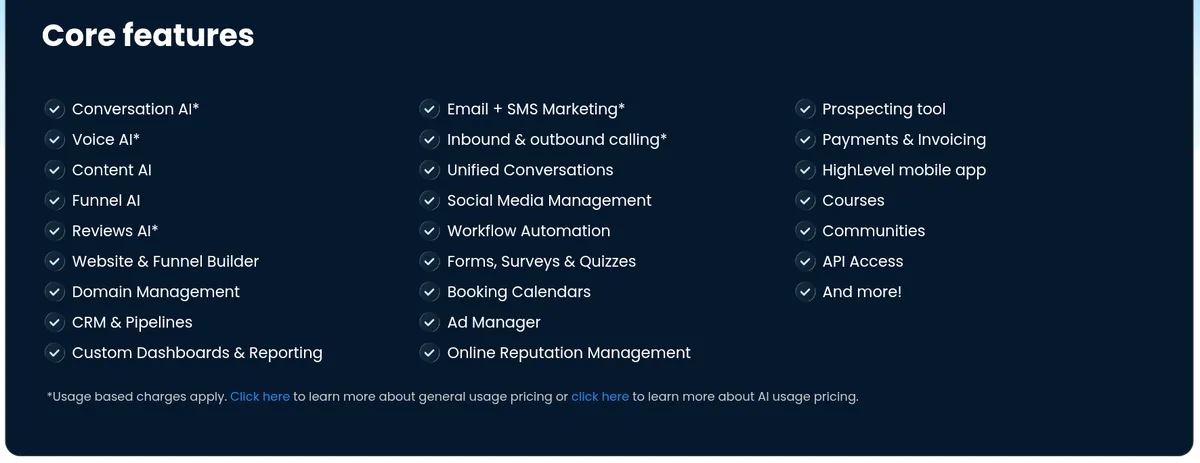
The full core features list on the pricing page is long. The ones most people use first are the CRM and pipelines, the website and funnel builder, email and SMS, booking calendars, and workflow automation. My GoHighLevel CRM guide shows how contacts and pipelines work. I cover the automation side in GoHighLevel automation and the page builder in the GoHighLevel website builder.
The AI tools inside HighLevel
HighLevel leans hard into AI now. The pricing page lists Conversation AI, Voice AI, Content AI, Funnel AI, and Reviews AI. In simple terms:
- Conversation AI can reply to chats and texts.
- Voice AI can answer phone calls.
- Content AI helps write emails, posts, and page copy.
- Reviews AI helps reply to reviews.
Several of these have usage charges. HighLevel's pricing guide lists three ways to pay for AI: pay per use, an AI Employee Growth plan at $50 a month per location, or AI Employee Unlimited at $97 a month per location, checked October 20, 2026.
My video: I show how to set up an AI voice agent in HighLevel that answers calls and books appointments for a local business, and how agencies offer it as a service. It came out in August 2026, so check today's prices above.
Any results mentioned in videos are not typical and are not a promise of income. Your results depend on your work and your market.
Who is GoHighLevel for?
HighLevel started with marketing agencies. Its home page says it was "built and powered by marketers." Today, three kinds of people use it most:
- Marketing agencies that run marketing for clients. Each client gets their own sub-account, which is like a separate workspace.
- Local businesses like gyms, dentists, and contractors that want leads, booking, and follow up in one place.
- Coaches and course creators who want funnels, courses, and communities together.
How much does GoHighLevel cost?
From HighLevel's pricing page, checked October 20, 2026:
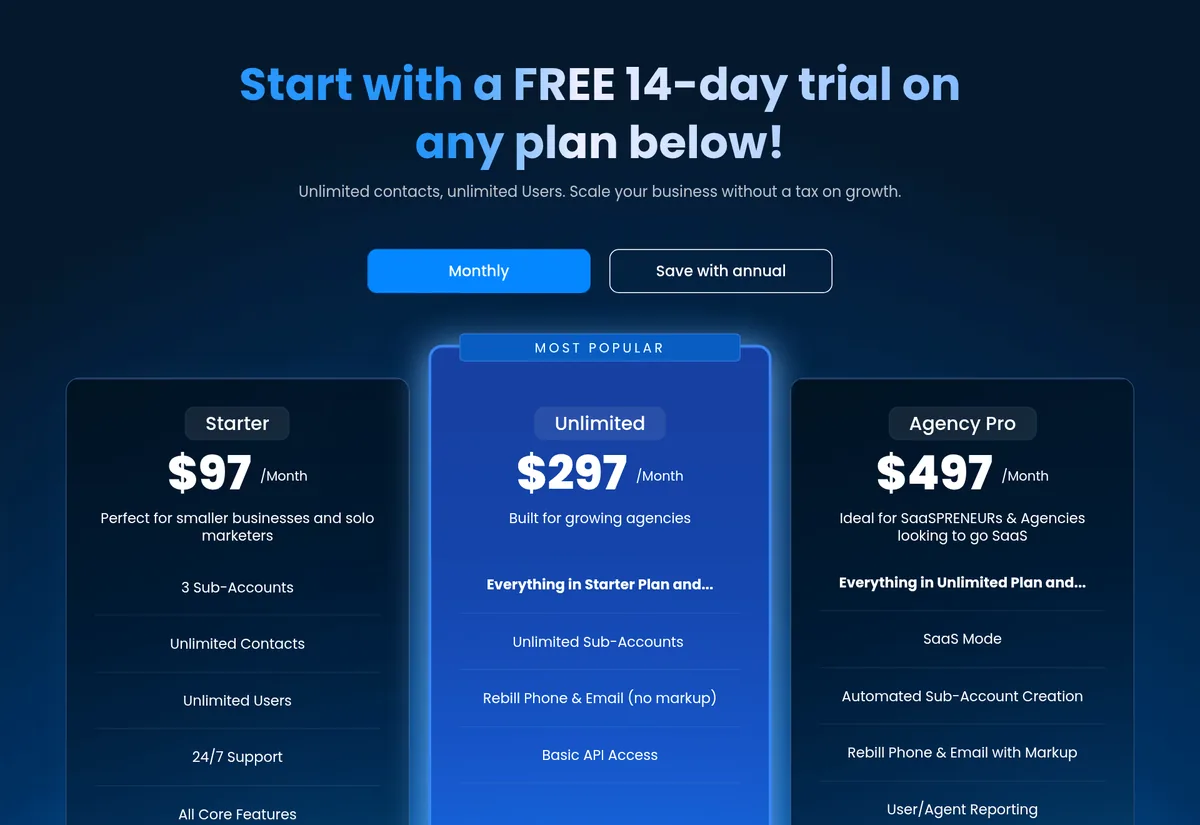
- Starter: $97 a month. 3 sub-accounts, unlimited contacts and users, all core features.
- Unlimited: $297 a month. Unlimited sub-accounts and Basic API access.
- Agency Pro: $497 a month. Adds SaaS Mode, so agencies can sell HighLevel as their own software.
On top of the plan, some things are pay as you go. HighLevel's pricing guide says email costs $0.675 per 1,000 emails. It also says phone and text pricing matches Twilio's rates, which vary by region. The pricing FAQ says there is no long-term contract, and you can cancel from your dashboard.
The pricing page offers a 14-day free trial. Through my partner link, new customers get a 30-day trial, checked October 20, 2026. Billing starts when the trial ends unless you cancel. Here is my link: 30-day GoHighLevel trial (I earn a commission if you buy through this link).
For a deeper look at which plan to pick, read GoHighLevel pricing for beginners.
How HighLevel accounts are set up
This part confuses a lot of new users, so here it is in plain words. HighLevel has two levels.
- The agency account is the top level. This is where you manage billing, your team, and all your client workspaces.
- Sub-accounts are the workspaces under it. Each one is for one business. It has its own contacts, calendars, pages, and phone numbers.
If you are a single business, you will mostly work inside one sub-account for yourself. If you are an agency, each client gets their own. The Starter plan allows 3 sub-accounts. Unlimited and Agency Pro allow as many as you need.
Agencies also use snapshots. A snapshot is a saved copy of a sub-account setup that you can load into a new one. It saves hours when you set up the same system for many clients. I explain it in HighLevel snapshots for beginners.
One thing to know before you text leads
If you plan to text people in the US, you need to register first. HighLevel's help center says A2P 10DLC "is the carrier registration framework used for business SMS and MMS messages sent to U.S. recipients from standard 10-digit local phone numbers."
In plain words, the phone carriers want to know who you are and that people agreed to get your texts. In HighLevel, you do this under Settings, then Phone System, then Trust Center. The carriers, not HighLevel, make the final call on approval. Start this early, because you cannot count on texting working on day one.
The good and the hard parts
| What is good | What is hard |
|---|---|
| Many tools in one login | So many features that it can feel like a lot at first |
| Unlimited contacts and users on every plan | Phone, email, and AI use add to the bill |
| Month to month, no long-term contract | Texting in the US needs A2P 10DLC registration first |
| Built for agencies with many clients | $97 a month is a lot if you only need one tool |
My own summary, based on HighLevel's pricing page and help docs, checked October 20, 2026.
How to get started the smart way
The biggest mistake I see is trying to set up everything in week one. Do this instead:
- Pick one real job, like book more calls or follow up with every lead.
- Build only the pieces for that job: one form, one calendar, one workflow.
- Test it like a customer, on your phone.
- Add the next tool only after the first one works.
My GoHighLevel tutorial for beginners walks you through your first 7 days, step by step.
Is GoHighLevel a fit for me?
Nothing you check here is sent or saved. Download it if you want to keep it.
See HighLevel for yourself
Start a trial, set up one real job, and test it like a customer. Through my link, new customers get a 30-day trial instead of the standard 14 days, checked October 20, 2026.
Start my 30-day GoHighLevel trialI earn a commission if you buy through this link. Billing starts when the trial ends unless you cancel. Usage fees for phone, email, and AI can apply during the trial.
Want help using AI in your business? Join my free AI workshop.
Frequently asked questions
What is GoHighLevel used for?
It is used to get leads, follow up with them, book calls, and close sales in one place. It includes a CRM, funnels, email and text marketing, calendars, automation, and AI tools.
Is GoHighLevel the same as HighLevel?
Yes. The company is called HighLevel. Many people still say GoHighLevel because the website is gohighlevel.com.
How much does GoHighLevel cost per month?
Starter is $97 a month, Unlimited is $297, and Agency Pro is $497, checked October 20, 2026. Phone, email, and AI use can cost extra.
Is GoHighLevel only for agencies?
No. It started with agencies, but many local businesses, coaches, and course creators use it for their own business.
Does GoHighLevel have a free trial?
Yes. The pricing page offers a 14-day free trial. Some partner links, including mine, offer 30 days for new customers. Billing starts when the trial ends unless you cancel.
Is there a contract?
No. HighLevel's pricing FAQ says it is month to month with no long-term contract, and you can cancel from your dashboard.
Sources
Checked October 20, 2026. Plans, prices, and rules can change.
- HighLevel home page
- HighLevel pricing
- HighLevel Pricing Guide (help center)
- What is A2P 10DLC? (help center)
- My HighLevel trial page (affiliate): gohighlevel.com/montoya
