
GoHighLevel · Website builder guide
HighLevel gives you three ways to build pages: Websites, Funnels, and AI Studio. Here is what each one is for, how to set up a site, and what it costs.
A lot of people sign up for GoHighLevel for the CRM and texting, then realize it can build their website too. That can save you a separate website bill. But HighLevel has more than one builder, and picking the wrong one makes life harder later.
In this guide, I explain the three ways to build pages in HighLevel, how to set up a website step by step, and what the AI tools cost. Everything is based on HighLevel's own help center and pricing page, checked October 19, 2026.
Quick answer
The GoHighLevel website builder is a drag and drop builder inside every HighLevel sub-account. Use Websites for multi-page business sites, and Funnels for step by step lead and sales pages, since only Funnels have split testing. HighLevel also has Funnel & Website AI to draft pages from a prompt, and AI Studio to build sites by chatting. The builder is part of the plans on HighLevel's pricing page, which start at $97 a month, checked October 19, 2026.
The three ways to build pages in HighLevel
This is the part most beginners miss. HighLevel has three page tools, and they are not the same.
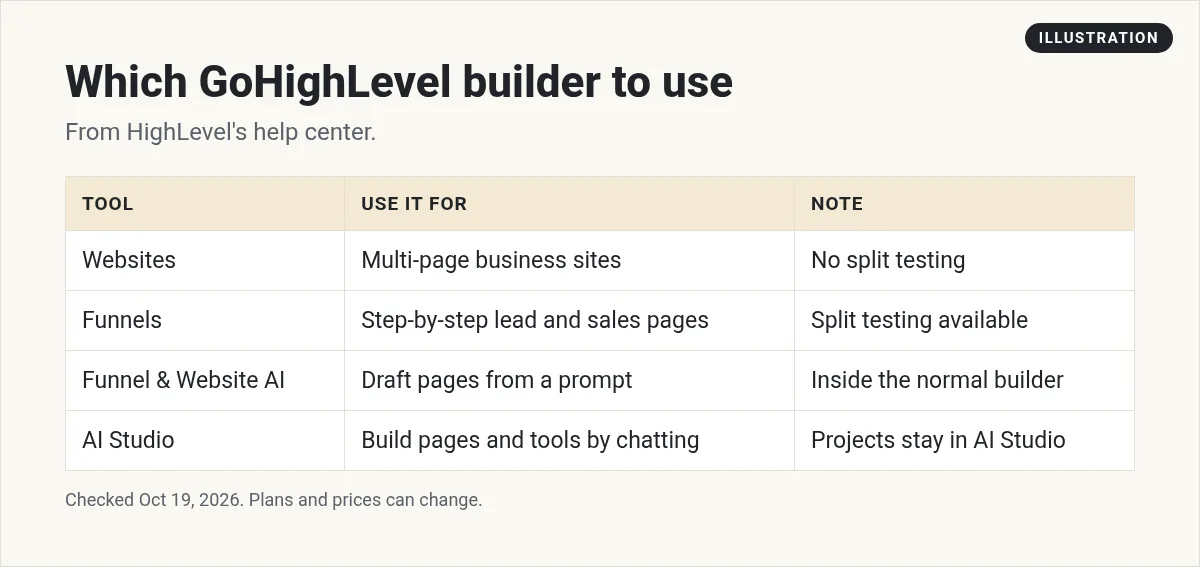
- Websites: multi-page sites people can click around, like a home page, service pages, and a contact page.
- Funnels: pages in a set order, built to move a visitor toward one goal, like an opt-in, then a booking.
- AI Studio: a newer builder where you describe what you want in plain words, and the AI builds it.
There is also Funnel & Website AI, which is an AI helper inside the normal Websites and Funnels builder.
Websites vs Funnels: which to use
HighLevel's help center says both use "the same core page-building experience." The difference is how they are organized.
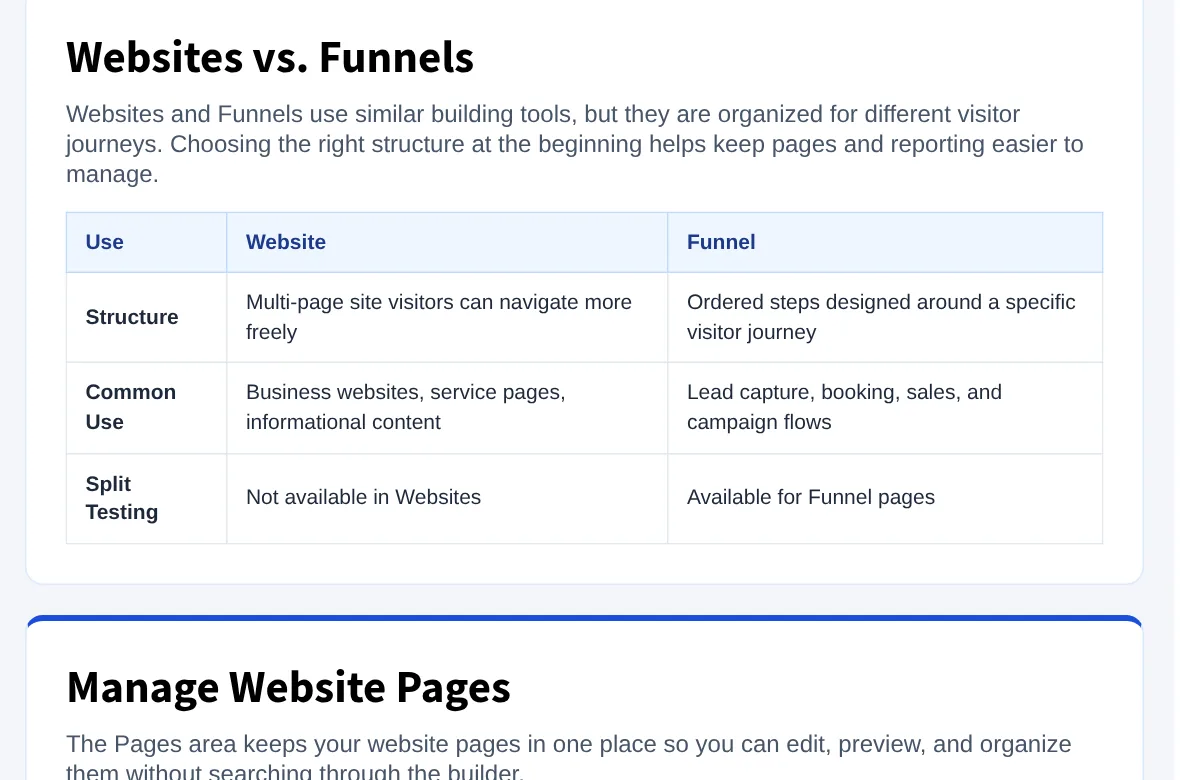
| Websites | Funnels | |
|---|---|---|
| Structure | Multi-page site visitors can move around freely | Ordered steps for one visitor journey |
| Common use | Business sites, service pages, content | Lead capture, booking, sales, campaigns |
| Split testing | Not available | Available |
Source: HighLevel help center, Websites overview, checked October 19, 2026.
My rule of thumb: Build your main business site in Websites. Build each ad campaign or offer as a Funnel, so you can test one page against another.
How to set up a GoHighLevel website (5 steps)
HighLevel lays out a simple flow: create, customize, review, connect, publish.
- Create the website. In your sub-account, go to Sites, then Websites. Choose From Blank or From Templates, then click Create.
- Add and organize pages. Give each page a clear name and path. You can drag page cards to reorder them, and HighLevel says "The new order saves automatically."
- Build each page. Add sections, rows, columns, and elements. Update text, images, buttons, and forms. Use Preview to test links.
- Review mobile and SEO. Switch to mobile view and fix anything that looks off. Add a page title and meta description for each page.
- Connect your domain and publish. Connect your own domain, test the saved version, then publish.
Funnel & Website AI: draft a page from a prompt
HighLevel describes Funnel & Website AI as its "AI-powered page creation and editing experience for funnel and website pages." It works inside the normal builder.
It has two main paths:
- Assist: you fill in guided fields like your niche, goal, and audience.
- Build: you describe exactly what you want in your own words.
After it builds a page, you can ask it to change the theme, redesign a section, or add a new section like pricing or FAQs. You can also start from a link or image. HighLevel notes this "does not create an exact clone of the original page."
Cost: HighLevel says Funnel & Website AI "is currently available without additional AI usage charges, subject to usage limits," checked October 19, 2026.
AI Studio: build a site by chatting
AI Studio is a separate builder. HighLevel calls it "an AI-powered builder in HighLevel that helps you create websites, landing pages, and other interactive experiences faster using natural language prompts." It can also build things like multi-step surveys and custom booking flows.
Two things to know before you start a project there:
- Projects stay in AI Studio. HighLevel says AI Studio projects "cannot be moved into the standard Sites or Funnels builders." Pick your builder before you put in a lot of work.
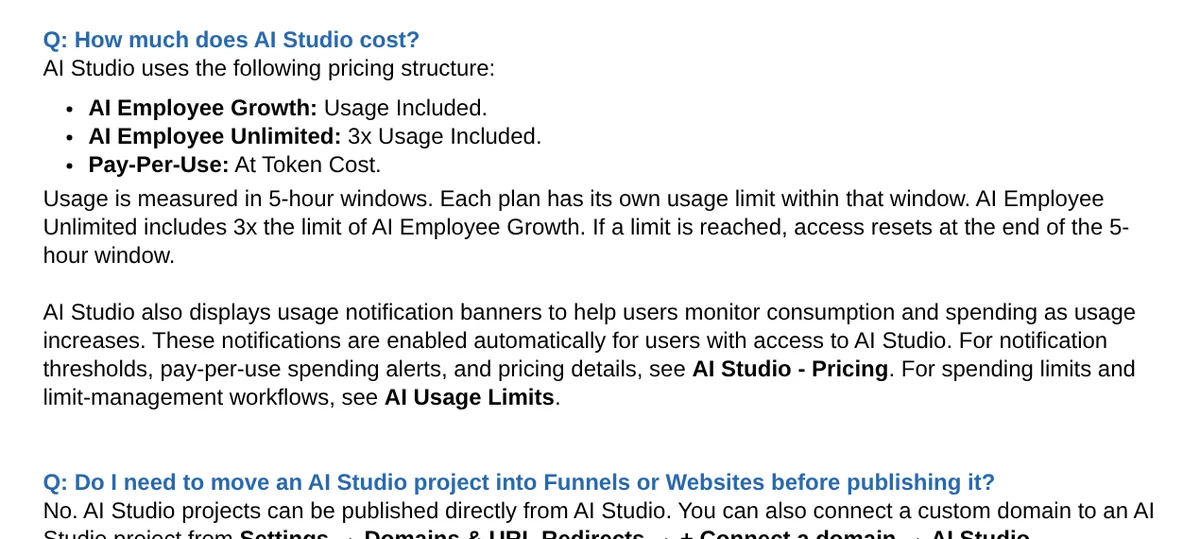
- It uses AI credits. Usage depends on your AI plan, measured in 5 hour windows.
| AI plan | AI Studio usage (per HighLevel's help center) |
|---|---|
| AI Employee Growth | Usage included |
| AI Employee Unlimited | 3x usage included |
| Pay-Per-Use | At token cost |
Source: HighLevel help center, AI Studio in HighLevel, checked October 19, 2026. If you hit a limit, access resets at the end of the 5 hour window.
To publish, you first publish to a preview domain, then connect your own domain. HighLevel says you "cannot connect a custom domain until the project has first been published to a preview domain."
What the GoHighLevel website builder costs
The website builder is not sold on its own. HighLevel's pricing page lists "Website & Funnel Builder" as part of its plans. Starter is $97 a month and Unlimited is $297 a month, checked October 19, 2026. The pricing page also lists custom domains for funnels and websites.
Keep in mind that the plan price is not the whole bill. Texts, calls, email, and some AI use cost extra. If your website has forms that send texts or emails, those messages count too. Plan for that before you launch.
For a full breakdown of the plans and the extra usage fees, read my GoHighLevel review.
Is the GoHighLevel website builder worth it?
It is a good fit if you already use HighLevel for your CRM, calendars, and texting. Your forms, bookings, and contacts all live in one place, so a new lead from your site goes straight into your pipeline.
It may not be the best fit if you only need a simple website and no CRM. A plain website builder will cost less. And if your site is mostly a blog or a large content site, test the blog tools first.
If you are comparing HighLevel to another CRM, my GoHighLevel vs HubSpot comparison may help. If you plan to build sites for clients, see my guide on GoHighLevel white label.
How to test it in your trial
HighLevel's pricing page offers a 14-day free trial. New customers get 30 days through my partner link, checked October 19, 2026. Either way, billing begins when the trial ends unless you cancel. Here is my link: 30-day GoHighLevel trial (I earn a commission if you buy through this link.)
Give your trial one clear job. Build one real page with a form, connect it to a calendar, and submit it yourself like a customer would. If you want the full trial walkthrough, read my guide to the GoHighLevel free trial.
My GoHighLevel website plan
Nothing you check here is sent or saved. Download it if you want to keep it.
Build your first GoHighLevel website
Start a trial and build one real page with a form and a booking calendar. Through my link, new customers get a 30-day trial instead of the standard 14 days, checked October 19, 2026.
Start my 30-day GoHighLevel trialI earn a commission if you buy through this link. Billing starts when the trial ends unless you cancel. Usage fees for phone, email, and AI can apply during the trial.
Want help using AI to build it? Join my free AI workshop.
Frequently asked questions
Does GoHighLevel have a website builder?
Yes. Every HighLevel sub-account has a drag and drop builder for Websites and Funnels, plus AI tools to draft pages. It is included in the plans on HighLevel's pricing page.
What is the difference between Websites and Funnels in GoHighLevel?
Websites are multi-page sites people can browse freely. Funnels are pages in a set order for one goal, like lead capture or booking. Only Funnels have split testing, per HighLevel's help center.
Can GoHighLevel build a website with AI?
Yes. Funnel and Website AI drafts pages from a prompt inside the normal builder, and AI Studio builds sites by chatting. HighLevel says Funnel and Website AI currently has no extra AI usage charges, subject to usage limits.
Can I move an AI Studio site into the Websites builder?
No. HighLevel says AI Studio projects stay in AI Studio and cannot be moved into the standard Sites or Funnels builders. AI Studio publishes from its own workspace.
How much does the GoHighLevel website builder cost?
It is not sold alone. It is part of HighLevel's plans, which start at $97 a month for Starter, checked October 19, 2026. AI Studio usage depends on your AI plan.
Can I use my own domain on a GoHighLevel website?
Yes. You can connect your own root domain or subdomain to a HighLevel website and publish it there.
Sources
Checked October 19, 2026. Plans, prices, and rules can change.
- HighLevel help: Websites overview
- HighLevel help: Funnel & Website AI
- HighLevel help: AI Studio in HighLevel
- HighLevel pricing
- My HighLevel trial page (affiliate): gohighlevel.com/montoya
