
GoHighLevel · White label guide
White label means your clients see your brand, not HighLevel's. Here are the five levels, what each one costs, and how to set up the first one today.
GoHighLevel white label lets you put your own brand on the software your clients use. They log in at your web address, see your logo, and can even download an app with your name on it. Some levels come with the $297 plan. Others need the $497 plan or a paid add-on.
I use HighLevel in my own business, and this blog runs on its website and blog tools. I am also an affiliate, so if you sign up through my links I earn a commission. Every plan and price below comes from HighLevel's own pages and help center, checked October 19, 2026.
Quick answer
GoHighLevel white label has five main levels: a branded login domain for the web app, a branded desktop app, a white label mobile app ($497 a month add-on), SaaS Mode for selling the software as your own (on the $497 plan), and up to two brands with SaaS Multi-Brands (also the $497 plan). HighLevel lists the Branded Desktop App with custom domains on its $297 Unlimited plan. Checked October 19, 2026.
What white label means in GoHighLevel
Normally your clients would log in at a HighLevel web address and see HighLevel's name. With white label, they see yours. HighLevel's pricing FAQ puts it simply: you can white label the desktop web app, so "your clients see your logo and branding when they log in, not HighLevel's."
That matters if you run an agency. Your clients see one brand, yours. It also opens a bigger option: selling the software as your own product.
The five levels at a glance
| Level | What your clients see | Plan or cost |
|---|---|---|
| 1. Branded login domain | Your web address and logo on the login page | Branded Desktop App and custom domains listed on Unlimited, $297/mo |
| 2. Branded desktop app | A Mac, Windows, or Linux app with your name and icon | Same as above |
| 3. White label mobile app | A phone app in the app stores with your brand | Add-on, $497/mo |
| 4. SaaS Mode | Your own software plans they can buy from your site | $497/mo plan |
| 5. SaaS Multi-Brands | Up to two separate brands from one account | $497/mo plan only |
Sources: gohighlevel.com/pricing, my HighLevel partner page, and HighLevel help center articles, checked October 19, 2026.
Level 1: Your own login domain
This is the place to start. Instead of a HighLevel address, clients log in at something like app.yourdomain.com. HighLevel's help article lays out the setup:
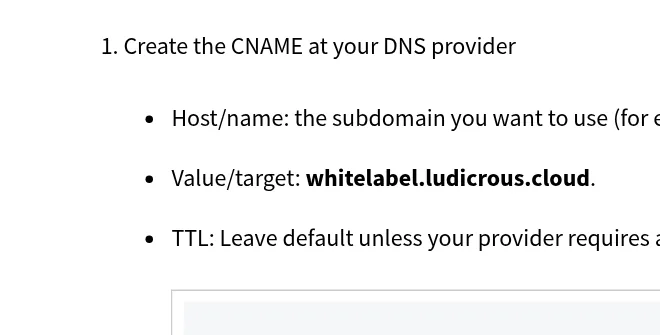
- Create a CNAME record at your domain provider. Use the subdomain you want, like app, and point it to the target in HighLevel's help article. On October 19, 2026, that target was whitelabel.ludicrous.cloud.
- Add the domain in HighLevel. Go to Agency View, then Settings, Company, Whitelabel, Whitelabel Domain. Enter the full subdomain and click Update.
- Add your logo and legal links. In Agency View, Settings, Company, upload your logo and paste your Privacy Policy and Terms and Conditions links.
- Check it. Wait for DNS to update, then open your new address. HighLevel says it issues the HTTPS certificate on its own once DNS points to the right place.
Do not forget your links. The same help article explains a second domain, called the API domain or branded links. It powers the links inside your emails and texts, like forms, surveys, calendars, and review links. Set it up so the links your contacts click show your brand too. HighLevel suggests setting up both for a fully branded experience.
Tip: use a subdomain only for logins. The help article suggests keeping it separate from your marketing site and email sending domains.
Level 2: A branded desktop app
HighLevel's White-Label Desktop App lets you build an app for macOS, Windows, and Linux with your own branding. You set it up in the Desktop App Customizer in the Agency Dashboard.
- What you can change: the app name, icon, theme, login screen title and subtitle, logo, and background image.
- How it works: you preview changes live, click Build App, and HighLevel builds it. Then you download it, copy the links, or promote it to your clients inside the app.
Level 3: A white label mobile app
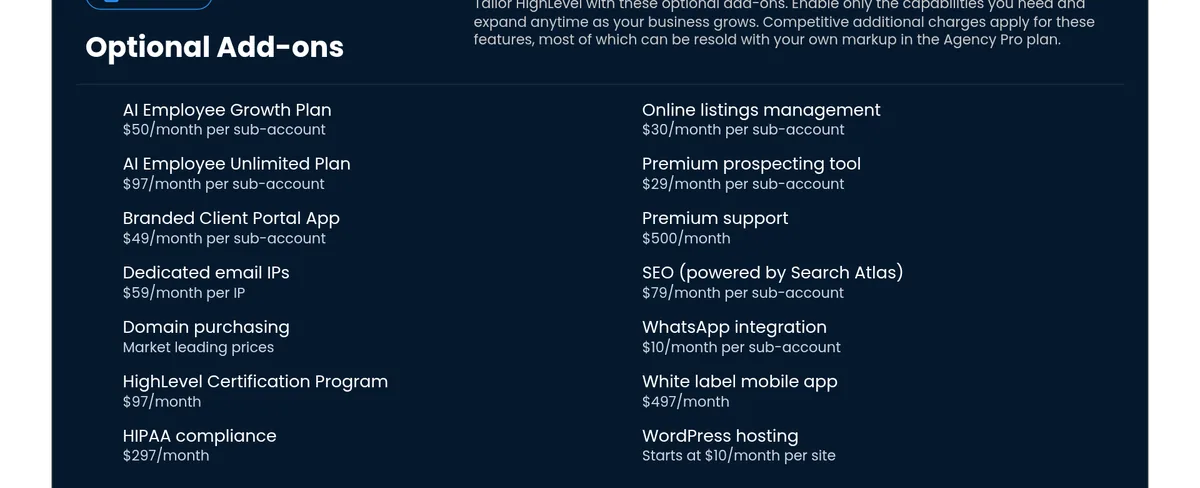
This puts your brand in the Apple App Store and Google Play. It is the most expensive level. HighLevel's pricing page lists the white label mobile app at $497 a month.
- What you need: the help center says publishing requires the right Custom Agency App subscription plus your own Apple and Google developer accounts.
- What you can change: app name, logo, main color, font, splash screens, and the menu layout.
If you do not need your own app in the stores, the pricing page also lists a Branded Client Portal App at $49 a month per sub-account. Compare both before you commit.
Level 4: SaaS Mode
This is where white label turns into a software business. HighLevel's pricing FAQ says SaaS Mode "transforms HighLevel into your own sellable software product." People buy a plan on your website, and their account is created for them. You set the price. On the $497 plan you can also rebill texts, email, and other usage with your own markup.
Before you build a whole software brand, read my guide to GoHighLevel pricing so you know what each plan includes.
Level 5: SaaS Multi-Brands
If you serve two very different markets, Multi-Brands lets you run up to two separate brands in one account. Each brand gets its own logo, domain, and white label settings. HighLevel's help article says it is "available only on the $497 Pro plan," and you must set up a white label domain first.
Which plan do you need?
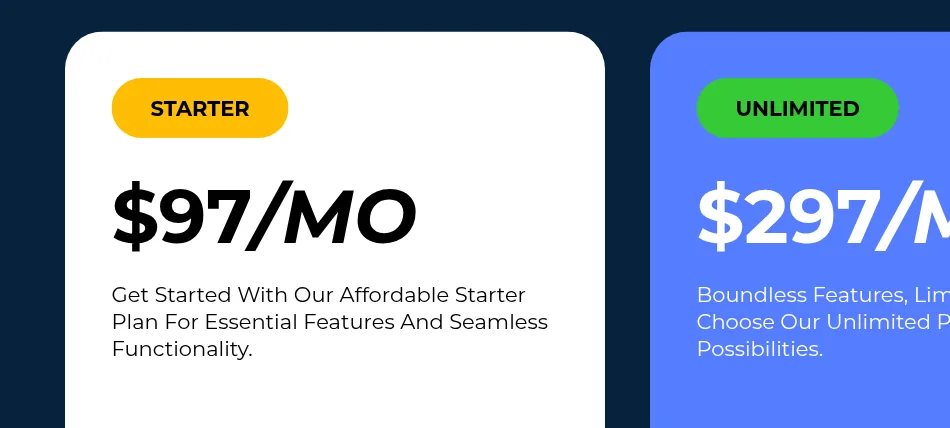
- Just testing with your own business: Starter, $97 a month, is fine. You can add branding later.
- Serving clients under your brand: Unlimited, $297 a month. My partner page lists the Branded Desktop App and custom domains on this plan.
- Selling the software as your own product: the $497 plan for SaaS Mode, with Multi-Brands if you need two brands.
Plan names vary across HighLevel's own pages. The pricing page says Agency Pro, while my partner page and some help articles say SaaS Pro or Pro for the same $497 plan.
What to sort out before you go white label
- Support. When clients see your brand, they will come to you with questions. Plan who answers.
- Setup speed. Ready made setups called snapshots can help you set up each new client faster. See my guide to GoHighLevel snapshots.
- Your offer. Branding does not sell itself. Know what problem you solve. My guide on starting an AI service business can help.
- Legal pages. HighLevel asks for your own Privacy Policy and Terms links for the branded login.
My video: I walk through how I would start an AI automation agency on GoHighLevel with no experience. It came out in July 2026.
Any results mentioned in videos are not typical and are not a promise of income. Your results depend on your work and your market.
My GoHighLevel white label checklist
Nothing you check here is sent or saved. Download it if you want to keep it.
Test white label in a 30-day trial
Set up your branded login domain and see how it feels before you pay. New customers get 30 days through my partner link instead of the standard 14, checked October 19, 2026.
Start my 30-day GoHighLevel trialI earn a commission if you buy through this link. Billing starts when the trial ends unless you cancel. Usage fees for phone, email, and AI can apply during the trial.
Want help picking what to sell under your brand? Join my free AI workshop.
Frequently asked questions
Does GoHighLevel offer white label?
Yes. You can use your own login domain and logo, build a branded desktop app, add a white label mobile app, and on the $497 plan, sell the software as your own with SaaS Mode.
How much does GoHighLevel white label cost?
My partner page lists the Branded Desktop App and custom domains on the $297 Unlimited plan. SaaS Mode needs the $497 plan. The white label mobile app is a $497 a month add-on. Checked October 19, 2026.
What is the GoHighLevel white label mobile app?
It is a phone app with your brand in the Apple and Google stores. HighLevel lists it at $497 a month, and you need your own Apple and Google developer accounts.
What is SaaS Mode?
It turns HighLevel into software you sell under your brand. People buy a plan on your site, and their account is created for them. It is on the $497 plan.
Can I have more than one brand?
On the $497 plan, SaaS Multi-Brands lets you run up to two brands, each with its own logo, domain, and white label settings.
Will clients know it is HighLevel?
With white label set up, they log in at your domain and see your logo. The pricing FAQ says clients see your branding when they log in, not HighLevel's.
Sources
Checked October 19, 2026. Plans, prices, and rules can change.
- HighLevel pricing (plans, add-ons, FAQ)
- How to Set Up a Whitelabel Domain for the Desktop Web App (help center)
- White-Label Desktop App Setup Guide (help center)
- How to Customize Your White Label HighLevel Mobile App (help center)
- How to Promote and Customize Your Whitelabel Mobile App (help center)
- SaaS Multi-Brands Overview (help center)
- My HighLevel trial page (affiliate): gohighlevel.com/montoya
