

GoHighLevel how-to · Beginner guide
GoHighLevel can do a lot. That's exactly why beginners get lost. This tutorial gives you one small job a day for seven days, in the right order, so you end the week with a working setup you understand.
This is for anyone who just opened GoHighLevel and felt overwhelmed by the menu.
You'll get a map of what each part does, a 7-day plan with one task per day, the mistakes that trip people up, and a tracker you can use as you go. Each day takes about 30 to 60 minutes.
Quick answer
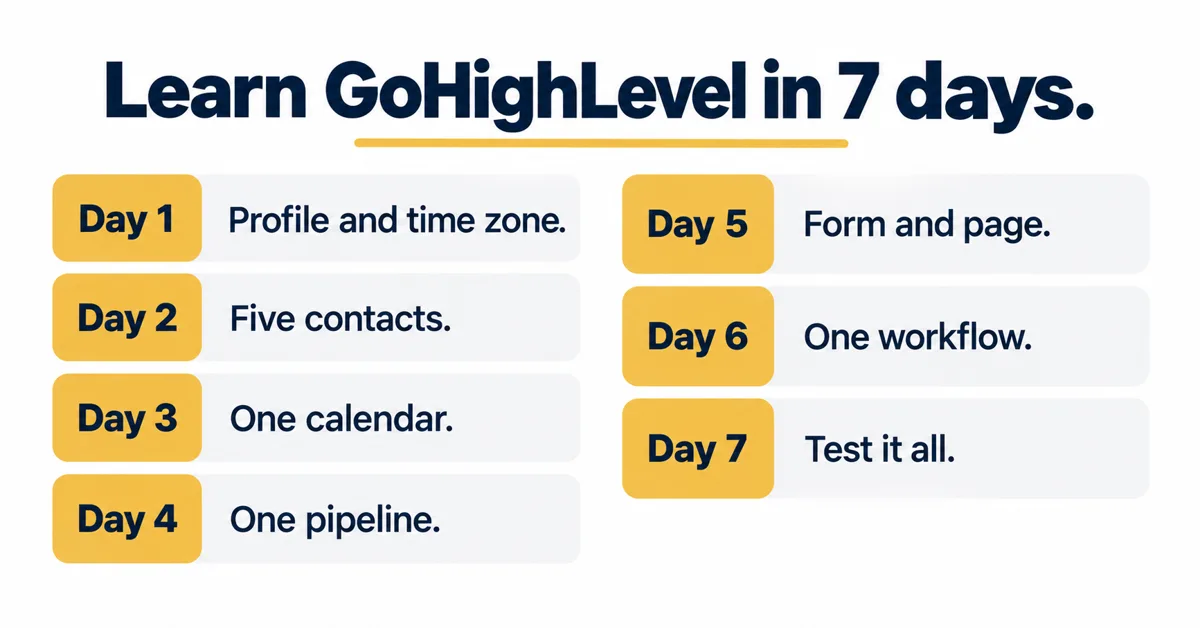
Learn GoHighLevel one part a day inside one test account. Day 1: business profile. Day 2: import five contacts. Day 3: a calendar. Day 4: a pipeline. Day 5: a form and a page. Day 6: one workflow. Day 7: test it all from start to finish. Ignore everything else until this works.
Before I built anything online, I was an electrical engineer. My boss would always say, "If it's garbage in, you're going to get garbage out."
He was talking about engineering. It's just as true in GoHighLevel. Messy contacts, the wrong time zone, or a half-built calendar will break everything you build on top of them.
That's why this plan starts with the boring stuff. Get the base right, and the fun parts work the first time.
“If it's garbage in, you're going to get garbage out.”
What GoHighLevel is (in plain English)
GoHighLevel, also called HighLevel or GHL, is all-in-one software for small businesses and agencies. It puts your contacts, texts, emails, calendars, web pages, and automations in one place.
There are two levels to know:
- The agency view is your control room. You manage your plan, your team, and your sub-accounts here.
- A sub-account is one business. Each one has its own contacts, calendars, pages, and automations. If you serve clients, each client gets one.
Even if you only serve yourself, do this whole tutorial inside one test sub-account. You can make mistakes there without hurting anything real.
The menu map: what each part does
Your menu may look a little different depending on your plan and settings. Here's what the main parts do and when you'll touch them.
| Menu item | What it does | When you touch it |
|---|---|---|
| Launchpad | A setup checklist with short videos (not in every account) | Optional, any day |
| Conversations | One inbox for texts, emails, chat, and social messages | Day 7, when you test |
| Calendars | Booking pages and appointment settings | Day 3 |
| Contacts | Your list of people (the CRM) | Day 2 |
| Opportunities | Pipelines that track deals by stage | Day 4 |
| Payments | Invoices, payment links, and products | After week one |
| AI Agents | AI that can chat, answer calls, and more | After week one |
| Marketing | Email and social posting | After week one |
| Automation | Workflows that do tasks for you | Day 6 |
| Sites | Funnels, websites, forms, and surveys | Day 5 |
| Settings | Business profile, phone numbers, team, and integrations | Day 1 |
Your 7-day GoHighLevel tracker
Check off each day when it's done. The tracker tells you what to do next. Nothing is saved or sent.
Day 1: Set up your business profile and time zone
What to do: Go to Settings, then Business Profile. Fill in the business name, email, phone, address, and logo. Set the time zone carefully.
Why it matters: Emails, pages, and calendars pull from this info. The time zone decides when appointments show up and when messages send.
Day 2: Import five contacts
What to do: Go to Contacts. Add yourself by hand first. Then import a small file with five rows: first name, last name, email, and phone. Add one tag, like "test-import."
Why it matters: A contact is one person. Every text, email, booking, and deal in GoHighLevel hangs off a contact record. Five rows show you how fields and tags work before you bring in hundreds.
Day 3: Build one calendar
What to do: Go to Calendars and create one simple calendar, like "15-minute intro call." Set your available hours, the meeting length, and a short buffer between calls. Open the booking link and book a test appointment.
Why it matters: Booking is often the point of everything else. Your form, your workflow, and your follow-up all lead here.
Day 4: Make one pipeline
What to do: Go to Opportunities, then Pipelines. Create one pipeline with four stages: New lead, Contacted, Booked, and Won or Lost. Add one of your test contacts as an opportunity and drag it through the stages.
Why it matters: A contact is a person. An opportunity is a deal with that person. One contact can have more than one opportunity. The pipeline shows you every deal and where it stands.
Day 5: Build one form and one page
What to do: Go to Sites. Create a form with three fields: name, email, and phone. Then build one simple page, or a one-step funnel, and place the form on it. Keep the page short: a headline, three lines about the offer, and the form.
Why it matters: This is how new people get into your system. When they fill out the form, a contact is created for you.
Your account may also offer AI tools to draft a page from a prompt. They're a fast start, but always check every word before you publish.
Day 6: Build one workflow
What to do: Go to Automation, then Workflows. Create a new workflow from scratch:
- Trigger: Form submitted (pick your Day 5 form).
- Action: Add a tag, like "new-lead."
- Action: Create an opportunity in the "New lead" stage.
- Action: Send a short welcome email with your Day 3 booking link.
- Action: Send yourself an internal notification.
Save it and turn it on.
Why it matters: This is the moment GoHighLevel starts working for you. One form fill now tags the person, adds the deal, emails them, and tells you, all on its own.
Day 7: Test it all, then save a snapshot
What to do: Pretend to be a new lead. Use a different email address than your own.
- Open your page and fill out the form.
- Check Contacts: is the new person there with the right tag?
- Check Opportunities: is there a new deal in "New lead"?
- Check your inbox: did the welcome email and your notification arrive?
- Click the booking link and book a time. Does it show on the calendar at the right time?
- Open Conversations and find the emails on the contact's thread.
Fix anything that failed, then run the test again.
Why it matters: A setup you haven't tested is a guess. A setup you have tested is a system.
When it all works, save it as a snapshot if your plan includes them. A snapshot is a copy of a sub-account's setup that you can load into a new one. Here's how to create and load your first GoHighLevel snapshot.
“I simply do this every day. I'm consistent.”
That's the whole secret to learning this tool too. One small job a day. By day seven, the menu that scared you on day one makes sense.
Training: once the basics feel normal, watch me use HighLevel for a real beginner project: building a website with the AI tools and setting up a Voice AI agent with its own knowledge base. Results shown in any video are not typical or promised.
Ways to keep learning GoHighLevel
| Option | Best for | Cost type | Difficulty | My take |
|---|---|---|---|---|
| This 7-day plan | A clear order to follow | Free | Easy | Start here. One job a day keeps you from drowning. |
| Launchpad inside your account | Guided setup with short videos | Included with your account | Easy | Helpful if your account has it. It shows a lot at once, so follow it in the order above. |
| HighLevel Help Center | Exact clicks for one feature | Free | Medium | The best source when a menu has moved. Search the feature by name. |
| YouTube walkthroughs | Watching someone click through it | Free | Easy | Great to watch, but check the date. Menus change often. |
| Free AI agency course | Using GoHighLevel to serve local businesses | Free | Easy | My course, if your goal is an AI service business. |
Wondering which plan you need? Read GoHighLevel pricing for beginners before you pick one.
My GoHighLevel first-week checklist
Nothing you check here is sent or saved. Download it if you want to keep it.
Ready to follow along in your own account?
Start a HighLevel trial and work through Day 1 today. Through my link, the trial is 30 days instead of the standard 14, so you have time to finish this plan and more. Check the signup page for the current offer.
Start my HighLevel trialAffiliate link: I may earn a commission if you sign up. Billing starts at the end of the trial unless you cancel, and phone, email, and AI usage can cost extra, even during the trial.
Frequently asked questions
Is GoHighLevel hard to learn?
It feels hard because it does so much at once. It gets easier when you learn one part a day inside a test account. Give yourself a week of short daily sessions on the core parts before you judge it.
Can I learn GoHighLevel for free?
Yes. The HighLevel Help Center, the Launchpad inside your account, free YouTube tutorials, and this guide cost nothing. You do need an account to practice, and HighLevel offers a free trial.
How long is the GoHighLevel free trial?
The standard trial on HighLevel's pricing page is 14 days. Some partner links, including mine, offer a 30-day trial. Check the signup page for the current offer, and note that billing starts when the trial ends unless you cancel.
What is the difference between the agency account and a sub-account?
The agency account is your control room for your plan, team, and settings. A sub-account is one business with its own contacts, calendars, pages, and workflows. Each client gets their own sub-account.
What is the difference between a contact and an opportunity?
A contact is a person in your CRM. An opportunity is a deal with that person, tracked by stage in a pipeline. One contact can have more than one opportunity.
Do I need A2P 10DLC to send texts in GoHighLevel?
If you text people in the US from a US local number, yes. Carriers require A2P 10DLC registration for business texting. Start it early, since approval can take time.
Sources
Checked October 15, 2026. Plans, prices, and rules can change.
