
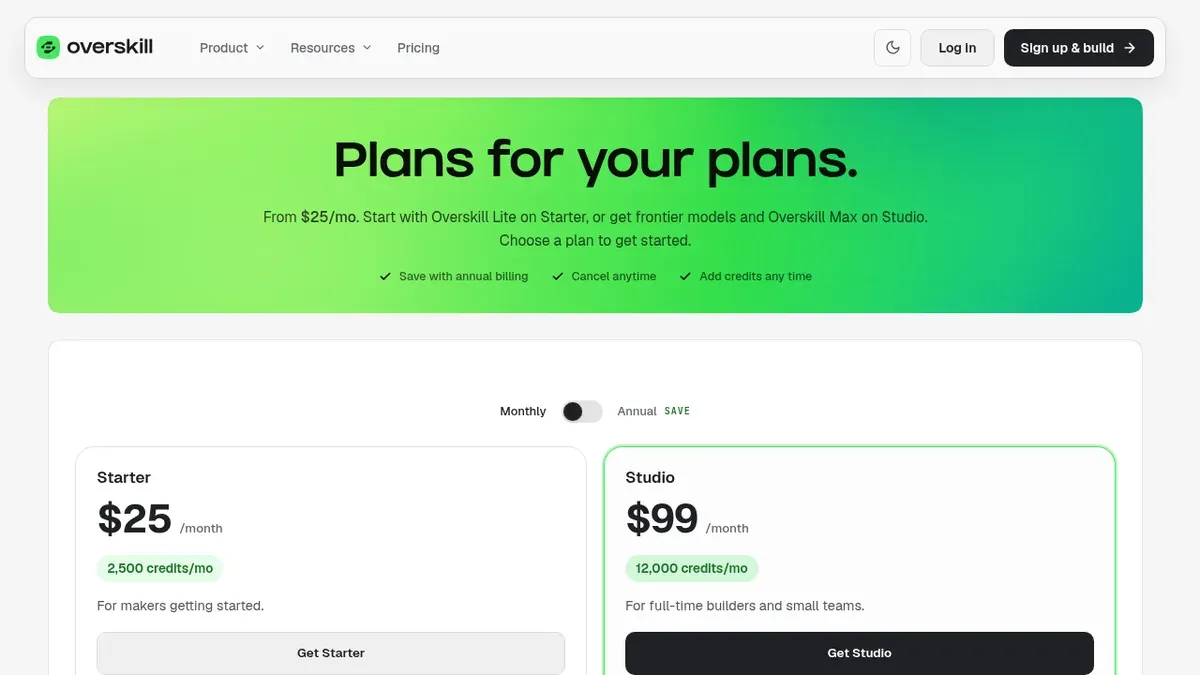
Overskill · Beginners
A simple, honest way to decide if Overskill is worth your money when you have never built an app before.
If you have never built an app, every AI builder looks the same at first. They all say "describe it and we build it." So how do you know if Overskill is worth paying for (I earn a commission if you buy through this link)?
This guide is not my full review. That one is here: my Overskill review. This guide answers one question for one kind of person: you, a beginner, deciding if it is worth it right now.
Quick answer
Overskill is worth it for a beginner who has one clear app idea that needs sign-in, saved data, or payments, and who can spend $25 a month to test it (checked Oct 16, 2026). It is not worth it yet if you have no idea, want to stay free, or need App Store publishing today. Take the 5-question check below to see where you land.
What "worth it" means for a beginner
For a pro developer, "worth it" means speed. For a beginner, it means something else. You want three things:
- You can get a working app without code.
- You do not get stuck alone when it breaks.
- You do not waste money finding out it is not for you.
Let's look at Overskill on each of those, using only what it publishes as of October 16, 2026.
Where Overskill is good for beginners
The hard parts come built in
Overskill's homepage says you can start with one useful workflow, then add sign-in, saved data, payments, and connections as your app needs them. For a beginner, that is the big win. Those are the parts that usually need a developer. Hosting is included too, and its help center says hosting, page views, and publishing do not use credits.
You do not start from a blank page
Overskill's templates page listed 385 published templates when I checked. You can open one, look at the preview, and describe what you want to change. That is much easier than inventing an app from nothing.
There is real help
- A help center. Overskill's help center has articles on credits, payments, and building. Inside the app, a help panel lets you search articles, ask an AI support assistant, or open a ticket.
- A learning path. The learn library has a five-part path: choose a problem, plan the workflow, build, test, and launch.
- Live coaching videos. ClickFunnels runs a Coaching Corner series on YouTube with Overskill trainings. One is embedded below.
You can leave with your work
The pricing page says every plan can download the app's code, database structure, and data as a ZIP file. That lowers the risk of trying it.
Where beginners struggle
Every tool has a hard side. Here is Overskill's, in plain words.
Credits take some getting used to
Overskill's pricing page says a typical change uses 400 to 1,500 credits and a fresh build uses 2,000 to 8,000. Starter has 2,500 credits a month. If you rebuild your app over and over, you will run out fast. Its help center says editing is almost always cheaper than rebuilding.
You can sign up today
Overskill now has open sign-up. You sign up with your email, and an invite code is optional.
The AI is good, not magic
Overskill is honest about this. Its help article on what the AI can and cannot do says it is great at building from scratch, adding features, and fixing its own mistakes. It says the AI struggles with pixel-perfect copies of other sites, heavy data crunching, and complex real-time apps like Figma.
No App Store yet
Overskill's help center says App Store and Google Play publishing is not available yet. Today, people install your app from the browser.
None of this scares me off a tool. What scares me is beginners who pay for a tool before they have an idea. My old engineering boss used to say, "If it's garbage in, you're going to get garbage out." Same with AI. A clear idea is the best thing you can bring.
What it costs a beginner
Overskill has no free plan, but every new account starts with 500 credits. Here is what the live pricing page shows:
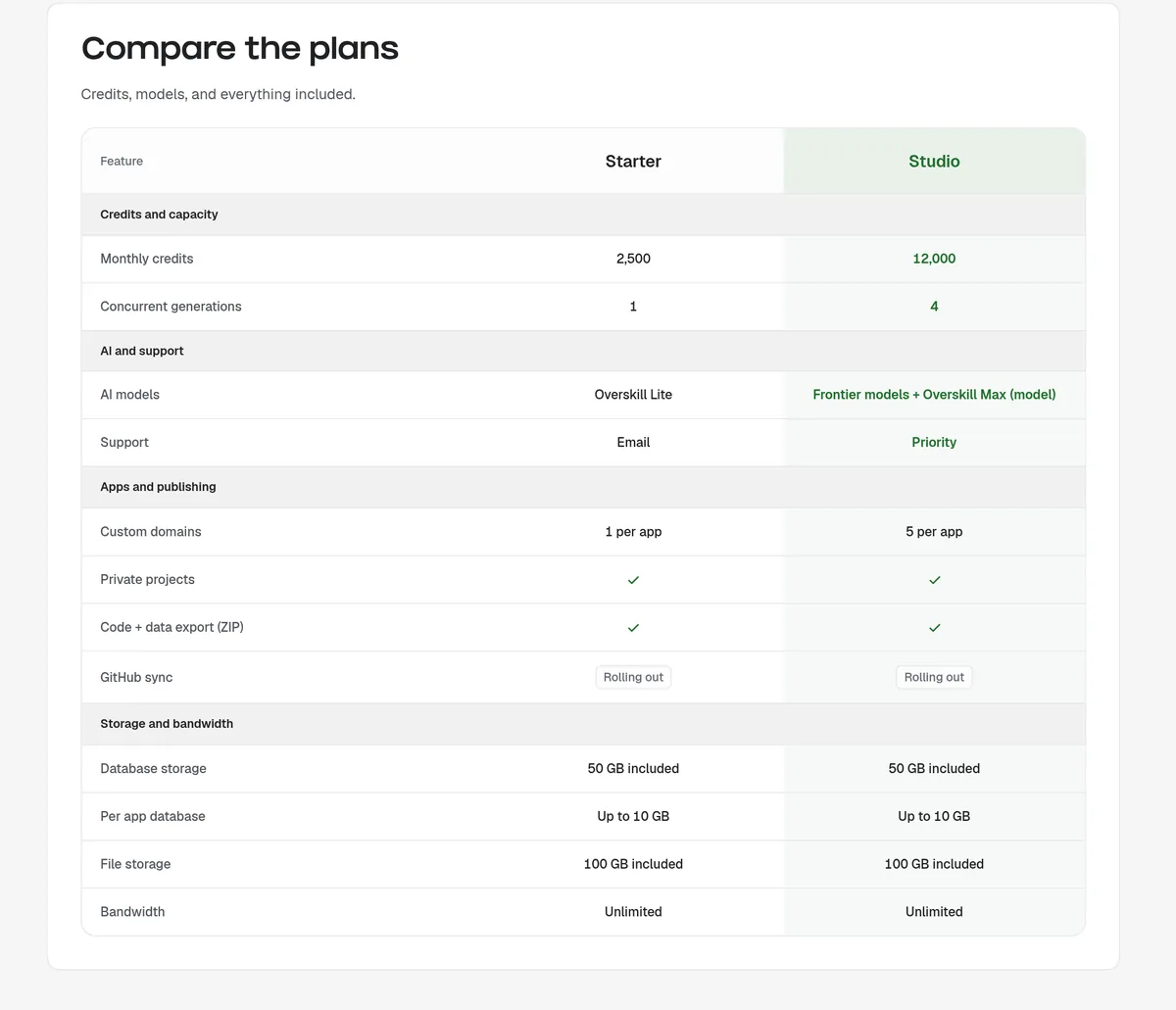
| Starter | Studio | |
|---|---|---|
| Price | $25/mo or $250/yr | $99/mo or $989/yr |
| Credits each month | 2,500 | 12,000 |
| Builds at once | 1 | 4 |
| AI model | Overskill Lite | Frontier models and Overskill Max |
| Custom domains | 1 per app | 5 per app |
| Support | Priority |
From overskill.com/pricing, checked Oct 16, 2026. Prices can change.
My advice for most beginners: start on Starter, monthly. Only move to yearly or Studio once you know you will keep building. You can cancel anytime. Overskill says you keep access until the end of the billing period, and your apps stay online.
For every pricing detail, see my Overskill pricing guide.
Who it is worth it for, and who should wait
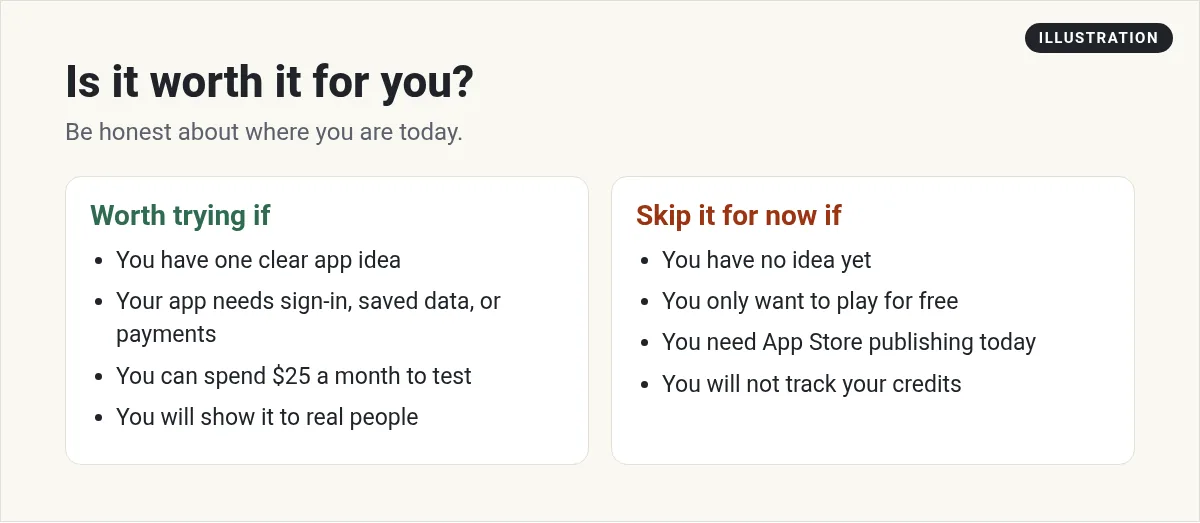
Here is the same idea in a few real-life examples. These are types of people, not real customers:
| Beginner | Worth it now? | Why |
|---|---|---|
| A coach who wants a client portal with sign-in | Likely yes | Needs sign-in and saved data, which Overskill includes |
| A shop owner who wants online booking | Likely yes | Overskill lists booking apps as a core use |
| Someone who "wants to build an app" but has no idea yet | Not yet | Pick the problem first, or credits go to waste |
| Someone who needs an iPhone app in the App Store this month | Not yet | App Store publishing is not available |
| Someone who only needs a one-page website | Probably not | A simple site builder may be enough |
The 5-question worth-it check
Answer these honestly. Give yourself 2 for yes, 1 for maybe, 0 for no.
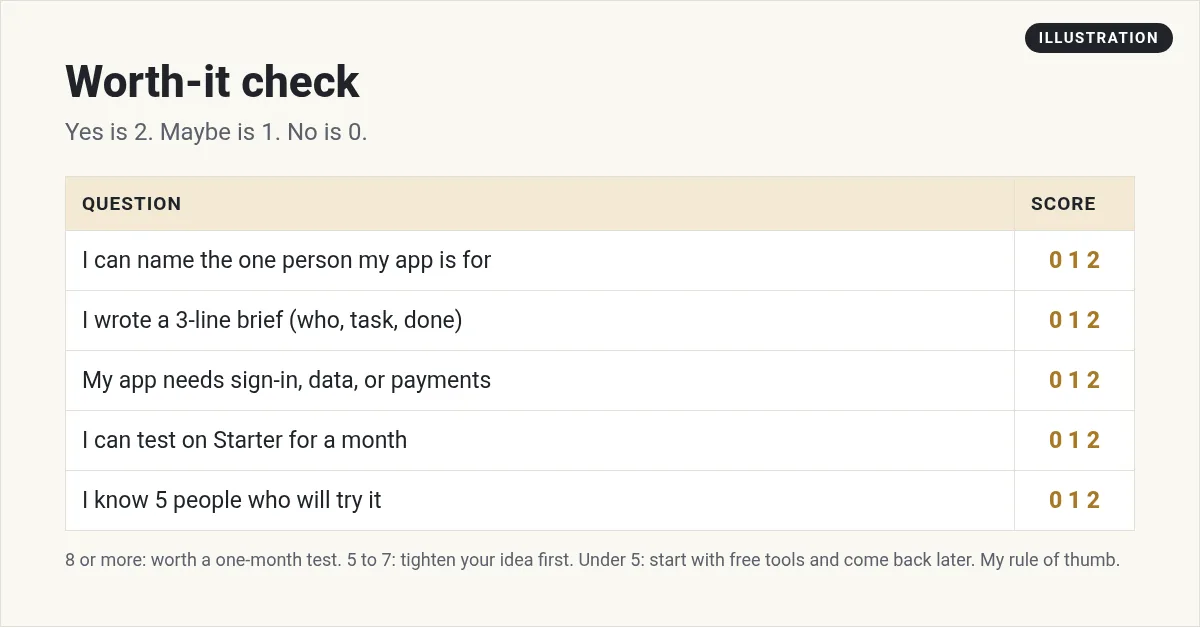
- 8 to 10: Overskill is worth a one-month test.
- 5 to 7: Tighten your idea first. My list of AI app ideas for beginners can help.
- Under 5: Wait. Learn the basics with free tools, then come back.
This is my rule of thumb, not an Overskill feature.
What to bring before you pay
The beginners who get the most from any AI builder show up with three things written down. It takes ten minutes, and it saves a lot of credits.
- Who it is for. One kind of person, like "dog groomers" or "parents in my church group."
- The one job. What they need to get done, like "book a time and pay a deposit."
- What done looks like. How you will know it works, like "I can book a test time and see it in my list."
Overskill's own learn library says the same thing in a different way. Its guide on writing a brief says a good brief names "one user, one job, the information they need, and a test that proves the job works."
If you cannot fill in those three lines yet, that is your answer for today. It is not worth paying yet. Spend a week talking to the people you want to help. Then the tool becomes worth a lot more.
If you say yes: your first month
- Pick one person and one job for your app.
- Start from a template close to your idea.
- Make small changes, one at a time. Watch the credit estimate.
- Test it like a customer would, on your phone and laptop.
- Show it to five real people. Write down what confuses them.
- Decide: keep going, change the idea, or cancel.
Need the click-by-click steps? My Overskill tutorial for beginners covers your first build.
From the ClickFunnels channel (not mine): ClickFunnels' Coaching Corner introduction to Overskill. This video is not mine. It shows the platform from the very start, which is helpful if you are brand new.
Still comparing tools? Here is my honest take on a few others.
My video: my honest review of Cursor, Lovable, and Bolt for people building with AI.
Is Overskill worth it for me?
Nothing you check here is sent or saved. Download it if you want to keep it.
Ready for a one-month test?
If you scored 8 or more, try Overskill on one small app. Start with the free starter credits and a template close to your idea.
Try OverskillI earn a commission if you buy through this link. Plans and credits can change, so check the live pricing page before you buy.
Want an AI team to help run your business? Meet AIM Agent, an AI Chief of Staff for business owners. I am a co-founder of AIM Agent and have a financial interest in the product.
Frequently asked questions
Is Overskill good for beginners?
Yes, if you have one clear idea. Sign-in, saved data, payments, and hosting come built in, and there are templates and help articles. The hard parts are learning how credits work and getting an invite.
How much does Overskill cost for a beginner?
There is no free plan. New accounts start with 500 credits. Starter is $25 a month or $250 a year with 2,500 credits a month, checked October 16, 2026.
Do I need to know how to code to use Overskill?
No. You describe what you want in plain words. You do need to test your app carefully and give clear instructions.
Can I build a phone app with Overskill?
You can build a web app that people install from their browser. Overskill says App Store and Google Play publishing is not available yet.
What if Overskill is not for me?
You can cancel anytime. Overskill says you keep access until the end of your billing period, your apps stay online, and you can export your code and data.
Sources
Checked October 16, 2026. Plans, prices, and rules can change. Links to overskill.com carry my referral code. I earn a commission if you buy through those links.
- Overskill pricing (plans, credits, FAQ)
- Overskill homepage (what you can add, checked Oct 26, 2026)
- Overskill templates page
- Overskill help: What the AI can and can't do
- Overskill help: Getting help in Overskill
- Overskill help: Editing vs. rebuilding
- Overskill help: App Store publishing FAQ
- Overskill help: What costs credits and what is free
- Overskill learn: How to write an AI app brief (five-part path)
