
Overskill · App ideas
Twelve simple app ideas you can build with Overskill, plus a scorecard to pick one before you spend a single credit.
You got into Overskill (I earn a commission if you buy through this link). You see the empty box that asks what you want to build. And your mind goes blank.
That is normal. The tool is not the hard part anymore. Picking the right first app is. This guide gives you 12 simple ideas, a quick way to score them, and a short brief you can paste in. The goal is one small app that real people use, not a dream app that eats your credits.
Quick answer
Build something small for one kind of person with one job to do. Good first picks are a booking app, a client portal, a quote calculator, a sign-up form with a waitlist, or a simple tracker for your own team. Score your idea first, keep version one to one or two screens, and show it to five real people before you add more.
Why your first idea matters so much
Overskill turns plain words into a working web app. Its homepage says you can add sign-in, saved data, payments, and connections as your app needs them. That is a lot of power. It also means a fuzzy idea can turn into a big, messy build fast.
Credits are the other reason. Overskill's pricing page says a typical change uses 400 to 1,500 credits, and most land around 700. A fresh build from a description usually uses 2,000 to 8,000. New accounts start with 500 credits. So a small, clear idea is not just easier. It is cheaper.
I learned this the hard way before AI builders existed. In my words: "I built things nobody asked for. Launched to crickets. Wondered why nobody was buying." The fix was simple. "Before you build anything, talk to people. Find out if they actually have the problem." That still holds, even when the build takes minutes.
New to the tool? Read what Overskill is first, then come back.
What Overskill is good at building
Start with what the tool is made for. On its homepage, Overskill lists six kinds of apps under "What will you build?":
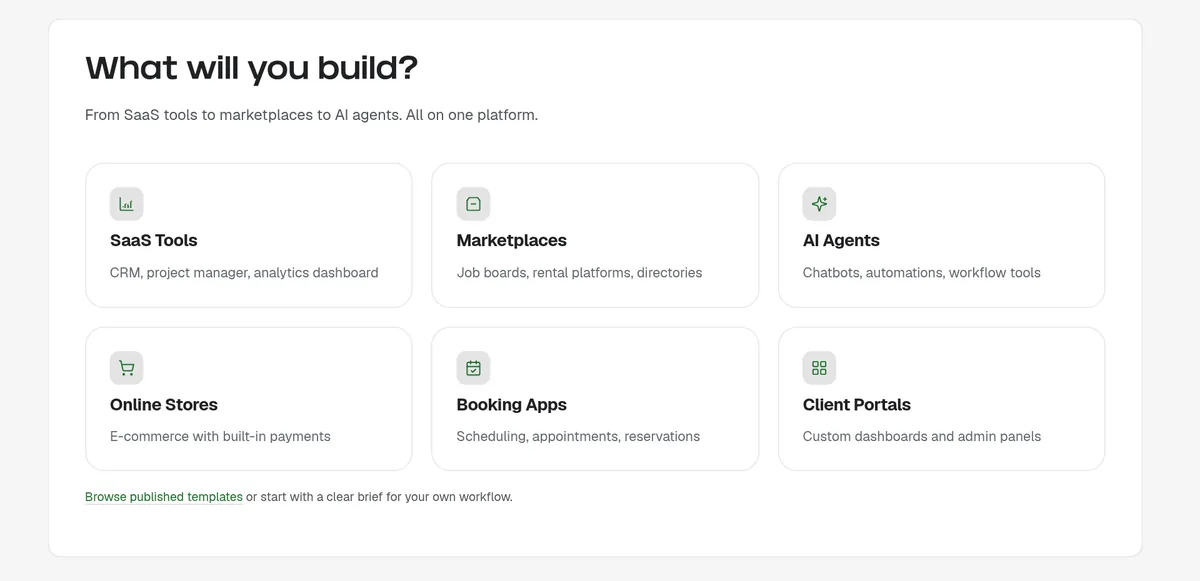
| Type | Examples Overskill gives | Good for beginners? |
|---|---|---|
| Booking apps | Scheduling, appointments, reservations | Yes. Clear job, clear users. |
| Client portals | Custom dashboards and admin panels | Yes. Great for service businesses. |
| SaaS tools | CRM, project manager, analytics dashboard | Yes, if you keep it to one task. |
| Online stores | E-commerce with built-in payments | Maybe. More setup and testing. |
| Marketplaces | Job boards, rental platforms, directories | Later. Two sides of users is harder. |
| AI agents | Chatbots, automations, workflow tools | Later. AI features use credits each time users run them. |
Types and examples from the overskill.com homepage, checked October 16, 2026. The "good for beginners" column is my opinion.
There is a reason I push beginners toward the top of that table. A booking app or a client portal has one person, one job, and an easy way to tell if it works. A marketplace needs buyers and sellers at the same time. That is two apps' worth of problems.
12 simple app ideas for beginners
Each idea below names who it is for and the one job it does. Overskill also has free guides in its learn library for several of these, which I linked so you can see a worked example.
For local service businesses
- Service booking app. For a salon, coach, or repair shop. Clients pick a time and get a clear yes. Overskill has a guide on how to build a service booking app.
- Quote or estimate calculator. For a landscaper, cleaner, or painter. A visitor answers a few questions and sees a price range. See Overskill's guide to design a service estimate calculator.
- Job update portal. For a contractor. Each homeowner signs in and sees the phase of their own project. Overskill's guide on renovation client updates walks through this.
- Service request inbox. For any shop that gets "can you fix this?" messages. Requests come in one place, sorted by how urgent they are.
For coaches, creators, and course sellers
- Client portal. Each client signs in and sees their own files, tasks, and notes. Overskill has a guide to build a client portal.
- Lead magnet app. A quiz or calculator that gives a useful result in exchange for an email. See build a useful lead magnet app.
- Workshop seats and waitlist. People sign up for a class. When it fills, new sign-ups join a waitlist. Overskill covers this in plan workshop seats and a waitlist.
- Members-only resource library. Paid members sign in and see the tools you made for them. Non-members see a sign-up page.
For your own team or side project
- Equipment checkout tracker. Who has the ladder, the camera, or the laptop, and when is it due back. See plan equipment checkout.
- Spreadsheet replacement. Take the one spreadsheet your team fights over and turn it into a simple app with sign-in. Overskill has a guide on when a spreadsheet is enough and when to build an app.
- Habit or practice tracker. Track one thing each day, like reading, workouts, or practice minutes.
- A study tool for your church or group. This one is personal for me. I built a Bible study app with AI. In my words, "I created this honestly for myself." Then I made an interactive Bible study for my church. Tools you build for yourself often help people like you.
If you want more ideas beyond Overskill, I keep a longer list in AI app ideas for beginners.
Score your idea before you build
Pick your top two or three ideas. Then score each one with five quick questions. This takes five minutes and can save you days.
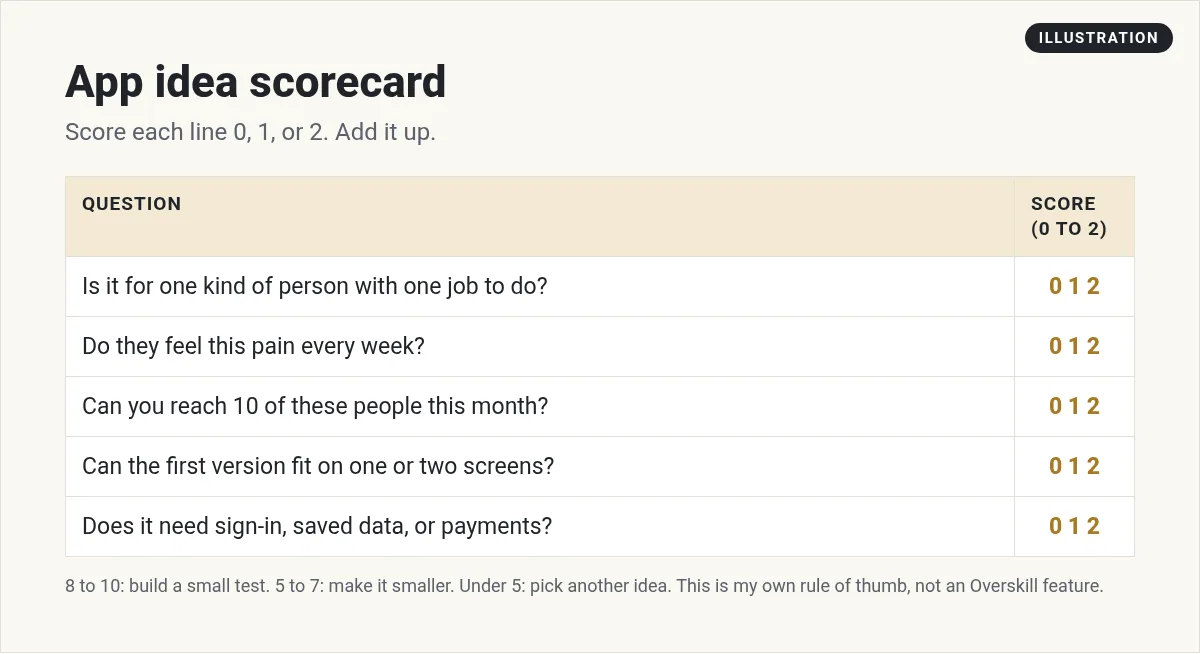
- One person, one job. "Salon owners who need to confirm bookings" beats "small businesses."
- Weekly pain. If the problem shows up every week, people remember it. If it shows up once a year, they forget.
- Reach. Can you message 10 of these people this month? If not, you will build in the dark.
- Small first version. If it does not fit on one or two screens, cut it down.
- Uses Overskill's strengths. Sign-in, saved data, and payments are built in. If your idea needs none of them, a simple form or page might be enough.
Write a one-paragraph brief
Overskill's own learn guide says a good brief names "one user, one job, the information they need, and a test that proves the job works." That matches what my old engineering boss used to say: "If it's garbage in, you're going to get garbage out." Same with AI.
Here is a brief you can copy and change. It uses idea number 2, the estimate calculator:
Notice what is missing. No dashboard full of charts. No AI chatbot. No app store. Those can come later, after people use version one.
Want a full walkthrough of the build itself? See how to build an app with Overskill and my Overskill tutorial for beginners.
Test it with five real people
Once version one works, stop building. Show it to five people who have the problem. Watch them use it. Do not explain. Just write down where they get stuck.
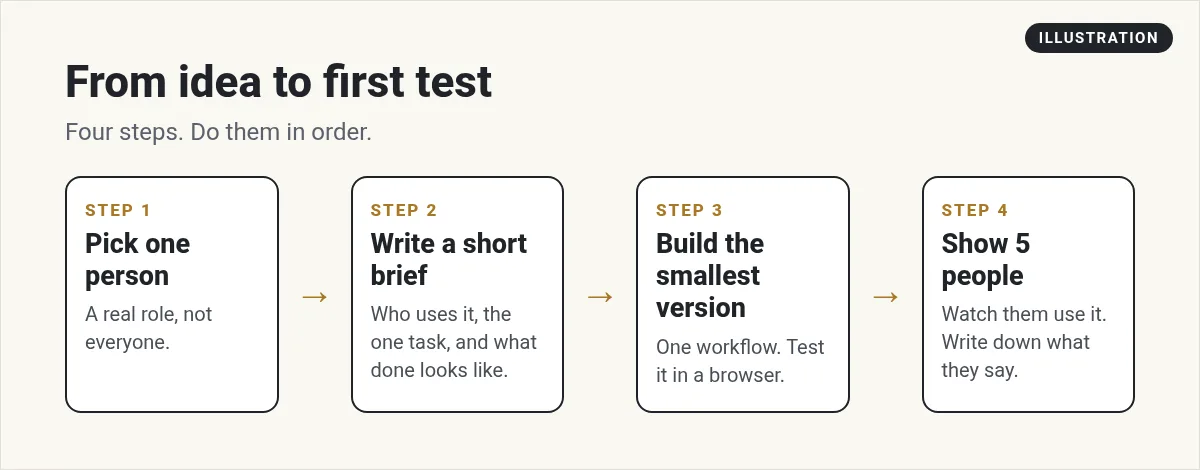
Overskill's head coach, Dante Torelli, wrote a guide on this. He says to "start with a task your customer already does" and ask them to walk through the last time they did it. That is a great way to open the conversation. You can read it here: start with a customer task.
My video: my four-part method for building software with AI and no code. Part one is picking an idea with a real pain point, which is what this guide is about.
Ideas to save for later
Some ideas are great, just not first. Put these on a "later" list:
- Two-sided marketplaces. You need buyers and sellers at the same time.
- Apps that need the App Store today. Overskill's help center says App Store and Google Play publishing is not available yet. Today, people install Overskill apps from the browser.
- Heavy AI features for every user. Overskill's help center says AI actions in your live app use your credits. That is fine, but price it in. Learn the basics first.
- Your "everything app." If you cannot explain it in one sentence, it is not a first app.
After you build: where finished apps go
A working app is step one. Getting it in front of buyers is the rest. I help people with that part inside MakerAI. One place finished apps can go is the MakerAI Marketplace, a public directory of software from members and independent makers. It showed 286 listings when I checked on October 16, 2026.
Two of my own products are listed there: Freedom Threads, which turns videos into social posts, and Truevest.AI, a stock pattern tools membership. I did not build those two in Overskill. I share them so you can see what a finished, listed product looks like.
What to build with Overskill checklist
Nothing you check here is sent or saved. Download it if you want to keep it.
Want help picking the right idea?
In my free AI workshop, I show how to find a software idea people already search for, check it with real data, and build it with AI. Bring your top idea.
Join my free AI workshopFree live workshop. No credit card needed.
Still need access to the builder? Start with Overskill (I earn a commission if you buy through this link.)
Frequently asked questions
What should I build first with Overskill?
Build something small for one kind of person with one job. A booking app, client portal, quote calculator, or team tracker are good first picks. Keep version one to one or two screens.
Can I start from a template instead of an idea?
Yes. Overskill's templates page listed 385 published templates on October 16, 2026. You can open one, look at the preview, and describe what you want to change.
How many credits does a first app use?
Overskill says a fresh build usually uses 2,000 to 8,000 credits and a typical change uses 400 to 1,500. New accounts start with 500 credits, so plan for a paid plan if you want a full build.
Can Overskill build a phone app for the App Store?
Not yet. Overskill's help center says App Store and Google Play publishing is still in development. Today, people can install your web app from their browser.
Do I need to know how to code?
No. You describe the app in plain words. You do need to test it like a customer would, and you need a clear brief.
Sources
Checked October 16, 2026. Plans, prices, and rules can change. Links to overskill.com carry my referral code. I earn a commission if you buy through those links.
- Overskill homepage (What will you build, credits to start)
- Overskill pricing (credit estimates, plans)
- Overskill templates page (385 published templates)
- Overskill learn: How to write an AI app brief
- Overskill learn: Start with a customer task (Dante Torelli)
- Overskill help: App Store publishing FAQ
- Overskill help: What costs credits and what is free
- MakerAI Marketplace
