
AI Business · Guide
Booking the call is only half the job. A good AI appointment setter also handles reschedules, cancellations, and quiet leads. Here is how that works and how to set it up right.
Most talk about AI appointment setters is about getting the booking. But anyone who runs a calendar knows the real pain comes after. People ask to move times. People cancel by text at 10 PM. People go quiet and never show up.
This guide is about the whole booking side, from first reply to the day of the appointment. I use HighLevel as the example and checked its help articles on October 21, 2026. If you want the bigger picture of AI that qualifies and sells, read my guide to the AI sales agent first.
Quick answer
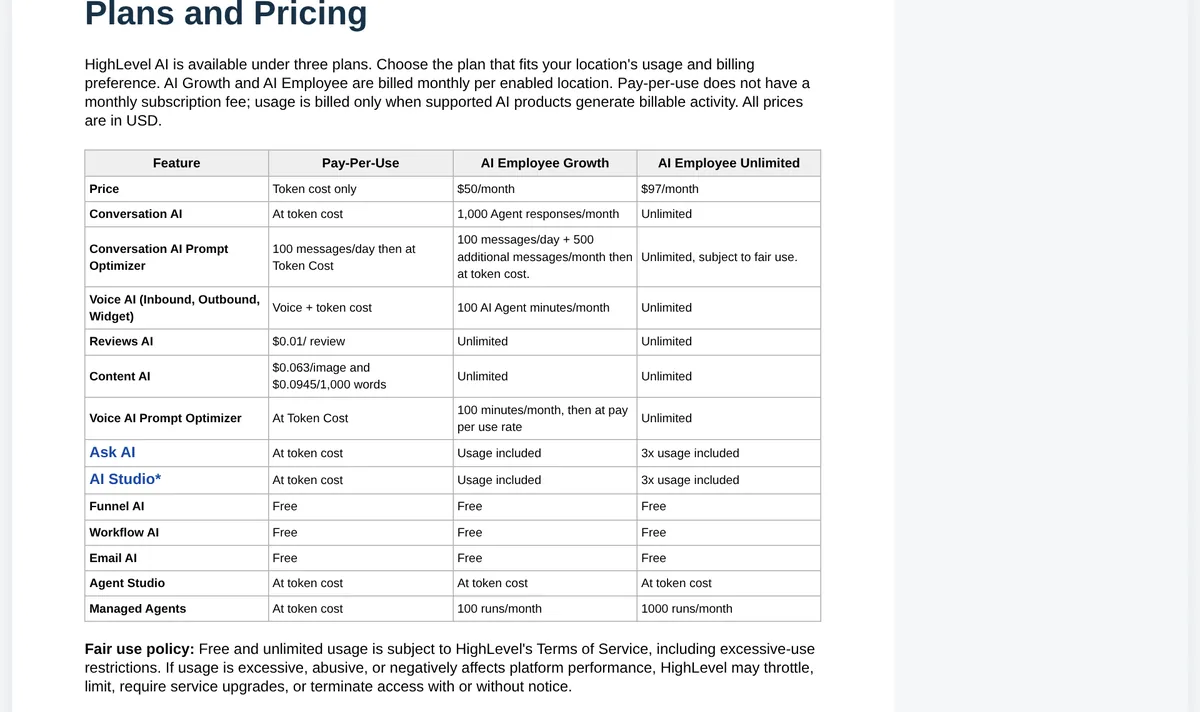
An AI appointment setter is a chat or voice bot that replies to leads, asks a few questions, and books them into your calendar. Good ones also reschedule, cancel, and follow up with people who go quiet. In HighLevel, Conversation AI can book appointments, and it can also cancel and reschedule existing ones when you turn those actions on. Its Auto Follow-Up action can send up to 5 follow-ups per scenario, only during your business hours. On October 21, 2026, HighLevel's AI Employee Growth plan was $50 a month per location and Unlimited was $97 a month, with phone charges billed separately.
What an AI appointment setter does
Think of it as a front desk helper that never sleeps. It handles four jobs:
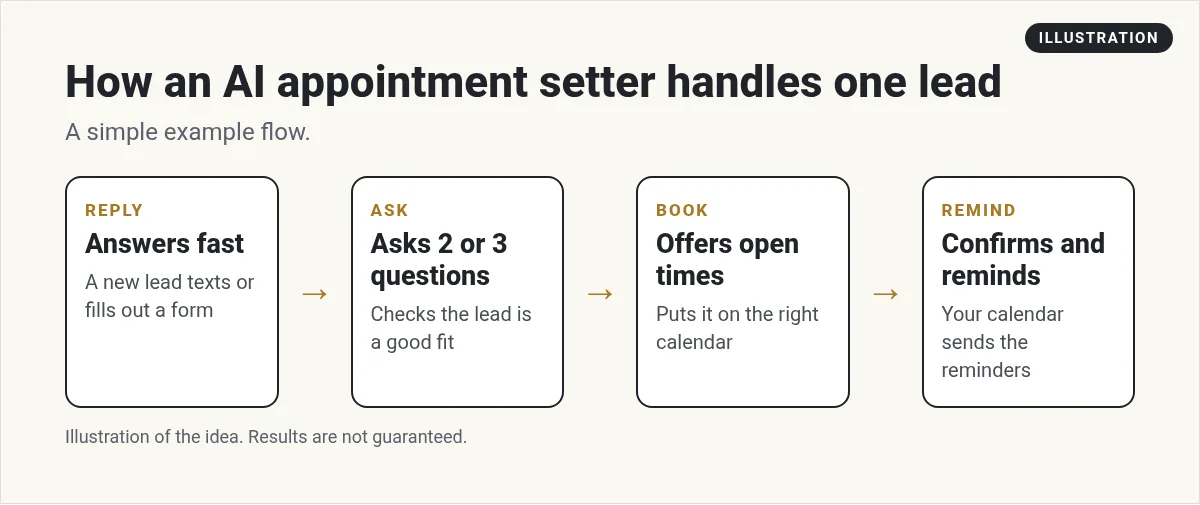
- Reply. It answers a new lead fast, by text, chat, or social message.
- Ask. It asks a few simple questions to see if the lead is a fit.
- Book. It offers open times from your calendar and books one.
- Remind. Reminders go out before the visit, so fewer people forget.
A person still owns the result. The AI handles the back and forth, and your team handles the actual call or visit.
Not sure if you need a setter or a receptionist? A setter works leads toward a booking. A receptionist answers calls and questions of all kinds. My guide to AI receptionist software covers that side.
Text first or voice first?
I usually tell people to start with text and chat. Here is why:
- It is easier to check. You can read every message the bot sent.
- Mistakes cost less. A clumsy text is easier to fix than an awkward phone call.
- It is easy for leads. They can tap a time without getting on a call.
Voice makes sense when your leads mostly call you, like a busy local service business. If that is you, add voice after your text setup runs smoothly. HighLevel's Voice AI can answer inbound calls too, and the rules section below matters even more for calls.
Reschedules and cancellations
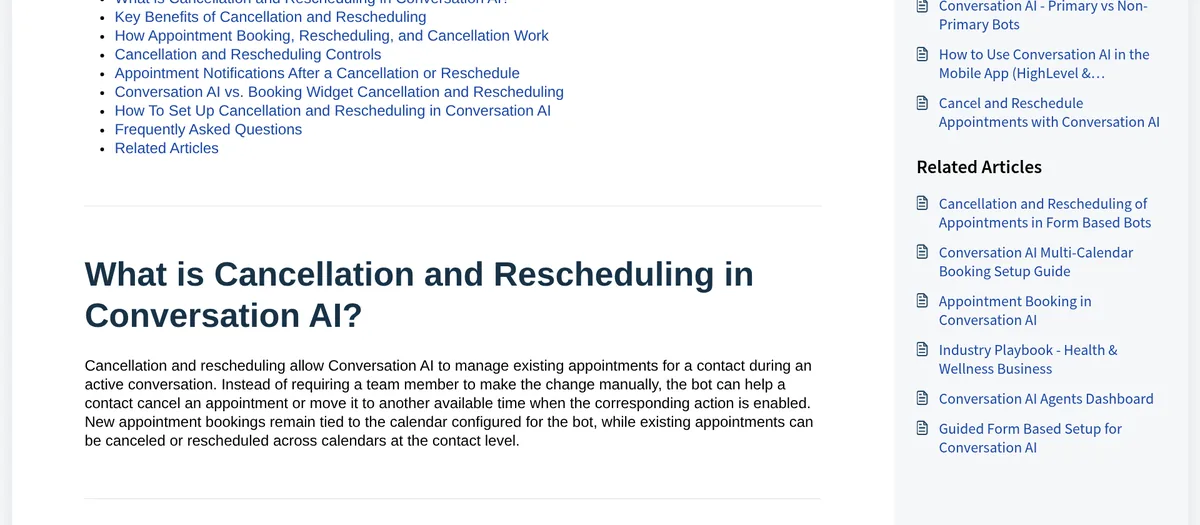
This is where a lot of setups fall short. HighLevel's help center says Conversation AI can cancel or reschedule an existing appointment during a conversation, so your team does not have to do it by hand.
A few details I found useful:
- You choose what it can do. You can allow both, only cancel, only reschedule, or neither.
- It can work across calendars. It can change an appointment even if it is on a different calendar than the one the bot books new visits on.
- One person, many visits. If someone has several appointments, the bot can cancel more than one in the same chat.
- You can test first. Bot Trial lets you try it before real contacts use it.
Changes do not send messages by themselves
HighLevel says changing an appointment and notifying people are separate. If you want the contact or your team to get a message after a cancel or reschedule, set that up in your calendar notifications or in an automation. Do not skip this step, or your team may not know a slot opened up.
Following up with quiet leads
Lots of leads stop replying halfway through booking. HighLevel's Auto Follow-Up action handles three cases:
- The contact stopped responding.
- The contact said they were busy.
- The contact asked you to follow up later.
For each case, you can add up to 5 follow-ups and set the delay between them. You can let the AI write each message or write your own. HighLevel says follow-ups only go out during the working hours you set.
One warning from the help article: do not also trigger a follow-up from a separate workflow, because it breaks the follow-up logic.
How to cut no-shows
A booking is only worth something if the person shows up. Here is what I would set up:
- Confirm right away. Send the time, place or link, and what to bring.
- Remind them twice. Once the day before and once a short time before.
- Make moving easy. If rescheduling is simple, people move instead of ghosting.
- Ask a reason to come. One question about their goal makes the visit feel real to them.
- Follow up on no-shows the same day. A kind note with a link to rebook.
How to set it up in HighLevel
This is the short version, based on HighLevel's help articles:
- Clean up your calendar. Set your hours, visit length, and buffer time first.
- Create the bot. Go to AI Agents, then Conversation AI, then create a bot.
- Turn on appointment booking and pick the calendar for new bookings.
- Decide on cancel and reschedule. Turn on only what your business allows.
- Turn on Auto Follow-Up for the cases you care about.
- Set up notifications for new bookings, cancels, and time changes.
- Test every path with Bot Trial: book, move, cancel, and go quiet.
If you want to try this yourself, here is my partner link: start a 30-day HighLevel trial (I earn a commission if you buy through this link). The standard trial on HighLevel's pricing page is 14 days. Billing starts when the trial ends unless you cancel. Checked October 21, 2026.
What it costs in HighLevel
Checked October 21, 2026, from HighLevel's AI Product Pricing article. All plans are billed monthly per location, on top of your HighLevel plan.
- Pay-Per-Use: no monthly fee for AI. You pay token cost when the AI is used.
- AI Employee Growth: $50 a month per location. Includes 1,000 agent responses and 100 AI agent minutes a month.
- AI Employee Unlimited: $97 a month per location. Unlimited, under a fair use policy.
HighLevel says phone system charges still apply to all calls on every plan, and texts and calls are billed separately.
Rules to follow
- Only message people who asked to hear from you, like someone who filled out your form.
- Be careful with AI voice calls. In February 2024, the FCC ruled that calls made with AI-generated voices count as artificial under the Telephone Consumer Protection Act. That means the robocall rules apply.
- Let people opt out of texts and honor it.
- Do not let the bot promise results or give medical, legal, or money advice.
I am not a lawyer. Check the rules for your state and industry.
What to measure
Track these each week so you know if the setter is working:
- Booking rate: of the leads who replied, how many booked?
- Show rate: of the people who booked, how many came?
- Reschedule rate: how many moved instead of disappearing?
- Handoffs: how often did a person need to step in, and why?
Read a few real chats every week too. Numbers tell you what happened. Chats tell you why.
Before my AI setter goes live
Nothing you check here is sent or saved. Download it if you want to keep it.
Want to build simple AI tools for real businesses?
In my free workshop, I show how regular people use AI tools to build simple apps and services, step by step.
Join my free AI workshopFree to join. No credit card needed.
Frequently asked questions
What is an AI appointment setter?
It is a chat or voice bot that replies to leads, asks a few questions, and books them into your calendar. Good ones also reschedule, cancel, and follow up.
Can an AI appointment setter reschedule appointments?
In HighLevel, yes. Conversation AI can cancel or reschedule existing appointments during a chat when you turn those actions on.
How does AI follow up with leads who go quiet?
HighLevel's Auto Follow-Up can send up to 5 follow-ups for each case, like a contact who stopped responding, and only during your business hours.
How much does an AI appointment setter cost in HighLevel?
On October 21, 2026, AI Employee Growth was $50 a month per location and Unlimited was $97 a month. Phone charges are billed separately.
Is it legal to use AI voices for calls?
The FCC ruled in February 2024 that AI-generated voices in calls count as artificial under the TCPA, so robocall rules apply. Check with a lawyer for your case.
How do I reduce no-shows?
Confirm right away, send two reminders, make rescheduling easy, and follow up the same day with a link to rebook.
Sources
Checked October 21, 2026. Plans, prices, and rules can change.
- HighLevel: Cancel and Reschedule Appointments with Conversation AI
- HighLevel: Conversation AI Auto Follow-Up Action
- HighLevel: How to set up a Conversation AI bot
- HighLevel: How to create Voice AI agents
- HighLevel: AI Product Pricing
- HighLevel pricing
- FCC: FCC Makes AI-Generated Voices in Robocalls Illegal
