
Build with AI · Review
Claude Code is Anthropic's AI coding agent. It reads your project, writes code, and runs commands for you. Here is what it does well, where it falls short, and who it is for.
Claude Code is one of the most popular AI coding tools right now. Its GitHub page showed about 152.9k stars when I checked on October 20, 2026. But popular does not mean it is right for you.
For this review, I read Anthropic's docs and pricing page on October 20, 2026. I also share how I think about it as someone who builds a lot of apps with AI.
Quick answer
Claude Code is worth it if you build software, or want to learn, and are OK working in a terminal or code editor. It works across your whole project, plans before it codes, and can run tests to check its own work. It is included in every paid Claude plan, starting with Pro at $17 a month billed yearly or $20 monthly, with Max plans from $100 a month (checked October 20, 2026). The main downsides are the learning curve, usage limits shared with your Claude chats, and the need to check its work. If you want to build an app without touching code at all, a no-code AI app builder is an easier start.
What is Claude Code?
Anthropic's docs say "Claude Code is an agentic coding tool that reads your codebase, edits files, runs commands, and integrates with your development tools."
In plain words, it is not just a chatbot that writes code for you to copy and paste. It works inside your project. It can open files, change them, run your tests, and fix what breaks. You tell it what you want, and it does the steps.
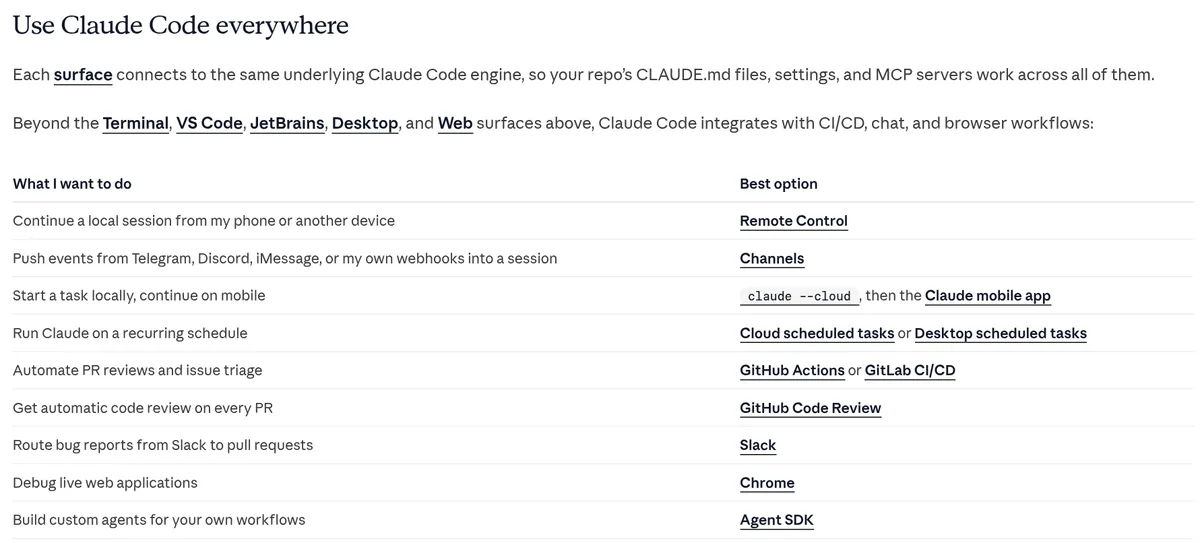
You can use it in your terminal, in VS Code or JetBrains, in a desktop app, or on the web. Anthropic says each one "connects to the same underlying Claude Code engine," so your settings follow you.
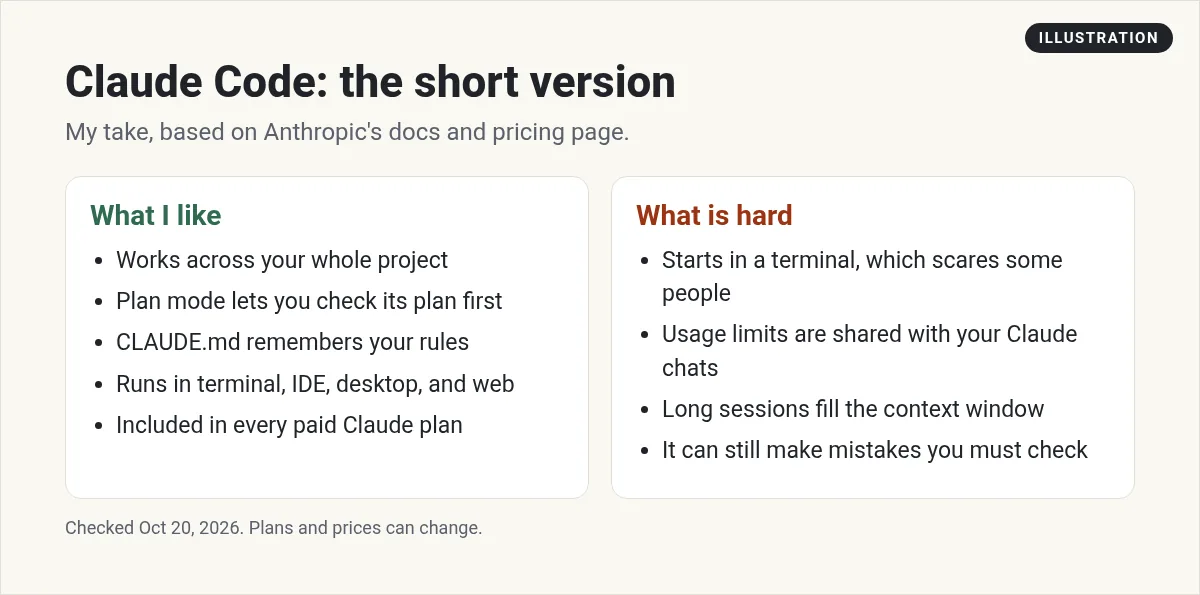
My verdict in one picture
What Claude Code does well
1. It works across your whole project
The docs say it "understands your entire codebase and can work across multiple files and tools to get things done." That is the big jump from older AI tools. You can ask for a feature that touches ten files, and it will find them.
2. It plans before it codes
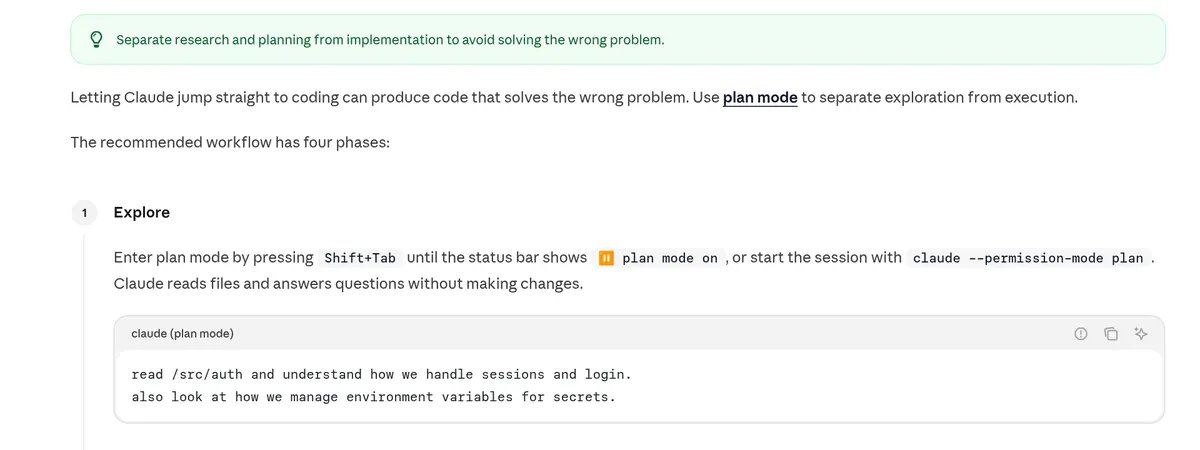
Claude Code has a plan mode. In plan mode, Anthropic says "Claude reads files and answers questions without making changes." You can read the plan, change it, and only then let it write code.
Anthropic's own best practices page recommends four steps: explore, plan, implement, then commit. I like this because it stops the AI from rushing into the wrong fix.
3. It remembers your rules
You can keep a file called CLAUDE.md in your project. Anthropic calls it "a special file that Claude reads at the start of every conversation." Put your rules in it, like how to run tests or what style to use. Run /init and Claude Code makes a starter file for you.
4. It can grow with you
The docs list a lot of extras: connecting tools with MCP, custom skills and hooks, running agents in parallel, and scheduled tasks. You do not need any of that on day one. But it is there when you are ready.
Where Claude Code falls short
1. The terminal can feel scary
The main way to use it starts with a command in a terminal. If you have never used one, that is a real hurdle. The desktop app and web version help, but you still need to understand some basics, like folders and files.
2. Usage limits are shared
Your Claude chats and your Claude Code work come out of the same pool. Anthropic says limits reset on a rolling five hour window, and paid plans add weekly limits. On a busy day, you can hit the cap.
3. Long sessions get worse
Anthropic is honest about this. Its best practices page says "Claude's context window fills up fast, and performance degrades as it fills." In plain words, the longer one chat goes, the more it forgets. The fix is simple: run /clear between unrelated tasks.
4. You still have to check the work
It can be wrong. Anthropic's tip is to give Claude a way to check itself, like a test suite or a screenshot to compare against. I agree. Never ship something you have not tested.
Does it ask before it changes things?
It can, and that is how most people start. Anthropic's quickstart says that when Claude Code wants to make a change, "If it asks before making the change, select Yes to approve."
How much it asks depends on the permission mode. You can press Shift+Tab to switch modes during a session. When you are new, let it ask. You will learn a lot by reading each change before you say yes. Once you trust it on a project, you can give it more freedom.
Good first tasks to try
Anthropic's quickstart suggests simple prompts. Here are a few I like for a first test:
- Ask what does this project do? to get a plain summary.
- Ask it to write unit tests for one part of your code.
- Ask it to update the README with installation instructions.
- Ask it to review my changes and suggest improvements.
These are low risk. They show you how it thinks before you trust it with bigger work.
How much does Claude Code cost?
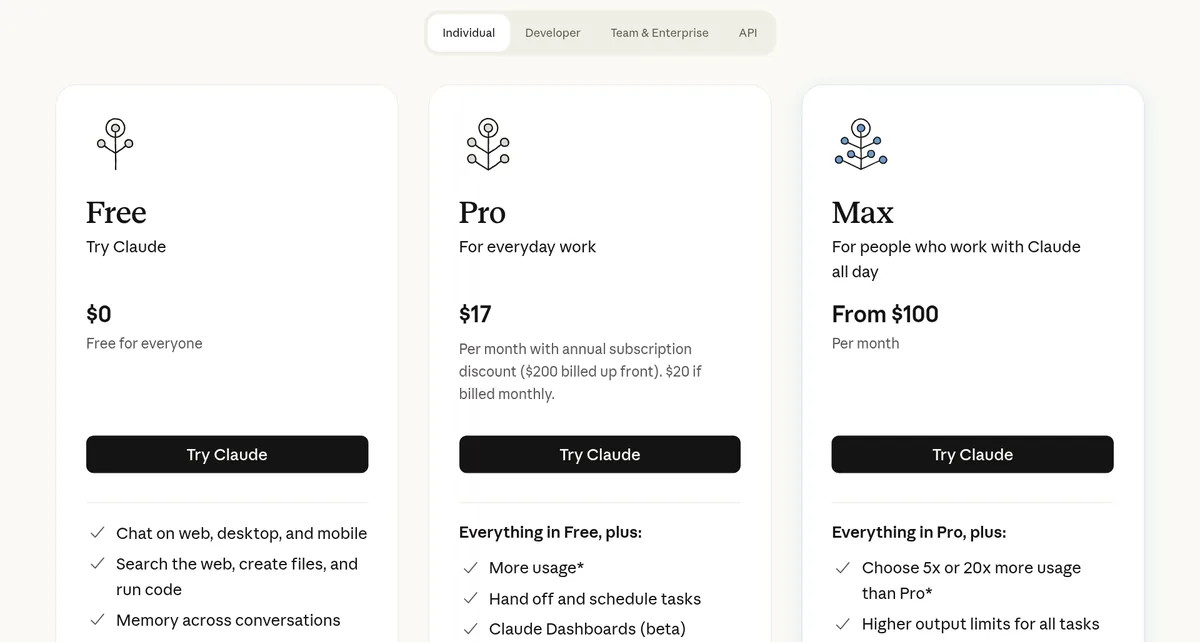
Claude Code is not sold on its own for most people. It comes with a paid Claude plan. Checked October 20, 2026:
- Free: $0, but Claude Code is not included.
- Pro: $17 a month billed yearly ($200 up front), or $20 billed monthly. Claude Code included.
- Max: from $100 a month, with 5x or 20x the usage of Pro.
- Team and Enterprise: for companies, with their own pricing.
Companies can also pay by usage through the API. Anthropic's costs page says that across enterprise deployments, the average is "around $13 per developer per active day." That is a company number, not what a solo builder on Pro pays.
For the full plan breakdown, read my Claude Code pricing guide.
Who should use Claude Code?
| If you are | My take |
|---|---|
| A developer | Yes. It can save you a lot of busy work. |
| A beginner willing to learn a little tech | Yes, start with the desktop app or VS Code. |
| Someone who never wants to see code | Start with a no-code AI app builder instead. |
| A team that needs code review help | Look at its GitHub and code review features. |
My own opinion, based on Anthropic's docs, checked October 20, 2026.
Comparing tools? See Cursor vs Claude Code and Lovable vs Claude Code.
From the JavaScript Mastery channel (not mine): A long, hands-on Claude Code course. Watch it if you want to see a real project built start to finish.
Any results mentioned in videos are not typical and are not a promise of income. Your results depend on your work and your market.
How to try it the right way
- Get a Claude Pro plan. Start monthly so you can cancel easily.
- Install it. Anthropic's docs give a one line install command for Mac, Linux, and Windows.
- Open a small project and type claude to start.
- Run /init to make your CLAUDE.md file.
- Use plan mode first. Ask it to explain the project before you change anything.
- Make one small change and test it yourself.
New to all of this? My step by step guide on how to use Claude Code walks you through your first session.
My Claude Code test run
Nothing you check here is sent or saved. Download it if you want to keep it.
Want to build your first app with AI?
In my free workshop, I show how to plan a simple app and build it with AI tools, step by step.
Join my free AI workshopFree to join. No credit card needed.
Frequently asked questions
Is Claude Code worth it?
Yes, if you build software or are willing to learn a little tech. It works across your whole project and can check its own work with tests. If you never want to see code, a no-code AI app builder is easier.
Is Claude Code free?
No. The Free Claude plan does not include it. Pro is $17 a month billed yearly or $20 monthly, checked October 20, 2026.
What is the best way to use Claude Code?
Anthropic recommends four steps: explore, plan, implement, and commit. Use plan mode first, keep your rules in CLAUDE.md, and run /clear between unrelated tasks.
Does Claude Code work in VS Code?
Yes. Anthropic's docs list VS Code and JetBrains extensions, plus the terminal, a desktop app, and the web.
What are the downsides of Claude Code?
The terminal can feel hard for beginners, usage limits are shared with your Claude chats, long sessions get worse as the context fills, and you still need to check its work.
How much does Claude Code cost for a team?
Anthropic's costs page says the enterprise average is around $13 per developer per active day when paying by usage. Teams can also buy Team or Enterprise plans.
Sources
Checked October 20, 2026. Plans, prices, and rules can change.
