
Build with AI · Pricing
Cursor changed how it sells its plans in 2026. Here is what each plan costs, what you get, and the one detail that trips up most people.
If you only look at the price tags, Cursor looks cheap. Plus is $8 a month. But the cheap plans leave out a lot, and the big one is this: Claude, GPT, and Gemini are not on Plus at all.
So I read Cursor's pricing page and its Models and Pricing docs on October 21, 2026. Below are all the plans, how the usage pool works, what happens when you run out, and how to pick a plan without paying for more than you need.
Quick answer
Cursor has five plans for one person. Free is $0. Plus is $8 a month. Premium is $30. Super is $100. Ultra is $200. Yearly billing is $80, $300, $1,000, and $2,000 a year. Teams seats cost $30, $100, or $200 per person each month. Plus only runs Cursor's own models, like Grok and Composer. To use Claude, GPT, or Gemini, you need Premium or higher, and you pay for those models on top, at their API list price. All prices checked October 21, 2026.
How much does Cursor cost?
Cursor is now sold as part of what it calls The X Subscription. That is one plan that covers Grok, Cursor, and X. Here are the plans for one person, checked October 21, 2026.
- Free: $0. Agent and Chat with limited use.
- Plus: $8 a month, or $80 a year. The base amount of use.
- Premium: $30 a month, or $300 a year. Four times the use of Plus.
- Super: $100 a month, or $1,000 a year. Fifteen times the use of Plus.
- Ultra: $200 a month, or $2,000 a year. Fifty times the use of Plus.
Prices do not include tax. Cursor's pricing page also says you can cancel any time, at least 24 hours before your plan renews.
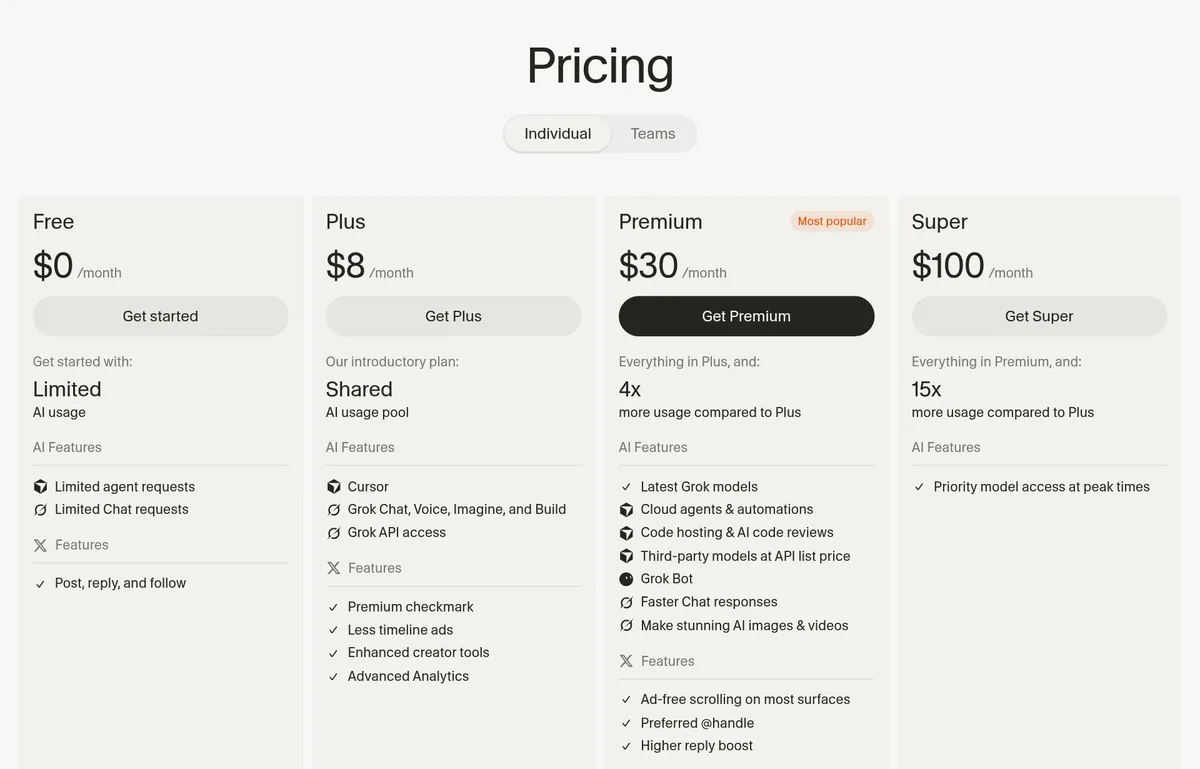
Cursor plans side by side
Here is the same list in one table. The last column is the part most people miss.
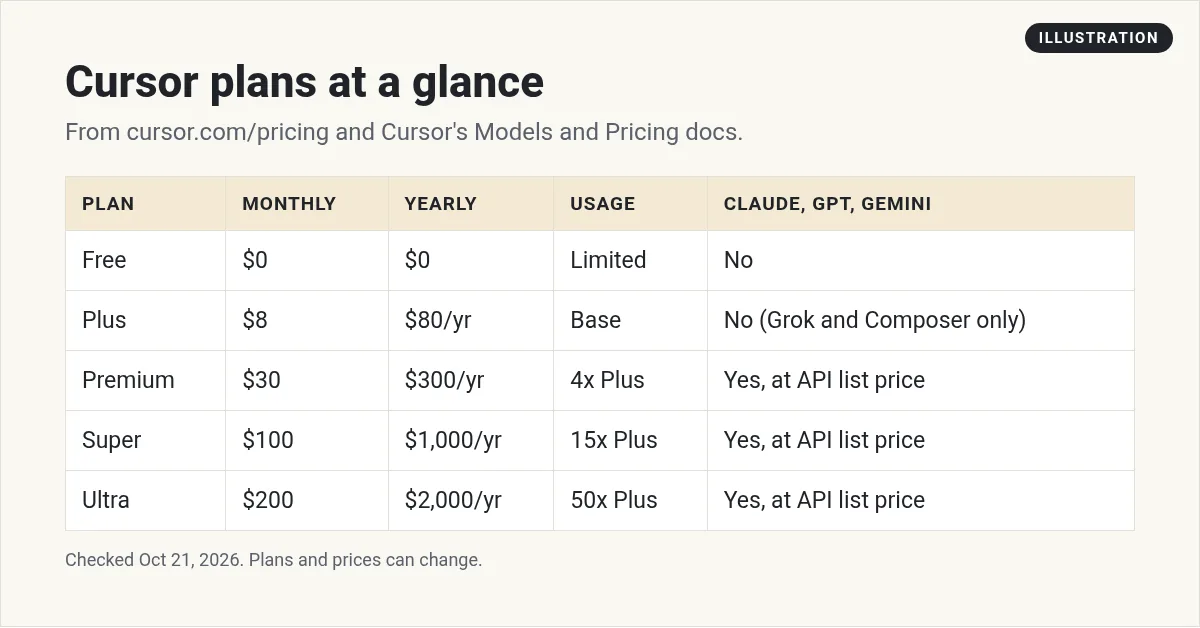
Premium is the first plan that unlocks the extra tools. Cursor's docs list Cloud Agents, Automations, code hosting, code review with Bugbot, and other companies' models. Plus has none of those.
How the weekly usage pool works
Every paid plan comes with one pool of use. Think of it like a gas tank that refills once a week.
- It is shared. The pool covers Agent in the editor, the command line tool, Cloud Agents, Grok Bot, and the Grok apps. If you use Grok a lot, you have less left for Cursor.
- It refills weekly. Cursor says one heavy day does not use up your month.
- Models burn it at different speeds. Bigger models use more of the pool for the same job.
- You can see it. Your editor settings show what is left and when it resets.
The pool only covers Cursor's own models. The docs name Grok 4.7, Grok 4.6, Grok 4.5, and Composer 2.5.
The catch: Claude, GPT, and Gemini cost extra
This is the one detail I want you to remember. Models from other companies are not part of the pool. That includes Claude, GPT, and Gemini.
- On Free and Plus: you cannot use them at all. The pricing page says only Grok models are on Plus.
- On Premium and up: you can use them from the first request. You pay the model's API list price from credit you buy ahead of time.
So if you want Claude inside Cursor, plan on Premium plus a top up. Cursor's docs list each model's price per million tokens. For example, Claude Sonnet 5.5 shows $2 for input and $10 for output. Prices like these change often, so check the docs before you budget.
What happens when you run out
When your weekly pool runs dry, Cursor's docs give you three choices:
- Wait. The pool refills each week.
- Pay as you go. Use prepaid credit at the listed rate for each model. You can turn on Auto Top-up so it refills when it gets low.
- Move up a plan. A bigger plan has a bigger pool.
Cursor also says requests are never made worse in quality or speed when you hit the limit. You just choose one of the three paths.
Cursor for teams
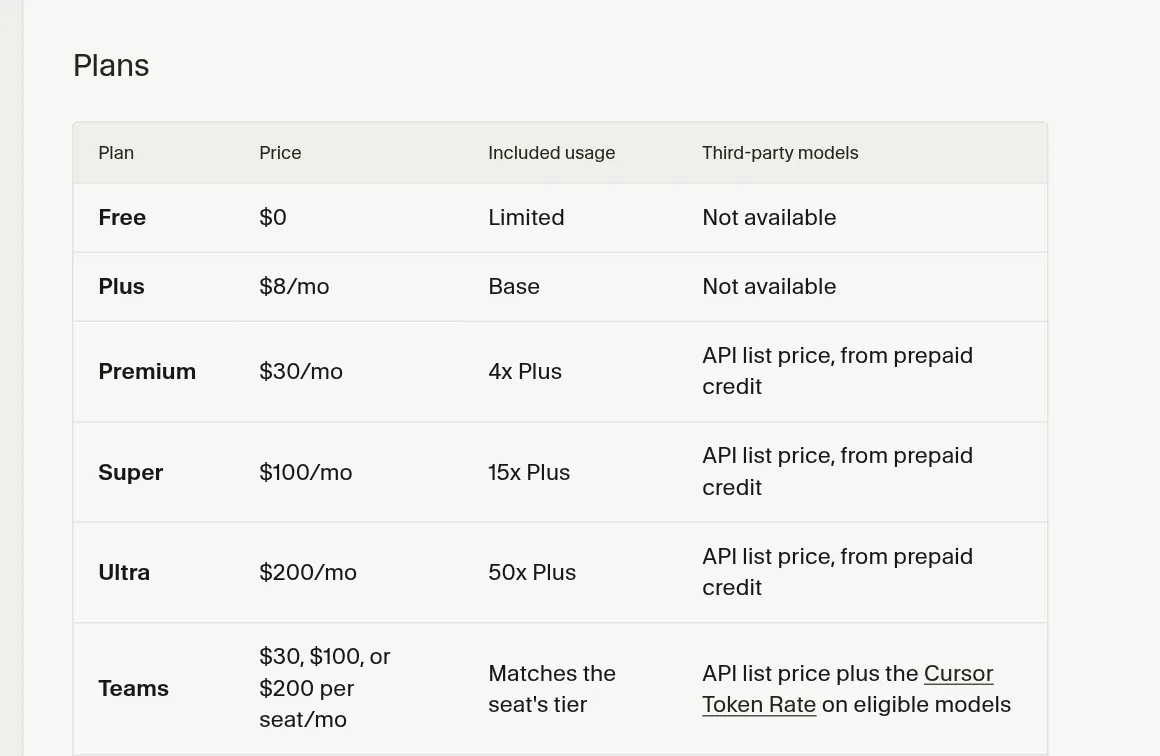
Teams pay per seat. Each person gets a Premium, Super, or Ultra seat at the same price as the matching plan for one person. You can mix seat types on one team. Plus is not offered for teams.
Team plans add shared billing, usage reports, privacy settings for the whole team, and single sign on. There is one more cost to know. On Teams and Enterprise, many outside models carry a Cursor Token Rate of $0.25 per million tokens on top of the model price. Plans for one person do not pay it.
Enterprise has custom pricing. It adds pooled use, invoices, and more admin controls.
What if you are on an older plan?
If you signed up before the change, you may still be on Pro, Pro+, Ultra, Start, or an older Teams seat. Cursor calls these legacy plans. The docs say they keep working as they are, with two monthly usage pools and on demand use.
So do not panic if your plan name does not match the new list. Check your billing page to see which plan you are on.
Three example monthly bills
Numbers make this easier. Here are three made-up people. This is my own math from Cursor's listed prices, so check it against your own use.
| Example person | Plan | Monthly cost (my math) |
|---|---|---|
| Tries a few small builds on weekends | Free | $0 |
| Builds a side project and is fine with Grok models | Plus | $8 |
| Wants Claude in the editor and adds $20 of credit | Premium plus credit | $50 |
The third person is the one to watch. The $30 plan is only the start. The credit for outside models is extra, and it goes up the more you use them. That is why a cap matters.
Also notice what is not on this list: tax. Cursor's prices do not include it, so your real bill may be a bit higher.
Is Cursor worth paying for?
It depends on what you build and how often. Cursor is a code editor first. If you have never opened a code editor, the screen can feel like a lot at the start.
If that sounds like you, the Free plan is the right test. Open a small project, ask Agent to explain the files, and make one tiny change. If you enjoy that, paying makes sense. If you feel lost, an app builder that hides the code may fit you better for now.
Which Cursor plan should you pick?
Here is how I would think about it. Cursor's own docs say Premium suits new Agent users, Super suits daily users, and Ultra suits power users. My take, in plain terms:
- Just curious? Start on Free. See if you like the editor before you pay.
- Building small things and fine with Grok? Plus at $8 is a cheap way in.
- Want Claude or GPT in your editor? You need Premium at $30, plus credit for those models.
- Coding every day? Look at Super. Run out of the Premium pool a few weeks in a row first, so you know you need it.
Do not start on yearly billing. Try a month first. Yearly saves money, but only if you keep using it.
My video: I compare Cursor with Lovable and Bolt for people who are not developers. Plans have changed since I made it, so use the prices in this post.
Any results mentioned in videos are not typical and are not a promise of income. Your results depend on your work and your market.
Common Cursor pricing mistakes
- Buying Plus to use Claude. Plus only runs Cursor's own models.
- Forgetting the pool is shared with Grok. Heavy Grok chats leave less for coding.
- Adding credit with no cap. Outside models bill per token. Set a monthly limit first.
- Paying yearly on day one. Test a month before you commit.
- Forgetting tax. Listed prices do not include it.
Still deciding if Cursor is the right tool at all? Read Cursor vs Claude Code or my list of Cursor alternatives. If you also use Claude, see my Claude Code pricing guide.
Before I pay for Cursor
Nothing you check here is sent or saved. Download it if you want to keep it.
Know what to build before you pay for tools
In my free workshop, I show how regular people pick a simple app idea and build it with AI tools, step by step.
Join my free AI workshopFree to join. No credit card needed.
Frequently asked questions
How much does Cursor cost per month?
Free is $0, Plus is $8, Premium is $30, Super is $100, and Ultra is $200 a month, checked October 21, 2026. Prices do not include tax.
Is there a yearly discount on Cursor?
Yes. Cursor's docs list $80 a year for Plus, $300 for Premium, $1,000 for Super, and $2,000 for Ultra.
Can I use Claude in Cursor on the Plus plan?
No. Plus only runs Cursor's own models, like Grok and Composer. Claude, GPT, and Gemini need Premium or higher, and you pay their API list price from prepaid credit.
What happens when I hit my Cursor limit?
You can wait for the weekly reset, pay as you go with prepaid credit, or move to a bigger plan.
How much is Cursor for teams?
Each seat costs $30, $100, or $200 a month, matching Premium, Super, or Ultra. Plus is not offered for teams. Enterprise has custom pricing.
Is Cursor free?
There is a Free plan at $0 with limited Agent and Chat use. It is a good way to try the editor before you pay.
Sources
Checked October 21, 2026. Plans, prices, and rules can change.
