
Build with AI · Tool comparison
Both are AI code editors you download. Both changed hands in the last year. Here is what each one is today, what it costs, and how to pick.
If you search for Windsurf vs Cursor, a lot of what you find is out of date. Both tools changed in big ways in 2026. Windsurf has a new name. Cursor has a new owner. Prices moved too.
So here is the short, current version. I checked both companies' own pricing pages, docs, and blog posts on October 19, 2026. By the end, you will know what each tool is now, what it costs, and which one fits the way you like to work.
Quick answer
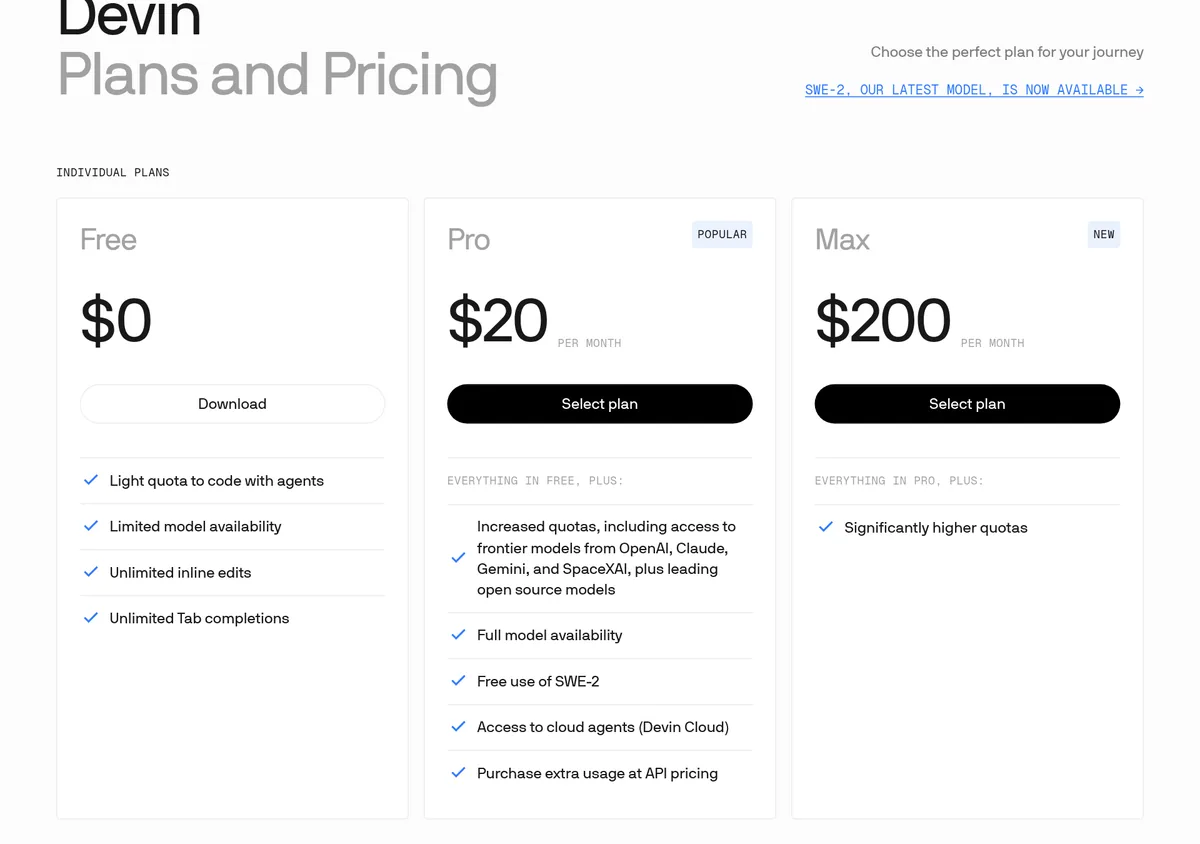
Windsurf is now called Devin Desktop, and Cognition owns it. Its plans are Free, Pro at $20 a month, and Max at $200 a month. Cursor is now part of SpaceX, with a free plan and paid plans from $8 a month (Grok models only) up to $200. Pick Windsurf if you want one plan that covers many model makers. Pick Cursor if you want the cheapest paid start or you like the Grok bundle. If you have never coded, start with a no-code builder.
What happened to Windsurf
Windsurf started as an AI code editor. In July 2025, Cognition, the company behind the Devin coding agent, announced a deal to buy it. Cognition's blog post says it "has signed a definitive agreement to acquire Windsurf, the agentic IDE."
Then came the rename. The Devin docs say: "On June 2, 2026, Windsurf is becoming Devin Desktop." They also say it is "the same IDE, same editor, and has the same features, but unified under the Devin brand." Today, windsurf.com/pricing sends you to devin.ai/pricing.
What changed for users? The main screen is now an agent command center for running many AI agents at once. The classic editor is still there. The old Cascade agent is being replaced by a new local agent called Devin Local. The FAQ still says Cascade "remains available through July" (checked October 19, 2026). That July window has passed, so treat Cascade as being replaced by Devin Local and confirm current access in the product or with support.
What happened to Cursor
Cursor is still Cursor, but it has a new parent. Its blog post from August 14, 2026 says "Cursor has officially been acquired by SpaceX."
Cursor's docs describe it as "a coding agent for building ambitious software." You download it and work on your project inside it. You can ask it to explain code, plan a feature, fix a bug, or review changes.
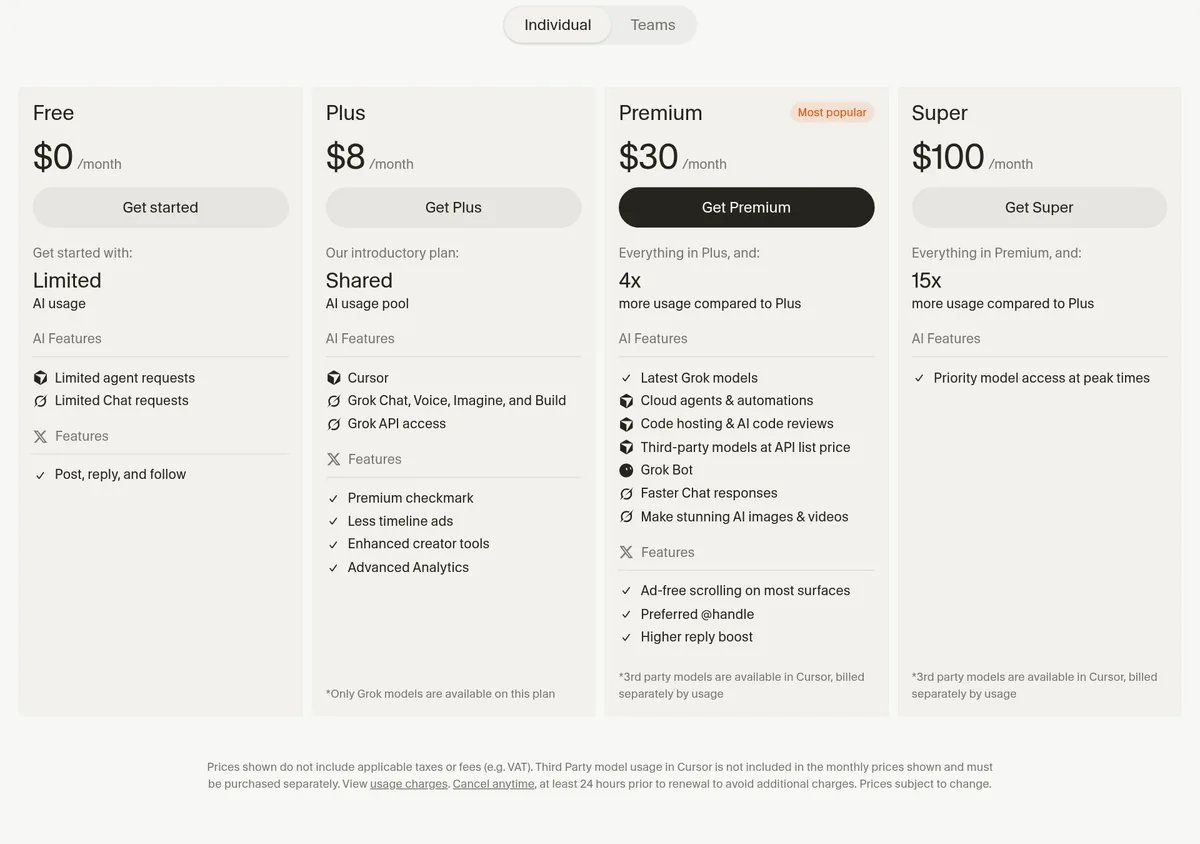
The SpaceX deal shows up in the plans. Cursor's paid plans now bundle Grok, the AI from SpaceX's AI arm, plus features for X, the social app, like a Premium checkmark. The cheapest paid plan only runs Grok models.
Prices side by side (checked Oct 19, 2026)
| Plan level | Windsurf (Devin Desktop) | Cursor |
|---|---|---|
| Free | $0: light agent quota, limited models, unlimited Tab completions | $0: limited agent and chat requests |
| Cheapest paid | Pro: $20 a month | Plus: $8 a month, Grok models only |
| Middle | None listed | Premium: $30 a month, 4x the usage of Plus |
| Heavy use | Max: $200 a month | Super: $100 a month. Ultra: $200 a month. |
| Teams | $80 a month for the team plan, plus $40 a month per full seat | From $30 per user a month |
Sources: devin.ai/pricing (windsurf.com/pricing redirects there) and cursor.com/pricing, checked October 19, 2026. Prices do not include tax.
Two details matter more than the sticker price.
- What models you get. Windsurf Pro includes frontier models from OpenAI, Claude, Gemini, and SpaceXAI, plus open source models. Cursor Plus only runs Grok. On Cursor Premium and up, other makers' models are billed separately at API list price.
- How limits work. Windsurf plans come with a usage allowance that refreshes daily and weekly. Past that, you can buy more at API pricing. Cursor Plus uses a shared usage pool, and each higher plan gets more usage than Plus.
The 5 differences that matter
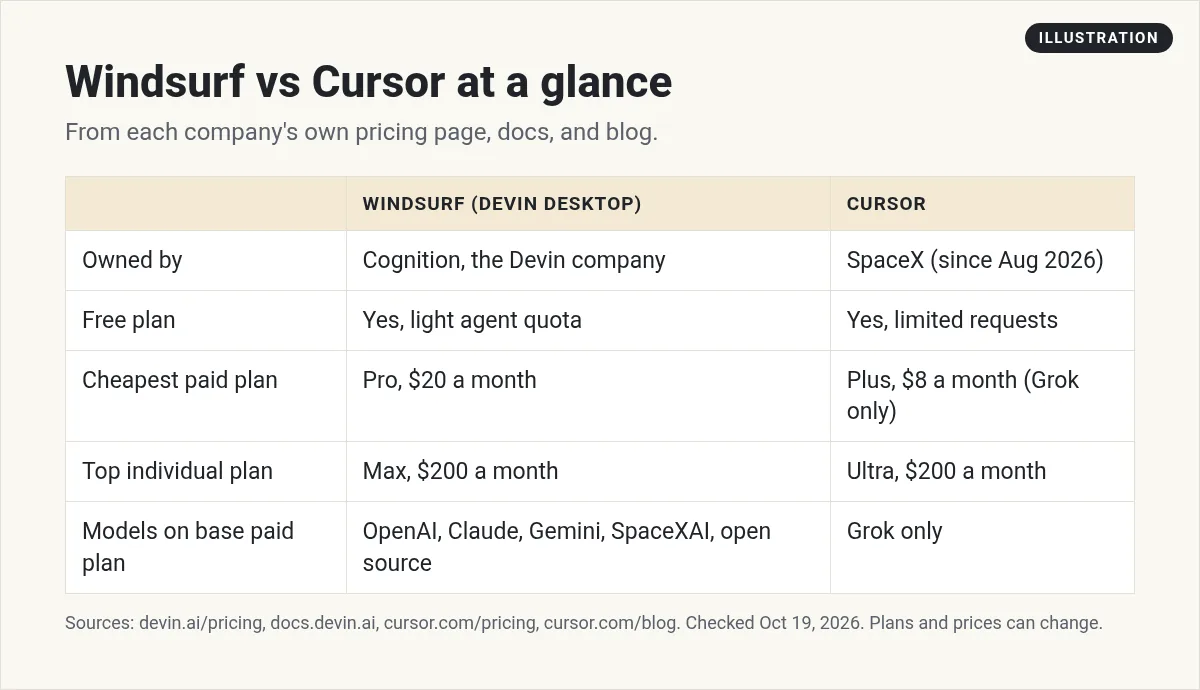
- Who owns it. Windsurf belongs to Cognition, the Devin company. Cursor belongs to SpaceX.
- Model choice on the base plan. Windsurf Pro covers many model makers in one price. Cursor's $8 plan is Grok only.
- The main screen. Devin Desktop opens on an agent command center, with the classic editor one click away. Cursor centers on the editor and its agent, with cloud agents on Premium and up.
- Extras you may not want. Cursor bundles X and Grok perks. Windsurf bundles access to Devin Cloud on Pro. Either is great if you use it. If not, it is just noise.
- Cheapest way in. Both have free plans. For paid, Cursor starts lower at $8, and Windsurf starts at $20.
Which one should you pick?
| If this is you | My pick | Why |
|---|---|---|
| You want Claude, GPT, and Gemini models for one price | Windsurf Pro | Its Pro plan lists all of them |
| You want the lowest paid price | Cursor Plus | $8 a month, if Grok models are fine |
| You want to run several agents at once | Either | Devin Desktop leads with it. Cursor has cloud agents on Premium and up |
| You already pay for X Premium | Cursor | Its plans bundle X features |
| You have never written code | Neither, yet | A no-code app builder is an easier first step |
This table is my own take from the official pages. Both tools change often, so test them on your own project.
How to test both in one afternoon
Do not pick based on hype. Pick based on one real task.
- Back up your project. Use Git or copy the folder. AI editors can change many files fast.
- Pick one small job. For example, add a contact form that saves a name and email.
- Write the request once. Use the exact same words in both tools. Say what done looks like.
- Run it on the free plans first. Both have one. Time each run and count the fixes you needed.
- Test the result like a user. Fill out the form. Check the data saved. Try it on your phone.
- Keep the winner. The tool that got you to done with fewer fixes is your tool for now.
Switching between them is easier than you think
Maybe you start in one and want to try the other. Good news: your project files are just files. Both tools open the same folder. The part that takes work is your rules, the notes that tell the AI how you like things done.
The Devin Desktop FAQ says it still reads your old Windsurf rules, including the .windsurfrules file. It also reads AGENTS.md files, and it "can import .cursor/rules (.mdc) into .devin/rules/." So if you have Cursor rules today, you can bring them over. New to rules? My Cursor rules guide explains how they work.
Here is a simple way to keep your options open:
- Keep one plain rules file. Write your project notes in one short file in the project folder: what the app does, how to run it, and what never to change.
- Keep your code in Git. Then any editor can pick up where the last one stopped.
- Do not stack two agents on one task. Run one tool at a time on a change, then commit, then switch.
What about Claude Code?
Many people comparing Windsurf and Cursor also look at Claude Code. It is Anthropic's coding agent, and it runs in your terminal, editor, desktop app, or browser. I compared it head to head in Cursor vs Claude Code. If you want to try it, my guide on how to use Claude Code walks you through your first session.
If you have never coded, start here
Windsurf and Cursor both assume you can open a project folder, read an error, and run a command. That is a lot on day one. A browser-based app builder handles hosting, logins, and the database for you.
I build a lot of apps, and I use more than one tool to do it. For a side by side of the beginner-friendly builders, read Lovable vs Replit vs Bolt vs Cursor or my list of the best vibe coding tools.
My video: I review Cursor, Lovable, and Bolt for beginners and explain why getting customers is the real hard part. It came out in February 2026, before Cursor joined SpaceX, so check today's prices above.
Any results mentioned in videos are not typical and are not a promise of income. Your results depend on your work and your market.
Windsurf or Cursor checklist
Nothing you check here is sent or saved. Download it if you want to keep it.
Pick the idea before you pick the editor
The editor is the easy part. In my free AI workshop, I show how to choose an app idea people will pay for, and how to plan it so any AI tool builds it faster.
Join my free AI workshopFree live workshop. No credit card needed.
Frequently asked questions
Is Windsurf still around?
Yes, under a new name. The Devin docs say Windsurf became Devin Desktop on June 2, 2026. It is the same editor with the same features, and windsurf.com/pricing now sends you to devin.ai/pricing.
Who owns Windsurf now?
Cognition, the company behind the Devin coding agent. Cognition announced its deal to buy Windsurf in July 2025.
Who owns Cursor now?
SpaceX. Cursor's blog post from August 14, 2026 says Cursor has officially been acquired by SpaceX.
Is Windsurf cheaper than Cursor?
Not at the entry level. Windsurf Pro is $20 a month and Cursor Plus is $8 a month, checked October 19, 2026. But Cursor Plus only runs Grok models, while Windsurf Pro includes models from several makers.
Do Windsurf and Cursor have free plans?
Yes. Windsurf's free plan has a light agent quota and unlimited Tab completions. Cursor's free plan has limited agent and chat requests.
Is Windsurf or Cursor better for beginners?
Both assume some coding comfort. If you have never coded, a browser-based AI app builder is an easier first step. Come back to an editor once you can read an error and run a command.
Sources
Checked October 19, 2026. Plans, prices, and rules can change.
- Devin Desktop FAQ (Windsurf rename)
- Devin pricing (windsurf.com/pricing redirects here)
- Devin Desktop page
- Cognition blog: Cognition's acquisition of Windsurf (July 14, 2025)
- Devin blog: Introducing our new Windsurf pricing plans (March 18, 2026)
- Cursor pricing
- Cursor docs: Welcome
- Cursor blog: Cursor is now a part of SpaceX (Aug 14, 2026)
