

Build with AI · Code Editors
Cursor changed a lot in 2026. It is now part of SpaceX, and its cheapest paid plan only includes Grok models. If that is not what you want, here are six other AI code editors and agents to try.
For a long time, Cursor was the default AI code editor. Then 2026 happened. Cursor joined SpaceX, and its plans changed.
Some people are happy with that. Others want a different mix of models, a lower price, or a lighter editor. I checked six alternatives on October 20, 2026, using each tool's own pricing page. Here is what each one offers.
Quick answer
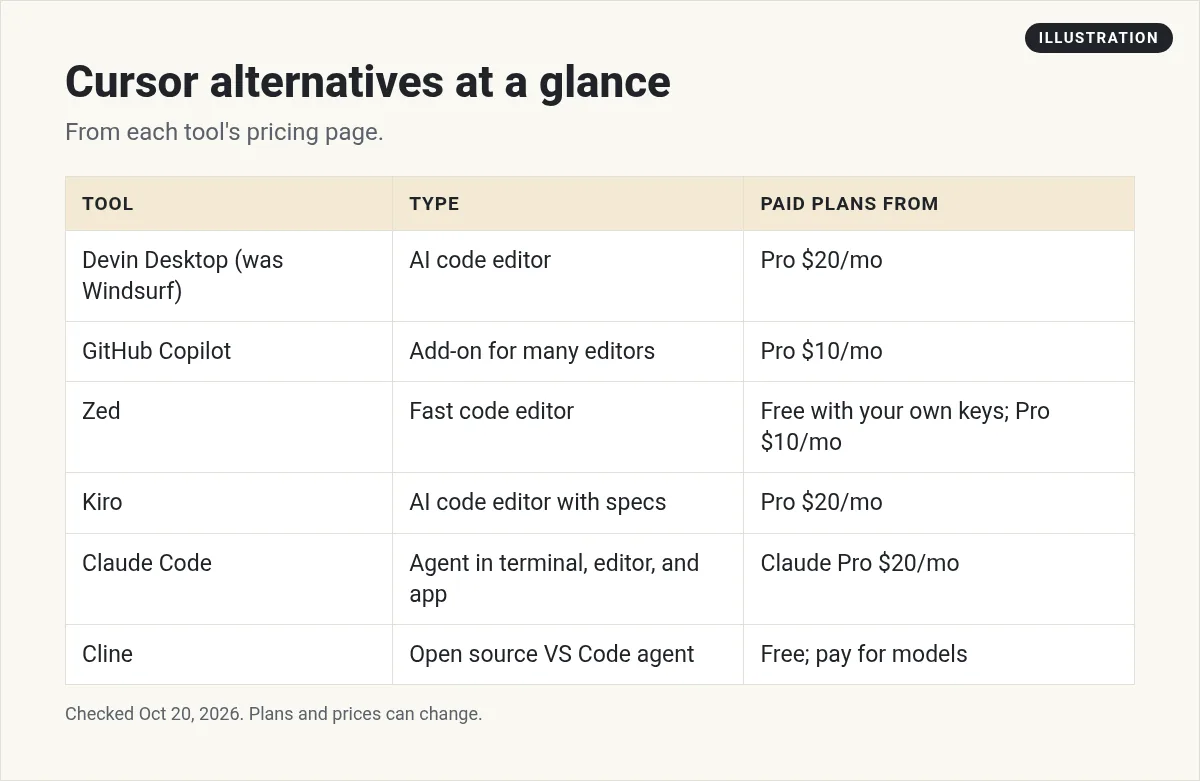
The top Cursor alternatives in 2026 are Devin Desktop (formerly Windsurf, Pro at $20 a month), GitHub Copilot (Pro at $10 a month), Zed (free with your own API keys, Pro at $10 a month), Kiro (Pro at $20 per user a month), Claude Code (with Claude Pro at $20 a month), and Cline (free and open source, you pay for the AI). Pick Copilot for the lowest price, Zed for speed, and Claude Code for a terminal agent. Prices checked October 20, 2026.
What changed with Cursor
On August 14, 2026, Cursor's blog posted: "Cursor has officially been acquired by SpaceX." The pricing page changed too. When I checked on October 20, 2026:
- Free: $0, with limited agent requests.
- Plus: $8 a month. The page says "Only Grok models are available on this plan."
- Premium: $30 a month. Third party models are available at API list price, billed separately by usage.
- Super: $100 a month. Ultra: $200 a month.
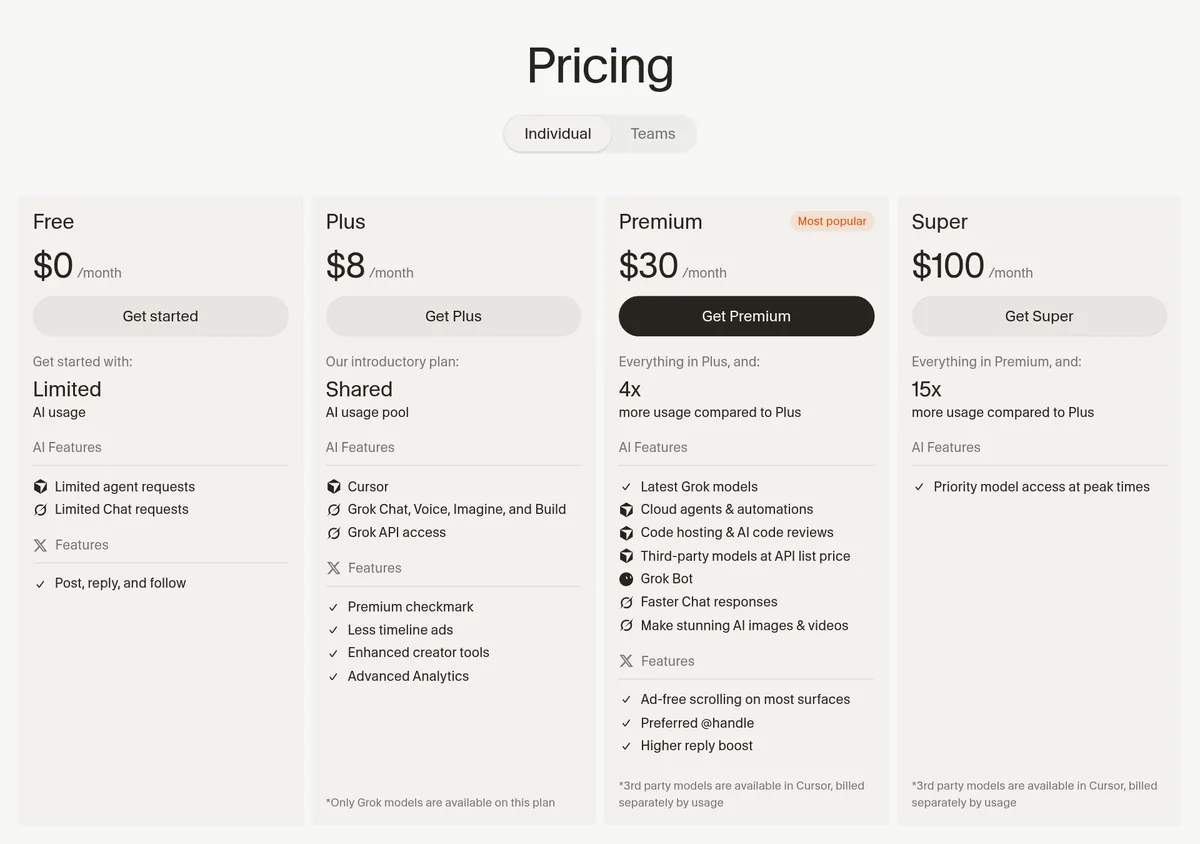
So if you want Claude or GPT models in Cursor, you now pay for Premium plus usage. That is the main reason people are looking around. For more on how Cursor stacks up against a terminal agent, see Cursor vs Claude Code.
Editors vs agents: know what you are picking
Before you compare tools, it helps to know there are three kinds here.
- AI code editors are full apps you write code in, with AI built in. Devin Desktop and Kiro are in this group, like Cursor.
- AI add ons plug into an editor you already use. GitHub Copilot works this way.
- AI agents take a task and do many steps on their own. Claude Code and Cline work this way. Zed is a fast editor that can run outside agents.
If you liked Cursor because you could see every change as it happened, start with an editor. If you liked handing off whole tasks, try an agent.
Why people leave Cursor
- Model choice. The cheapest paid plan only includes Grok models.
- Cost. Premium is $30 a month, plus usage for outside models.
- Ownership. Some teams want to review any vendor change after an acquisition.
- Speed. Some people want a lighter, faster editor.
Here is my summary card of the six alternatives. Each one is covered below.
1. Devin Desktop (formerly Windsurf): closest to Cursor
If you used Windsurf, it has a new name. Devin's FAQ says: "On June 2, 2026, Windsurf is becoming Devin Desktop." It is still a full AI code editor, a lot like Cursor.
The plans, checked October 20, 2026:
- Free: $0, with a light quota and unlimited Tab completions.
- Pro: $20 a month. It lists access to models "from OpenAI, Claude, Gemini, and SpaceXAI, plus leading open source models."
- Max: $200 a month, with much higher quotas.
- Teams: $80 a month for the team plan, plus $40 a month per full dev seat.
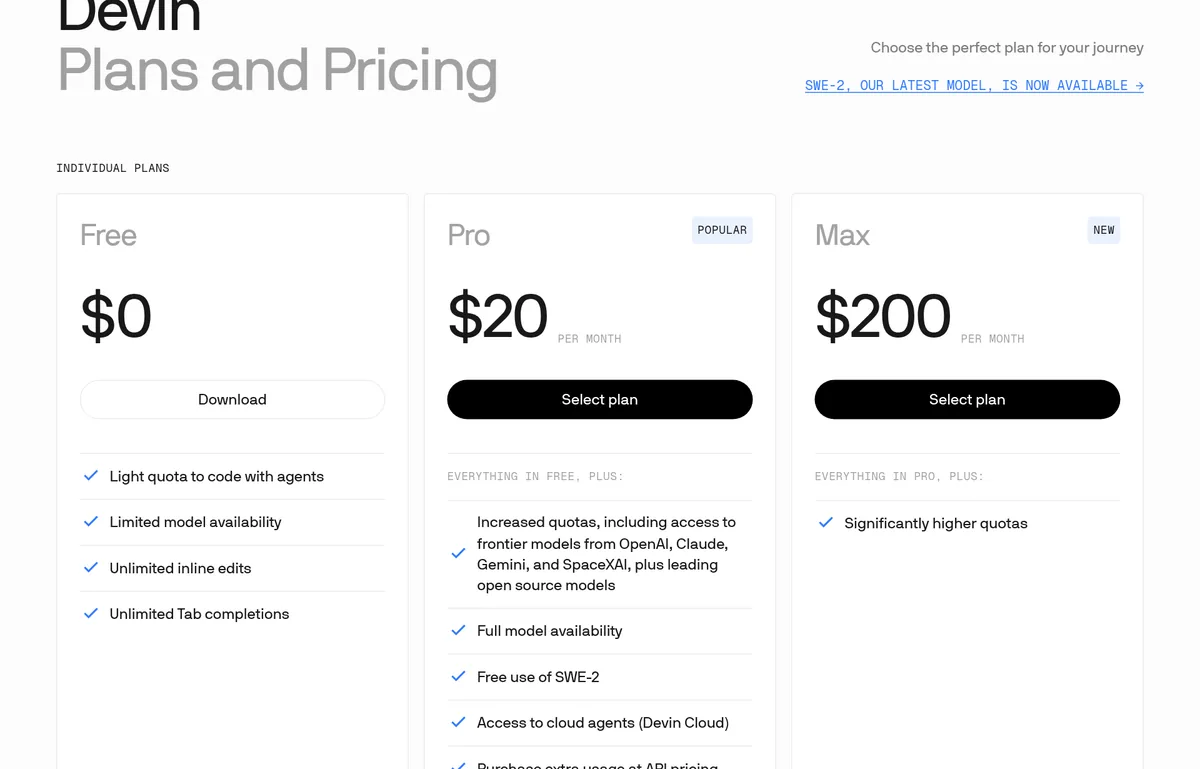
Pick Devin Desktop if you want the closest thing to Cursor with many model choices. I compared the two before the rename in Windsurf vs Cursor.
2. GitHub Copilot: lowest price, most editors
Copilot is not a separate editor. It plugs into the editor you already use. GitHub lists VS Code, Visual Studio, Xcode, JetBrains IDEs, Neovim, and Eclipse.
- Free: $0, with 2,000 completions a month.
- Pro: $10 per user a month, with 1,500 monthly AI credits and "Access to 3rd party agents (Claude Code and Codex)."
- Pro+: $39 per user a month.
Pick Copilot if you want to keep your current editor and pay the least. Watch out: GitHub labels the free plan "For lightweight chats" and Pro "For medium agent tasks." So plan on paying for real agent work.
3. Zed: fast editor, bring your own AI
Zed is a fast, modern code editor. Its free plan is a nice twist. The pricing page says it is free forever with "Unlimited use with your API keys or external agents like Claude Agent, Codex CLI, and more."
- Personal: $0, using your own keys or outside agents.
- Pro: $10 a month, with $5 of tokens included and usage based billing after that.
- Business: $30 per seat a month.
Pick Zed if speed matters and you already pay for an AI model or agent. Watch out: on Pro, the $5 of included tokens goes quickly if you use AI all day. After that, you pay for usage.
4. Kiro: plan first, then build
Kiro is an AI code editor with two ways to work. Its pricing page mentions "vibe mode or spec mode." In spec mode, you plan the work as a spec first, then Kiro builds from it. That suits people who like structure.
- Free: $0, with 50 credits.
- Pro: $20 per user a month, with 1,000 credits.
- Pro+: $40 per user a month, with 2,000 credits.
Pick Kiro if you like to plan before you code and want clear credit limits. Watch out: Kiro says complex prompts, such as running a spec task, "typically cost more than 1 credit." Extra credits are $0.04 each.
5. Claude Code: an agent, not an editor
Claude Code is different. It is an AI agent that works in your terminal, with add ons for editors like VS Code and JetBrains. It reads your code, makes changes, and runs commands.
It comes with paid Claude plans. Claude Pro was $17 a month billed yearly or $20 billed monthly, checked October 20, 2026. See my Claude Code pricing guide for the full breakdown.
Pick Claude Code if you want the AI to do bigger jobs on its own while you review the work. Want other agents like it? See my Claude Code alternatives list.
6. Cline: free, open source, pay as you go
Cline is an open source coding agent that runs in VS Code and as a CLI. Its pricing page says "Cline is free for individual developers." You pay your AI provider for what you use, or bring your own key.
Pick Cline if you want no subscription and full control over which model you use.
Quick comparison
| Tool | Type | Free option | Entry paid price |
|---|---|---|---|
| Devin Desktop | AI editor | Yes | Pro $20/mo |
| GitHub Copilot | Plugs into your editor | Yes | Pro $10/user/mo |
| Zed | Editor | Yes, with your own keys | Pro $10/mo |
| Kiro | AI editor | Yes, 50 credits | Pro $20/user/mo |
| Claude Code | Terminal agent | No | Claude Pro $20/mo, or $17/mo yearly |
| Cline | Open source agent | Yes, pay for AI | No subscription |
Watch: my take on Cursor, Lovable, and Bolt
I recorded this in February 2026, before the SpaceX deal. It is my honest review of Cursor, Lovable, and Bolt, plus a lesser known tool. The prices in it are out of date, so use the ones above.
My video: An honest review of Cursor, Lovable, and Bolt, plus a lesser known tool. Recorded February 2026, before Cursor joined SpaceX, so prices have changed.
Any results mentioned in videos are not typical and are not a promise of income. Your results depend on your work and your market.
How to choose
- Want the most Cursor like editor? Devin Desktop.
- Want to keep your editor and pay little? GitHub Copilot.
- Want speed and your own AI keys? Zed.
- Like to plan before you build? Kiro.
- Want an agent that does more on its own? Claude Code.
- Want open source and no subscription? Cline.
Not a coder? You may want an AI app builder instead. My list of the best vibe coding tools covers those.
Before you switch
- Move your rules. Cursor rules files will not carry over by themselves. Copy what matters.
- Try a real task. Fix a bug in your own project, not a demo.
- Watch usage costs. Credit and token billing can add up faster than a flat plan.
- Check the price page. These tools change prices often.
Before I leave Cursor
Nothing you check here is sent or saved. Download it if you want to keep it.
Want to see AI coding tools in action?
In my free workshop, I show how people use AI tools to build real projects, even if they are not developers.
Join my free AI workshopFree to join. No credit card needed.
Frequently asked questions
What is the best alternative to Cursor?
For the closest experience, Devin Desktop, formerly Windsurf. For the lowest price, GitHub Copilot Pro at $10 a month. For a terminal agent, Claude Code. Prices checked October 20, 2026.
Is there a free Cursor alternative?
Yes. Zed is free with your own API keys, Cline is free and open source, and Copilot, Kiro, and Devin Desktop all have free tiers with limits.
What happened to Windsurf?
Devin's FAQ says Windsurf became Devin Desktop on June 2, 2026. Pro is $20 a month, checked October 20, 2026.
Who owns Cursor now?
Cursor's blog says it was acquired by SpaceX, in a post dated August 14, 2026.
Can I still use Claude models in Cursor?
Yes, on Premium and higher plans, where third party models are billed separately by usage. The $8 Plus plan only includes Grok models.
Is Claude Code a Cursor alternative?
It can be. Claude Code is a terminal agent rather than an editor, but it works with editors like VS Code and does many of the same jobs.
Sources
Checked October 20, 2026. Plans, prices, and rules can change.
