
Overskill how-to
You can put your Overskill app right inside your funnel, blog, or website. If you tried and got a blank box that says "refused to connect," this is the fix, step by step.
Disclosure: Some links in this post are affiliate links. I earn a commission if you buy through this link. It does not change the price you pay. MakerAI is my own company.
Quick answer
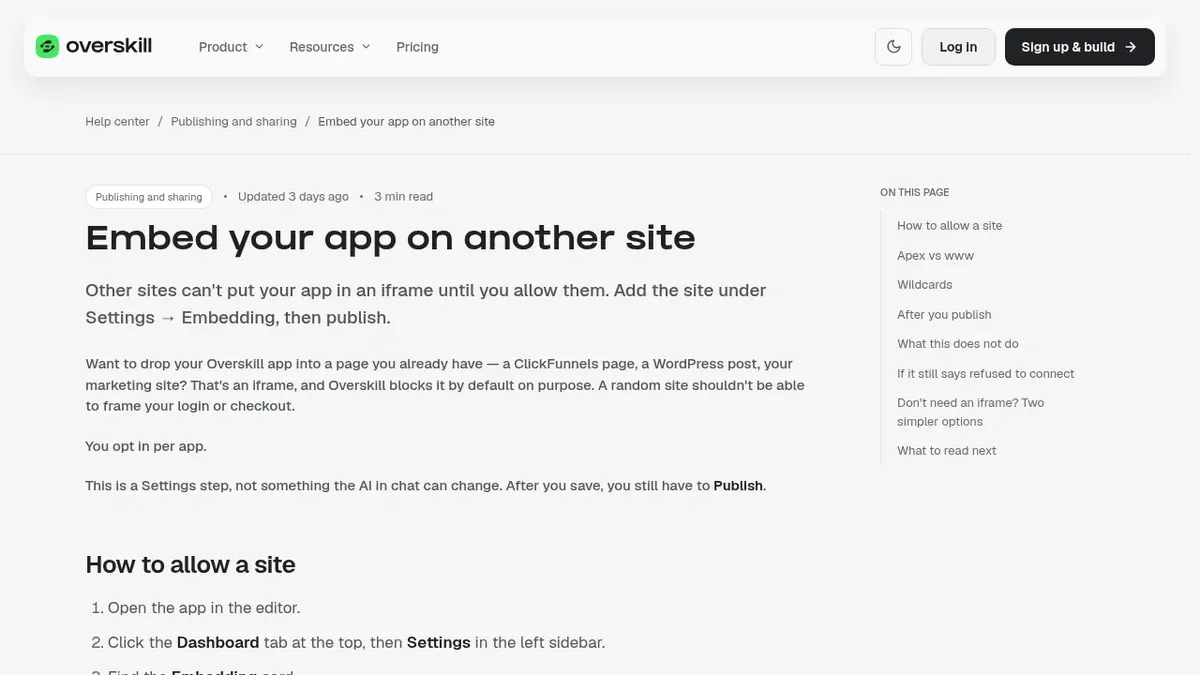
Overskill (I earn a commission if you buy through this link.) blocks iframe embeds by default, which is why you see "refused to connect." To fix it, open your app, go to Dashboard, then Settings, find the Embedding card, and add the exact address of the page that holds the iframe (like https://www.yoursite.com). Click Save Embedding Settings, then click Publish, then hard refresh your page. Saving alone does not change the live app.
Why you see "refused to connect"
An iframe is a window on one web page that shows another web page. It is how you would show your Overskill app inside your WordPress post or ClickFunnels page.
Overskill blocks that by default, on purpose. Its help says "A random site shouldn't be able to frame your login or checkout." That trick, putting a real login inside a fake page, is called clickjacking.
The block comes from a browser rule called frame-ancestors. Every live Overskill app sends it. It tells the browser which sites may show the app in an iframe. Until you add your site, your own page counts as a stranger.
| What you see | What it means |
|---|---|
| A blank box or "refused to connect" | Your page's address is not on the app's allowed list yet |
| Works in the Overskill preview only | You have not published the change yet |
| Works on www but not the bare domain | Those count as two different sites |
| Works in a new tab, not the old one | The old tab still has the old block cached |
Based on Overskill help, embedding refused to connect, checked Oct 17, 2026.
How to allow your site, step by step
Overskill's help is clear that this is a Settings step. "The AI in chat can't do it for you." Here is the path.
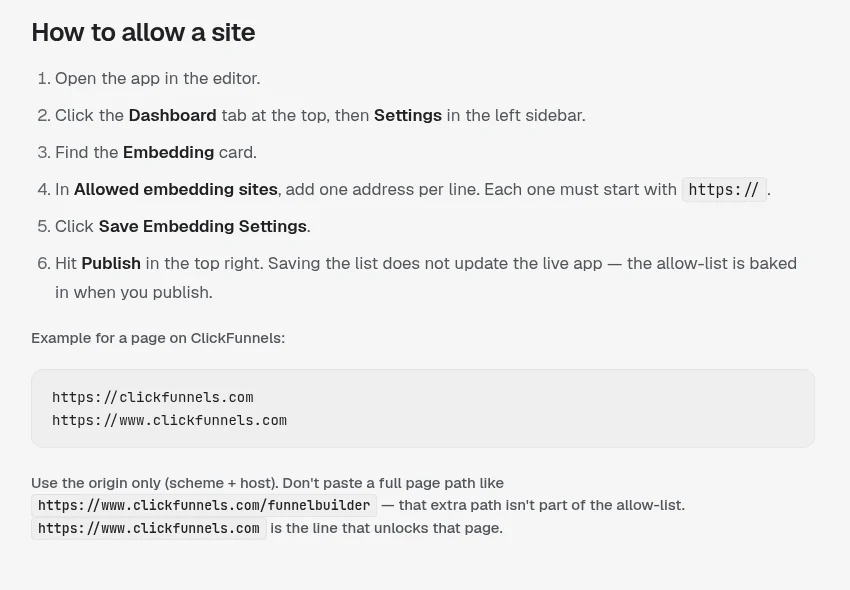
- Open the app in the Overskill editor.
- Click the Dashboard tab at the top, then Settings in the left sidebar.
- Find the Embedding card.
- In Allowed embedding sites, add one address per line. Each must start with https://.
- Click Save Embedding Settings.
- Click Publish in the top right.
- Hard refresh the page that holds the iframe. On most computers that is Ctrl+Shift+R, or Cmd+Shift+R on a Mac.
What to type in the box
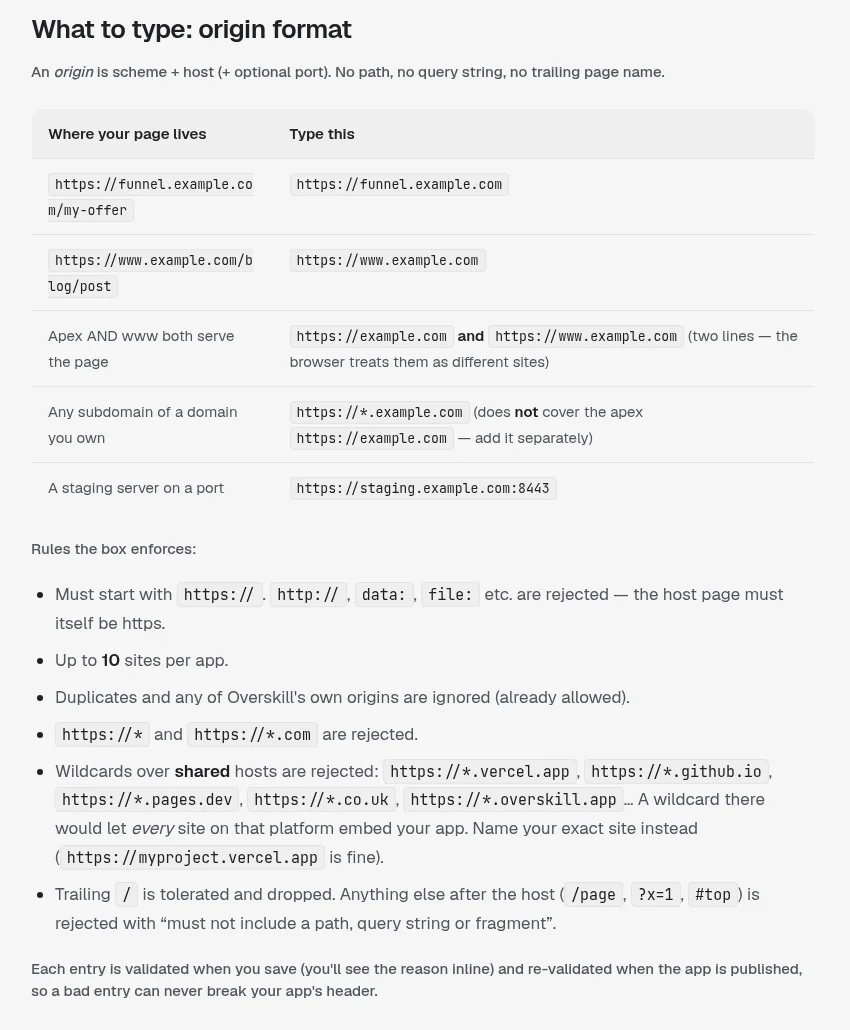
This is where most people get stuck. The box wants an origin. An origin is just the start of a web address: https, plus the domain. No page path after it.
| Your page lives at | Type this |
|---|---|
| https://www.example.com/blog/post | https://www.example.com |
| https://funnel.example.com/my-offer | https://funnel.example.com |
| Both example.com and www.example.com | Two lines: https://example.com and https://www.example.com |
| Any subdomain you own | https://*.example.com (plus the bare domain on its own line, if needed) |
Examples from Overskill help, checked Oct 17, 2026.
Rules the box enforces
- Must start with https://. Plain http:// is rejected.
- Up to 10 sites per app.
- No paths, question marks, or # parts after the domain.
- No wildcards over shared hosts, like https://*.vercel.app or https://*.github.io. Name your exact site instead.
- A trailing slash is fine. It gets dropped.
Embedding in ClickFunnels
ClickFunnels gets its own section in Overskill's help, because it trips up a lot of people. Allow the domain your funnel is served from.
| Your funnel uses | Allow this |
|---|---|
| Your own domain, like offers.yourbrand.com | https://offers.yourbrand.com |
| A ClickFunnels address, like yourbrand.myclickfunnels.com | https://yourbrand.myclickfunnels.com |
| You also want it to show inside the ClickFunnels editor | Add the editor's address too |
Source: Overskill help, embedding refused to connect, checked Oct 17, 2026.
If what you really want is to send leads from your app into ClickFunnels, you do not need an embed at all. Overskill has a built-in ClickFunnels connection for that. My guide to building a lead magnet app with Overskill covers it.
The iframe code to paste
Once your site is allowed and the app is published, paste a basic iframe into your page builder's HTML or custom code block. Swap in your app's live address.
That is standard HTML, not anything special to Overskill. The title is for screen readers. Change the height to fit your app. MDN, the web's main reference, has the full list of iframe options if you want more.
Still blank? Check this in order
| Symptom | Check |
|---|---|
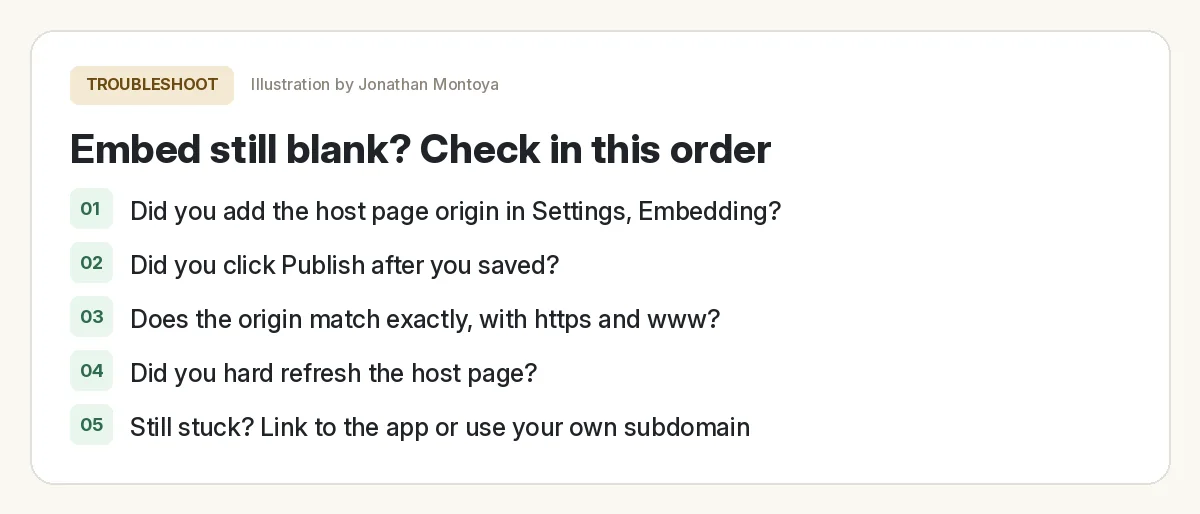
| Still refused after saving | Did you click Publish after saving? |
| Works in a fresh tab, not the old one | Hard refresh the host page |
| Works on www, not the bare domain | Add both lines |
| Works on the live funnel, not the editor | Add the editor's origin, or test on the live funnel |
| "must start with https://" | Your host page is http. Switch it to https |
| Console names a different blocked site | Add the exact site the console names |
Source: Overskill help, embedding refused to connect, checked Oct 17, 2026.
That last one is a pro tip from Overskill's help. Open your browser's console. The error line lists exactly which sites are allowed, and the site named as blocked is the one to add.
Two simpler options that work anywhere
Sometimes an iframe is more trouble than it is worth. Overskill's help offers two easier paths.
| Option | How | Best for |
|---|---|---|
| Link to your app | A button that opens the app's live address | Sign-in and checkout that must behave perfectly |
| Give it your own address | Connect a subdomain like app.yoursite.com | A full page that looks like part of your site |
Source: Overskill help, embed your app on another site, checked Oct 17, 2026.
I use a link more often than an embed. It is simpler, and nothing can break inside someone else's page.
Is embedding safe?
Yes, if you keep the list short. The allowed list only affects iframes. It does not change who can use your app; visibility, sign-in, and payments are separate settings. Each app has its own list, and an empty list is the safest default.
Embed check before you share the page
Nothing you check here is sent or saved. Download it if you want to keep it.
For more on keeping your app safe before launch, read my Overskill tutorial for beginners and check out Overskill login help if you get stuck on sign-in.
Meet AIM Agent
AIM Agent is an AI Chief of Staff for business owners. You give it a real task, and it brings the work back for you to review. You stay the one who approves.
Meet AIM AgentI am a co-founder of AIM Agent and have a financial interest in the product.
Want to try it on your own site?
Build a small calculator or quiz, allow your site, publish, and drop it into a page.
Try OverskillI earn a commission if you buy through this link. Check the live pricing page before you buy.
Frequently asked questions
Why does my Overskill app say refused to connect in an iframe?
Overskill blocks iframe embeds by default to protect logins and checkouts. Add the host page's origin under Settings, Embedding, then click Publish and hard refresh the page.
Can the Overskill AI fix embedding for me?
No. Overskill says it is a Settings step that the AI in chat cannot change. You add the site, save, and publish yourself.
What should I type in Allowed embedding sites?
Type only the origin: https plus the domain, with no page path. For a page at https://www.example.com/blog/post, type https://www.example.com.
How many sites can I allow?
Overskill allows up to 10 sites per app. Each must start with https://.
How do I embed an Overskill app in ClickFunnels?
Allow the exact domain your funnel uses, like your custom domain or yourbrand.myclickfunnels.com. Do not use a wildcard for myclickfunnels.com. Overskill rejects it.
Is there an easier way than an iframe?
Yes. Link to your app with a button, or connect your own subdomain like app.yoursite.com. Both work anywhere with no allow list.
Sources
All checked October 17, 2026. Overskill is in beta and changes often, so plans, features, and rules can change. Links to overskill.com below include my affiliate code. I earn a commission if you buy through this link.
