
No Code · Pricing
FlutterFlow lets you build real mobile and web apps visually. Here is what each plan costs by month and by year, how seat pricing works, and which plan fits your project.
FlutterFlow is a visual app builder that makes real Flutter code. You drag and drop screens, connect data, and ship to the app stores. The pricing page looks simple, but seat prices and the annual switch change the math.
I checked FlutterFlow's official pricing page on October 25, 2026, in both the monthly and annual views. Here is what you will pay.
Quick answer
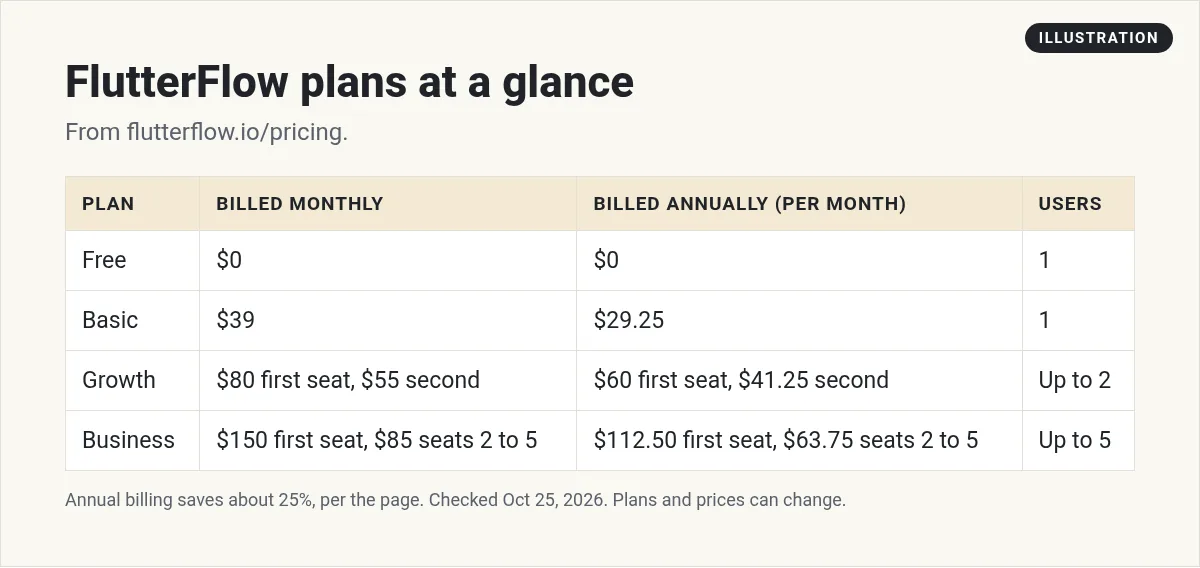
On October 25, 2026, FlutterFlow had four plans for individuals and teams. Billed monthly: Free at $0, Basic at $39 a month, Growth at $80 a month for the first seat and $55 for the second, and Business at $150 a month for the first seat and $85 each for seats 2 to 5. Annual billing saves about 25%: Basic drops to $29.25 a month, Growth to $60 for the first seat, and Business to $112.50 for the first seat, all billed annually.
FlutterFlow plans at a glance
The page had three tabs: Individual/Teams, Enterprise, and Education. This guide covers the Individual/Teams plans.
Monthly prices
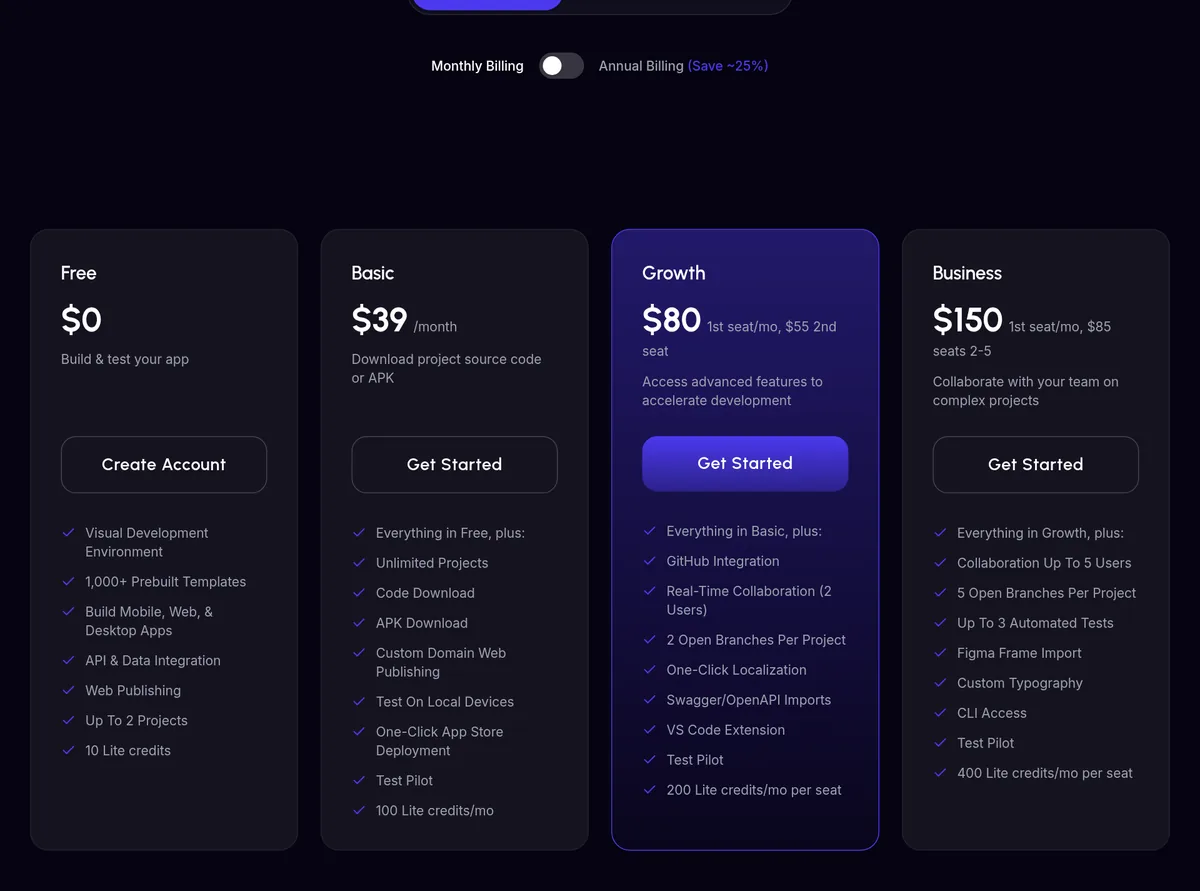
With Monthly Billing selected, the page listed:
- Free: $0
- Basic: $39 a month
- Growth: $80 a month for the 1st seat, $55 for the 2nd seat
- Business: $150 a month for the 1st seat, $85 each for seats 2 to 5
Annual prices (save about 25%)
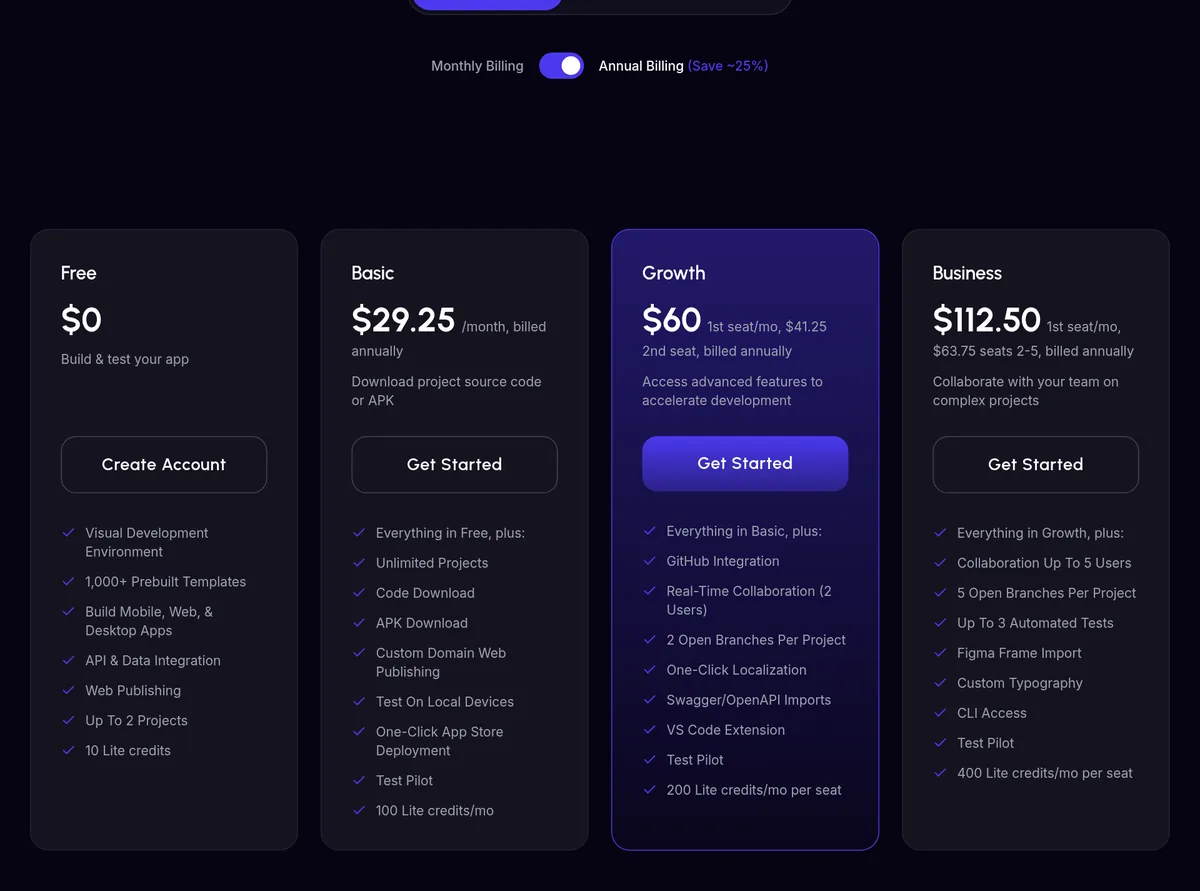
When I flipped the switch to Annual Billing, the page said "Save ~25%" and showed:
- Basic: $29.25 a month, billed annually
- Growth: $60 a month for the 1st seat, $41.25 for the 2nd seat, billed annually
- Business: $112.50 a month for the 1st seat, $63.75 each for seats 2 to 5, billed annually
Annual billing is a good deal if you know you will build for a full year. If you are still testing, start monthly.
What each plan includes
Free
Free lets you build and test. You get up to 2 projects, 10 Lite credits, and 5 AI generation requests for the lifetime of the account. It includes the visual builder, 1,000+ templates, API connections, and web publishing.
Basic
Basic is the plan for shipping your first real app. You get unlimited projects, code download, APK download, custom domain web publishing, testing on local devices, and one click app store deployment. It includes 100 Lite credits a month and 50 AI generation requests a month.
Growth
Growth adds GitHub integration, a VS Code extension, one click localization, and real time collaboration for 2 users. You get 2 open branches per project, 200 Lite credits a month per seat, and 200 AI generation requests a month.
Business
Business is for teams. It allows up to 5 users, 5 open branches per project, up to 3 automated tests per project, Figma frame import, custom typography, and CLI access. It includes 400 Lite credits a month per seat and 500 AI generation requests a month.
How seat pricing works
Growth and Business charge per seat. The first seat costs more than the rest.
For example, a 2 person team on Growth pays $80 plus $55, which is $135 a month billed monthly. On annual billing, that is $60 plus $41.25, or $101.25 a month.
A 5 person team on Business pays $150 plus 4 seats at $85, which is $490 a month billed monthly. On annual billing, it is $112.50 plus 4 seats at $63.75, or $367.50 a month.
Growth tops out at 2 editors, and Business at 5. Bigger teams should look at the Enterprise tab.
AI requests and Lite credits
Every plan comes with two kinds of AI limits, and they are easy to mix up.
AI generation requests are for FlutterFlow's AI features that help build parts of your app. Free gets 5 for the life of the account. Basic gets 50 a month, Growth 200, and Business 500.
Lite credits are a separate allowance. Free gets 10. Basic gets 100 a month. Growth gets 200 a month per seat, and Business 400 a month per seat. The pricing page lists the amounts but does not explain each use in detail, so check FlutterFlow's docs if you plan to lean on them heavily.
If you run out, the simple fix is to move up a plan. Think about this before you pick Basic for a big project.
Is FlutterFlow worth the price?
It depends on what you are building and how you like to work.
FlutterFlow is worth it if you want a real mobile app in the app stores and you want to own the code. Being able to download your Flutter code means you are not stuck if you outgrow the tool. Over 3.3 million users had joined, per the pricing page.
It may not be worth it if you only need a simple web app or an internal tool. There is a learning curve. You need to understand screens, state, and data. Tools that build from a prompt can get you to a first version faster, even if you give up some control.
My advice: build one small screen on the Free plan. If you enjoy the process, upgrade. If it feels like a chore, try a different kind of builder.
Costs outside the FlutterFlow plan
Your FlutterFlow plan is not your only bill. Plan for these too:
- Backend: FlutterFlow connects to Firebase and Supabase, which have their own pricing.
- App store fees: Apple and Google charge developer account fees to publish apps.
- Domain: a custom domain for your web app costs extra from your domain seller.
- APIs: outside services, like AI models or payments, may charge by use.
What the Free plan cannot do
Free is great for learning, but it has clear limits. You cannot download your code or an APK. You cannot publish to a custom domain or use one click app store deployment. You are capped at 2 projects. And with only 5 AI requests for life, you will do most of the work by hand.
That is fine for a test. Once you want real users, plan on Basic at the least.
Which FlutterFlow plan should you pick?
Free if you are learning or building a test project.
Basic if you are one person and ready to publish an app or download the code.
Growth if you work with one other person or need GitHub.
Business if a team of up to 5 builds together and needs branches and testing.
Tips to save money on FlutterFlow
- Build on Free first. Get your screens and data working before you pay.
- Go annual once you are sure. It cuts the price by about 25%.
- Only add seats you need. Each extra seat adds to your bill every month.
- Watch your AI requests. Free has only 5 for life, so use them on hard screens.
If you would rather describe your app than drag it
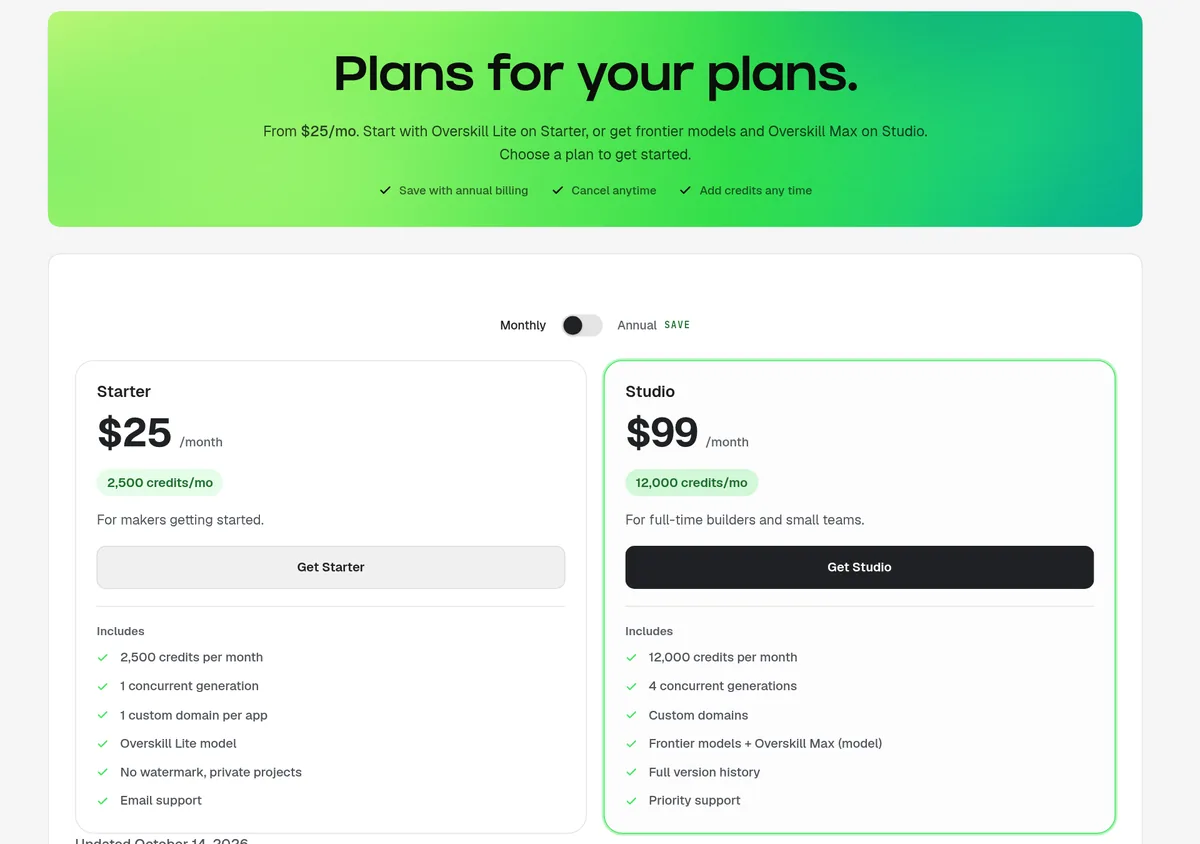
FlutterFlow is great if you want control and real code. But it still takes time to learn. If you would rather describe your app in plain words, an AI app builder may be faster.
Overskill is one tool that works that way. On October 25, 2026, its pricing page listed Starter at $25 a month and Studio at $99 a month, billed monthly. Starter includes 2,500 credits a month. Studio includes 12,000. With Annual selected, Starter is $250 billed yearly ($20.83 a month) and Studio is $989 billed yearly ($82.42 a month).
For more options, see Overskill pricing, Bubble pricing, no code app builders, and vibe coding vs no code.
Before you pay for FlutterFlow
Nothing you check here is sent or saved. Download it if you want to keep it.
Want to build your app by chatting with AI?
If you would rather describe your app than drag screens around, try Overskill. Start with one small idea and test it first.
Try OverskillI earn a commission if you buy through this link. Plans and credits can change, so check the live pricing page before you buy.
Want an AI team to help run your business? Meet AIM Agent, an AI Chief of Staff for business owners. I am a co-founder of AIM Agent and have a financial interest in the product.
Frequently asked questions
How much does FlutterFlow cost?
On October 25, 2026, billed monthly, FlutterFlow was Free at $0, Basic at $39 a month, Growth at $80 a month for the first seat, and Business at $150 a month for the first seat.
Does FlutterFlow have a free plan?
Yes. The Free plan includes up to 2 projects, 10 Lite credits, and 5 AI generation requests for the lifetime of the account.
How much is FlutterFlow per year?
Annual billing saves about 25%. Basic is $29.25 a month, Growth is $60 for the first seat, and Business is $112.50 for the first seat, all billed annually.
Can I download my code on FlutterFlow?
Code download and APK download start on the Basic plan. The Free plan does not include them.
How many people can use one FlutterFlow plan?
Basic has 1 editor. Growth allows up to 2 editors, and Business allows up to 5. Each extra seat costs more per month.
Does FlutterFlow include hosting for my backend?
FlutterFlow connects to backends like Firebase and Supabase. Those services have their own pricing, separate from FlutterFlow.
Sources
Checked October 25, 2026. Plans, prices, and rules can change.
- FlutterFlow: Pricing (Monthly Billing view and compare table)
- FlutterFlow: Pricing (Annual Billing view, after clicking the switch)
- Overskill: Pricing page, overskill.com/pricing (updated October 14, 2026)
