
Build with AI · Pricing
Bubble prices its plans by features plus two usage meters: workload units and AI credits. Here is what each plan costs, what the meters mean, and how to keep your bill in check.
Bubble is a no code tool for building web and mobile apps. Its pricing looks simple at first, then you see words like "workload units" and "AI credits" and wonder what you will really pay.
I checked Bubble's pricing page, in both the monthly and yearly views, plus its FAQ, on October 25, 2026. Here is every web plan, what the two meters mean, and what to watch for.
Quick answer
On October 25, 2026, Bubble's web plans were Free at $0, Starter at $39 a month billed monthly or $32 a month billed yearly, Growth at $134 or $119, and Team at $399 or $349. Enterprise was custom. Each plan includes a monthly amount of workload units, which measure server use, and AI credits, which measure AI feature use. A paid plan is needed to put a live app online.
Bubble plans and prices
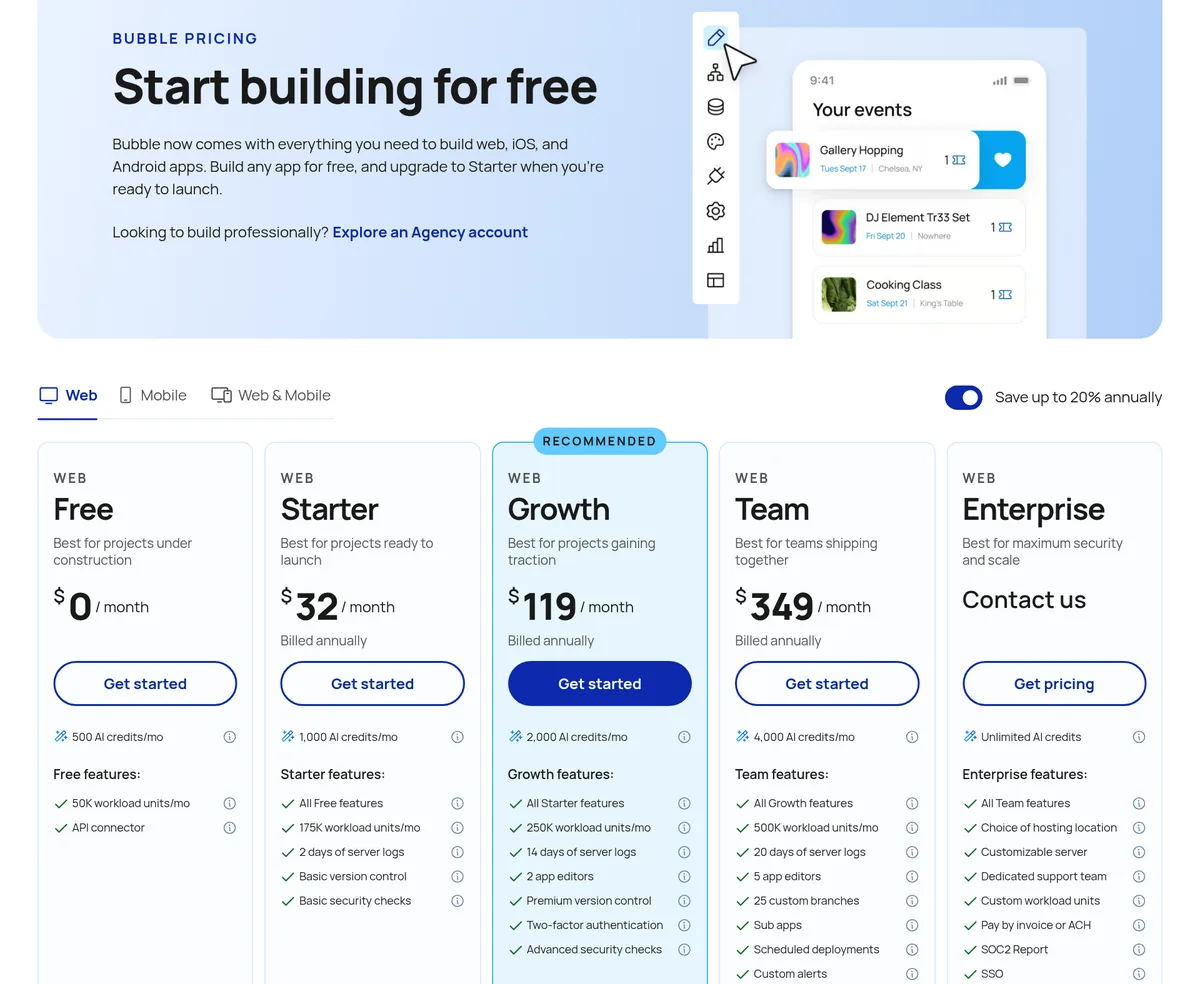
Bubble's pricing page has tabs for Web, Mobile, and Web plus Mobile, and a switch for monthly or yearly billing. It says you can "Save up to 20% annually." Here are the web plans, in US dollars, as of October 25, 2026:
- Free: $0. 50K workload units a month and 500 AI credits.
- Starter: $39 a month billed monthly, or $32 a month billed yearly. 175K workload units and 1,000 AI credits a month.
- Growth: $134 a month billed monthly, or $119 a month billed yearly. 250K workload units, 2,000 AI credits, and 2 app editors.
- Team: $399 a month billed monthly, or $349 a month billed yearly. 500K workload units, 4,000 AI credits, and 5 app editors.
- Enterprise: contact Bubble. Custom workload.
Mobile plans cost more. On the Mobile tab, billed yearly, Starter was $42, Growth $169, and Team $449 a month. Check the live page for monthly mobile prices and the Web plus Mobile bundle.
Bubble pricing at a glance
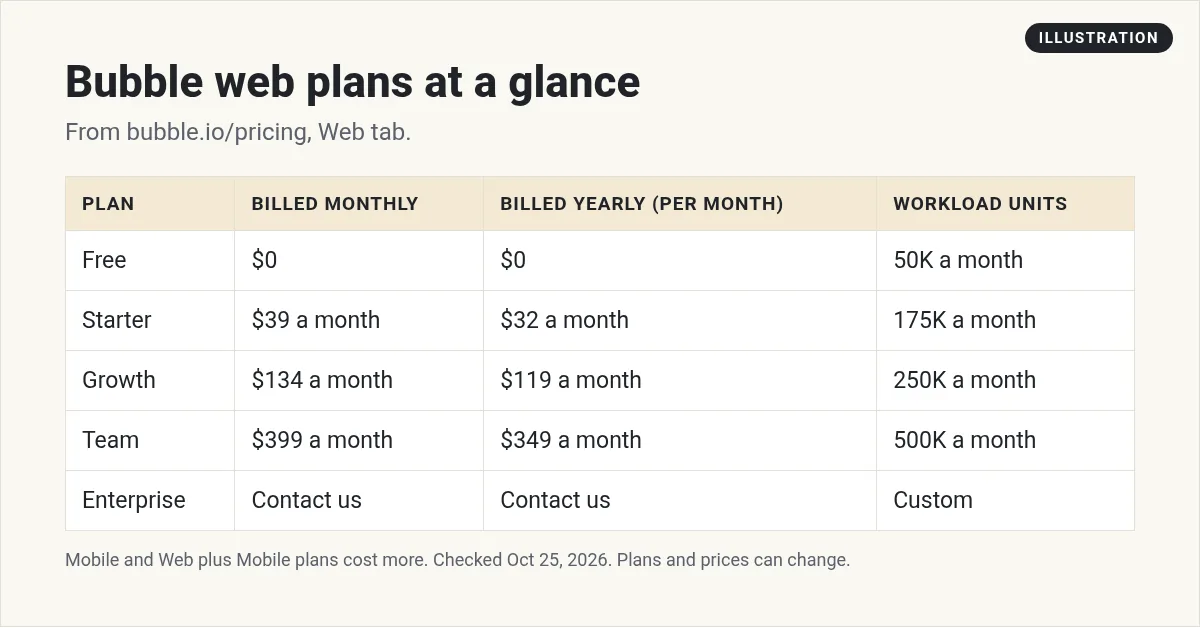
The yearly savings are real but small on Starter. $39 x 12 = $468 a year billed monthly. $32 x 12 = $384 a year billed yearly. That is $84 saved over a year.
What are workload units?
Workload units take a minute to learn, so here is the short version. Bubble's FAQ says workload units (WU) "measure general server processing needed to host, run, and scale apps."
In plain words: every time your app does something, like loading a page, saving data, or running a workflow, it uses some workload. More users and more actions mean more workload.
How much will you need? Bubble's FAQ says it "depends on a variety of factors." Its advice is to start on the Free plan, which "comes with more than enough Workload to get started," and watch how your app uses it.
One thing to know if you build both web and mobile: Bubble says the apps "share the same backend and database," so "all workload usage is cumulative."
What if you need more workload?
Per the FAQ, on Starter, Growth, or Team you have two choices:
- Buy a workload tier for a set amount of extra workload.
- Pay for overages as you go.
You can also put a cap on it. Bubble says you "can disable overages at any time so that your app does not use more than the amount that comes with your plan."
Note: Bubble says apps on the Free plan "cannot subscribe to workload tiers and cannot enable overages because these plans are designed for development."
What are Bubble AI credits?
AI credits are separate from workload. Bubble's FAQ says AI credits "measure AI-powered feature usage specifically."
Key rules from the FAQ:
- Your monthly credits "do not roll over and refresh on the first of each month."
- Credits you buy "expire six months from purchase," and roll over until then.
- On a paid plan, you can buy more AI credits at any time.
- On Free, if you run out, you "will need to upgrade to Starter or wait until credits refresh."
- "Currently, app generation does not require credits."
Other Bubble costs
Bubble's FAQ lists a few add ons on top of your plan:
- Workload tiers (Starter, Growth, and Team only).
- Extra file storage at "$3 per 100 GB each month."
- Plugin subscriptions, which some plugins charge for.
Add these up before you budget. Storage and plugins are easy to forget until the bill shows up.
Bubble also says plans are bought "at the project level." One project can hold a web app, a mobile app, or both.
And there are discounts. Bubble says it offers "discounts to students on all plans," and that "Nonprofit organizations get a discount on all plans."
Is Bubble free?
You can build for free. The Free plan is $0 with 50K workload units and 500 AI credits a month.
But to go live, you need to pay. For mobile, Bubble says "A paid plan is necessary for deploying a live version of your app," which you need to test with Apple TestFlight and Google Play, and to publish to the app stores.
The same idea applies to web apps. Bubble says the Free and Agency plans "are designed for development," which is why they cannot use workload tiers or overages.
So think of Free as a place to learn and build. Plan to move to Starter or higher when you are ready to launch.
How to keep your Bubble bill low
- Build on Free first. Do your learning and testing before you pay.
- Turn on the overage cap. That way a busy week cannot surprise you.
- Watch your workload. Bubble shows how parts of your app use it. Fix the heavy ones first.
- Go yearly only when you are sure. The savings are up to 20%, but you commit for a year.
- Buy AI credits only when needed. Bought credits expire after six months.
- Ask about discounts. Students and nonprofits get a discount on all plans.
Small habits like these matter more than the plan you pick. A well built app can use far less workload than a messy one that does the same job.
Which Bubble plan should you pick?
Free if you are learning or building your first version.
Starter if you are ready to launch a simple app with light traffic.
Growth if a second person needs to edit the app, or you need more workload and AI credits.
Team if you have up to 5 editors and a busy app.
Enterprise if you need custom workload and support.
Whatever you pick, turn on the overage cap at first. You can always raise it once you see your real usage.
A different way to build: describe your app
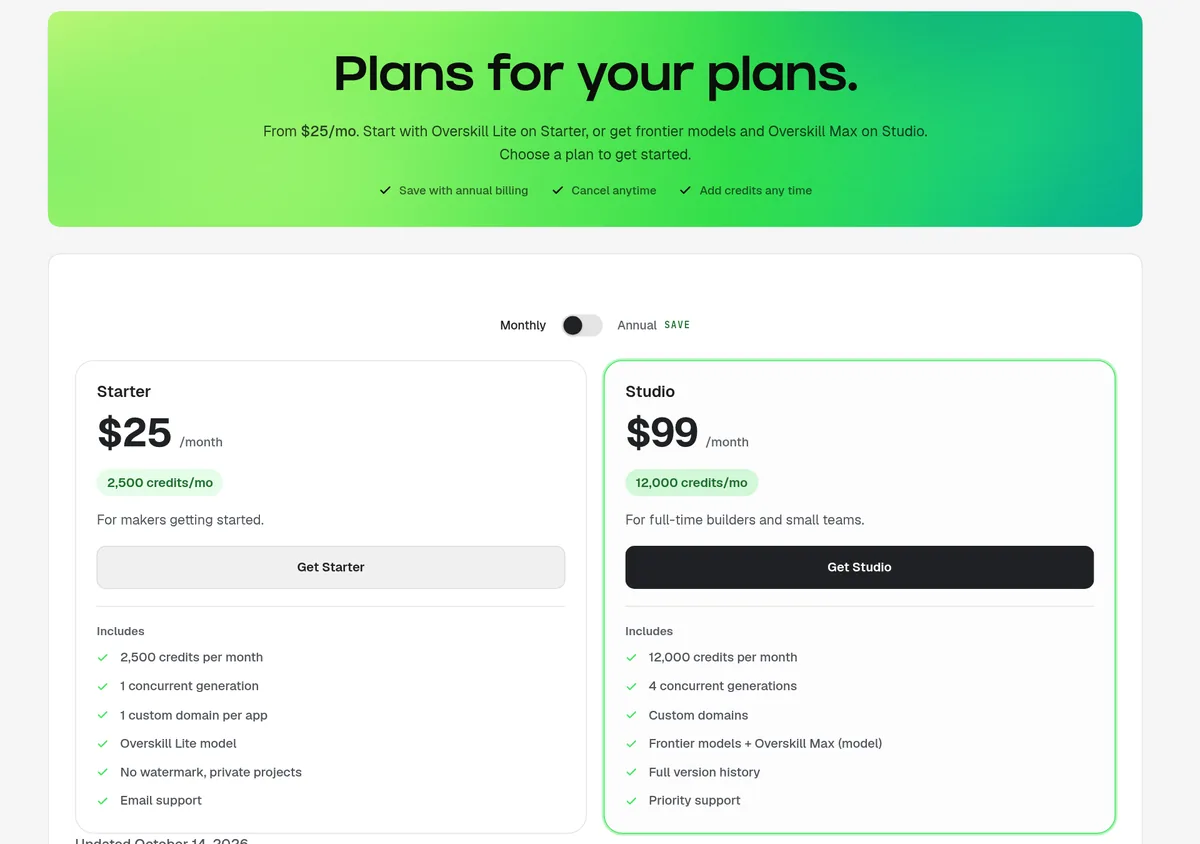
Bubble is a visual builder. You drag elements and set up workflows by hand. If you would rather describe the app in plain words and let AI build it, that is called vibe coding.
Overskill is one tool that works that way. On October 25, 2026, its pricing page listed Starter at $25 a month and Studio at $99 a month, billed monthly. Starter includes 2,500 credits a month. Studio includes 12,000. The page says you can "Save with annual billing." With the Annual switch on, Starter was $20.83 a month billed annually ($250 a year) and Studio was $82.42 a month billed annually ($989 a year).
I compared the two in detail in Overskill vs Bubble. For more on Overskill's plans, see Overskill pricing. And if you are still choosing a builder, my guide to no code app builders lists more options. I also cover Glide pricing and FlutterFlow pricing.
Before you pay for Bubble
Nothing you check here is sent or saved. Download it if you want to keep it.
Rather describe your app than drag it?
If you want to build by chatting with AI instead of setting up workflows by hand, try Overskill. Start with one small idea and test it first.
Try OverskillI earn a commission if you buy through this link. Plans and credits can change, so check the live pricing page before you buy.
Want an AI team to help run your business? Meet AIM Agent, an AI Chief of Staff for business owners. I am a co-founder of AIM Agent and have a financial interest in the product.
Frequently asked questions
How much does Bubble cost?
On October 25, 2026, Bubble's web plans were Free at $0, Starter at $39 a month billed monthly or $32 billed yearly, Growth at $134 or $119, and Team at $399 or $349. Enterprise was custom.
Is Bubble free?
You can build on the Free plan at $0, with 50K workload units and 500 AI credits a month. A paid plan is needed to deploy a live app.
What are Bubble workload units?
Bubble says workload units measure the server processing needed to host, run, and scale your app. Each plan includes a monthly amount.
Can I cap my Bubble workload?
Yes. Bubble says you can disable overages at any time so your app does not use more than your plan includes.
Do Bubble AI credits roll over?
No. Monthly credits refresh on the first of each month and do not roll over. Credits you buy expire six months after purchase.
Does Bubble have a student discount?
Yes. Bubble says it offers discounts to students on all plans, and nonprofits also get a discount on all plans.
Sources
Checked October 25, 2026. Plans, prices, and rules can change.
- Bubble: Pricing (Web and Mobile tabs, monthly and yearly views, and FAQ)
- Overskill: Pricing page, overskill.com/pricing (updated October 14, 2026)
