
Build with AI · No Code
There is no single best no code app builder. There is a best one for the app you want. Tell me what you are building, and this guide points you to the right tool.
People ask me all the time which no code app builder is best. My answer is always the same question back: what are you building?
A phone app for the App Store needs a different tool than a web app or a team tool built on a spreadsheet. So I sorted seven builders by the kind of app they suit. I checked every price on October 20, 2026, on each tool's own pricing page.
Quick answer
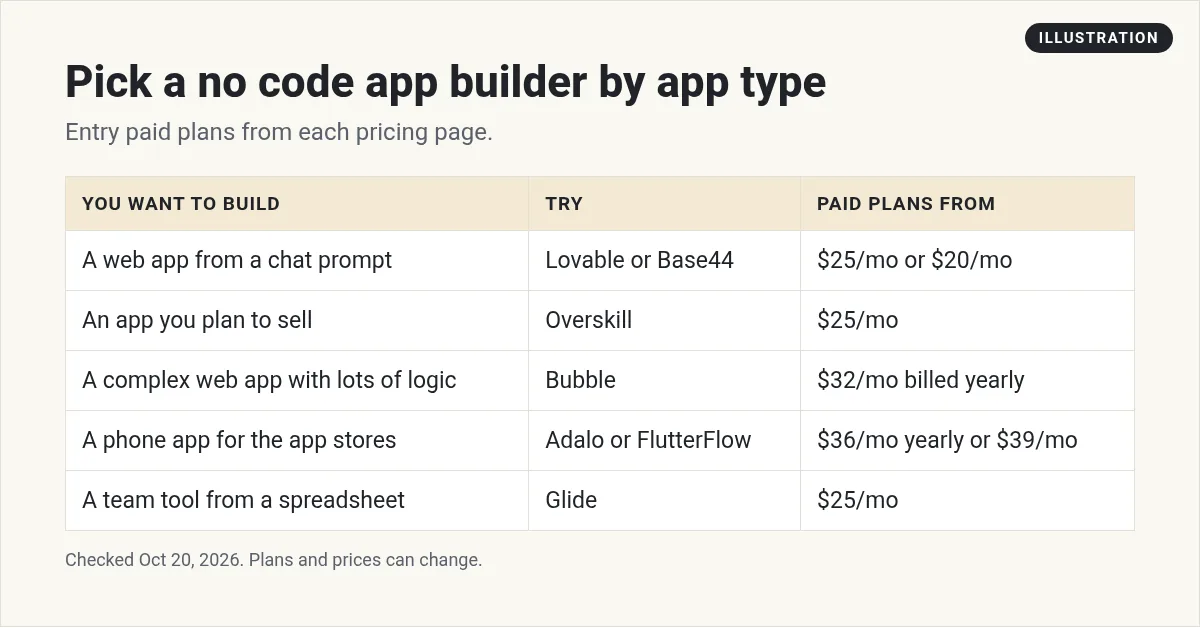
The best no code app builder depends on your app. For a web app from a simple prompt, try Lovable (Pro $25 a month) or Base44 (Starter $20 a month). For an app you plan to sell, try Overskill (Starter $25 a month). For a complex web app with full control, try Bubble (Starter $32 a month billed yearly). For phone apps in the app stores, try Adalo (Starter $36 a month billed yearly) or FlutterFlow (Basic $39 a month). For a team tool from a spreadsheet, try Glide (Basic $25 a month).
Two kinds of no code builders
Before we start, know that no code now means two different things.
- AI builders. You describe the app in plain words, and AI builds it. Lovable, Base44, and Overskill work this way. People also call this vibe coding.
- Visual builders. You drag and drop parts on a screen and set up the logic yourself. Bubble, Adalo, FlutterFlow, and Glide started this way. Most now add AI help too.
AI builders are faster to start. Visual builders give you more control over every detail. I explain the trade off in vibe coding vs no code.
Here is my summary card. The full breakdown is below it.
If you want a web app from a prompt: Lovable or Base44
These are the fastest way to go from idea to working web app. You type what you want, and you get a real app with pages, a database, and logins.
- Lovable: free plan, then Pro at $25 a month. It is known for clean designs.
- Base44: free plan with 25 message credits a month, then Starter at $20 a month, or $16 a month billed yearly. It puts the app, database, and logins in one place.
Pick one of these if you want results today and your app lives in a web browser. See my Base44 vs Lovable comparison to choose between them.
If you want an app you can sell: Overskill
Overskill is an AI builder made for people who want to sell what they build. You can charge your customers for the AI inside your app with what it calls buyer credits.
- Starter: $25 a month, with 2,500 credits a month and 1 custom domain per app.
- Studio: $99 a month, with 12,000 credits a month.
There is no free plan, but its pricing page says "Every new account starts with 500 credits so you can build something real before choosing a plan." You can also export your app's code and data as a ZIP file. If selling apps is your goal, take a look at Overskill (I earn a commission if you buy through this link).
If you want a complex web app with full control: Bubble
Bubble is one of the oldest and most powerful visual builders. You can build big, detailed web apps with it. It takes longer to learn.
Bubble's pricing page says it "now comes with everything you need to build web, iOS, and Android apps." The web plans, checked October 20, 2026:
- Free: $0, for projects under construction. You cannot launch a live site on it.
- Starter: $32 a month billed yearly, with a live website and custom domain.
- Growth: $119 a month billed yearly.
- Team: $349 a month billed yearly.
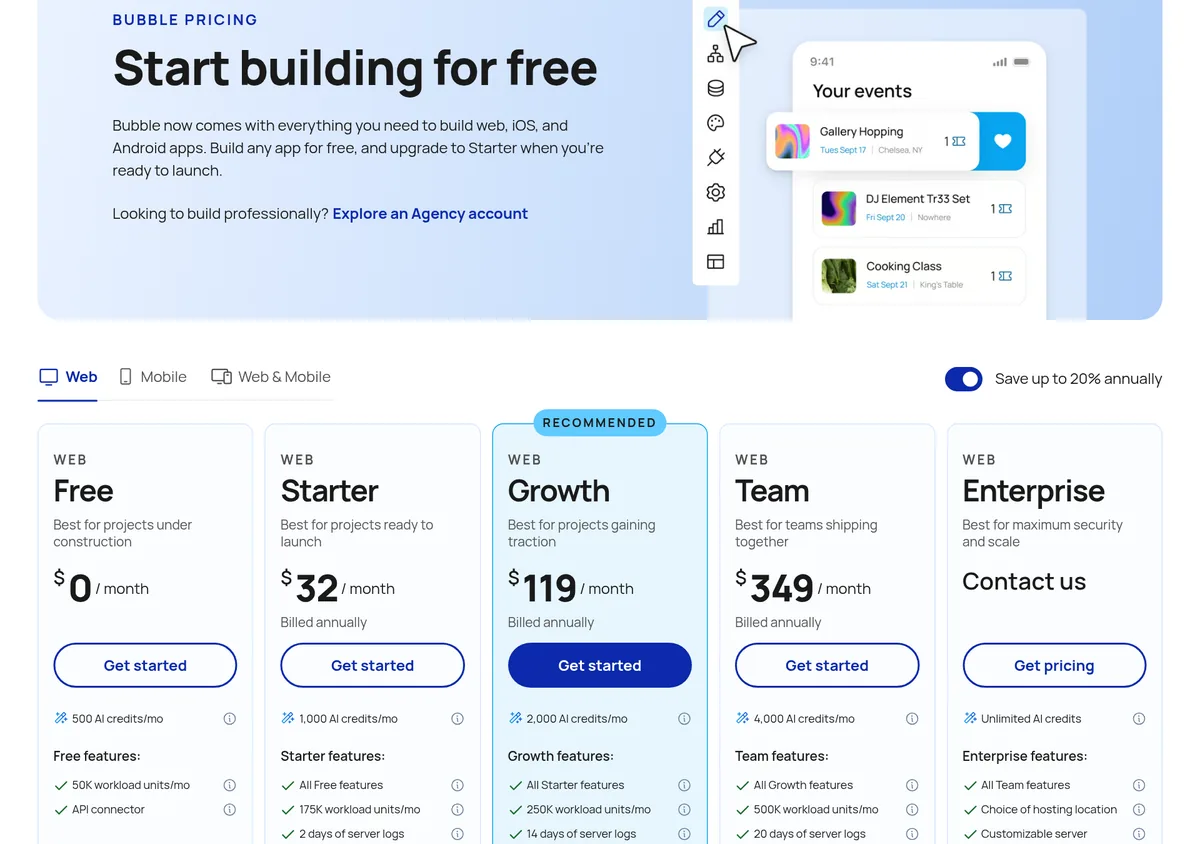
Bubble also counts server use in workload units. Busy apps use more. Keep an eye on that as you grow.
If you want a phone app in the app stores: Adalo or FlutterFlow
Getting an app into the Apple and Google stores takes extra steps. These two tools are built for it.
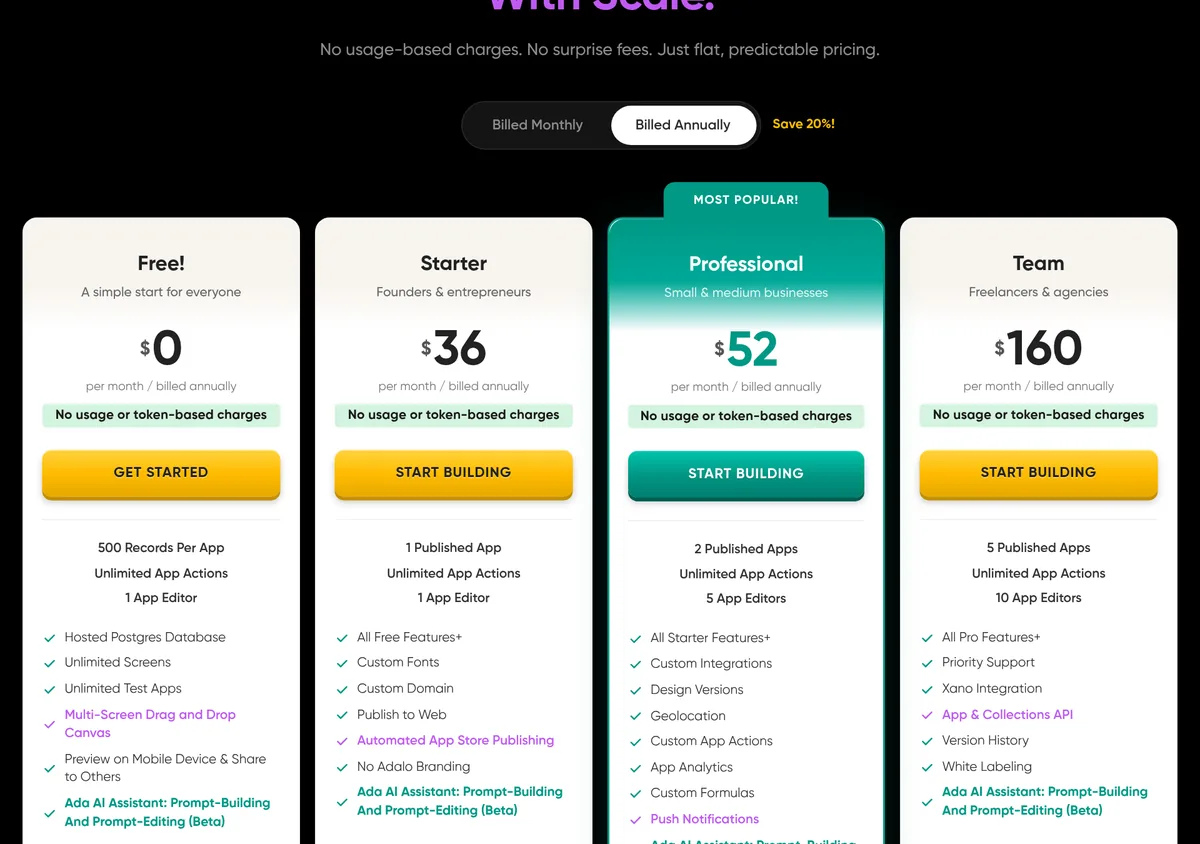
Adalo is the simpler one. Its page says "No usage-based charges. No surprise fees." Prices billed yearly, checked October 20, 2026:
- Free: $0, with 500 records per app.
- Starter: $36 a month, with 1 published app, a custom domain, and automated app store publishing.
- Professional: $52 a month, with 2 published apps.
Adalo says monthly billing costs 20% more.
FlutterFlow gives you more power, and you can download your code. Prices billed monthly, checked October 20, 2026:
- Free: $0, with up to 2 projects.
- Basic: $39 a month, with code download, APK download, and one click app store deployment.
- Growth: $80 a month for the first seat.
FlutterFlow says yearly billing saves about 25%. Pick Adalo for simple. Pick FlutterFlow if you may hire a developer later, since you can take the code with you. For the publishing steps, see how to publish an app.
If you want a team tool from a spreadsheet: Glide
Glide is great for tools your team uses inside the business. Think job trackers, inventory lists, or client portals. Its pricing page says GlideOS is for "building internal business apps from a spreadsheet, a prompt, or a file."
- Free: $0, with limited credits.
- Basic: $25 a month, with 100 credits and 2 published apps.
- Plus: $50 a month, with public apps.
The page shows these as monthly prices and did not show a yearly option when I checked. Note that these are GlideOS plans. Glide Classic is a separate product. Softr is another tool for client portals and team tools, and I break down its plans in my Softr pricing guide.
Watch: building software with AI and no code
This is my video on building software with AI, no code needed. I recorded it in December 2025, so some tools and prices have changed since. The steps still apply.
My video: How to build software with AI and no code. Recorded December 2025, so check today's prices above.
Any results mentioned in videos are not typical and are not a promise of income. Your results depend on your work and your market.
How to choose in 4 questions
- Web or phone? Phone apps in the stores point to Adalo or FlutterFlow.
- Do you want AI to build it? If yes, start with Lovable, Base44, or Overskill.
- Is it for your team only? Glide is built for that.
- Do you need full control? Bubble or FlutterFlow give you the most.
Then build a tiny test app in your top two picks. A simple form that saves data is enough. You will know which one feels right in an hour.
New to all of this? My guide on building an app with no coding experience walks you through your first one.
What it really costs to launch
The cheapest plan that lets you go live is the number that matters. Here is that number for each tool, checked October 20, 2026:
| Tool | Cheapest plan to go live | Billing period shown |
|---|---|---|
| Base44 | Starter $20/mo, or $16/mo | Monthly, or yearly |
| Lovable | Pro $25/mo | Monthly |
| Overskill | Starter $25/mo | Monthly |
| Glide | Basic $25/mo | Monthly |
| Bubble | Starter $32/mo | Billed yearly |
| Adalo | Starter $36/mo | Billed yearly |
| FlutterFlow | Basic $39/mo | Monthly |
Some free plans let you publish too, with limits or branding. But if you want your own domain and no limits that block launch, plan on one of these.
Mistakes to avoid
- Picking by hype. Pick by the kind of app you need.
- Ignoring usage limits. Credits, records, and workload units can run out.
- Forgetting the exit. Check if you can export your code or data.
- Comparing yearly and monthly prices. Make sure you compare the same billing period.
Before I pick a no code app builder
Nothing you check here is sent or saved. Download it if you want to keep it.
Want to build your first app with AI?
In my free workshop, I show how people use AI tools to build simple apps and products, even with no coding background.
Join my free AI workshopFree to join. No credit card needed.
Frequently asked questions
What is the best no code app builder?
It depends on your app. Lovable or Base44 for a web app from a prompt, Overskill for an app you want to sell, Bubble for complex web apps, Adalo or FlutterFlow for phone apps, and Glide for team tools.
What is the best free no code app builder?
Lovable, Base44, Bubble, Adalo, FlutterFlow, and Glide all have $0 plans with limits, checked October 20, 2026. Bubble's free plan cannot launch a live site.
Which no code app builder is best for phone apps?
Adalo and FlutterFlow. Adalo's Starter plan includes automated app store publishing. FlutterFlow's Basic plan includes one click app store deployment and code download.
Can I build an app with AI and no code?
Yes. AI builders like Lovable, Base44, and Overskill build an app from a plain language description.
Can I export my code from a no code builder?
Some let you. FlutterFlow's Basic plan includes code download, and Overskill lets you export code and data as a ZIP. Check each tool before you build.
Is Bubble still a good choice?
Yes, for complex web apps where you want full control. It takes longer to learn than an AI builder, and its Starter plan is $32 a month billed yearly.
Sources
Checked October 20, 2026. Plans, prices, and rules can change.
- Lovable pricing
- Base44 pricing
- Overskill pricing: overskill.com/pricing
- Bubble pricing
- Adalo pricing
- FlutterFlow pricing
- Glide pricing
