
Build with AI · Pricing
Softr lets you build client portals and internal tools without code. The plan price is only half the story. Builders, app users, and records decide which plan you really need.
Softr is a tool for building business apps without code. People use it for client portals, internal tools, simple CRMs, and team hubs.
On October 23, 2026, I went through the Softr pricing page, its plan comparison, and its FAQ. Here is what each plan costs, what the limits mean, and how to pick without overpaying.
Quick answer
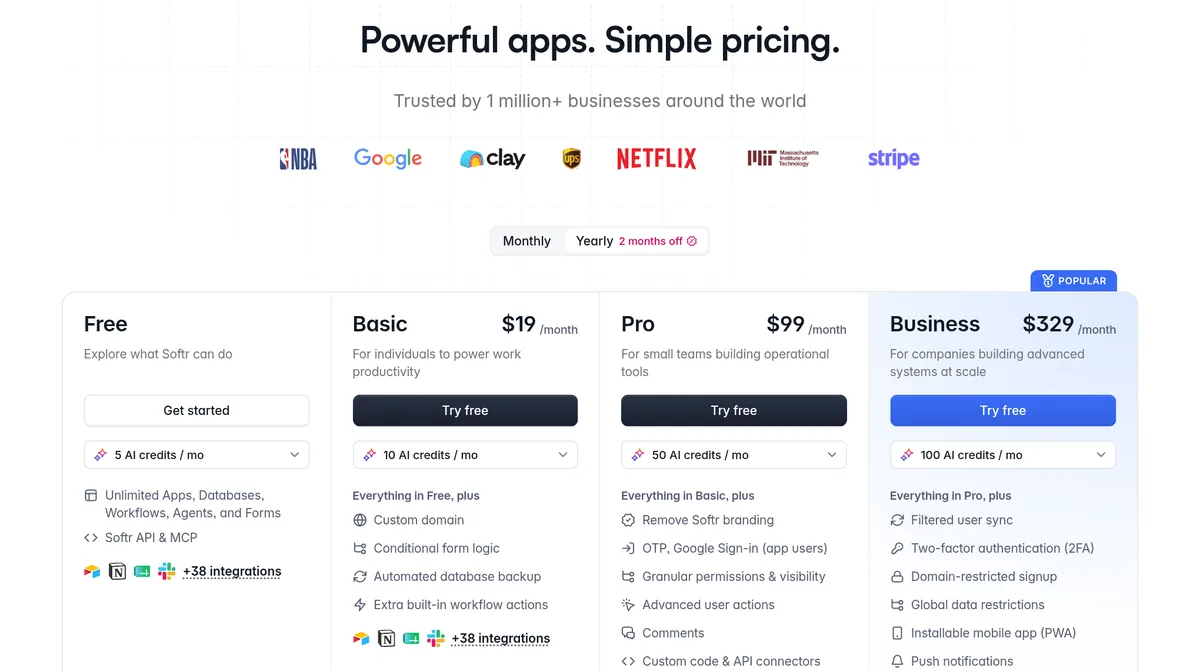
On October 23, 2026, Softr had a Free plan at $0 and three paid plans: Basic at $19 a month, Pro at $99 a month, and Business at $329 a month, as shown with the Yearly toggle, which Softr says gives 2 months off. Enterprise had custom pricing. Each plan sets limits on builders, app users, database records, workflow actions, and AI credits.
Softr plans at a glance
Here is what the Softr pricing page showed on October 23, 2026. The prices below were shown with the Yearly toggle selected. Softr labels yearly billing as 2 months off, so paying month to month costs more. Check the Monthly toggle before you buy.
- Free: $0. For exploring what Softr can do.
- Basic: $19 a month. For individuals.
- Pro: $99 a month. For small teams building operational tools.
- Business: $329 a month. For companies building bigger systems.
- Enterprise: custom pricing. Talk to sales.
Softr's FAQ also says listed prices do not include tax. Tax is added at checkout based on where you are.
What you can build with Softr
Before you look at plans, it helps to know what Softr is for. Its home page says you can build secure portals and internal tools with no developer. Examples it lists:
- Client portals for clients, vendors, and partners
- A custom CRM
- Inventory trackers
- A team intranet
- Dashboards and knowledge bases
Softr has its own built in database, workflow automation, and permissions. It can also sit on top of data you already have. The home page lists Airtable, Notion, Google Sheets, monday.com, ClickUp, Coda, Supabase, MySQL, and PostgreSQL, plus a REST API for other tools. For AI agents, it lists GPT, Claude, and Gemini models.
What each plan includes
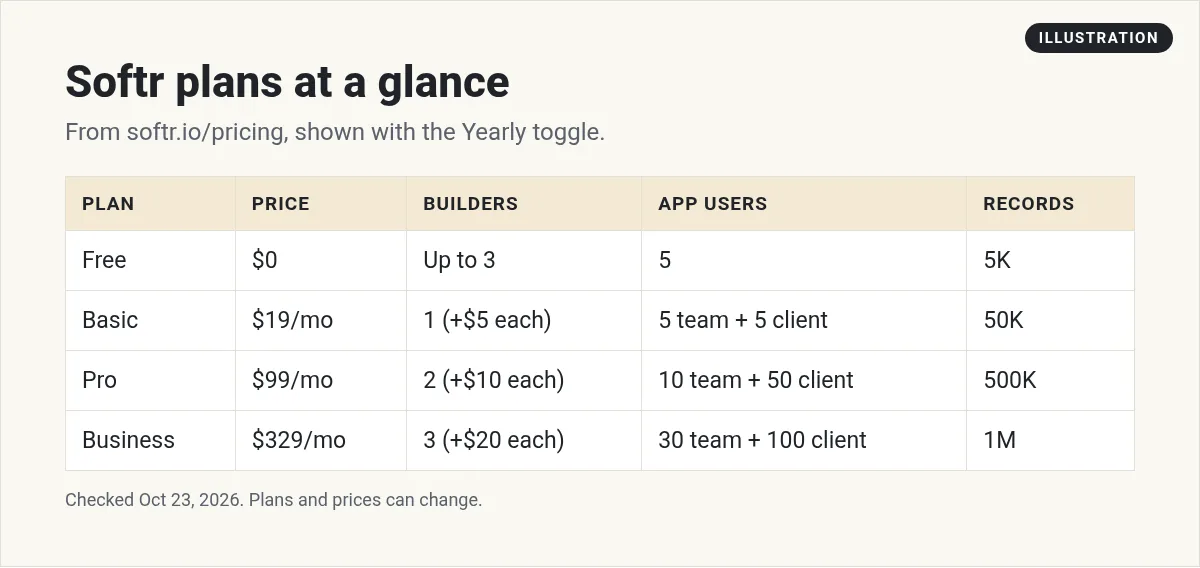
The plans are mostly different in their limits. Here is the breakdown from the page:
- Free: up to 3 builders, 5 app users, 5K database records, 500 workflow actions a month, and 5 AI credits a month.
- Basic: 1 builder included, then $5 a month per extra builder. 5 team users plus 5 client users. 50K records, 2.5K workflow actions a month, 10 AI credits.
- Pro: 2 builders included, then $10 a month each. 10 team users plus 50 client users. 500K records, 10K workflow actions a month, 50 AI credits.
- Business: 3 builders included, then $20 a month each. 30 team users plus 100 client users. 1M records, 25K workflow actions a month, 100 AI credits.
The Free plan also includes unlimited apps, databases, workflows, agents, and forms. So you can build a lot before you pay. The limits are on how many people use it and how much data and automation you run.
Builders, team users, and client users
This is where people get confused, so here is the plain version from Softr's FAQ:
- A builder is someone in your workspace who builds apps, databases, and workflows.
- An app user is someone who logs in to an app you built.
- Team users are app users with the same business email domain as a builder.
- Client users are everyone else. Free email addresses like Gmail always count as client users.
A few counting rules help a lot:
- The same email in several of your apps only counts once.
- Deactivated users do not count.
- Builders can be added as app users for free.
So if you are building a client portal, look hard at the client user limit. Basic allows 5 client users. Pro allows 50. Business allows 100. On Pro and above, you can add more app users, billed each month.
Features that push you to a higher plan
Limits are not the only reason to upgrade. Some features only start on certain plans:
- Basic adds: a custom domain, conditional form logic, automated database backups, and extra built in workflow actions.
- Pro adds: removing Softr branding, OTP and Google sign in for app users, granular permissions, advanced user actions, comments, and custom code and API connectors.
- Business adds: two factor authentication, domain restricted signup, global data restrictions, an installable mobile app (PWA), push notifications, and priority support with onboarding.
- Enterprise adds: SSO, SCIM, audit logs, custom agreements, and a customer success manager.
If your app is for clients and you want it to look like your own brand, Pro is usually the first plan that fits, since it removes Softr branding.
Extra costs to know
- Extra builders: $5, $10, or $20 a month each, depending on your plan.
- Extra custom domains: $15 a month, or $13 a month billed yearly.
- Extra AI credits: add on credits can be bought, even on the Free plan.
Two rules on AI credits from the FAQ. Credits in your plan reset each month and do not roll over. Add on credits roll over for one month. The good news is that Softr lets you keep building without AI when you run out, using its no code editor.
Free trial, refunds, and discounts
- Free trial: the FAQ says everyone gets a free trial at sign up with no credit card needed. You can extend it once by picking a plan to trial again.
- Free plan: Softr says it is free forever.
- Refunds: a full refund within 14 days of your first payment on monthly, or 30 days on yearly.
- Discounts: 50% off for non profits and education.
- Payment: credit card on Basic, Pro, and Business. Invoice options on Enterprise.
Three quick cost examples
Here is how the limits play out, using the Yearly toggle prices from October 23, 2026.
Example 1: a solo coach with a small client portal. You build it alone, and 4 clients log in with Gmail addresses. Basic covers 1 builder and 5 client users, so Basic at $19 a month fits. If you grow to 20 clients, you pass the Basic limit and need Pro.
Example 2: a team tool for 3 builders. Pro includes 2 builders. The third costs $10 a month. So Pro would run $99 plus $10, or $109 a month.
Example 3: a portal for 80 clients. Pro allows 50 client users, so you would need to add app users or move to Business, which allows 100.
The lesson is simple. Count your people first. The user limits decide your plan more than the features do.
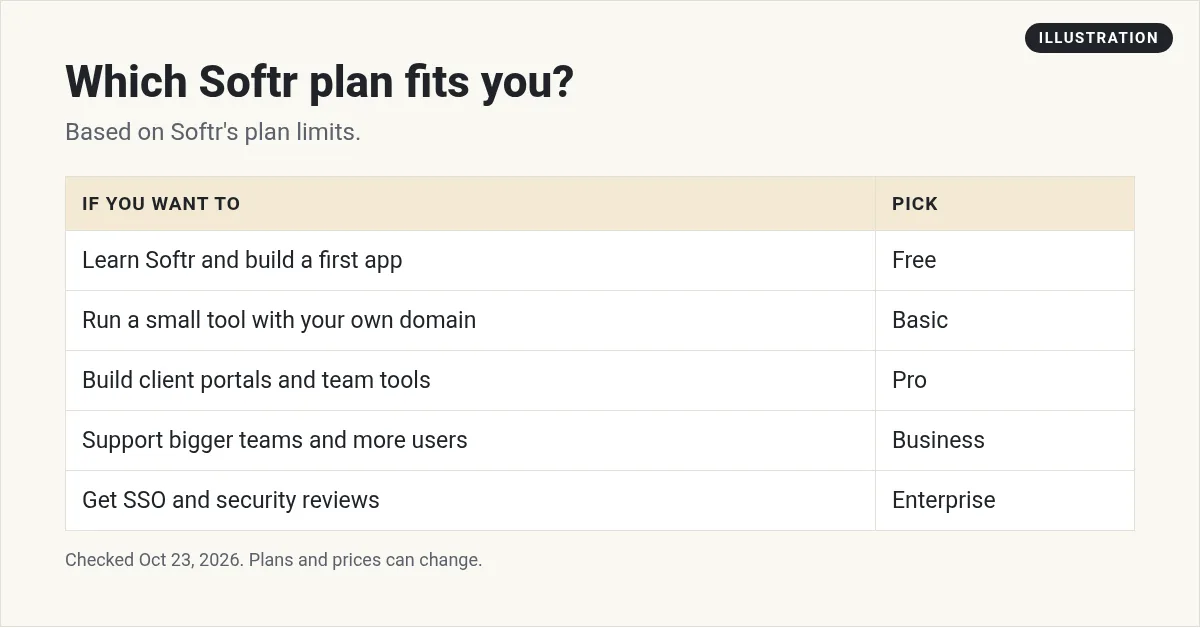
Which Softr plan should you pick?
- Free: to learn Softr and build your first app.
- Basic: for a small tool used by you and a few people, with your own domain.
- Pro: for client portals and team tools that need your branding and real permissions.
- Business: for bigger teams that need 2FA, a mobile app, and more users.
- Enterprise: for companies that need SSO and security reviews.
My video: My walkthrough of building software with AI and no code.
Any results mentioned in videos are not typical and are not a promise of income. Your results depend on your work and your market.
Where to go next
Softr is one of several ways to build apps without code. If you are still comparing, read my guide to the best no code app builder. If you want an AI tool that writes the app for you, see Lovable pricing and Base44 pricing.
Want to see how regular people build simple apps and online businesses with AI? I walk through it in my free AI workshop.
Want to build real apps with AI?
In my free workshop, I show how regular people use AI tools to build simple apps and online businesses, even with no coding background.
Join my free AI workshopFree to join. No credit card needed.
Frequently asked questions
How much does Softr cost?
On October 23, 2026, Softr showed Free at $0, Basic at $19 a month, Pro at $99 a month, and Business at $329 a month with the Yearly toggle selected. Enterprise was custom.
Is Softr's free plan really free?
Yes. Softr's FAQ says the Free plan is free forever. It includes up to 3 builders, 5 app users, 5K records, and 500 workflow actions a month.
What is the difference between a builder and an app user?
A builder builds apps, databases, and workflows in Softr. An app user logs in to an app you built. Builders can be added as app users for free.
Does Softr have a free trial?
Yes. The FAQ says everyone gets a free trial at sign up with no credit card required.
Do Softr AI credits roll over?
Plan AI credits reset each month and do not roll over. Add on credits roll over for one month.
Does Softr offer refunds?
Softr offers a full refund within 14 days of your first monthly payment, or within 30 days of your first yearly payment.
Does Softr work with Airtable?
Yes. Softr's home page says you can build business apps on top of your Airtable bases. It also lists Notion, Google Sheets, Supabase, and other data sources.
Which Softr plan is best for a client portal?
It depends on how many clients log in. Basic allows 5 client users, Pro allows 50, and Business allows 100. Pro also removes Softr branding, which matters for client facing apps.
Sources
Checked October 23, 2026. Plans, prices, and rules can change.
