
Build with AI · Comparison
Both tools write code with AI, but they come at it from different sides. Here is what each costs, where each runs, and a simple way to pick.
GitHub Copilot started as a helper that finishes your lines of code. Claude Code started as an agent that takes a task and works through it. In 2026, the two overlap more than ever, and the choice can feel confusing.
I checked GitHub's Copilot plans page and docs, plus Claude's pricing page and Claude Code docs, on October 21, 2026. Here is a fair side by side, the one surprise in Copilot's plans, and how I would choose.
Quick answer
GitHub Copilot is cheaper to start. It has a Free plan and a Pro plan at $10 a month, and it works inside many editors and on GitHub. Claude Code is not on Claude's free plan. It starts with Claude Pro at $17 a month billed yearly or $20 monthly. Claude Code is built to take a whole task and work through it across files. Copilot gives you many models and quick suggestions as you type, plus its own agents. Pick Copilot for low cost and editor help. Pick Claude Code for bigger, multi-step tasks. Checked October 21, 2026.
The short version
If you only read one section, read this.
- Want the cheapest way to try AI coding? GitHub Copilot. It has a Free plan.
- Want help as you type in your editor? GitHub Copilot. Its code suggestions are built for that.
- Want to hand off a whole task and review the result? Claude Code. That is what it is built for.
- Already pay for Claude Pro? Try Claude Code first. It is included.
What each tool is
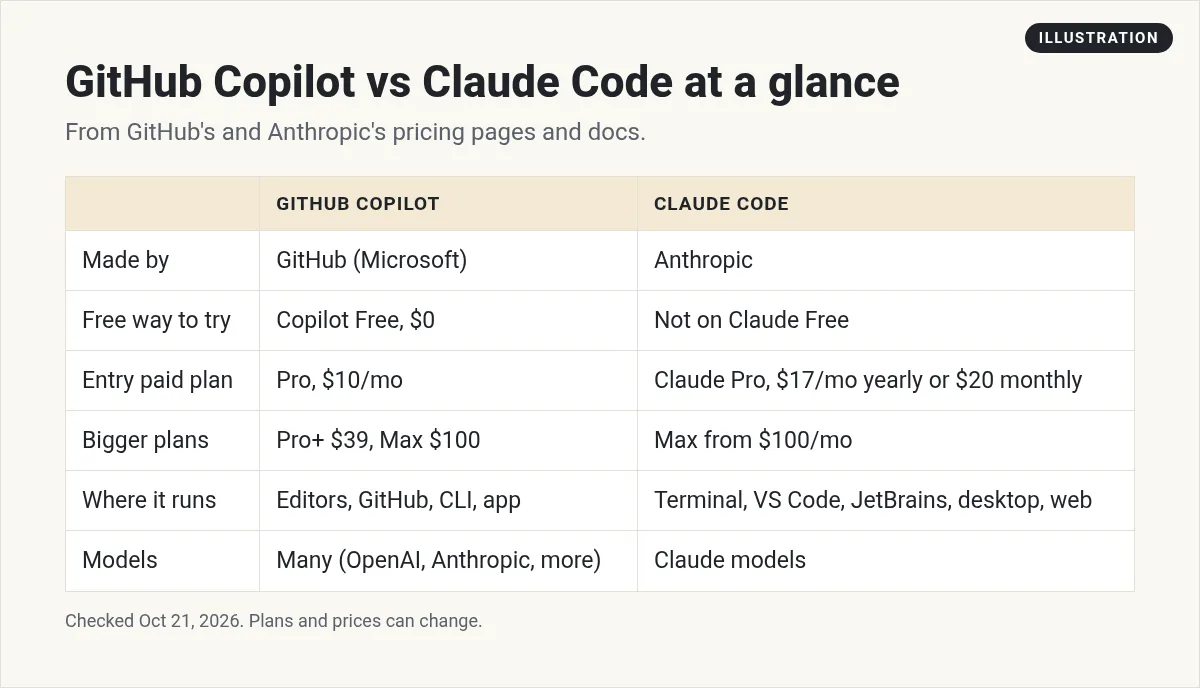
GitHub Copilot is GitHub's AI coding helper. It suggests code as you type, answers questions in a chat, and has agents that can work on tasks. GitHub's docs say all plans include Copilot CLI and the Copilot app.
Claude Code is Anthropic's coding agent. Its docs describe it as a tool that reads your codebase, edits files, runs commands, and connects to your tools. It runs in your terminal, in editors like VS Code and JetBrains, in a desktop app, and on the web.
The big difference is the starting point. Copilot grew from helping you write. Claude Code grew from doing the work while you watch and steer.
That shapes how each one feels. With Copilot, you often stay in the driver seat and accept small suggestions as you go. With Claude Code, you describe the goal, read a plan, and then review a batch of changes. Neither way is better for everyone. It depends on how you like to work.
Price: GitHub Copilot vs Claude Code
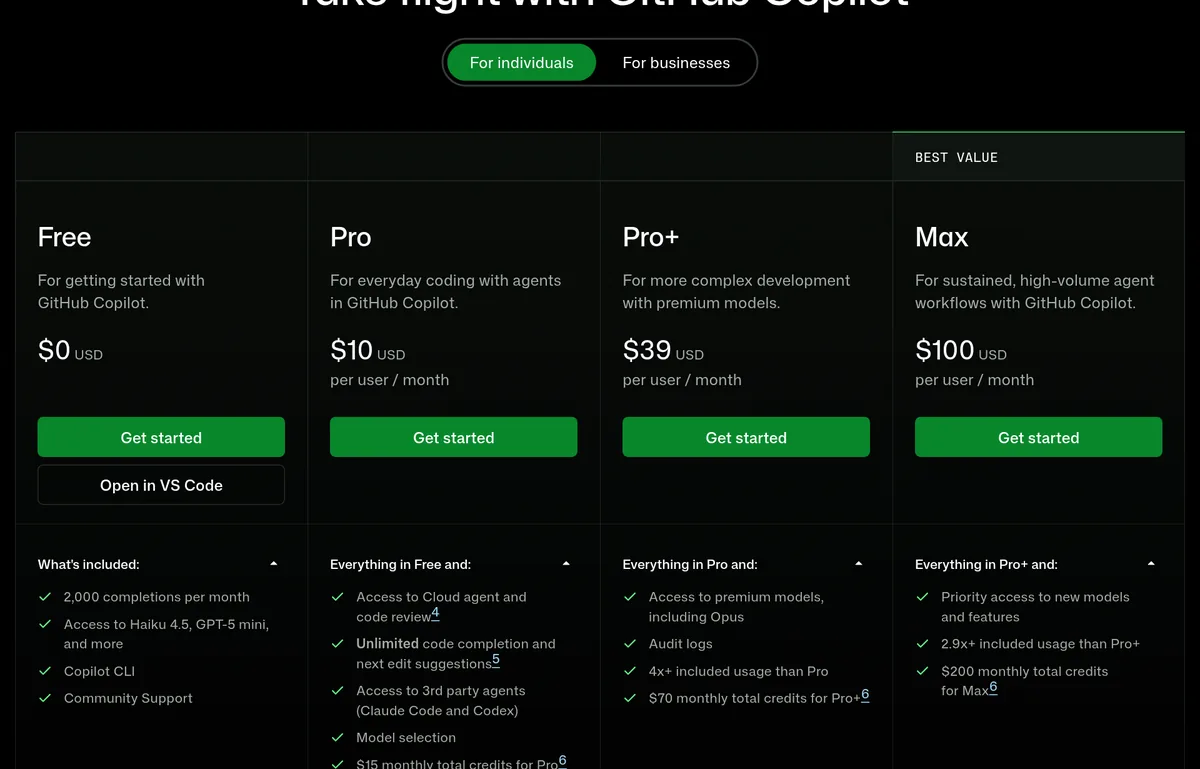
Here are the plans for one person, checked October 21, 2026.
| Plan | GitHub Copilot | Claude (includes Claude Code from Pro up) |
|---|---|---|
| Free | $0, 2,000 completions a month | $0, but no Claude Code |
| Entry paid | Pro, $10/mo | Pro, $17/mo yearly ($200 up front) or $20 monthly |
| Middle | Pro+, $39/mo | Max, from $100/mo |
| Top | Max, $100/mo | Max 20x (see claude.com/pricing) |
For teams, GitHub's docs list Copilot Business at $19 per seat a month and Enterprise at $39 per seat. Verified students can get Copilot Student for free.
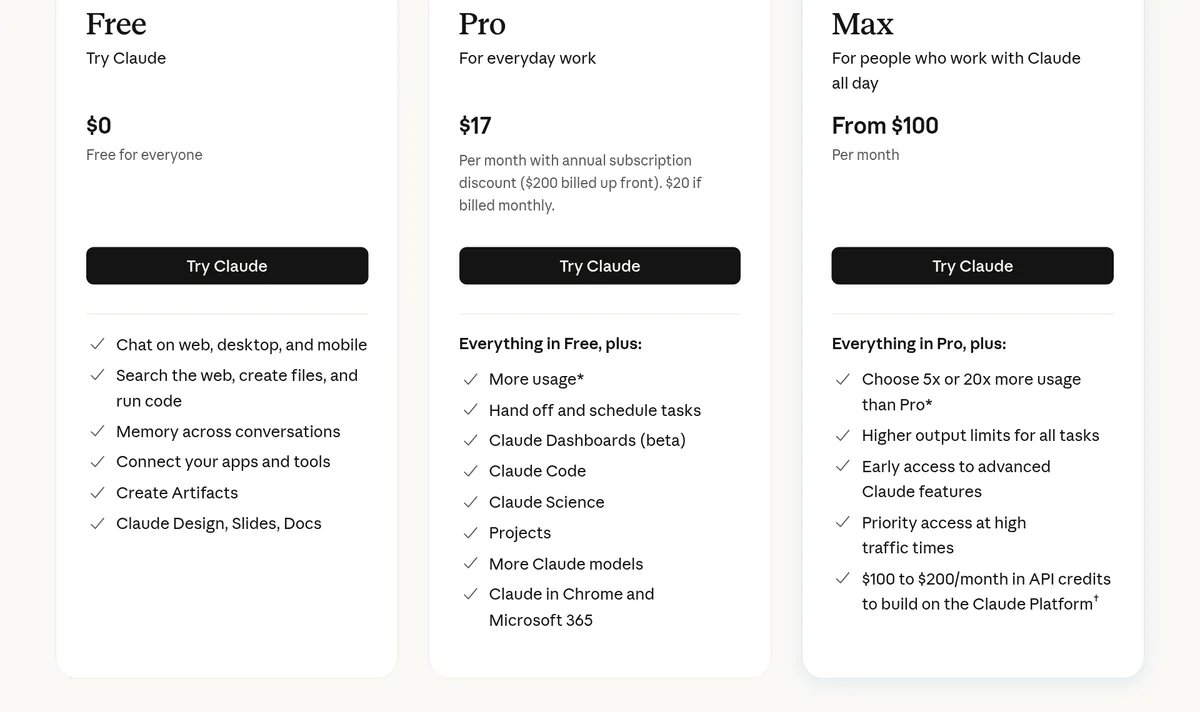
On the Claude side, Pro is the cheapest way into Claude Code. Max gives you 5x or 20x more use than Pro.
How usage works on each
Both tools limit how much you can use, but they count it in different ways.
- Copilot uses GitHub AI Credits. Agent mode, code review, the cloud agent, Copilot CLI, and Chat all use credits, and the amount depends on the model. The plans page lists $15 a month in total credits for Pro, $70 for Pro+, and $200 for Max.
- Claude Code shares your Claude plan's usage limits. Claude's pricing page says usage limits apply, and Max gives 5x or 20x the use of Pro.
In both cases, bigger and smarter models use up your allowance faster. Start on the entry plan and see if you hit the limit before you upgrade.
Where each one runs
Copilot lists a long set of places: GitHub, VS Code, Visual Studio, Xcode, JetBrains editors, Neovim, Eclipse, Raycast, SQL Server Management Studio, and Zed. That is a lot of reach. If you use an unusual editor, Copilot probably works there.
Claude Code runs in the terminal, VS Code, JetBrains, its desktop app, and the web. Anthropic's docs say every surface uses the same engine, so your project rules carry over.
If you want to try Claude Code in an editor, my beginner guide to Claude Code is a good place to start.
Models
Copilot lets you choose models from several companies on paid plans. Its plans page lists models from OpenAI and Anthropic, among others. Pro+ adds premium models, including Opus.
Claude Code uses Anthropic's Claude models. You do not get GPT or Gemini inside it.
So if you like to switch between companies' models, Copilot gives you more choice. If you are happy with Claude, Claude Code gives you the most direct access to it.
The surprise: Claude inside Copilot
Here is something many people miss. GitHub's plans page lists access to third-party agents, Claude Code and Codex, on the Pro card.
But the same page's compare table marks delegating tasks to third-party agents like Claude as Pro+ and Max only, and calls it a preview. The two parts of the page do not match. If this matters to you, check the live page or ask GitHub before you pay.
Either way, this is not the same as a Claude plan. It runs through Copilot and uses Copilot's credits.
Where each one shines
GitHub Copilot is strong at:
- A free way to start, and a low $10 paid plan.
- Fast suggestions while you type.
- Working inside many editors and right on GitHub.
- Choice of models from several companies.
Claude Code is strong at:
- Taking one task and working across many files.
- Planning before it changes things, with plan mode.
- Project rules in a CLAUDE.md file that load every session.
- Add-ons like subagents, skills, and hooks.
How to pick: a simple test
Do not decide from a chart. Try both on the same small job. Here is how I would do it.
- Pick one small, real task, like adding a contact form to a test site.
- Try it with Copilot Free first. Note how much you had to steer it.
- If you already have Claude Pro, try the same task in Claude Code.
- Compare the result, the time it took, and how easy it was to review.
- Pay for the one that felt easier for you.
Common mistakes when choosing
- Comparing only the price. $10 vs $17 matters, but the time you save matters more. Test both on a real task.
- Thinking Claude Free includes Claude Code. It does not. You need Pro or higher.
- Ignoring credits. Copilot's agents and premium models use credits. Heavy use can run out before the month ends.
- Paying for both right away. Start with one. Add the other only if you hit a real gap.
- Skipping Git. Both tools can change many files at once. Save your work first so you can undo.
One more point. Both companies change their plans often. Everything here was checked on October 21, 2026. Check both pricing pages again on the day you buy.
What I tell beginners
If you are brand new and money is tight, start with Copilot Free. It costs nothing and teaches you how AI coding feels.
If your goal is to build a small app by describing what you want, Claude Code is often the better fit, because it handles bigger jobs from start to finish. Just know it starts at the Claude Pro price.
Comparing more tools? Read Claude Code vs Codex, my list of Claude Code alternatives, or Cursor vs Claude Code.
Before I choose Copilot or Claude Code
Nothing you check here is sent or saved. Download it if you want to keep it.
Pick the tool after you pick the idea
In my free workshop, I show how regular people choose a simple app idea and build it with AI, step by step.
Join my free AI workshopFree to join. No credit card needed.
Frequently asked questions
Is GitHub Copilot cheaper than Claude Code?
Yes, to start. Copilot has a Free plan and Pro at $10 a month. Claude Code starts with Claude Pro at $17 a month billed yearly or $20 monthly, checked October 21, 2026.
Is Claude Code free?
No. Claude's free plan does not include Claude Code. It starts with Claude Pro.
Can I use Claude models in GitHub Copilot?
Yes. Copilot's plans page lists Anthropic Claude models, and Pro+ adds premium models including Opus.
Which is better for beginners, Copilot or Claude Code?
Copilot Free is the cheapest way to learn. Claude Code is often better for handing off a whole task, but it needs a paid Claude plan.
Does GitHub Copilot work in VS Code?
Yes. GitHub lists VS Code along with Visual Studio, JetBrains editors, Xcode, Neovim, and more.
How much is Copilot for teams?
GitHub's docs list Copilot Business at $19 per seat a month and Copilot Enterprise at $39 per seat a month.
Sources
Checked October 21, 2026. Plans, prices, and rules can change.
