
GoHighLevel for dentists can help your front desk turn new leads into booked visits, send reminders and follow up after a missed visit. Use it alongside your dental practice software for marketing and messages. Start with one booking calendar. Before you add patient data, check the HIPAA setup. HighLevel is not HIPAA compliant by default.

Disclosure: I earn a commission if you buy HighLevel through my links, at no extra cost to you. I am not HighLevel and do not speak for it.
Key takeaways
- Start with one visit type and name who will check new requests.
- Use one set of booking reminders. Give missed visits their own follow-up.
- Build recall from dates your team checks in the dental system.
- HighLevel lists HIPAA at $297 a month for the agency account. The agency owner must turn on HIPAA for each sub-account that needs it.
GoHighLevel for dentists starts with HIPAA
HighLevel is not HIPAA compliant by default. HighLevel lists a $297 a month HIPAA add-on for the whole agency account. HighLevel gives its customer agency a Business Associate Agreement, or BAA. If an outside agency handles your patient data, HighLevel says that agency must also give your practice a BAA. Once the agency signs with HighLevel, the agency owner must turn on HIPAA for the practice's sub-account.
HighLevel says the add-on cannot be canceled or turned off once enabled. Once you enable HIPAA for a sub-account, you cannot turn it off there either.
Your practice is still responsible for meeting HIPAA rules. Ask your own compliance advisor to review which tools may hold patient data, who can see it and what staff can send. Have them check forms, replies and any calendar connection you plan to use. This guide is not legal advice.
Capture new patient leads and book visits
Pick one type of visit to start with. For example, let new patients book an exam from your site if the front desk can set aside the right slots. For visits that need a staff check first, offer a callback form. Use fields your practice has cleared, such as a name and a way to reach the person. Leave health history and treatment details for your approved intake process.
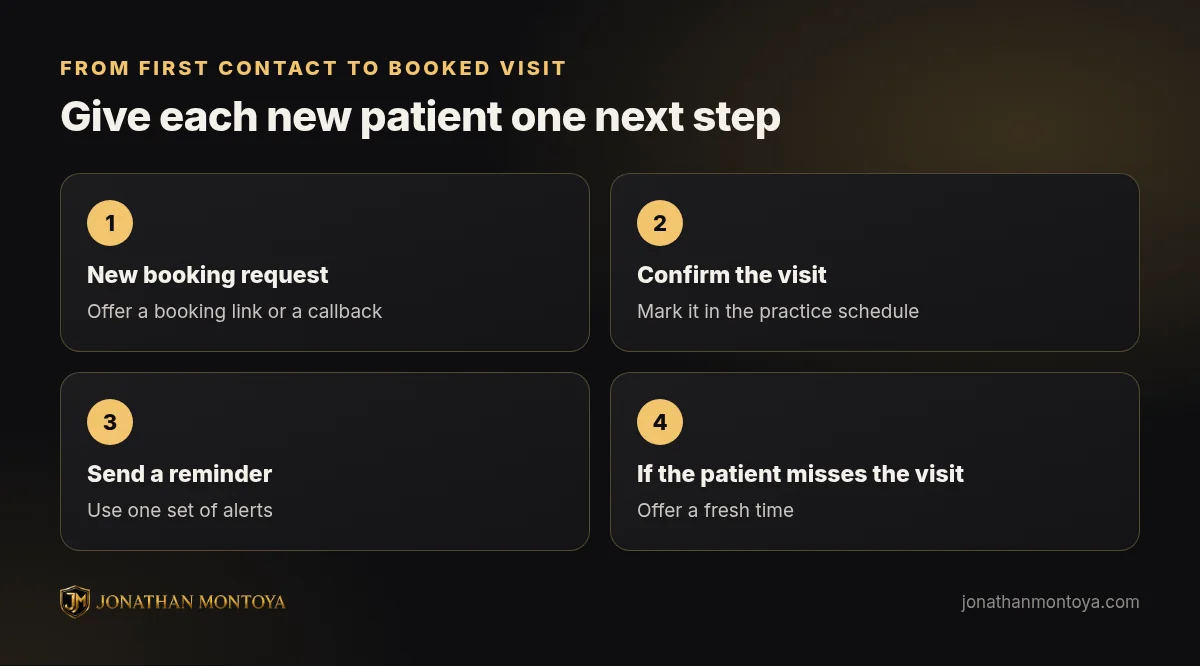
Decide what counts as booked. A form request asks for help. When the front desk accepts a slot, have them mark the visit as confirmed in the practice schedule. Use plain copy for each. Try 'Thanks for your request. Our team will be in touch' on the form. Use booking copy only after the visit is set. Give staff a place to check for leads who sent a form and then booked on their own.
Match online slots to the front desk schedule
Choose the staff and hours for the first calendar. Check that the office can honor each slot, including the chair and staff it needs. If you use Google Calendar, HighLevel can sync with it and use conflict calendars to block busy times. Have each staff member who takes bookings check their linked calendar and their conflict calendars. Then try to book a busy slot as a new patient. If the dental schedule lives elsewhere, give staff a clear way to check it and keep it up to date.
Give missed callers a way back in
Before you turn on any automated texts, confirm the practice has cleared the channel and the contact has agreed to get that type of text. Check contact preferences and Do Not Disturb settings. For US business texts from a local number that falls under A2P 10DLC, get both the Brand and Campaign approved. Link the sending number to the approved Campaign. See the A2P 10DLC setup guide.
HighLevel's Missed Call Text Back can send a reply when the office misses a call. Use a short note that asks the caller to request a callback. Give someone the job of checking replies. HighLevel says the built-in tool can text after each missed call, even from the same caller. Test two calls in a row. Check which number sends the reply, since HighLevel may use another eligible number. Read the missed call text back guide before you turn it on.
Set reminders and follow up on no-shows
HighLevel calendars can send booking, reminder and reschedule notices. Pick one place to send each notice. If your dental system already sends a reminder, check what happens when both tools are on. Read the full set of messages as a patient would see them.
| What happened | What to set up | What to check |
|---|---|---|
| Visit booked | Confirm the visit once the office has accepted it. | The time and office are right. |
| Visit is coming up | Send one reminder by a channel the practice has cleared. | The same reminder does not come from both tools. |
| Visit moved | Tell the person the new time. | No message still points to the old slot. |
| Visit canceled | Confirm the change and give a way to reach the office. | The notice reflects the change on the schedule. |
| Visit missed | Ask if the person wants help finding a new time. | Only a visit marked No-show starts this follow-up. |
For the missed visit, use HighLevel's Appointment Status trigger. Filter it to No-show and to the dental calendar you mean to use. Have staff mark the status after they check who came in. A simple note could say 'Need help finding a new time? Please contact our office.' Check your calendar alerts as well. HighLevel says a no-show can also send a cancellation notice.
Run a test where a visit moves. HighLevel treats a reschedule as a new appointment for the workflow, so check what the contact gets for each slot. If a reschedule link is blank, check that the message can read the appointment record.
Build a recall list and a reactivation list
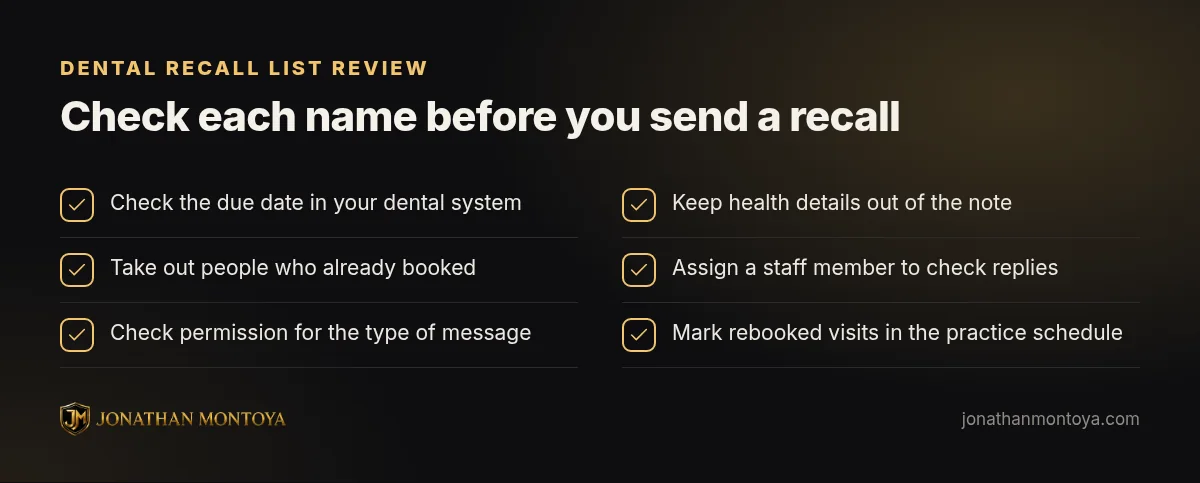
Recall means asking someone to book when the practice says they are due for a visit, such as a cleaning. Start with due dates in the dental system. Ask a staff member to check the list and remove anyone who has already booked. Use HighLevel to send the approved note to the people your practice has cleared for that message.
Reactivation means asking people who have been away if they want help booking again. Review this list on its own. Check if the person asked you to stop. Make sure their phone number or email is still current and you have consent for that type of outreach. Permission for a visit reminder should not be treated as permission for a promo text.
For either list, pick who owns replies before you send. If someone books by phone, have staff mark the booking in the dental system and take the name off the next send list. If a reply asks for care advice, route it to the practice team. Before the next batch, check how many people booked and where a reply still needs a human.
Ask for reviews after visits
For Google reviews, connect the right Google Business Profile location. If you use a custom link, test that it opens the review form for your office. Use a channel the practice has cleared and check who has agreed to get that kind of message. Turn on the review request setting for SMS or email and check the live template. You can send a text or email request by hand, or add the Send Review Request action to a workflow. For a small test, let staff send the first requests after they confirm the visit took place. If you later use the Showed status to start a workflow, check that the same person does not get a manual request too.
Keep the request plain. Try 'Thanks for visiting our office. If you would like to share feedback, here is our review link.' Send a test to check the message and the link. Check the retry settings so the team knows if a second request can go out.
What does GoHighLevel cost for a dental office?
HighLevel lists Starter at $97 a month. Starter has three sub-accounts, and the core tools include forms, booking calendars and workflows. If your practice buys its own Starter agency account and adds HIPAA, the $297 monthly HIPAA fee brings those two fees to $394 a month. If you work with an outside agency, ask what it charges. Texts, calls and email can add usage charges. See the GoHighLevel pricing guide and the usage fees guide for the rest of the bill.
You can start these flows without AI. If you want help with common questions, Conversation AI has a Suggestive mode where staff review and send the replies. Start with approved general questions, such as office hours. Before using AI on a patient-facing channel, have your compliance advisor review the bot, the channel and what people might send. Use it only with the channels and data your practice clears. Route care questions to staff. Check the AI Employee guide for paid options.
Want to try a test booking? Start with one open slot and a made-up contact.
Start HighLevelTest the front desk plan before you go live
Give one person the role of patient and one the role of front desk lead. Use made-up contacts and read the replies on a phone. Track which events send a note, who gets it and whether a staff member needs to step in.
- Clear the setup with your advisor. Check the BAA, the right sub-account and the data each tool will handle. Approve the text and email copy before staff use it.
- Book a test visit. Use a made-up contact. Check the time, the staff calendar and the message your test contact gets. Try to book a slot you blocked.
- Test changes and missed visits. Move a visit, cancel one and mark one as No-show. Read each message in the order it comes in. Check both the old and new times.
- Check who gets follow-up. Try a mock recall list with one person who booked and one who opted out. Check that each stays off the send list.
- Give the front desk the go-ahead. Name the person who checks replies and fixes errors. Start with one visit type. Add the other flows once the team can run that first one.
Try HighLevel with a test booking
Start with a made-up contact and one open slot. Have the front desk check what lands on the calendar and what the contact sees.
When you start HighLevel through my link, you also get my GHL Clone for free. It is a done-for-you affiliate system I spent 11 months building. You can copy it in about 5 minutes, add your own affiliate link and share it. There is no website to build and no emails to write.
Start HighLevelGet the free GHL CloneMy HighLevel link shows a 30-day free trial for new HighLevel customers on HighLevel's own offer page (checked Nov 18, 2026). HighLevel's standard pricing page lists 14 days. Usage fees can apply during the trial. The HIPAA add-on is a separate paid commitment. Disclosure: I earn a commission if you buy HighLevel through my link, at no extra cost to you. The GHL Clone is my own system, and I earn a commission if you later pay for HighLevel. What anyone earns depends on their own work, and no one can promise a result.
FAQ
Is GoHighLevel HIPAA compliant for dentists?
HighLevel is not HIPAA compliant by default. Its HIPAA add-on costs $297 a month at the agency level and includes a BAA. HighLevel gives its customer agency a BAA. If an outside agency handles patient data, it must also give your practice a BAA. Once the agency signs with HighLevel, its owner must turn on HIPAA for your sub-account. Your practice is still responsible for how it handles patient data.
How much does GoHighLevel cost for a dental office?
Starter costs $97 a month. If your practice buys its own Starter agency account and adds HIPAA at $297 a month, those two fees total $394 a month. Texts, calls and email can cost extra. If you work with an outside agency, ask what it charges.
Can patients book dental visits online with GoHighLevel?
Yes. Use a HighLevel booking calendar for the visits your front desk clears for online booking. Have staff check that the visit lands on the right schedule and that blocked slots stay closed.
Can GoHighLevel follow up after a missed dental visit?
Yes. The Appointment Status trigger can start a workflow when a visit is marked No-show. Staff need a clear way to record that status. Test the calendar alerts too, since a no-show can also fire a cancellation alert.
Can GoHighLevel send dental cleaning recall texts?
You can build a recall workflow around a list your team checks and clears for outreach. Get due dates from your dental system. Review who has booked and who can be texted before you send.
Can GoHighLevel ask for Google reviews after a visit?
Yes. Set the Google review link and send a request by hand or with the Send Review Request workflow action. Check the review link, send channel and message with a test contact first.
How does GoHighLevel work alongside dental practice software?
Have the front desk check new bookings by hand and confirm them in the practice schedule. Use HighLevel for marketing and messages alongside your dental software. If you use Google Calendar, staff can link their Google calendars in HighLevel.
Sources, checked Nov 18, 2026
- HighLevel pricing and core tools
- HighLevel pricing, billing and usage charges
- HIPAA add-on, BAA and sub-account setup
- HighLevel HIPAA module and practice responsibility
- Calendar notifications and appointment links
- Appointment Status workflow trigger
- Missed Call Text Back and repeat calls
- Google Calendar sync and conflict calendars
- Manual and automated review requests
- Review request text and email settings
- Guided review setup
- A2P campaign setup and text consent
- Conversation AI setup and reply modes
- HighLevel AI pricing
- HighLevel offer page for my link
Affiliate disclosure: I earn a commission if you buy HighLevel through my links, at no extra cost to you. Freedom Launch Accelerator and the GHL Clone are my own programs. HighLevel is a trademark of HighLevel, Inc. This site is not run by or affiliated with HighLevel.
