
GoHighLevel for roofers gives your office one place to track new leads, book roof inspections, and follow up on estimates. Start with one path. Log the lead, set a visit, send an estimate, and give each open estimate a next step. Your team still checks the roof, sets the price, and decides when the job is ready for the crew.

Disclosure: I earn a commission if you buy HighLevel through my links, at no extra cost to you. I am not HighLevel and do not speak for it.
Key takeaways
- Send new calls and form leads to one queue with a staff member assigned.
- Use a roof visit calendar and tell the homeowner what to expect.
- Check each estimate before it goes out. Stop estimate nudges when the homeowner makes a choice.
- Ask for a review after closeout. Check consent before you text past clients.
GoHighLevel for roofers starts with a clear pipeline
A pipeline shows where each deal stands. Give each stage a name that tells the office what just took place. Then pick who takes the next step. A lead can sit in the right stage and still be stuck if no one is assigned.
Here is an example for a roofing company. Use your own names if the crew already knows them. Keep a fresh roof request apart from an estimate that has been sent. The office has a different job in each case.
| Example stage | When to move the deal here | Next step |
|---|---|---|
| New lead | A call or form comes in. | Office checks the job type and service area. |
| Inspection booked | A roof visit is on the calendar. | Office checks access and visit details. |
| Estimate to write | The roof visit is done. | Estimator checks scope and price. |
| Estimate sent | The estimate has gone to the homeowner. | Office sets a date to check for a reply. |
| Signed job | The team has the signed paperwork it needs. | Office hands off the job to the crew lead. |
| Job complete | The crew has closed out the work. | Office checks whether to send a review request. |
| Closed without a job | The homeowner declines or the team closes the lead. | Log the reason and end estimate follow-up. |
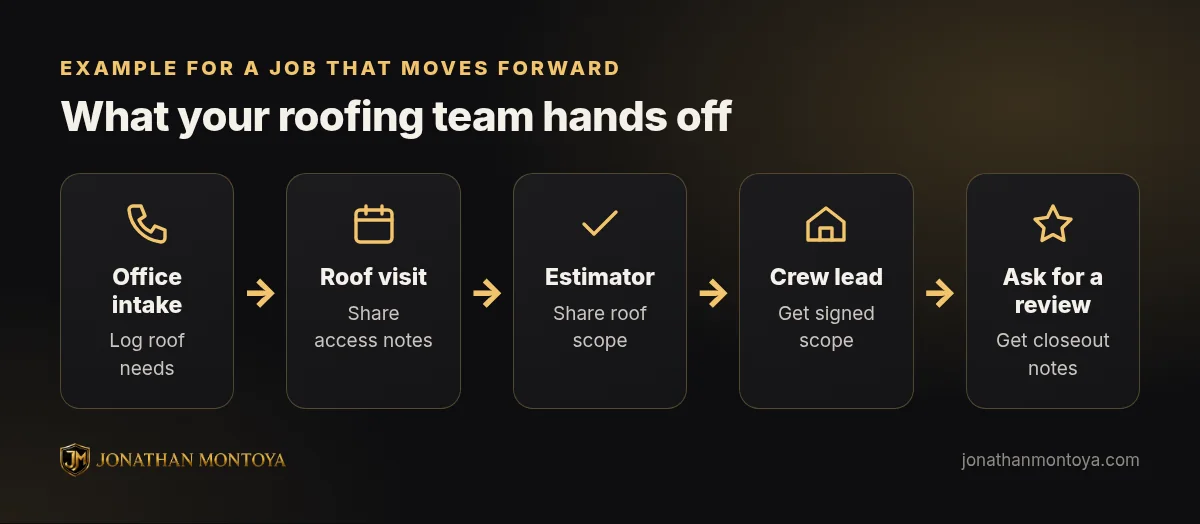
Pick one person to check each open deal at the start of the day. Have them look for new leads with no next step and estimates with a reply that needs a call. For more on the contact and deal side, see my GoHighLevel CRM guide.
Capture leads from ads, Maps, and missed calls
Start with the places people already find you. Give each source a label your office will know. Ask for the job type, where the work is, and how the homeowner wants to hear back. For example, flag an active leak for a call from the office. Send a roof quote request to the person who books visits.
- Facebook Lead Ads. Make sure you have admin access to the Facebook Page and its Business Manager. Connect the page and map the Instant Form fields to the right CRM fields. Send a test lead. Check that the form data reaches the contact record and that the right workflow starts.
- Google Ads. Send ad clicks to a landing page with a roof request form. Submit a test form and check that it reaches the queue your office uses.
- Google Business Profile. Try the optional call tracking setup for your profile. Place a test call to check that it reaches the office. In this example, the office logs the roof inquiry and assigns the next step.
If you want to manage campaigns in HighLevel, you can also connect Google Ads to Ad Manager. That setup needs Ad Manager permission and a subscription. Grant the requested Google permissions when you connect the account. Ad spend is billed on its own.
Give missed callers one clear next step
HighLevel can send an auto text when you miss an inbound call. Keep it short. An example reply is Hi, this is the roofing office. We missed your call. What town is the roof in, and is this a leak or a quote request? Use your shop name. Before you turn on the reply, check how callers agree to get that text. Use a callback for callers whose permission you cannot verify. If you cannot enforce that rule with the built-in text, use a workflow that checks consent.
The built-in feature can text each time you miss a call, even if the same person calls more than once. The text may come from a different number. If no sending number is eligible, the send can fail. Check the log for the reason. To limit repeats, use a custom workflow in place of the built-in text. Add a wait or a tag to hold repeat texts. The Call Details trigger can filter by call direction and status. You can use it to make a callback task for the office. Try two missed calls from the same test contact and check that the built-in feature and the workflow do not both text the caller. Test a contact without consent too. See my Missed Call Text Back guide.
Book the roof inspection and prep the visit
Give roof visits their own slots. Ask your office to check the service area before it sends a link if the crew works across several towns. Give the homeowner a short way to share gate or access notes. Have the office take over when the homeowner reports an urgent leak or needs a visit the calendar cannot offer.
HighLevel calendar notices can cover a new booking, a change, a cancel, or a reminder. Pick the channel and who gets each note. For a reminder, include the date, the visit window, and how to reach the office if plans change. Try a test booking, then move it and cancel it. Check what both the office and the homeowner see.
If you want help with basic questions, Conversation AI is a paid option. It can collect lead details and help with booking based on how you set it up. Start with simple tasks like asking what town the job is in. Route roof advice, price changes, and urgent cases to your team.
Want to try the lead and booking path? My HighLevel link shows a 30-day free trial for new customers on HighLevel's own offer page (checked Nov 18, 2026). HighLevel's standard pricing page lists 14 days.
Start HighLevelSend the roof estimate and follow up on open estimates
An estimate, or bid, lists the work and price for the homeowner. You can send it by email or text with HighLevel Estimates. Your office can see estimate states such as Draft, Sent, Accepted, and Declined. A workflow can also use the Send Estimate action to make one from a template. You can choose Create as Draft or Send Directly.
My take is to start with Create as Draft for roof work. The estimator can check the scope, price, and expiry date for that home before the homeowner sees it. Have the office check that the deal moves to Estimate sent only after the estimate goes out.
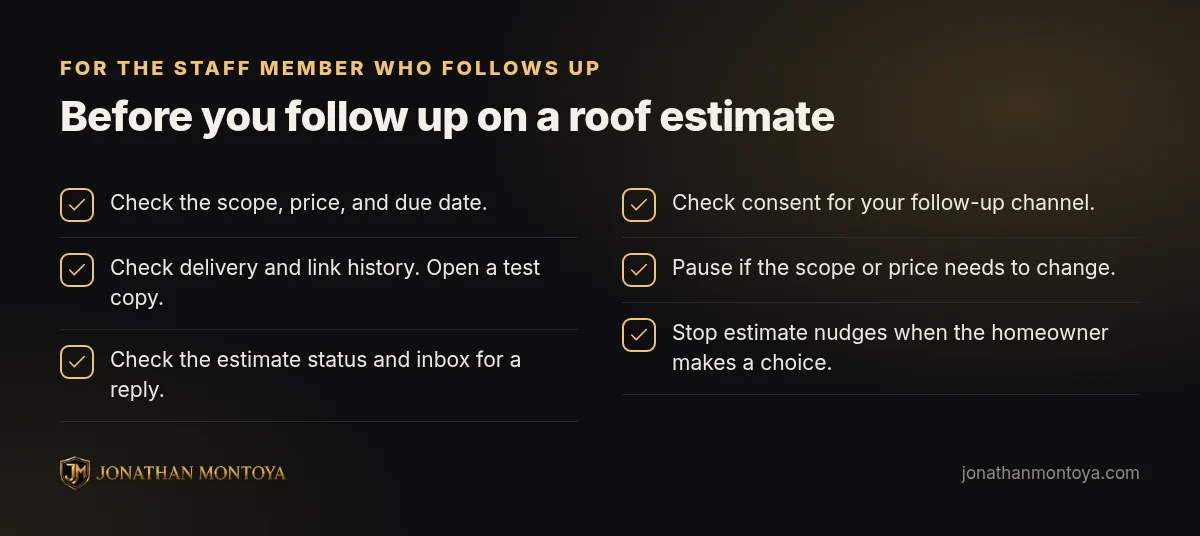
- Send the estimate.Add a short note that says what work the estimate covers and who can answer questions. Check delivery and link history. Open the test copy before you use the setup with a homeowner.
- Set a check date.Pick a date based on what you told the homeowner. Before you follow up, check the estimate status and any reply. Confirm the homeowner agreed to get this type of message on that channel. Ask if they have a question about the scope or want a call.
- Pause for changes.If the homeowner asks for a new option, pause estimate nudges while the estimator checks the change. Make sure the next note points to the estimate you want them to review.
- Close the loop.Stop estimate follow-up when the homeowner accepts, declines, or asks you to stop. Have the office check for signed paperwork before it hands the deal to the crew.
Say a homeowner gets an estimate for a full roof job, then asks if you can fix just one section. Put the follow-up on hold and give the question to the estimator. If the scope changes, send the new estimate with a note that says what changed. Set a fresh check date. That way the next note asks about the estimate the homeowner is looking at now.
Start with a manual check on open estimates. Once the team agrees when notes should go out and when they should stop, use the same rules to plan a workflow. See my GoHighLevel automation guide for the basics.
Hand off signed roof jobs and ask for reviews
When an estimate is accepted, check what still needs to happen. For example, have the office confirm that it has the signed agreement and the scope the crew should use. Then move the deal to Signed job. Pick one place for the crew lead to find the notes and one person to flag a change.
Wait until the team marks the work complete before you ask for a review. A booked visit or an accepted estimate is too early for a request about the roof job. Connect your Google Business Profile before you send a Google review link. HighLevel can send review requests by email or text, by hand or through a workflow. Set the link and when to retry. The retries can stop when the homeowner clicks the link. Check Google itself to see if they posted a review.
Send a test request to check the link. If you work from more than one shop, check the link goes to the right shop page. Keep the note plain. Thank the homeowner for choosing your crew and ask for an honest review of the work.
Reach out to past customers after a storm
Say a storm passed through a town where you have done roof work. You might ask past clients in that area if they want to book a new roof visit. Check where each client is and verify that they agreed to get this type of storm text. Leave out anyone who only signed up for inspection texts or has opted out. Keep the note calm. Give them a way to ask for a visit and let the office deal with replies. Leave out claims about damage you have yet to see.
HighLevel's A2P 10DLC guide says that for texts from applicable US local 10-digit numbers, you need Campaign registration after Brand approval. The guide also asks you to show how people opt in. Match your messages and opt-in wording to the use case you register. An inspection reminder and a storm offer can serve different purposes. Link the sending number to the approved campaign. Follow the guide for HELP and STOP wording for that campaign and its opt-in setup. See my A2P 10DLC guide.
What it costs and what to try first
For one roofing company, I would start with the $97 a month Starter plan. It includes the CRM, pipelines, forms, and calendars. Budget for LC Phone numbers, calls, and texts, plus LC Email use. Conversation AI is optional and costs extra. The standard trial lasts 14 days, and some usage fees may apply. See my GoHighLevel pricing guide for plan details.
Start with one lead source, one roof calendar, and one estimate. Follow that lead all the way through. Check who gets the first reply, who handles the visit, and who checks on the estimate. If your team needs tools for roof measurements, job costing, or crew dispatch, check those needs on their own before you move that work.
Try HighLevel with one roof lead
Book a visit with a test contact. Make a draft and check the scope and price. Then send the reviewed estimate to your test contact. See what your office gets at each step.
When you start HighLevel through my link, you also get my GHL Clone for free. It is a done-for-you affiliate system I spent 11 months building. You can copy it in about 5 minutes, add your own affiliate link and share it. There is no website to build and no emails to write.
Start HighLevelGet the free GHL CloneMy HighLevel link shows a 30-day free trial for new customers on HighLevel's own offer page (checked Nov 18, 2026). HighLevel's standard pricing page lists 14 days. Disclosure: I earn a commission if you buy HighLevel through my link, at no extra cost to you. The GHL Clone is my own system, and I earn a commission if you later pay for HighLevel. What anyone earns depends on their own work, and no one can promise a result.
FAQ
Is GoHighLevel good for roofing companies?
It can be a good fit if you need one place for calls, leads, roof visits, and estimates. Map the steps your team uses today. If you need a tool to measure the roof or plan crew routes, check how you will handle those jobs before you switch.
Can GoHighLevel text back a missed roofing call?
Yes. HighLevel has a Missed Call Text Back feature. It can send another text each time the same person calls and gets no answer. The text may come from a different number. If no sending number is eligible, the send can fail and HighLevel logs the reason. Use a custom workflow in place of the built-in text to limit repeats.
Can homeowners book a roof inspection online?
Yes. Use a booking calendar for roof visits. HighLevel can send notices for new bookings, changes, and canceled visits. Offer slots your team can cover and use the visit note to set clear plans for access.
Can I send a roofing estimate through GoHighLevel?
Yes. You can send an estimate by email or text. The homeowner can accept or decline it. You can also have a workflow make a draft from a template, then check the scope and price before you send it.
Does an accepted estimate mean the roofing job is signed?
Give those two events their own rules. HighLevel can show that an estimate was accepted. In this example, your team moves the deal to Signed job when it has the signed paperwork it needs.
Can I ask for a Google review after a roof job?
Yes. Connect your Google Business Profile first. HighLevel can send the link by email or text, by hand or in a workflow. You can set retries to stop on a click. Check Google to see if a review was posted.
Do roofers need A2P 10DLC for HighLevel texts?
HighLevel says that when you use an applicable US local 10-digit number to send texts, you need Campaign registration after Brand approval. Link the sending number to the approved campaign. Show how people agree to get each type of text. For a storm text, leave out anyone who only agreed to inspection texts or who opted out.
How much does GoHighLevel cost for one roofing company?
The Starter plan costs $97 a month. It includes the CRM, pipelines, forms, and calendars. LC Phone and LC Email use can add to the bill. Conversation AI is an optional paid tool. HighLevel also notes that some usage fees can apply during a trial.
Sources, checked Nov 18, 2026
- HighLevel pricing and features
- Facebook Lead Ads integration
- Google Ads connection in Ad Manager
- Google Business Profile integration
- Missed Call Text Back and repeat calls
- Call Details workflow trigger
- Calendar notifications
- Conversation AI setup
- Create and send estimates
- Send Estimate workflow action
- Send review requests
- Review links, messages, and retries
- A2P 10DLC campaign registration and consent
- HighLevel billing and LC Email usage
- LC Phone pricing and billing
- HighLevel AI pricing
- HighLevel offer page for my link
Affiliate disclosure: I earn a commission if you buy HighLevel through my links, at no extra cost to you. Freedom Launch Accelerator and the GHL Clone are my own programs. HighLevel is a trademark of HighLevel, Inc. This site is not run by or affiliated with HighLevel.
