
GoHighLevel SaaS mode lets you sell HighLevel as your own software, under your own brand. Clients sign up, their account builds itself and billing runs on its own. This guide covers what it is, what it costs, how to set it up and how to package it well.

Disclosure: I earn a commission if you buy HighLevel through my links, at no extra cost to you. I am not HighLevel and do not speak for it.
Key takeaways
- GoHighLevel SaaS mode lets an agency resell HighLevel as its own branded software.
- It is part of the $497 Founder plan, which replaced Agency Pro.
- When a client buys, HighLevel creates the account, sets permissions and bills them automatically.
- You can rebill usage with your own markup for texts, calls, email and AI.
- The best SaaS offers solve one problem for one niche, with a ready-made snapshot.
What is GoHighLevel SaaS mode?
SaaS stands for software as a service. It is software people use in a browser and pay for each month. HighLevel's SaaS setup guide says SaaS mode lets agencies take the platform and rebrand it as their own, with HighLevel's branding removed.
So instead of only selling services, you can sell a software plan. For example, a CRM built for roofers, with your name on it, your setup inside and your price on the plan.
Which plan you need for SaaS mode
SaaS mode is part of the $497 Founder plan. HighLevel's pricing page lists 'SaaS mode with unlimited reselling' as a Founder feature. Its Founder plan announcement says the Founder plan replaced the $497 Agency Pro tier.
| Plan | Price | SaaS mode |
|---|---|---|
| Starter | $97 a month | No |
| Unlimited | $297 a month | No |
| Founder | $497 a month | Yes |
Want the full plan breakdown? Read my guide to the GoHighLevel Founder plan.
How SaaS mode works
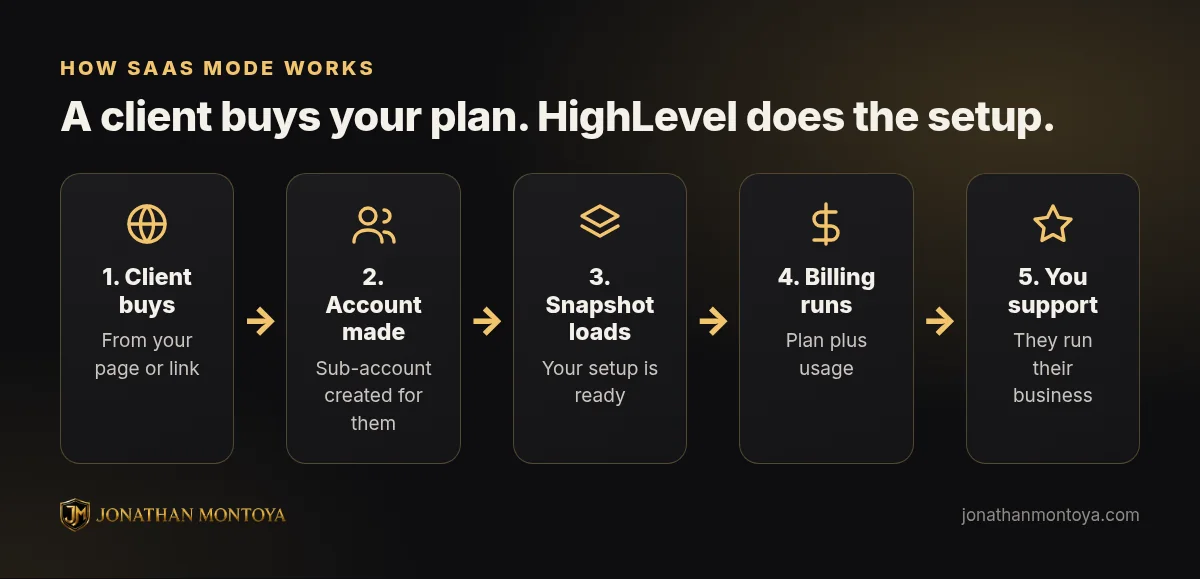
Per HighLevel's Founder plan announcement, SaaS mode lets you sell tailored plans while the system handles account creation, permissions and billing. You decide what each plan includes and what it costs.
How to set up GoHighLevel SaaS mode
HighLevel's setup guide lays out the path. Here it is in plain words:
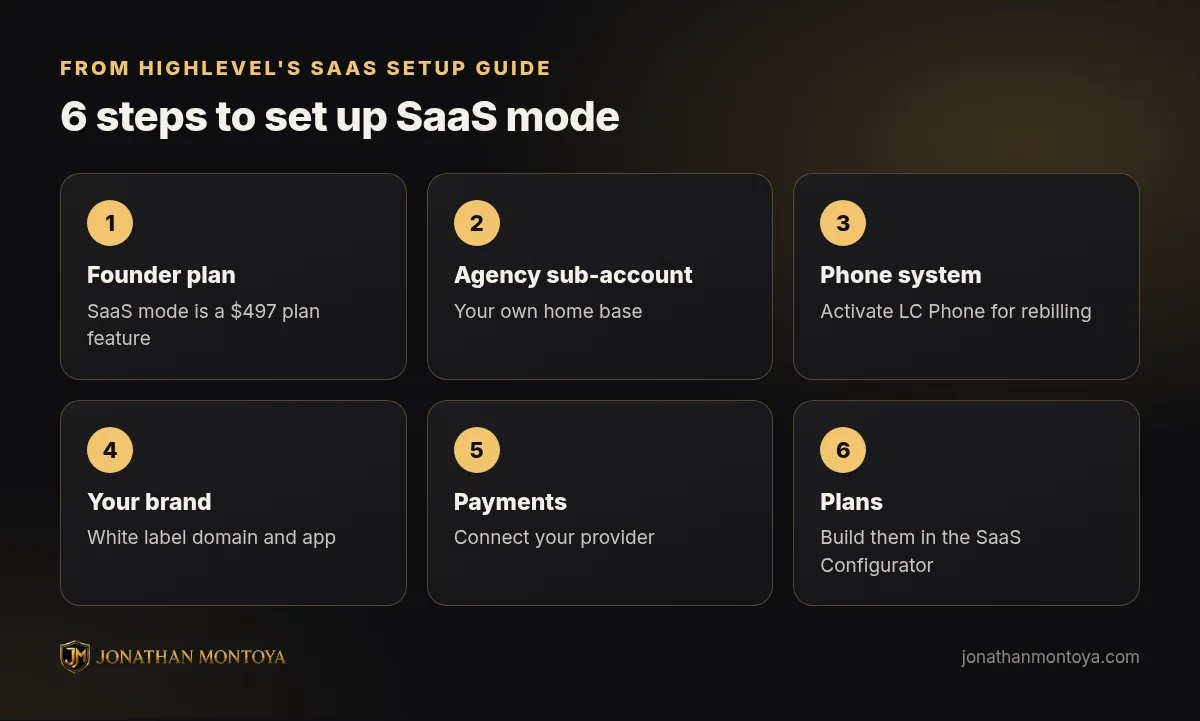
- Get on the Founder planSaaS mode is part of the $497 Founder plan.
- Create an agency sub-accountSet up the account you will run your own business from.
- Set up the phone systemActivate the LC Phone system so you can rebill calls and texts.
- Brand itAdd your white label domain, desktop app branding and API domain.
- Connect paymentsConnect your payment provider at the agency level.
- Build your plansCreate plans in the SaaS Configurator and choose what each one includes.
Want to explore SaaS mode? It is part of the Founder plan. My HighLevel link shows a 30-day free trial on HighLevel's own offer page.
Start HighLevelBilling and rebilling in SaaS mode
Your clients pay you for two things: their plan and their usage.
| What | How it works |
|---|---|
| Plan price | You set it in the SaaS Configurator |
| Usage (texts, calls, email, AI) | HighLevel charges your agency wallet, then you rebill the client |
| Your markup | Founder plan agencies can rebill at cost or with a markup |
| Pass-through fees | HighLevel adds a fixed 5% markup to carrier fees, A2P fees and similar charges when rebilling is on |
| Payment providers | SaaS V2 supports Stripe, NMI, Authorize.net and Square, set per sub-account. V1 is Stripe only |
Sources: HighLevel's pricing and billing guide and SaaS mode FAQ. For the usage prices themselves, see my guide to GoHighLevel usage fees.
Useful SaaS controls
- Contact limits: you can set a contact limit for SaaS sub-accounts, so each plan level has a clear cap.
- Manual approval: you can require approval before a new SaaS account goes live.
- Add-ons: you can resell add-ons as part of your SaaS plans.
- Cancellation flow: you can customize what clients see when they try to cancel.
How to package your SaaS offer
HighLevel's own SaaS mode playbook gives smart advice. The big idea: do not sell 'a platform.' Sell the removal of one chore for one type of business.
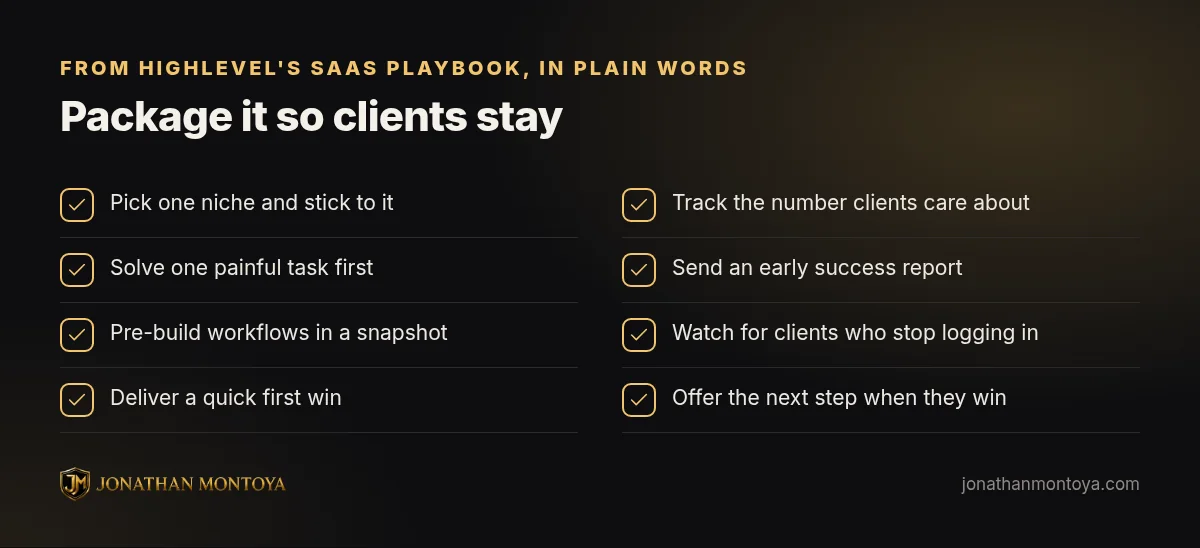
- Pick one nicheRoofers, med spas or dentists. One niche means one repeatable setup.
- Solve one painLike calling back missed leads or asking for reviews.
- Make it plug and playPre-build the workflows and templates in a snapshot, so clients only turn it on.
- Deliver a fast first winHighLevel suggests a missed call text back or a review request as the very first automation.
- Show the proofBuild a dashboard that tracks the number the client cares about.
New to snapshots? Start with my guide to GoHighLevel snapshots. And for the first automation, see missed call text back.
Things to watch out for
- Auto recharge and cards: HighLevel says auto recharge does not support 3DS-only cards.
- Support is on you. Your clients see your brand, so they come to you for help.
- Compliance: clients who text still need A2P registration. Plan time for it.
Start building your SaaS offer
Begin with one niche and one snapshot. You can test the whole flow in your trial before you charge anyone.
When you start HighLevel through my link, you also get my GHL Clone for free. It is a done-for-you affiliate system I spent 11 months building. You can copy it in about 5 minutes, add your own affiliate link and share it. There is no website to build and no emails to write.
Start HighLevelGet the free GHL CloneMy HighLevel link shows a 30-day free trial on HighLevel's own offer page (checked Nov 17, 2026). HighLevel's standard pricing page lists 14 days. Disclosure: I earn a commission if you buy HighLevel through my link, at no extra cost to you. The GHL Clone is my own system, and I earn a commission if you later pay for HighLevel. What anyone earns depends on their own work, and no one can promise a result.
Want to start an AI agency? My free program, Freedom Launch Accelerator, shows you how to offer AI services like these to local businesses.
See the free programFAQ
What is GoHighLevel SaaS mode?
It lets an agency sell HighLevel as its own branded software. Clients buy a plan from you, and HighLevel creates their account, sets permissions and handles billing automatically.
Which plan do I need for SaaS mode?
The $497 Founder plan. HighLevel lists SaaS mode as a Founder plan feature on its pricing page, and the Founder plan replaced the old $497 Agency Pro plan.
Which payment providers work with SaaS mode?
HighLevel's SaaS FAQ says the newer SaaS V2 supports Stripe, NMI, Authorize.net and Square, configured per sub-account. The older V1 is Stripe only.
Can I mark up texts, calls and AI in SaaS mode?
Yes. Rebilling with your own markup is a Founder plan feature. HighLevel also adds a fixed 5% markup to pass-through charges like carrier fees when rebilling is on.
What happens if I turn SaaS mode off for a client?
Per HighLevel's FAQ, the subscription is cancelled and the client's wallet is permanently deleted. Your agency gets the wallet balance by email and must handle any refunds.
Is SaaS mode white label?
It is designed to be. HighLevel says SaaS mode lets you remove HighLevel branding with your own domain, desktop app branding and branded links.
Sources, checked Nov 17, 2026
- HighLevel: Guide from zero to SaaS mode (modified May 20, 2026)
- HighLevel SaaS mode FAQs (modified Sep 18, 2026)
- HighLevel: Marketing agency SaaS mode playbook
- HighLevel blog: Meet the Founder plan (Nov 7, 2026)
- HighLevel pricing page (Nov 17, 2026)
- HighLevel Pricing and Billing guide
- HighLevel offer page for my link (30-day trial)
Affiliate disclosure: I earn a commission if you buy HighLevel through my links, at no extra cost to you. Freedom Launch Accelerator and the GHL Clone are my own programs. HighLevel is a trademark of HighLevel, Inc. This site is not run by or affiliated with HighLevel.
